
1. Introduction
The Lefant M3 Max is an advanced robot vacuum and mop designed for comprehensive floor cleaning. It features precise navigation, powerful suction, and an automated self-cleaning station to simplify home maintenance.
Key Features:
- LiDAR dToF 360° Navigation: Ensures accurate mapping and efficient cleaning paths, even in low light.
- PSD 190° Obstacle Detection: Wide-angle avoidance for furniture and objects, minimizing collisions.
- Freemove 3.0 Sensor Network: Provides comprehensive body protection without physical bumpers.
- All-in-One Self-Cleaning Station: Automates mop sterilization (45°C hot air), 2-hour fresh air drying, and features a 3.5L hands-free dustbin for up to 8 weeks of capacity. Includes intelligent water control and a V-brush with double comb for tangle-free cleaning.
- Automatic Mop Lifting System: Mops rotate at 200 RPM and lift adaptively by 9mm when carpets are detected, ensuring optimal cleaning across various floor types.
- 20,000 Pa Hyper Suction: Deep cleans carpets, hard floors, and crevices, effectively removing pet hair and debris.
- Extended Battery Life: 5200 mAh battery provides up to 220 minutes of runtime, covering areas up to 220 m².
- Multi-Level Smart Mapping: Automatically recognizes and stores maps for up to 3 different floor levels.
- Triple Safety System: Features anti-fall, anti-collision, and anti-entanglement mechanisms.

Image: The Lefant M3 Max robot vacuum and its accompanying self-cleaning station.
2. Setup
2.1 Unboxing and Components
Carefully remove all components from the packaging. Ensure all items listed below are present.

Image: Diagram showing the contents of the box, including the robot, station, power cord, dust bags, side brushes, mop holders, mop cloths, HEPA filters, cleaning solution, cleaning tool, and user manual.
- Lefant M3 Max Robot Vacuum Mop
- Self-Cleaning Station
- Power Cord (x1)
- Dust Bags (x2)
- Side Brushes (x2)
- Mop Holders (x2)
- Washable Mop Cloths (x2)
- HEPA Filters (x2)
- Cleaning Solution (x1)
- Cleaning Tool (x1)
- User Manual (x1)
2.2 Charging Station Placement
Place the self-cleaning station against a wall in an open area. Ensure there is at least 0.5 meters of clear space on both sides and 1.5 meters in front of the station for optimal robot navigation and docking.
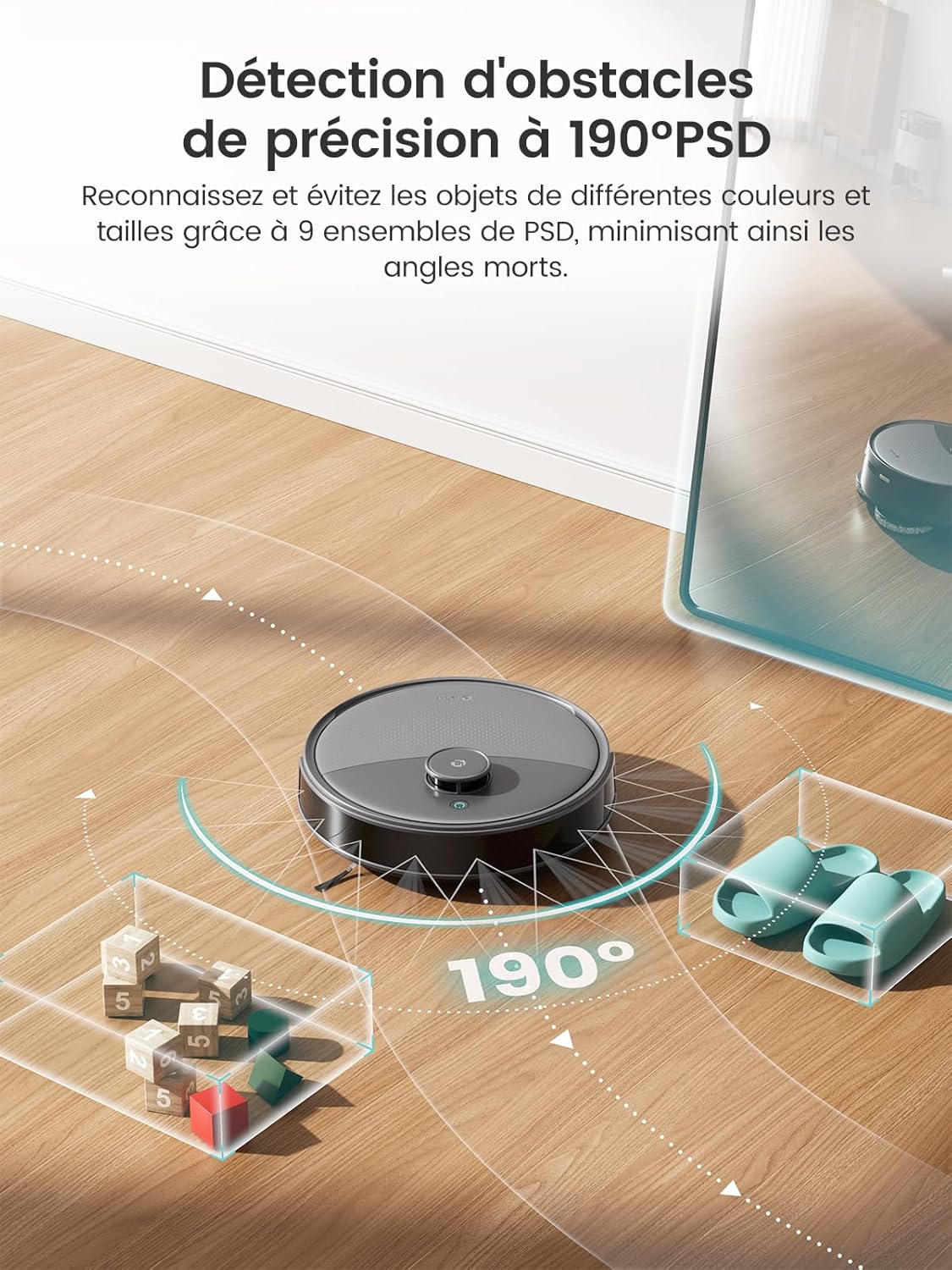
Image: Illustration showing recommended clear space around the charging station for the robot.
2.3 Initial Charging
Connect the power cord to the self-cleaning station and plug it into a power outlet. Place the robot onto the charging station. Ensure the charging contacts align. Allow the robot to fully charge before its first use.
2.4 Connecting to the Lefant App
To unlock the full features of your Lefant M3 Max, download and connect it to the Lefant app.
- Download the "Lefant" app from your app store.
- Add your M3 Max robot vacuum to the app.
- Connect to a 2.4 GHz Wi-Fi network (5 GHz is not supported).
- Power on the robot vacuum by pressing the button.
- Press and hold the start button for 6 seconds to enter network configuration mode.
- Select "M3 Max" in the app and wait for successful pairing.

Image: Visual guide for connecting the Lefant M3 Max to the mobile application.
2.5 Connecting to Voice Assistants (Alexa)
Integrate your M3 Max with Amazon Alexa for convenient voice control.
- Open the "Lefant APP" and navigate to "Mine" -> "Voice" to access the service.
- Register your voice account and password.
- Open the "Alexa APP" -> "Plus" -> "Skills & Games".
- Search for "Smart Life".
- Click on "Enable to Use".
- Select your region and enter the voice account and password from step 2.
- Wait for successful connection.

Image: Visual guide for connecting the Lefant M3 Max to Amazon Alexa.
3. Operating Instructions
3.1 Starting and Stopping Cleaning
- Start: Press the power button on the robot or use the "Start Cleaning" option in the Lefant app.
- Pause/Resume: Press the power button once during cleaning to pause. Press again to resume.
- Stop: Hold the power button for a few seconds or use the "Stop Cleaning" option in the app. The robot will return to its charging station.
3.2 App Control and Smart Features
The Lefant app provides extensive control over your M3 Max.
- Cleaning Schedule: Set specific times for the robot to clean automatically.
- No-Go Zones: Define areas the robot should avoid, such as pet bowls or delicate items.
- Targeted Cleaning: Select specific rooms or areas on the map for cleaning.
- Multi-Level Mapping: The robot can store maps for up to three different floors, allowing for customized cleaning plans for each level.

Image: Screenshot of the Lefant app showing various control options like scheduling, no-go zones, and mapping.

Image: The robot avoiding a designated no-go zone around pet items, controlled via the app.
3.3 Voice Control
Once connected to Alexa or Google Assistant, you can control your M3 Max using voice commands.
- "Alexa, ask Lefant Robot to clean."
- "Alexa, pause Lefant Robot."
- "Hey Google, start cleaning with Lefant."

Image: A woman in a kitchen using voice commands to control the Lefant M3 Max robot vacuum.
3.4 Carpet Detection and Mop Lifting
The M3 Max automatically detects carpets and adjusts its cleaning mode. The mop pads will lift by 9mm to prevent wetting carpets while vacuuming, and suction power will increase for deeper cleaning.

Image: The robot vacuum on a hard floor approaching a carpet, with an illustration showing the mop lifting by 9mm and suction increasing.
3.5 Obstacle Avoidance and Navigation
Equipped with LiDAR dToF 360° navigation and PSD 190° obstacle detection, the M3 Max navigates efficiently and avoids obstacles.

Image: The robot vacuum navigating a living room, illustrating its 360° LiDAR range and multi-floor mapping capabilities.
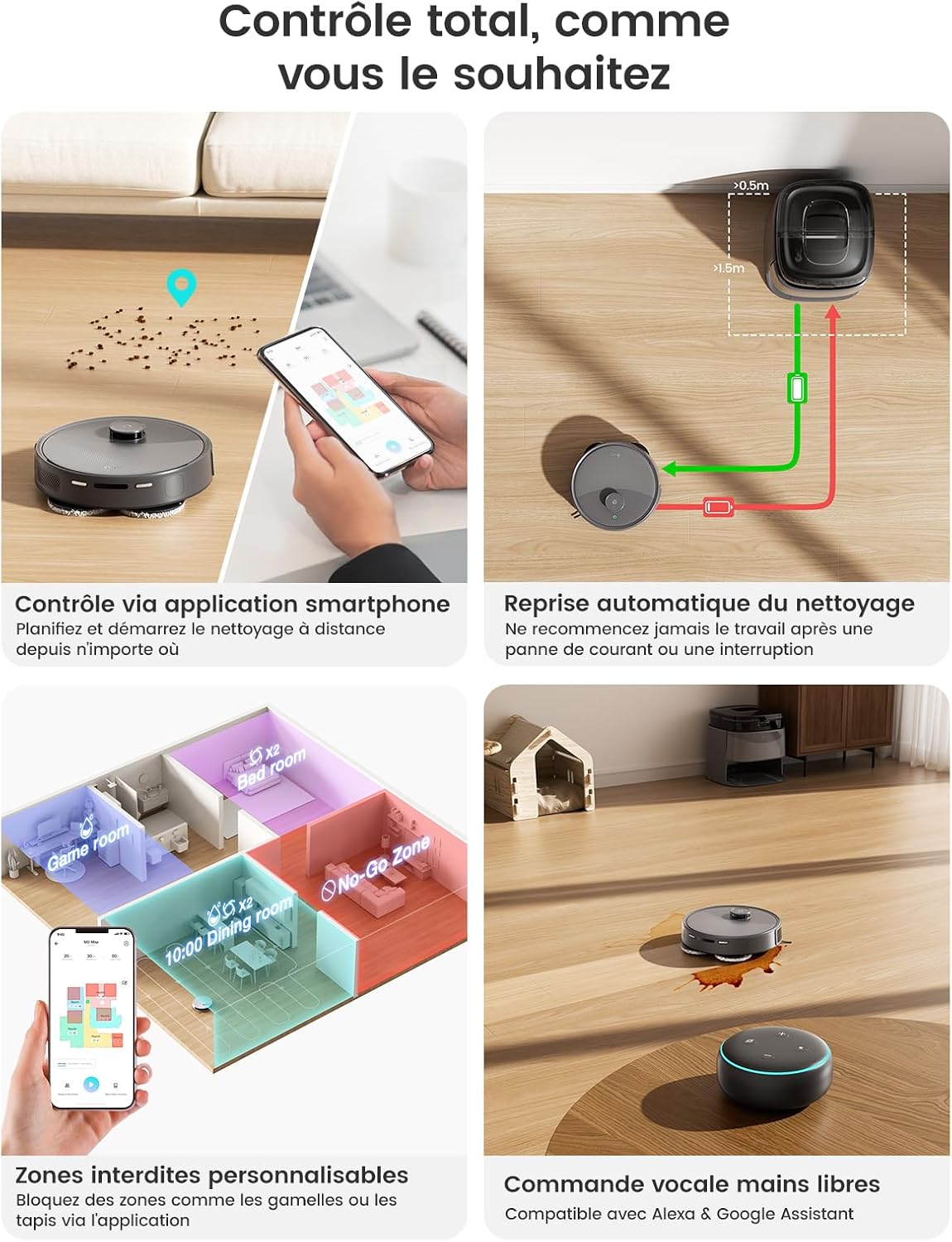
Image: The robot vacuum detecting and avoiding various objects on the floor with its 190° PSD sensor.
4. Maintenance
4.1 Self-Cleaning Station Functions
The all-in-one station automates several maintenance tasks:
- Mop Sterilization: Uses 45°C hot air to sterilize mop pads, eliminating 99% of bacteria.
- Mop Drying: 2-hour fresh air drying cycle preserves mop fiber integrity and prevents odors.
- Auto-Empty Dustbin: The 3.5L dustbin in the station can hold debris for up to 8 weeks, reducing manual emptying frequency.
- Intelligent Water Control: Prevents over or under-wetting of mop pads.
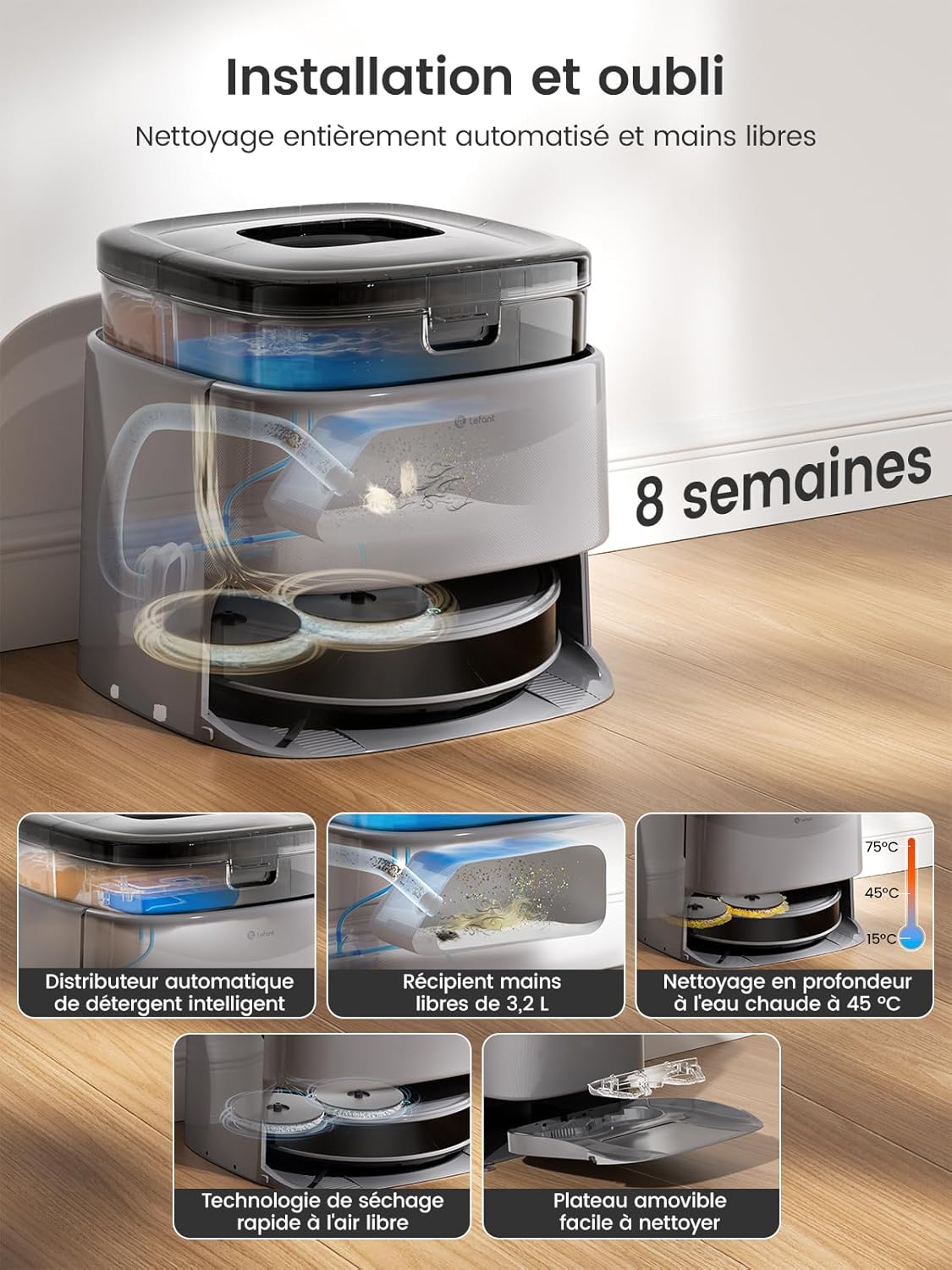
Image: Detailed diagram illustrating the internal workings and features of the self-cleaning station, including hot air sterilization, air drying, and the 3.2L hands-free bin.
4.2 Cleaning the Robot
- Main Brush (V-brush): Regularly check and clean the main brush for tangled hair or debris. The double comb design helps prevent tangles, but occasional manual cleaning may be required.
- Side Brushes: Inspect and clean side brushes for debris. Replace if worn or damaged.
- Filters: Clean the HEPA filters regularly. Tap out dust and rinse if necessary (ensure completely dry before reinstallation). Replace filters every 3-6 months depending on usage.
- Sensors: Wipe all sensors (cliff sensors, wall sensors, charging contacts) with a dry cloth to ensure proper function.
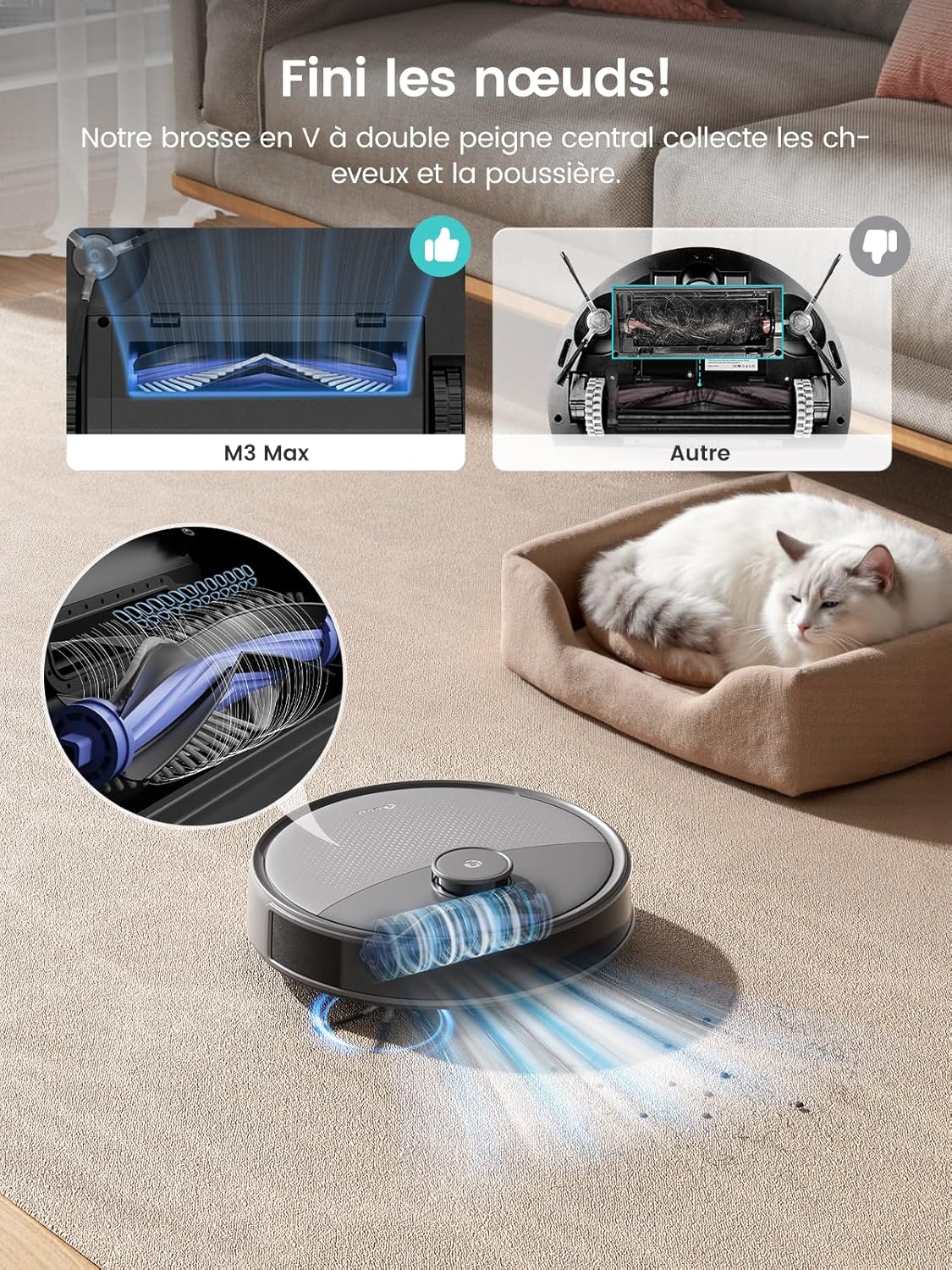
Image: Close-up view of the robot's underside, highlighting the V-shaped main brush and double comb design for hair collection.
4.3 Emptying Dustbin and Water Tanks
- The self-cleaning station automatically empties the robot's dustbin into its 3.5L bag. Replace the dust bag in the station when full (approximately every 8 weeks).
- The station also manages clean and dirty water for mopping. Ensure the clean water tank is filled and the dirty water tank is emptied as needed.
5. Troubleshooting
If you encounter issues with your Lefant M3 Max, refer to the following common problems and solutions.
| Problem | Possible Cause | Solution |
|---|---|---|
| Robot does not start or respond. | Low battery; power switch off; robot stuck. | Ensure robot is charged; check power switch; clear any obstructions. |
| Robot cannot connect to Wi-Fi. | Incorrect Wi-Fi band (5GHz); wrong password; poor signal. | Ensure 2.4GHz Wi-Fi is used; verify password; move robot closer to router. |
| Robot gets stuck frequently. | Obstacles (cables, small objects); uneven surfaces. | Clear floor of small items; use no-go zones in app for problem areas. |
| Poor cleaning performance. | Full dustbin; dirty filters/brushes; low water in tank. | Empty dustbin; clean/replace filters and brushes; refill clean water tank. |
| Mop pads not getting wet or too wet. | Water tank issues; intelligent water control malfunction. | Check water tanks for proper installation and water levels. If issue persists, contact support. |
| Robot loses connection to the network. | Weak Wi-Fi signal; router issues. | Restart router; ensure robot is within Wi-Fi range; re-pair with app if necessary. |
For further assistance, please refer to the detailed troubleshooting section in the Lefant app or contact Lefant customer support.
6. Specifications
| Feature | Detail |
|---|---|
| Brand | Lefant |
| Model Name | M3 Max |
| Suction Power | 20,000 Pa |
| Navigation Type | LiDAR dToF 360° |
| Obstacle Detection | PSD 190° |
| Mop Rotation Speed | 200 RPM |
| Automatic Mop Lift | 9 mm |
| Battery Type | Lithium-ion |
| Battery Capacity | 5200 mAh |
| Runtime | Up to 220 minutes |
| Coverage Area | Up to 220 m² |
| Dustbin Capacity (Station) | 3.5 Liters (up to 8 weeks) |
| Filter Type | HEPA |
| Control Methods | App Control, Voice Control (Alexa, Google Assistant) |
| Product Dimensions (L x W x H) | 32L x 32W x 9.7H centimeters |
| Item Weight | 9.7 Kilograms |
| Recommended Surface | Hard floor, Parquet, Tile, Marble, Carpet |
| UPC | 644161766384 |
7. Warranty and Support
Lefant products typically come with a manufacturer's warranty. Please refer to the warranty card included in your product packaging or visit the official Lefant website for detailed warranty information and terms.
For technical support, troubleshooting assistance, or spare parts, please contact Lefant customer service through the official website or the Lefant app. You can also find FAQs and additional resources online.
Official Lefant Store: Lefant Amazon Store


