
Introduction
This manual provides instructions for the proper setup, operation, and maintenance of your SMALLRIG Push-Button Rotating Side Handle with NATO Clamp. This accessory is designed to enhance handheld camera operation by providing a comfortable and versatile grip solution for camera cages and mounting plates equipped with NATO rails.
What's in the Box
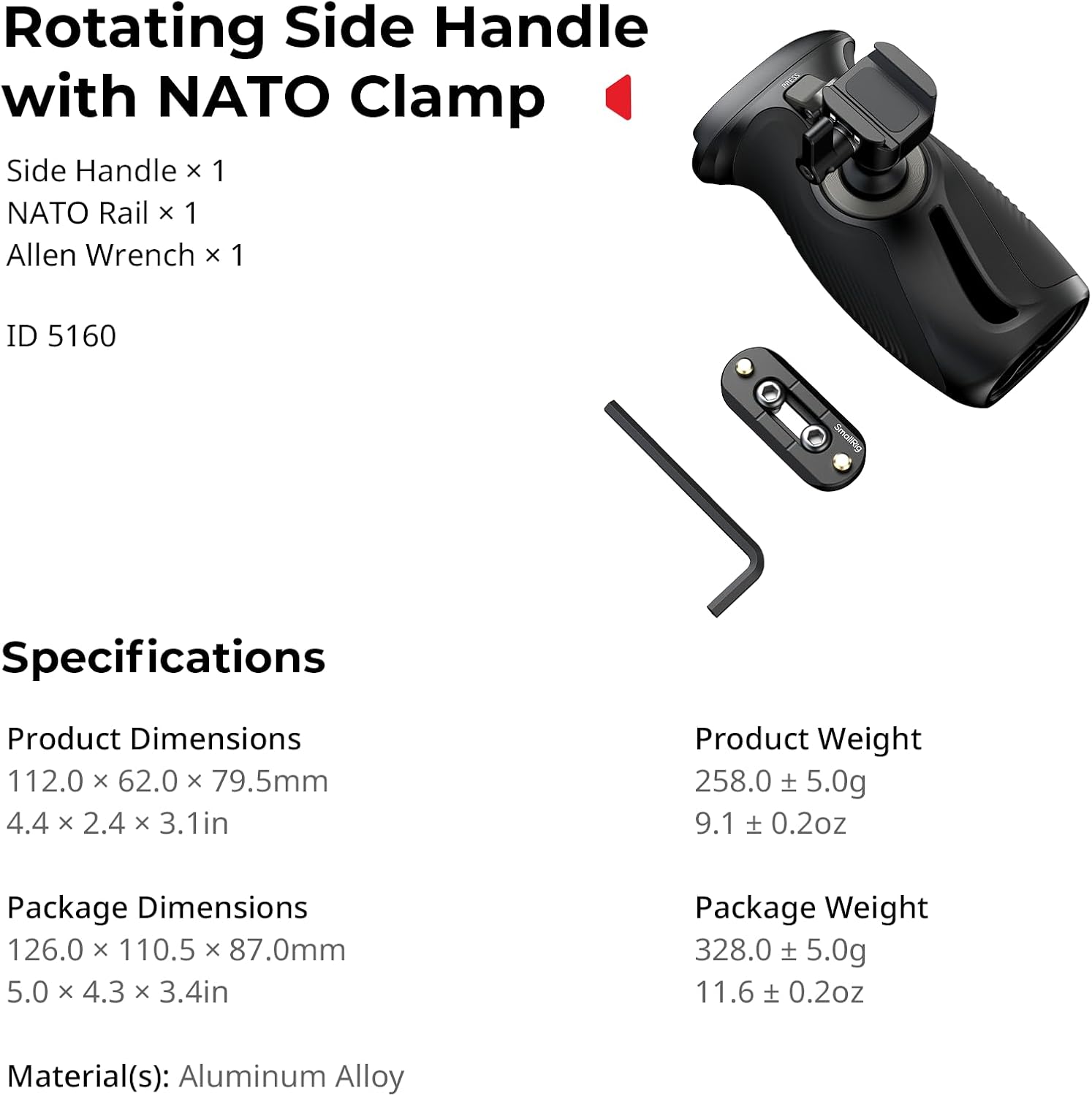
- Side Handle x 1
- NATO Rail x 1
- Allen Wrench x 1
Key Features
- Rotatable Design: Features a push-button mechanism for 360° rotation, allowing for quick and smooth angle adjustments.
- Universal Compatibility: Designed for both left and right-hand use, attaching to camera/monitor cages and mounting plates with NATO rails.
- High Load Capacity: Supports a maximum load of 15kg (33lb), ensuring stability for various camera setups.
- Ergonomic Grip: Constructed with anti-slip silicone for a comfortable and secure hold, even in varying conditions.
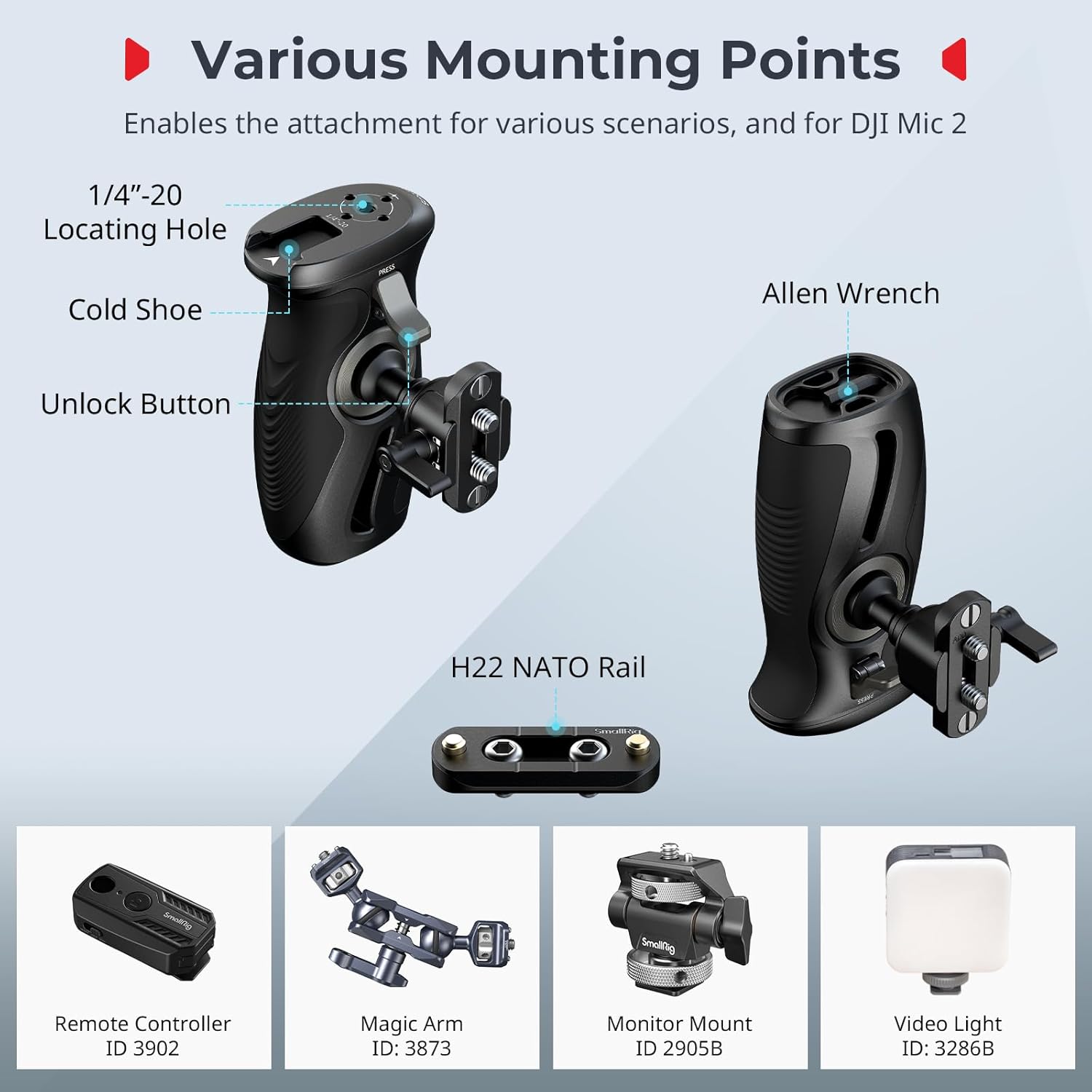
- Multiple Mounting Points: Includes 1/4"-20 locating holes and a cold shoe mount for attaching accessories like remote controllers, magic arms, monitors, microphones, and video lights.
Setup Instructions
- Attach NATO Rail (if necessary): If your camera cage or mounting plate does not have a built-in NATO rail, use the included NATO rail and Allen wrench to securely attach it to your desired position on the cage. Ensure it is tightened firmly to prevent movement.
- Mount the Side Handle: Align the NATO clamp on the side handle with the NATO rail on your camera setup. Slide the handle onto the rail.
- Secure the Handle: Tighten the locking knob on the NATO clamp to firmly secure the side handle in place. Verify that the handle is stable and does not wobble.

Operating Instructions
360° Rotation
The side handle features a push-button mechanism for quick angle adjustments. To rotate the handle:
- Locate the unlock button on the handle.
- Press and hold the unlock button.
- While holding the button, rotate the handle to your desired angle (up to 360°).
- Release the button to lock the handle in the new position.
Important Safety Precaution: When adjusting the angle, always hold the camera or rig securely with your other hand to prevent accidental drops or damage.

Attaching Accessories
The handle provides various mounting points for additional accessories:
- 1/4"-20 Locating Holes: Use these threaded holes to attach remote controllers, magic arms, or other accessories with 1/4"-20 screws.
- Cold Shoe Mount: The integrated cold shoe mount allows for direct attachment of accessories such as monitor mounts, microphones, or video lights.
Maintenance
- Regularly inspect all screws and connections to ensure they are tight. Use the included Allen wrench for tightening if necessary.
- Clean the handle and NATO rail with a soft, dry cloth. Avoid using harsh chemicals or abrasive materials that could damage the finish or silicone grip.
- Store the handle in a dry, dust-free environment when not in use.
Troubleshooting
Handle is loose or wobbly after attachment
Ensure the locking knob on the NATO clamp is fully tightened. If the issue persists, check if the NATO rail itself is securely attached to your camera cage. Re-tighten any loose screws using the Allen wrench.
Rotation mechanism feels stiff or does not lock properly
Ensure the unlock button is fully depressed when attempting to rotate. If the mechanism feels stiff, check for any debris or obstructions around the rotating joint. Avoid forcing the rotation; if resistance is significant, contact customer support.
Specifications
| Feature | Detail |
|---|---|
| Model Name | 12669 |
| Product Dimensions | 112.0 x 62.0 x 79.5mm (4.41 x 2.44 x 3.15 inches) |
| Product Weight | 0.26 Kilograms (9.1 oz) |
| Material | Aluminum Alloy, Silicone |
| Max. Load Capacity | 15 Kilograms (33 lb) |
| Rotation Angle | 360° |
| Mounting Type | NATO Clamp (Surface Mount) |
| Compatible Devices | Camera / monitor cages, mounting plates with NATO rail |

Warranty and Support
Warranty Information
This SMALLRIG product is covered by a 2-Year Manufacturer Warranty from the date of purchase. This warranty covers defects in materials and workmanship under normal use. It does not cover damage caused by misuse, accident, unauthorized modification, or improper installation.
Customer Support
For technical assistance, warranty claims, or product inquiries, please contact SMALLRIG customer support through their official website or the retailer where the product was purchased. Please have your product model number (12669) and proof of purchase ready when contacting support.


