
Introduction
This manual provides instructions for the assembly, operation, and maintenance of your Zevemomo 61-inch Metal Pantry Cabinet. Please read this manual thoroughly before assembly and use to ensure proper function and safety. Keep this manual for future reference.
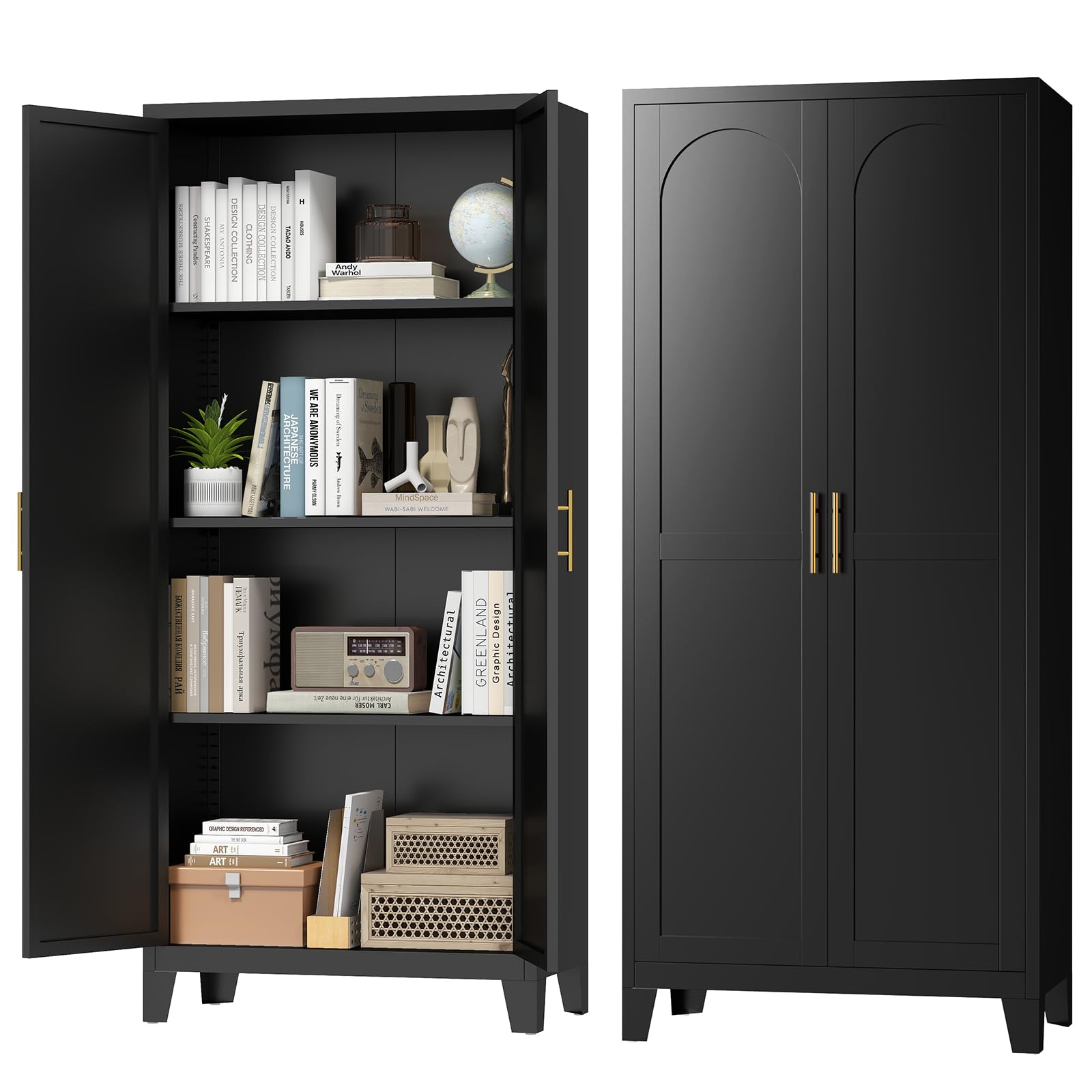
Image: The Zevemomo 61-inch Metal Pantry Cabinet, black, with its two doors open, revealing multiple shelves. The shelves are organized with various household items, including books, small plants, and decorative objects, demonstrating its storage capacity. The cabinet stands in a bright room with natural light.
Safety Information
Please observe the following safety precautions during assembly and use:
- Always assemble the cabinet on a clean, flat, and stable surface to prevent damage or injury.
- Ensure all parts are securely fastened before use. Regularly check all connections for tightness.
- Do not overload shelves. The maximum load capacity per shelf is approximately 120 lbs (54 kg).
- Keep small parts and packaging materials away from children to prevent choking hazards.
- It is recommended to wear gloves during assembly to protect hands from sharp edges.
- For stability, consider anchoring the cabinet to a wall, especially if used in areas with children or pets, or if storing heavy items on upper shelves. Wall anchoring hardware is typically not included and may need to be purchased separately.
Package Contents
Verify that all components are present before beginning assembly. If any parts are missing or damaged, please contact customer support.
- 1 x Metal Pantry Cabinet (disassembled components)
- 1 x Assembly Manual
- All necessary hardware (screws, bolts, etc.)
Setup and Assembly
Follow these steps to assemble your Zevemomo Metal Pantry Cabinet. It is recommended to have a second person assist with assembly for easier handling of larger components.
- Unpack Components: Carefully remove all parts from the packaging. Lay them out on a soft, clean surface to prevent scratches.
- Identify Parts: Refer to the parts list in the included assembly manual to identify each component.
- Assemble Frame: Begin by connecting the side panels to the base and top panels using the provided hardware. Ensure all connections are finger-tight before fully tightening.
- Install Back Panel: Secure the back panel to the assembled frame.
- Attach Doors: Mount the two doors to the cabinet frame using the hinges and screws. Adjust hinges as needed to ensure proper door alignment and smooth opening/closing.
- Install Handles: Attach the metal bar pull handles to the doors.
- Insert Shelves: The cabinet includes 3 adjustable shelves. Insert the shelf pins into the desired slots on the side panels, then place the shelves onto the pins. You can adjust the shelf height as needed for flexible storage.
- Final Tightening: Once the cabinet is fully assembled, carefully tighten all screws and bolts. Do not overtighten.
Note: For detailed diagrams and specific screw types, please refer to the separate assembly manual included in your package.

Image: A diagram illustrating the product dimensions (61.02" H x 27.56" L x 13.78" W) and highlighting key features such as large capacity, strong load-bearing capability (120 lbs per shelf), and easy setup. The image shows the cabinet with one door open, revealing the adjustable shelf tracks.

Image: Two Zevemomo metal pantry cabinets are shown side-by-side. The left cabinet displays items on shelves at standard heights. The right cabinet highlights the adjustable nature of the shelves with blue shaded areas and orange arrows indicating that shelves can be moved up or down to accommodate items of various heights.
Operating Instructions
Your Zevemomo Metal Pantry Cabinet is designed for versatile storage in various rooms.
- Adjusting Shelves: To adjust a shelf, remove all items from it. Lift the shelf slightly, remove the four shelf pins, reposition the pins into the desired slots, and then place the shelf back onto the pins. Ensure all four pins are securely seated before placing items back on the shelf.
- Door Operation: The cabinet features two doors with metal bar pull handles for easy opening and closing. Ensure doors are fully closed to protect contents.
- Placement: This freestanding cabinet can be used in kitchens, dining rooms, bathrooms, laundry rooms, home offices, or living rooms. Choose a flat, stable surface for placement.

Image: A collage of four images demonstrating the versatile use of the Zevemomo metal pantry cabinet in different home environments. It is shown in a kitchen and dining area, a bathroom and wash area, a living room and bedroom, and an office and workspace, highlighting its adaptability for various storage needs.
Maintenance
To keep your Zevemomo Metal Pantry Cabinet in optimal condition:
- Cleaning: The cabinet's smooth, powder-coated steel surface is easy to clean. Wipe with a soft, damp cloth and mild detergent. Avoid abrasive cleaners or harsh chemicals that could damage the finish. Dry thoroughly after cleaning.
- Inspection: Periodically check all screws and connections to ensure they remain tight. Retighten if necessary.
- Rust Prevention: The cabinet features a rust-proof powder coating. To maintain this protection, avoid prolonged exposure to excessive moisture.

Image: A detailed view of the Zevemomo cabinet's features. It shows a close-up of the gold-colored metal bar pull handles, a hand wiping the smooth black metal surface with a cloth, and the stable, elevated base design, emphasizing ease of use, cleaning, and stability.
Troubleshooting
If you encounter any issues with your cabinet, refer to the following common solutions:
| Problem | Possible Cause | Solution |
|---|---|---|
| Cabinet is wobbly or unstable. | Screws are loose; uneven floor surface. | Ensure all assembly screws are fully tightened. Move the cabinet to a level surface or use shims under the legs if necessary. |
| Doors do not close properly or are misaligned. | Hinges are not adjusted correctly; cabinet frame is not square. | Adjust the door hinges. Ensure the cabinet was assembled squarely. Check for any obstructions. |
| Shelves are difficult to adjust. | Shelf pins are stuck or misaligned. | Ensure shelves are empty before attempting to adjust. Wiggle shelf pins gently to remove and reinsert them correctly into the desired slots. |
| Dents or scratches on arrival. | Shipping damage. | Contact customer support immediately with photos of the damage. |
Specifications
| Feature | Detail |
|---|---|
| Brand | Zevemomo |
| Model Number | MPC-02-61B |
| Material | Alloy Steel (Powder Coated) |
| Color | Black |
| Product Dimensions (D x W x H) | 13.78" x 27.56" x 61.02" |
| Item Weight | 39 Pounds |
| Number of Shelves | 3 (Adjustable) |
| Number of Doors | 2 |
| Installation Type | Freestanding |
| Special Feature | Adjustable Shelf |
Warranty and Support
For warranty information or customer support, please refer to the contact details provided with your purchase documentation or visit the official Zevemomo website. Please have your model number (MPC-02-61B) and purchase date ready when contacting support.
For additional assistance, you may visit the Zevemomo Store on Amazon.