
1. Introduction
This manual provides detailed instructions for the assembly, operation, and maintenance of your Polibi Queen Size Storage Bunk Bed. Please read all instructions carefully before assembly and use to ensure safe and proper operation of the product. Keep this manual for future reference.

Figure 1: Assembled Polibi Queen Size Storage Bunk Bed.
2. Safety Information
WARNING: Failure to follow these warnings and instructions could result in serious injury or death.
- Always use the recommended mattress size for both upper and lower bunks.
- Ensure all guardrails are properly installed and secured before use. The top bunk must have guardrails on all four sides.
- The top bunk is not suitable for children under six years of age.
- Do not allow more than one person on the top bunk.
- Prohibit horseplay on or under the bed.
- Always use the ladder for entering and exiting the upper bunk. Do not use substitute parts. Contact the manufacturer for replacement parts.
- Periodically check and ensure that all connectors are tight.
- Do not remove warning labels from the bed structure.
- Use of a night light may provide added safety precaution for a child using the upper bunk.
- Always use a mattress that is at least 5 inches below the upper edge of the guardrails.
3. Package Contents
Your Polibi Queen Size Storage Bunk Bed package includes all necessary parts, hardware, and tools for assembly. Please verify all components are present and undamaged before beginning assembly. If any parts are missing or damaged, do not proceed with assembly and contact customer support.
The package typically includes:
- Bed frame components (headboards, footboards, side rails, slats)
- Ladder components
- Guardrails
- Built-in shelves and storage box components
- USB charging station unit
- LED light strip
- Metal clothes hooks (3 units)
- Assembly hardware (screws, bolts, nuts, washers, etc.)
- Assembly tools (Allen wrench, screwdriver, etc.)
- Instruction manual

Figure 2: Bunk bed frame components before mattress placement.
4. Setup and Assembly
Assembly of the Polibi Queen Size Storage Bunk Bed requires two adults. Follow the step-by-step instructions provided in the separate assembly guide included in your package. Ensure you have ample space and all components are laid out before starting.
- Unpack Components: Carefully remove all parts from the packaging. Place them on a soft, clean surface to prevent scratches.
- Identify Parts: Refer to the parts list in your assembly guide to identify each component.
- Assemble Base Frames: Begin by assembling the lower and upper bed frames according to the diagrams.
- Attach Ladder and Guardrails: Securely attach the ladder and all guardrails to the upper bunk frame.
- Install Storage Features: Mount the built-in shelves, storage box, and clothes hooks as indicated in the instructions.
- Connect Electrical Components: Install the USB charging station and LED light strip. Ensure all wiring is safely routed and connected.
- Final Check: Once assembled, double-check all bolts, screws, and connections to ensure they are tight and secure.
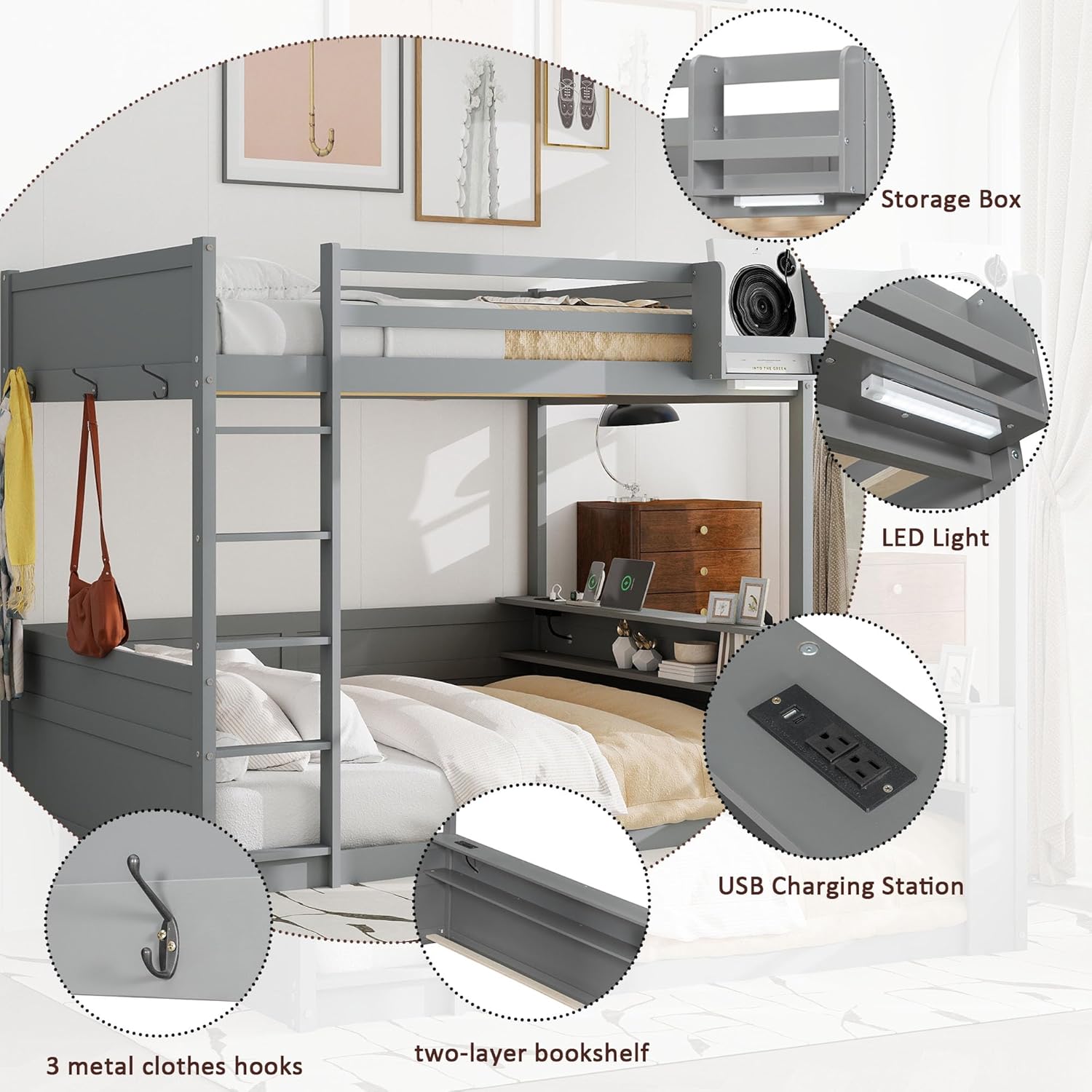
Figure 3: Key features of the bunk bed, including integrated storage and electronics.
5. Operating Instructions
5.1 USB Charging Station
The bunk bed features a built-in USB charging station located on the lower storage shelf. This allows convenient charging of electronic devices such as smartphones and tablets.
- To Use: Plug the bed's main power cord into a standard wall outlet. Connect your device's USB cable to one of the USB ports on the charging station.
- Power Outlets: The station also includes standard power outlets for other electronic devices.

Figure 4: USB charging station and LED light detail.
5.2 LED Lighting
An energy-efficient LED light is installed under the upper storage box, providing illumination for reading or ambient light.
- To Turn On/Off: The LED light typically operates via a switch located near the light fixture or on the power cord. Ensure the bed's main power cord is plugged in.
5.3 Storage Features
The bunk bed is equipped with various storage solutions to help organize your space.
- Built-in Shelves: Two lower shelves are integrated into the bed frame, suitable for books, small electronics, or decorative items.
- Upper Storage Box: A spacious storage box is located at the end of the upper bed, designed to hold necessities. It has a capacity of approximately 26 lbs.
- Two-Layer End Shelf/Desk: A versatile two-layer shelf at the end of the bed can function as a small desk or additional storage.
- Metal Clothes Hooks: Three sturdy metal hooks are provided for hanging clothes, bags, or other accessories.

Figure 5: Upper storage box and end shelf/desk.

Figure 6: Detail of a metal clothes hook.
6. Maintenance
- Cleaning: Wipe the bed frame with a soft, damp cloth. Avoid harsh chemicals or abrasive cleaners that may damage the finish.
- Hardware Check: Periodically (e.g., every 3-6 months) inspect all bolts, screws, and connections. Tighten any loose hardware to ensure the bed remains stable and safe.
- Electrical Components: Ensure the USB charging station and LED light connections are secure. If any electrical component malfunctions, discontinue use and contact customer support.
7. Troubleshooting
| Problem | Possible Cause | Solution |
|---|---|---|
| Bed feels wobbly or unstable. | Loose hardware. | Check and tighten all bolts and screws. Ensure all connections are secure. |
| USB charging station not working. | Bed not plugged into power outlet; loose connection; faulty device cable. | Ensure the bed's main power cord is securely plugged into a working wall outlet. Check the connection of the USB station to the bed's wiring. Try a different USB cable or device. |
| LED light not turning on. | Bed not plugged into power outlet; light switch off; loose connection; faulty LED strip. | Verify the bed is plugged in. Ensure the light switch is in the "on" position. Check the LED light's connection. If issues persist, contact customer support. |
| Missing or damaged parts during assembly. | Shipping error or manufacturing defect. | Do not proceed with assembly. Contact Polibi customer support immediately for replacement parts. |
8. Specifications
| Brand | Polibi |
| Model | Queen Size Storage Bunk Bed |
| Color | Grey |
| Overall Product Dimensions | 82.7"L x 63.6"W x 63.2"H |
| Bed Dimension | 80"L x 60"W (Queen) |
| Recommended Mattress Thickness (Upper/Lower) | 6" - 8" / 8" - 10" |
| Weight Capacity (Per Bed Level) | 650 lbs |
| Material | Engineered Wood, Pine Wood |
| Special Features | Lighted, Storage Box, USB Port, Built-in Shelves, Guardrails |
| Assembly Required | Yes |

Figure 7: Product dimensions and weight capacity.
9. Warranty and Support
Polibi products are manufactured with quality and care. For specific warranty information, please refer to the documentation included with your purchase or contact Polibi customer support directly. If you encounter any issues or require assistance with your bunk bed, please reach out to the seller or manufacturer.
Manufacturer: Polibi
For support, please visit the Polibi Store on Amazon or contact their customer service.
