1. Introduction
This manual provides comprehensive instructions for the setup, operation, and maintenance of your Hisense R632 3.1 Channel Soundbar with Wireless Subwoofer. This system is designed to enhance your audio experience with powerful sound and immersive surround capabilities.
The Hisense R632 soundbar features 380 watts of total audio power, a 5-speaker array, and supports advanced audio formats like Dolby Atmos and DTS:X for a truly cinematic sound experience. Its wireless subwoofer delivers deep, impactful bass, while multiple connectivity options including HDMI eARC and Bluetooth ensure versatile integration with your home entertainment system.
What's Included
Please check the package contents carefully. If any items are missing or damaged, contact your retailer.
- Soundbar
- Wireless Subwoofer
- HDMI cable
- Optical cable
- Wall Mount Kit
- Remote Control with Batteries
- AC power cables
- User Guide (this manual)

Image: The Hisense R632 soundbar and its accompanying wireless subwoofer, both in black, are shown. The soundbar is positioned horizontally in the foreground, and the subwoofer is a cube-shaped unit placed behind it.
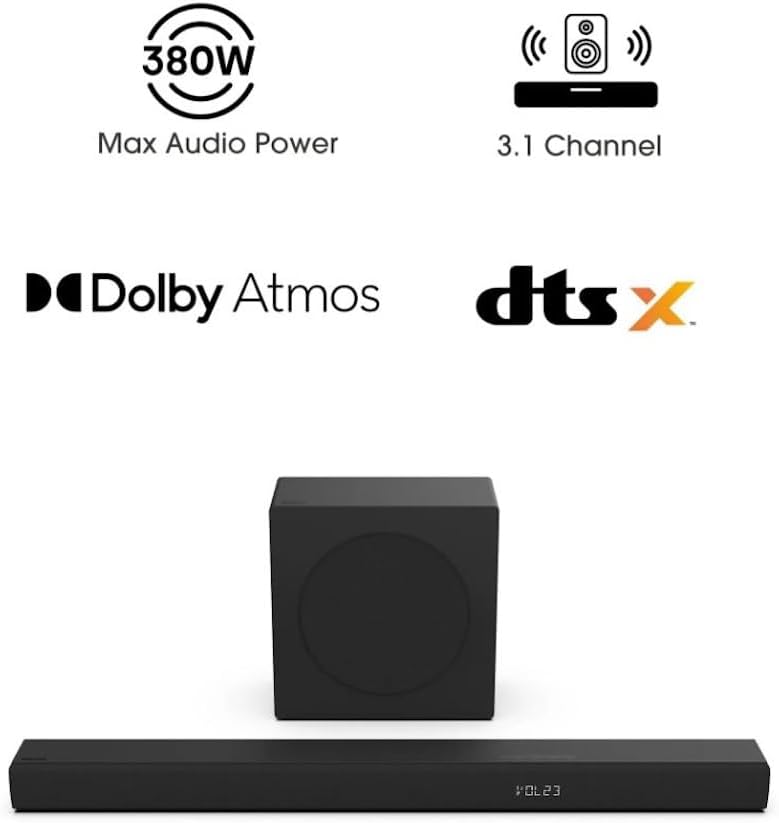
Image: An illustration highlighting key features of the Hisense R632 soundbar system. Icons and text indicate "380W Max Audio Power," "3.1 Channel," "Dolby Atmos," and "DTS:X." The soundbar and subwoofer are shown at the bottom of the image.
2. Important Safety Instructions
Please read all safety and operating instructions carefully before using this product. Keep these instructions for future reference.
- Power Source: Only use the power cables provided with the unit. Ensure the voltage matches your local power supply.
- Ventilation: Do not block any ventilation openings. Install in accordance with the manufacturer's instructions.
- Water and Moisture: Do not use this apparatus near water or expose it to dripping or splashing.
- Heat: Do not install near any heat sources such as radiators, heat registers, stoves, or other apparatus (including amplifiers) that produce heat.
- Cleaning: Clean only with a dry cloth.
- Servicing: Do not attempt to service this product yourself. Refer all servicing to qualified service personnel.
- Placement: Place the soundbar and subwoofer on a stable, flat surface or mount securely to a wall using the provided kit.
3. Setup Guide
3.1 Placement
Proper placement of your soundbar and subwoofer is crucial for optimal sound performance.
- Soundbar: Place the soundbar centrally below your television. Ensure there are no obstructions in front of the soundbar that could block the sound.
- Wireless Subwoofer: The wireless subwoofer can be placed anywhere in the room, ideally within 30 feet (9 meters) of the soundbar. For best bass response, try placing it in a corner or near a wall. Ensure it has access to a power outlet.

Image: A close-up of the Hisense 6.5" wireless subwoofer, showing sound waves emanating from it, emphasizing its deep bass capabilities. The subwoofer is black and cube-shaped.
3.2 Connections
Connect your soundbar to your television or other audio sources using the following methods:
- HDMI eARC (Recommended): For the best audio quality, especially with Dolby Atmos and DTS:X, connect the soundbar to your TV's HDMI eARC/ARC port using the supplied HDMI cable.
Ensure your TV's HDMI-CEC (or equivalent) feature is enabled for seamless control.
- Optical: If your TV does not have an HDMI eARC/ARC port, connect the soundbar to your TV's Optical Digital Audio Out port using the supplied optical cable.
Remember to set your TV's audio output to "PCM" or "Stereo" if you experience no sound via optical.
- Bluetooth: For wireless audio streaming from mobile devices, pair your device with the soundbar via Bluetooth. (See Section 4.3 for detailed Bluetooth pairing instructions).
- AUX: Connect external audio devices using a 3.5mm AUX cable (not included) to the AUX port on the soundbar.
- USB: For playing audio files directly from a USB drive, insert the drive into the USB port.

Image: An illustration showing the various connectivity options on the back of the Hisense soundbar, including Optical, AUX, USB, and HDMI eARC ports. It also highlights Bluetooth 5.3 connectivity with a smartphone.
3.3 Wall Mounting
The Hisense R632 soundbar comes with a wall mount kit for convenient installation. Follow these general steps:
- Determine the desired mounting location, ensuring it is level and centered with your TV.
- Use the provided wall mount template (if included) to mark drilling points on the wall.
- Drill pilot holes and insert wall anchors (if necessary).
- Secure the wall brackets to the wall.
- Carefully attach the soundbar to the wall brackets.
- Ensure all cables are properly routed and secured.
For detailed wall mounting instructions, refer to the specific wall mount guide included in your kit.
4. Operating Instructions
4.1 Power On/Off and Input Selection
- Power: Press the Power button on the remote control or the soundbar to turn the unit on or off.
- Input Selection: Press the Input button on the remote control repeatedly to cycle through available input sources (HDMI eARC, Optical, Bluetooth, AUX, USB). The selected input will be displayed on the soundbar's front panel.
4.2 Volume Control and Sound Modes
- Volume: Use the Volume Up (+) and Volume Down (-) buttons on the remote control to adjust the master volume.
- Mute: Press the Mute button to temporarily silence the sound. Press again to restore sound.
- Sound Modes (EQ Modes): The R632 offers 7 tailored sound modes to optimize your listening experience for different content types. Press the EQ button on the remote control to cycle through these modes:
- AI EQ Mode
- Music Mode
- Night Mode
- Game Mode
- Movie Mode
- News Mode
- Sport Mode

Image: A graphic illustrating the 7 tailored sound modes (EQ Modes) available on the Hisense soundbar, represented by various icons and scenes, including AI EQ, Music, Night, Game, Movie, News, and Sport modes.

Image: Two people are shown sitting on a couch, enjoying an immersive audio experience from the Hisense soundbar and subwoofer, with sound waves illustrating the Dolby Atmos and DTS:X surround sound filling the room.

Image: A living room scene with the Hisense soundbar and subwoofer, illustrating the 380W Max Audio Power filling the space with sound. Sound waves are shown emanating from the soundbar.
4.3 Bluetooth Pairing
To connect your mobile device via Bluetooth:
- Press the Bluetooth button on the remote control or the soundbar. The soundbar's display will show "BT" and begin flashing, indicating it's in pairing mode.
- On your mobile device, enable Bluetooth and search for available devices.
- Select "Hisense R632" (or similar) from the list of devices.
- Once connected, the "BT" indicator on the soundbar will stop flashing and remain solid. You can now stream audio from your device.
To disconnect, press and hold the Bluetooth button on the remote control for 3 seconds, or disconnect from your device's Bluetooth settings.
4.4 Remote Control (EzPlay)
The included remote control allows you to manage all functions of your soundbar, including power, input selection, volume, and sound modes. The EzPlay feature allows for simplified control.

Image: A hand holding the Hisense soundbar remote control, pointing towards the soundbar and a television screen displaying soundbar settings. This illustrates the "EzPlay" feature, suggesting control with one remote.
5. Maintenance and Care
To ensure the longevity and optimal performance of your Hisense soundbar system, follow these care guidelines:
- Cleaning:
- Always unplug the soundbar and subwoofer from the power outlet before cleaning.
- Use a soft, dry, lint-free cloth to wipe down the surfaces.
- Do not use liquid cleaners, sprays, or abrasive cleaning agents, as they may damage the finish or internal components.
- Ventilation: Ensure that the ventilation openings on the soundbar and subwoofer are not blocked by dust or debris. Regularly check and clean if necessary.
- Storage: If storing the unit for an extended period, unplug it from the power source and store it in a cool, dry place, away from direct sunlight and extreme temperatures.
- Avoid Liquids: Keep liquids away from the soundbar and subwoofer. In case of accidental spills, immediately unplug the unit and contact qualified service personnel.
6. Troubleshooting
If you encounter issues with your Hisense R632 soundbar, refer to the following common problems and solutions:
| Problem | Possible Cause | Solution |
|---|---|---|
| No Power | Power cable not connected; Power outlet not active. | Ensure power cables are securely plugged into the soundbar/subwoofer and a working power outlet. |
| No Sound | Incorrect input selected; Volume too low; TV audio output settings incorrect; Cables loose. |
|
| Subwoofer Not Connecting | Subwoofer not powered on; Out of range; Interference. |
|
| Bluetooth Pairing Issues | Soundbar not in pairing mode; Device too far; Interference. |
|
| Remote Control Not Working | Batteries dead/incorrectly inserted; Obstruction; Remote out of range. |
|
If the problem persists after trying these solutions, please contact Hisense customer support.
7. Specifications
| Feature | Detail |
|---|---|
| Model Name | R632 |
| Speaker Configuration | 3.1 Channel (5-speaker array in soundbar) |
| Max Audio Power | 380 Watts |
| Audio Technologies | Dolby Atmos, DTS:X |
| Subwoofer Type | Wireless, 6.5 inches |
| Connectivity | Bluetooth, HDMI eARC, Optical, AUX, USB |
| Compatible Devices | Gaming Console, Home Theater, Streaming Device, Television |
| Color | Black |
| Product Dimensions (Soundbar) | 2.4 x 36.2 x 3.5 inches |
| Item Weight | 17 Pounds (total system) |
| Power Source | Corded Electric |
| Input Voltage | 120 Volts |
| Mounting Type | Tabletop Mount, Wall Mountable |
| UPC | 724129302660 |
8. Warranty Information
This Hisense R632 Soundbar system comes with a Limited Warranty. The specific terms and duration of the warranty may vary by region and retailer.
The warranty typically covers defects in materials and workmanship under normal use. It does not cover damage caused by misuse, accident, unauthorized modification, or external causes such as power surges.
Please retain your proof of purchase (receipt) as it will be required for any warranty claims. For detailed warranty terms and conditions, refer to the warranty card included in your product packaging or visit the official Hisense support website.
9. Customer Support
If you require further assistance or have questions not covered in this manual, please contact Hisense customer support.
- Online Support: Visit the official Hisense website for FAQs, support articles, and contact information.
- Telephone Support: Check the Hisense website or your product documentation for regional customer service phone numbers.
- Service Centers: Information on authorized service centers can be found on the Hisense website.
When contacting support, please have your product model number (R632) and serial number (if applicable) ready.


