
1. Introduction
Thank you for choosing the U`King 150W Moving Head Lights. This professional stage lighting fixture is designed to deliver powerful and dynamic lighting effects for various events, including DJ parties, stage shows, weddings, and more. Featuring high brightness, versatile pattern options, and multiple control modes, this light is built for performance and reliability. Please read this manual thoroughly before operation to ensure safe and correct usage.
2. Safety Information
- Power Supply: Ensure the power supply matches the voltage requirements specified on the device.
- Ventilation: Do not block ventilation openings. Ensure adequate airflow around the unit to prevent overheating.
- Installation: Install the fixture securely using appropriate mounting hardware. Avoid direct eye exposure to the light source.
- Maintenance: Disconnect power before cleaning or servicing. Refer all servicing to qualified personnel.
- Environment: Keep the device away from water, moisture, and extreme temperatures.
3. Packing List
Upon unpacking your U`King 150W Moving Head Lights, please verify that all items listed below are present and in good condition:
- U`King 150W Moving Head Light(s)
- Power Cable
- DMX Cable (3-pin)
- Mounting Bracket with Screws
- User Manual

Figure 3.1: Contents of the U`King 150W Moving Head Light package, including the light fixture, power cable, DMX cable, mounting bracket, and user manual.
4. Setup
4.1 Power Connection
- Connect the provided power cable to the 'POWER' input on the rear of the light fixture.
- Ensure the power cable is securely twisted and locked into place.
- Plug the other end of the power cable into a suitable power outlet.
- Turn on the power switch located next to the power input.
4.2 Mounting
The fixture can be mounted on a ceiling or pole using the included mounting bracket. Ensure the mounting surface is capable of supporting the weight of the fixture(s).
- Attach the mounting bracket to the base of the light fixture using the provided screws.
- Secure the bracket to your desired mounting location (e.g., ceiling truss, lighting stand).

Figure 4.1: Rear panel of the U`King 150W Moving Head Light, highlighting the DMX In/Out, Fuse, Power On/Off switch, and locking power connector.
5. Operating Modes
The U`King 150W Moving Head Lights offer several operating modes for versatile control.
5.1 Auto Mode
In Auto Mode, the light fixture will cycle through pre-programmed patterns and colors automatically.
- Press the MENU button on the control panel to navigate to the main menu.
- Use the UP/DOWN buttons to find "SLnd" (Sound/Auto Mode selection). Press ENTER.
- Use the UP/DOWN buttons to find "Auto". Press ENTER to activate.
5.2 Sound Mode
In Sound Mode, the light reacts to ambient sound or music, creating dynamic effects synchronized with the audio.
- Press the MENU button on the control panel to navigate to the main menu.
- Use the UP/DOWN buttons to find "SLnd" (Sound/Auto Mode selection). Press ENTER.
- Use the UP/DOWN buttons to find "SouN". Press ENTER to activate.
- The light will now respond to sound. Sensitivity can be adjusted via the menu.
5.3 DMX Mode (Master-Slave & Controller)
DMX mode allows for precise control over all light functions using a DMX controller or by linking multiple units in a master-slave configuration.
5.3.1 Master-Slave Setup
To synchronize multiple lights without a DMX controller:
- Connect the DMX OUT of the first light (Master) to the DMX IN of the second light (Slave). Continue this chain for all lights.
- Set the Master light to "Auto" or "Sound" mode via its control panel.
- Set all Slave lights to DMX mode (e.g., "CHnd" then select a DMX address, typically 001 for the first slave). The slave units will then follow the master.
5.3.2 DMX Controller Setup
For advanced control, connect to a DMX controller:
- Connect the DMX OUT of your DMX controller to the DMX IN of the first light fixture.
- Connect the DMX OUT of the first light to the DMX IN of the next light, and so on.
- On each light fixture, press MENU to find "CHnd" and press ENTER.
- Use UP/DOWN to set a unique DMX address for each light (e.g., 001, 013, 025, etc., depending on the 12-channel mode).
- Control the lights using your DMX controller.
Video 5.1: Demonstration of Auto Mode, Sound Mode, and DMX Master-Slave connection for the U`King 150W Moving Head Lights. This video illustrates how to set up and use the different operating modes.
6. Features
- High Brightness: Illumination up to 34000 Lux at 5 meters, providing powerful and concentrated beams.
- 18-Facet Prism: Features an 18-facet rotating prism for enhanced light refraction and scattering, adding depth to effects.
- Gobos & Colors: Equipped with 8 rotating gobos and 8 vibrant colors with color mixing capabilities for diverse pattern and color options.
- Beam Angle & Strobe: A narrow 2.8° beam angle and 1-25 Hz strobe function for dynamic stage effects.
- Pan & Tilt: Smooth and precise XY axis adjustment for accurate light positioning, including Pan/Tilt Inversion and Fine Pan/Tilt control.
- Dimming: 0-100% digital dimming for smooth intensity control.
- Cooling System: Built-in fan for efficient heat dissipation, extending the lifespan of the LED engine.

Figure 6.1: Detailed view of the light's internal components, illustrating the 8 colors, 8 gobos, and 18-facet prism for diverse lighting effects.

Figure 6.2: Examples of the diverse light patterns and color combinations achievable with the U`King 150W Moving Head Light.
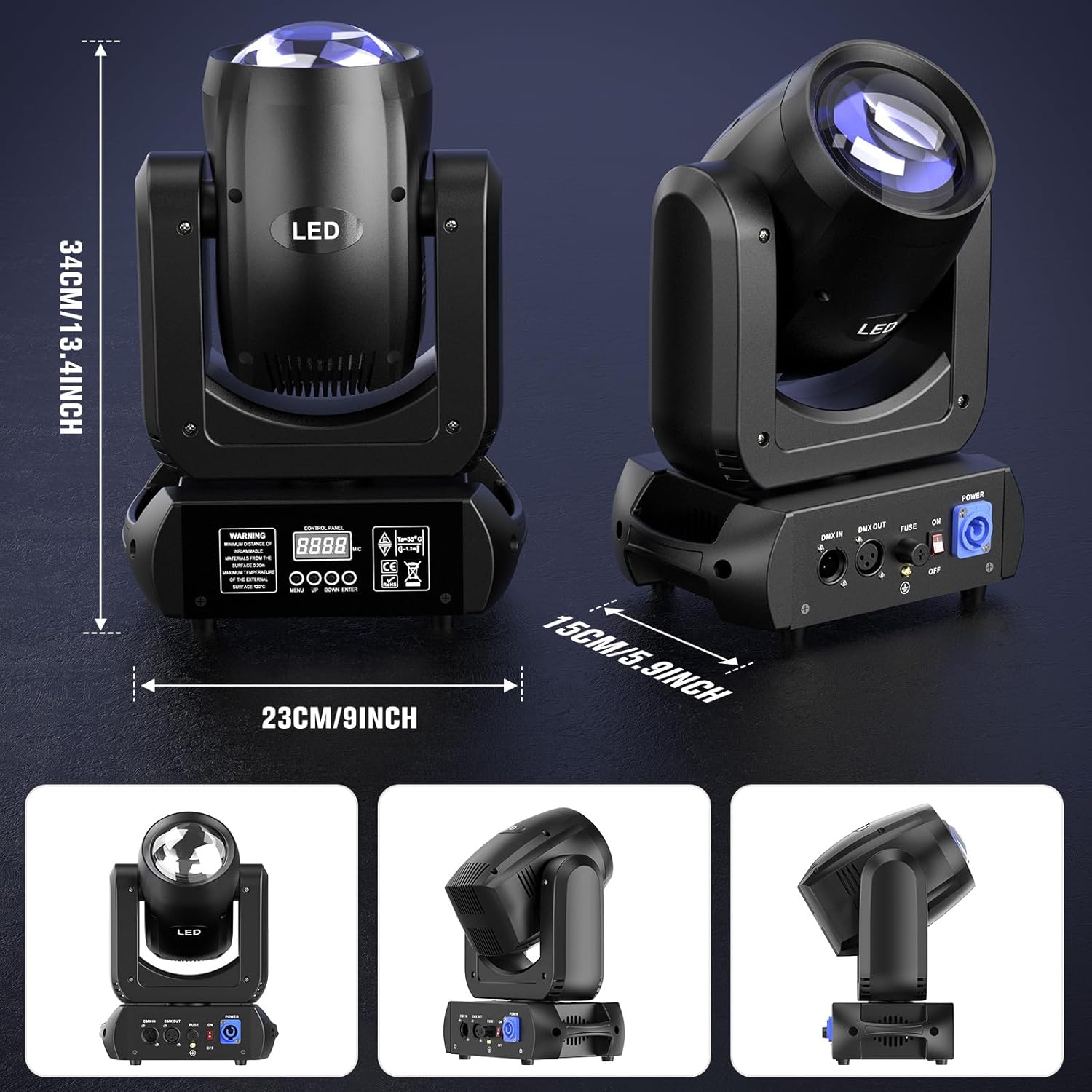
Figure 6.3: Illustration of the 2.8° beam angle and high illumination intensity of the U`King 150W Moving Head Light at various distances.
Video 6.1: Demonstration of the 18-facet prism, gobo, and color mixing features of a similar moving head light. This video showcases the dynamic visual effects possible.
Video 6.2: A brief demonstration of the 150W Moving Head Light's beam movement and effects, highlighting its agility and brightness.
7. Specifications
| Feature | Description |
|---|---|
| Model Number | ZQ02341 |
| Light Source Wattage | 150 Watts |
| Brightness | 34000 lux |
| Beam Angle | 2.8 Degrees |
| Prism | 18-Facet Rotating Prism |
| Gobos | 8 Rotating Gobos |
| Colors | 8 Colors with Color Mixing |
| DMX Channels | 12 DMX Channel Modes |
| Control Modes | DMX, Sound Activated, Auto, Master-Slave |
| Pan/Tilt | XY Axis Adjustment, Pan/Tilt Inversion, Fine Pan/Tilt |
| Strobe | 1-25 Hz |
| Dimming | 0-100% Linear Dimming |
| Material | Aluminum |
| Product Dimensions | 9.05"L x 5.91"W x 12.02"H |
| Mounting Type | Ceiling Mount, Pole Mount |

Figure 7.1: Visual representation of the U`King 150W Moving Head Light's dimensions.
8. Maintenance
Regular maintenance ensures optimal performance and longevity of your U`King 150W Moving Head Lights.
- Cleaning: Periodically clean the lenses and exterior with a soft, lint-free cloth. Do not use abrasive cleaners.
- Inspection: Regularly check all cables, connections, and mounting hardware for any signs of wear or damage.
- Cooling: Ensure the cooling fan and vents are free from dust and debris to maintain proper airflow.
- Storage: When not in use, store the lights in a dry, dust-free environment.
9. Troubleshooting
If you encounter issues with your U`King 150W Moving Head Lights, refer to the following common solutions:
| Problem | Possible Cause | Solution |
|---|---|---|
| Light does not power on | No power, faulty cable, blown fuse | Check power connection, replace power cable, check/replace fuse. |
| No DMX control | Incorrect DMX cabling, wrong DMX address, DMX controller issue | Verify DMX cable connections, ensure correct DMX addresses, check DMX controller functionality. |
| Light not responding in Sound Mode | Low sound sensitivity, no ambient sound | Adjust sound sensitivity in the menu, ensure sufficient sound input. |
| Movement is erratic or stuck | Obstruction, internal error | Check for physical obstructions, perform a smart reset via the menu. If issue persists, contact support. |
10. Warranty and Support
The U`King 150W Moving Head Lights come with a standard manufacturer's warranty. For specific warranty details, please refer to the documentation included with your purchase or contact U`King customer support. For technical assistance or further inquiries, please visit the official U`King store on Amazon or contact their customer service.


