1. Introduction
Thank you for choosing the HiBig H1 7D Arc Magnetic Detachable Electric Razor. This versatile 5-in-1 grooming kit is designed to provide a smooth, efficient, and comfortable shaving experience for both head and body hair. Featuring advanced 7D floating blades, IPX7 waterproofing, and a convenient LED display, this manual will guide you through its proper use, maintenance, and care to ensure optimal performance and longevity.
2. Safety Instructions
- Read all instructions before using the appliance.
- Keep the appliance dry when charging. Do not charge near water or with wet hands.
- This appliance is waterproof (IPX7) and can be used in the shower. However, ensure the charging port is completely dry before connecting the USB-C cable.
- Do not use the appliance if the blades are damaged, as this may cause injury.
- Keep out of reach of children.
- Only use the provided USB-C cable for charging.
- Do not disassemble or attempt to repair the appliance yourself. Contact customer support for assistance.
- Avoid extreme temperatures and direct sunlight.
3. Package Contents
Verify that all items listed below are included in your package:
- Main Shaver Unit (with 7-head bald shaver attachment)
- Trimmer Head
- 3 Guide Combs (3mm, 5mm, 7mm)
- Nose & Ear Trimmer
- Facial Cleansing Brush
- Silicone Brush
- USB-C Charging Cable
- Cleaning Brush

A complete overview of the HiBig H1 grooming kit components, including the main unit, 7-head bald shaver, trimmer head, guide combs, nose & ear trimmer, facial cleansing brush, silicone brush, and USB-C cable.
4. Product Features
- 7D Arc Magnetic Detachable Shaving Head: Features Hyperflex 360° pivoting technology for a close, smooth shave that adapts to facial and head contours. The magnetic design allows for easy removal and cleaning.
- 5-in-1 Grooming Kit: Includes interchangeable heads for various grooming needs: 7-head bald shaver, hair trimmer, nose & ear trimmer, facial cleansing brush, and silicone brush.
- IPX7 Waterproof: Allows for convenient wet and dry shaving, and easy cleaning under running water.
- USB-C Fast Charging & LED Display: Built-in 800mAh battery provides 120 minutes of runtime after 90 minutes of charging. The LED display shows real-time battery levels and includes a travel lock indicator.
- Two Adjustable Speed Modes: Customize your shaving experience for different hair types and areas.

This image illustrates the upgraded 7D Arc Floating Shaver Head, designed to conform closely to the contours of the head, face, and neck for efficient shaving.
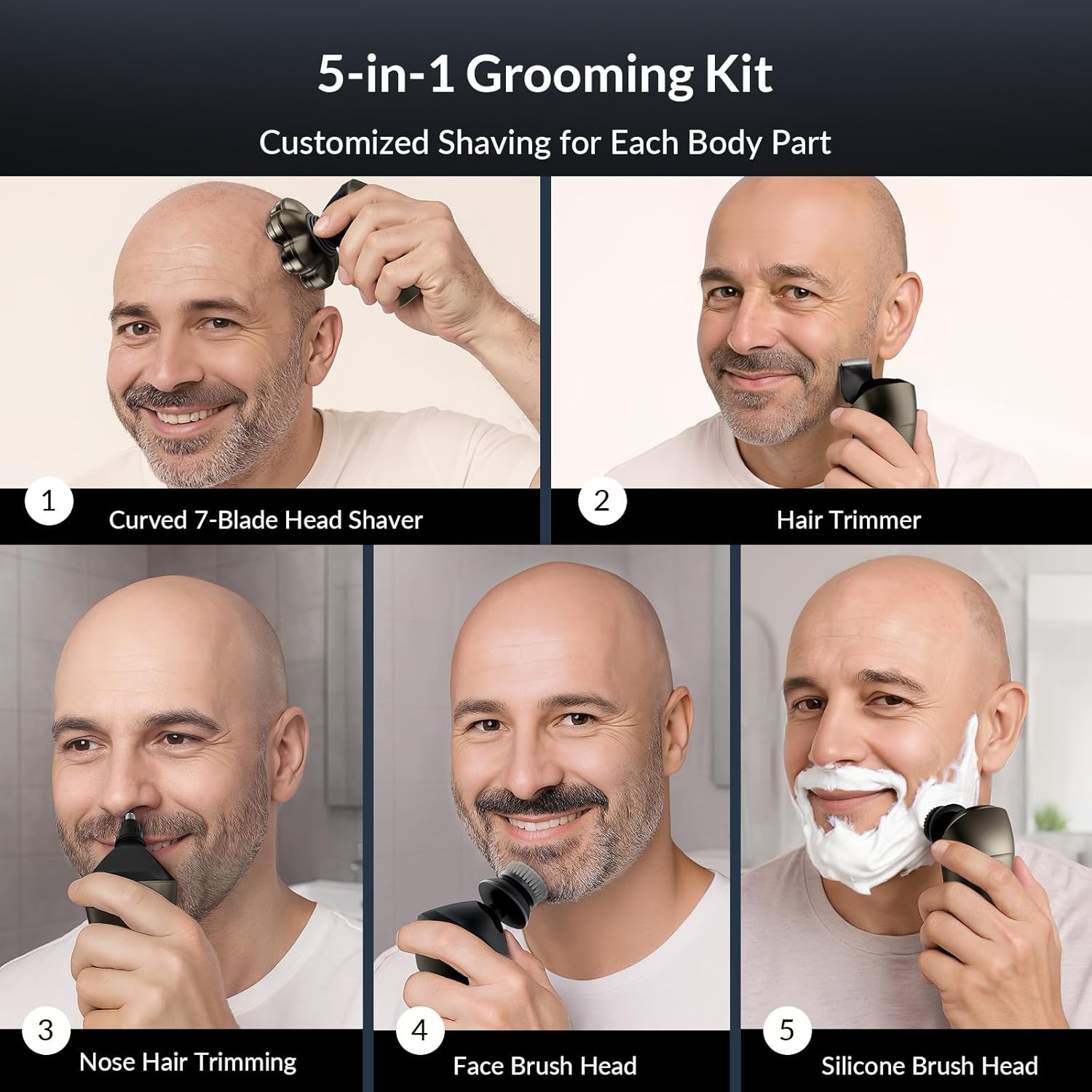
This image shows the versatility of the 5-in-1 grooming kit, demonstrating its use for head shaving, hair trimming, nose hair trimming, and facial cleansing with both brush heads.

The HiBig H1 shaver is suitable for both wet and dry use, allowing for comfortable shaving with foam in the shower or quick dry shaves.

The shaver features a clear LED digital display for battery level and a convenient USB-C charging port for fast charging and portability.
5. Setup
5.1 Initial Charging
- Before first use, fully charge the shaver.
- Ensure the shaver is turned off and the charging port is dry.
- Connect the USB-C cable to the shaver's charging port and the other end to a compatible USB power adapter (not included) or a computer USB port.
- The LED display will show the battery percentage increasing during charging. A full charge typically takes about 90 minutes.
- Once fully charged (100% displayed), disconnect the charging cable.
5.2 Attaching/Detaching Heads
To change attachments, gently pull the current head upwards to detach it from the main unit. Align the desired attachment with the main unit and push it down until it clicks securely into place.
6. Operating Instructions
6.1 Power On/Off and Speed Adjustment
- Press the power button once to turn the shaver on. It will start in the default speed mode.
- Press the power button again to switch to the higher speed mode.
- Press the power button a third time to turn the shaver off.
6.2 Travel Lock Function
- To activate the travel lock, press and hold the power button for 3 seconds while the shaver is off. A lock icon will appear on the LED display.
- To deactivate, press and hold the power button for 3 seconds again. The lock icon will disappear.
6.3 Using the 7-Head Bald Shaver
- Attach the 7-head bald shaver to the main unit.
- For best results, ensure your skin is clean. Can be used wet with shaving foam/gel or dry.
- Gently press the shaver against your skin and move it in small, circular motions. The flexible heads will adapt to your contours.
- Avoid excessive pressure to prevent irritation.
6.4 Using the Trimmer Head
- Attach the trimmer head. Select a guide comb (3mm, 5mm, or 7mm) and slide it onto the trimmer head if desired for specific hair lengths.
- Use for shaping beards, sideburns, or trimming body hair.
- Move the trimmer against the direction of hair growth for an even trim.
6.5 Using the Nose & Ear Trimmer
- Attach the nose & ear trimmer head.
- Carefully insert the trimmer tip into your nostril or ear canal.
- Move it gently to trim unwanted hair. Do not insert too deeply.
6.6 Using the Facial Cleansing Brush and Silicone Brush
- Attach either the facial cleansing brush or the silicone brush.
- Apply your preferred facial cleanser to your face or directly to the brush head.
- Gently move the brush in circular motions across your face to cleanse and exfoliate.
- Rinse your face and the brush head thoroughly after use.
7. Maintenance and Cleaning
Regular cleaning ensures optimal performance and hygiene.
7.1 Cleaning the 7-Head Bald Shaver
- Turn off the shaver.
- Gently detach the 7-head shaver unit from the main body.
- The magnetic blade cover can be easily opened for thorough cleaning. Rinse the blades and the inside of the head under running water.
- Use the small cleaning brush to remove any stubborn hair particles.
- Shake off excess water and allow the head to air dry completely before reattaching or storing.

The integrated magnetic blade cover design allows for easy disassembly and cleaning of the shaver head, contrasting with less convenient split or convex cutter heads.
7.2 Cleaning Other Attachments
All other attachments (trimmer head, nose & ear trimmer, facial brushes) can be rinsed under running water. Use the cleaning brush for the trimmer head if needed. Ensure they are dry before storing.
7.3 Blade Replacement
For optimal performance, it is recommended to replace the shaver heads every 3-6 months, depending on usage. Replacement heads can be purchased from authorized HiBig retailers.
8. Troubleshooting
| Problem | Possible Cause | Solution |
|---|---|---|
| Shaver does not turn on. | Low battery; Travel lock activated. | Charge the shaver; Deactivate travel lock by pressing and holding the power button for 3 seconds. |
| Poor shaving performance. | Blades are dull or clogged; Shaver head not properly attached. | Clean the shaver head thoroughly; Replace shaver head if blades are dull; Ensure head is securely attached. |
| Shaver stops during use. | Battery is low. | Recharge the shaver. |
| Irritation after shaving. | Excessive pressure; Dry shaving on sensitive skin; Dull blades. | Use lighter pressure; Try wet shaving with foam/gel; Replace shaver head. |
9. Specifications
- Model: H1
- Brand: HiBig
- Power Source: Battery Powered
- Battery Type: Built-in 800mAh rechargeable battery
- Charging Time: Approximately 90 minutes
- Runtime: Up to 120 minutes on a full charge
- Charging Interface: USB-C
- Waterproof Rating: IPX7
- Wattage: 5 watts
- Recommended Uses: Beard, Face, Nose Hair, Scalp
10. Warranty and Support
HiBig products are manufactured with quality and performance in mind. For warranty information, technical support, or replacement parts, please refer to the warranty card included in your product packaging or visit the official HiBig website. Please retain your proof of purchase for any warranty claims.


