
Sunseeker V3
Sunseeker V3 Robotic Lawn Mower User Manual
Model: V3 | Brand: Sunseeker
Introduction
This manual provides essential information for the safe and efficient operation, setup, maintenance, and troubleshooting of your Sunseeker V3 Robotic Lawn Mower. The Sunseeker V3 is designed for areas up to 600 m², featuring advanced Vision AI, a dual camera system for obstacle detection, and the ability to handle slopes up to 42%.
The Sunseeker V3 Robotic Lawn Mower, ready for operation on a well-maintained lawn.
Its wire-free perimeter system and intuitive app control make lawn care effortless, allowing for one-click mowing and continuous updates for optimal performance.
Setup
Setting up your Sunseeker V3 is designed to be quick and straightforward, allowing you to start mowing in as little as 3 minutes.
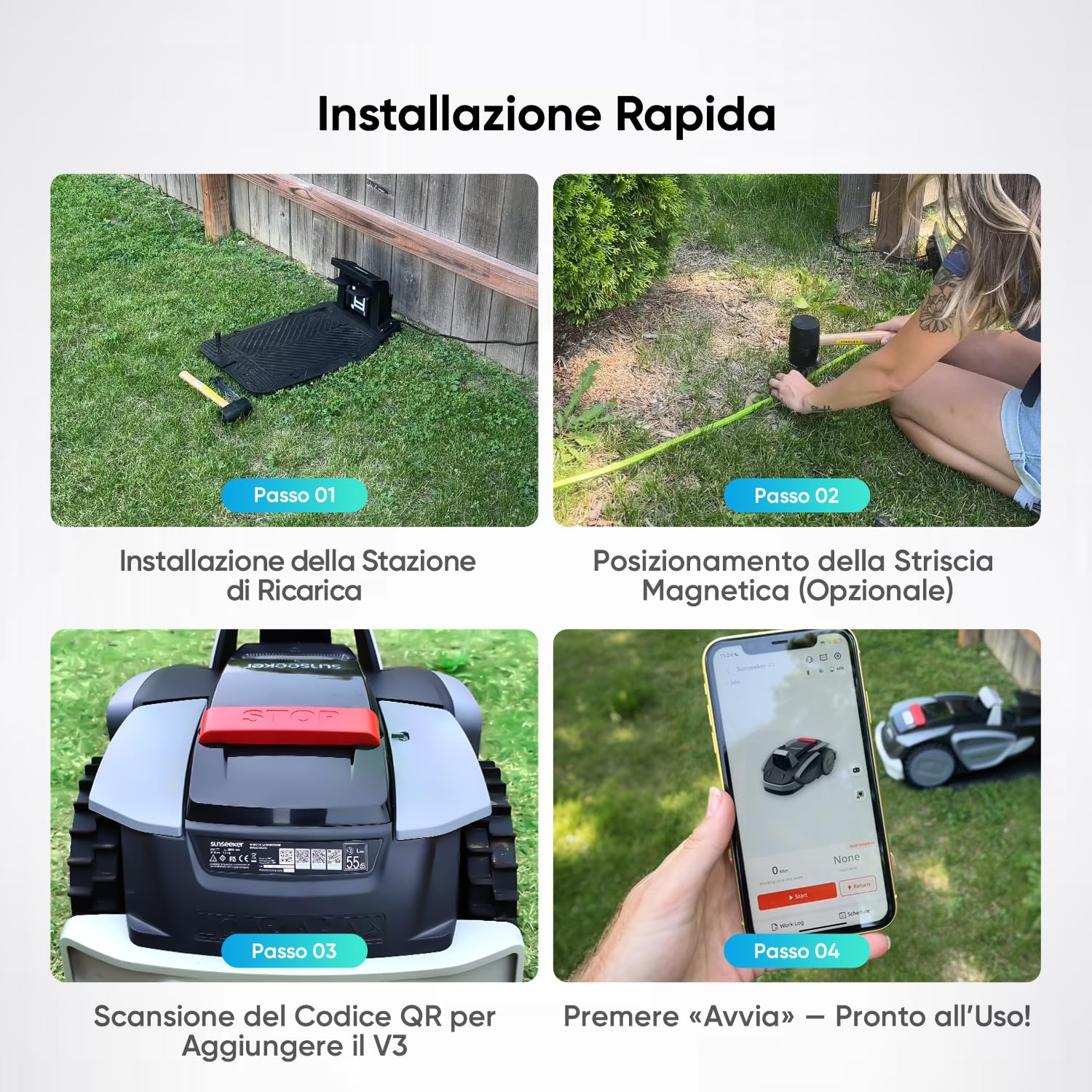
- Install the Charging Station: Place the charging station in a suitable location within your lawn area. Ensure it is in a Wi-Fi covered area for optimal connectivity.
- Connect Power: Plug the charging station into an outdoor power outlet.
- Position the Mower: Roll your V3 Sunseeker into the charging station. A green light will indicate it is correctly positioned and charging.
- Define Boundaries (Optional): For areas without clear boundaries or to create specific no-mow zones, use the provided magnetic strips. Hammer the stakes to secure the strips in place. The mower's Vision AI will recognize these boundaries.
- App Registration: Download the Sunseeker app. Scan the QR code located on the back of your lawn mower to register your device and connect it to your Wi-Fi network.

The charging station being set up on the lawn, ready for the robotic mower.

The robotic mower approaching a magnetic boundary strip, which helps define mowing areas.
Once these steps are completed, your Sunseeker V3 is ready for operation.
Operating Instructions
The Sunseeker V3 offers flexible operating modes, including one-click mowing, app control, and manual adjustments.
One-Click Mowing
For immediate mowing, simply press the 'Start' button on the mower's control panel or within the app. The mower will begin its operation based on its intelligent algorithm.
Official Sunseeker V3 product video demonstrating easy setup and operation. This video highlights the mower's ability to navigate various terrains and obstacles, and its smart features like automatic return to base and rain detection.
App Control and Scheduling
The Sunseeker app provides comprehensive control over your mower:
- Schedule Mowing: Set specific times and days for the mower to operate.
- Customize Settings: Adjust cutting height, edge mowing preferences, and rain delay settings.
- Monitor Status: View battery level, Wi-Fi connectivity, and current operational status.
- Manual Control: Use the app to manually steer the mower for precise control in specific areas.
The Sunseeker app displaying control options and scheduling for the robotic lawn mower.
Blade Level Adjustment
The cutting height can be adjusted manually using the dial located under the mower's lid. Rotate the dial to select your desired cutting height, ranging from 20 mm to 60 mm.

Close-up of the Sunseeker V3's control panel, showing the dial for adjusting blade cutting height.
Intelligent Navigation and Obstacle Avoidance
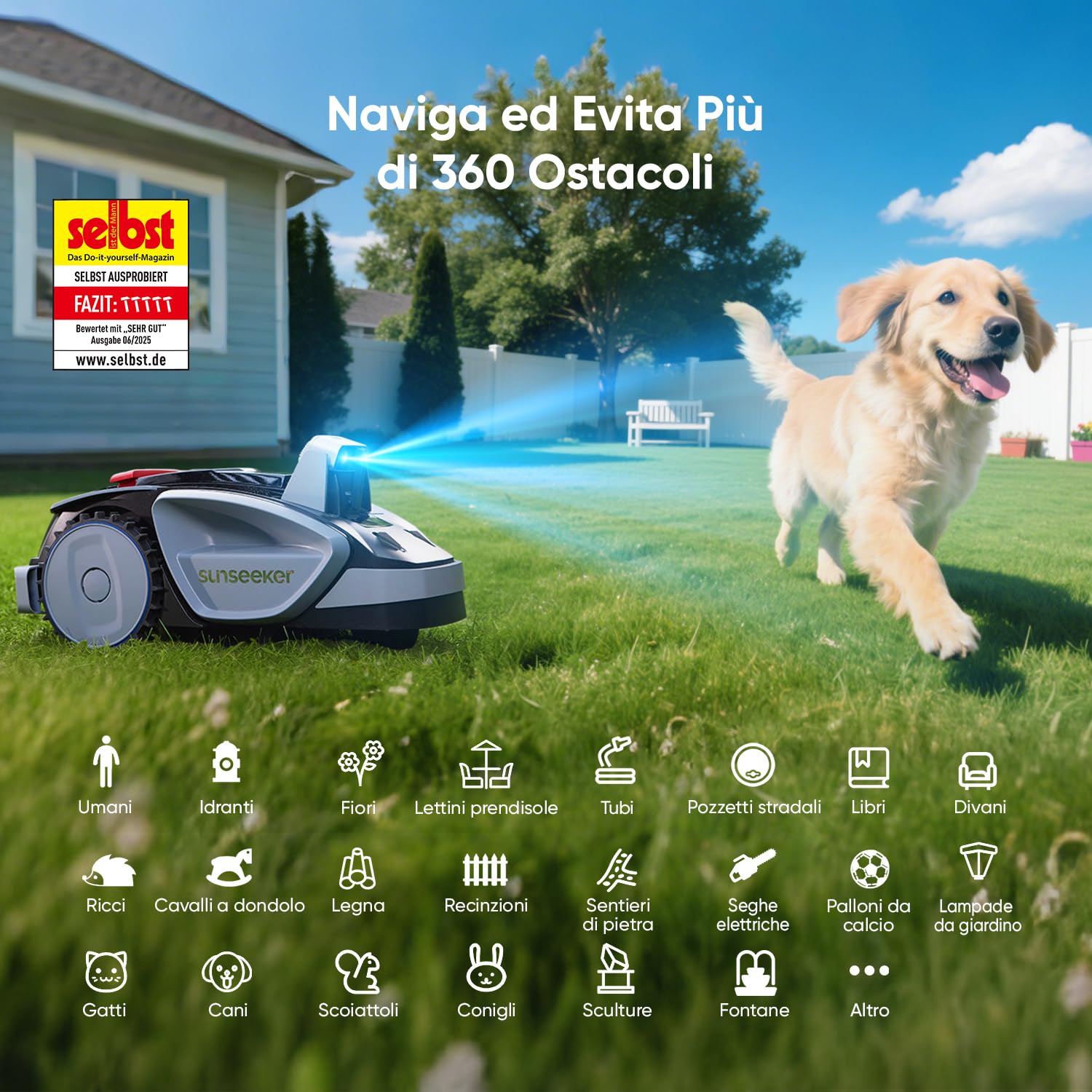
The V3 Sunseeker utilizes Vision AI and a dual camera system to navigate your lawn. It can recognize over 160 obstacles, from garden tools to toys, ensuring no area is missed while avoiding collisions. Its floating cut system adjusts to go over pathways, and it can handle slopes up to 42%.

The Sunseeker V3 robotic mower intelligently navigating around various garden obstacles.

The Sunseeker V3 demonstrating its capability to mow on a steep incline of up to 42%.
Maintenance
Regular maintenance ensures the longevity and optimal performance of your Sunseeker V3.
- Cleaning: The mower is IPX5 water resistant, allowing for easy cleaning with a hose. Ensure the mower is powered off before cleaning.
- Blade Replacement: Periodically check the blades for wear and tear. Replace them as needed to maintain cutting efficiency. Replacement blades are available from Sunseeker.
- Software Updates (OTA): The mower supports Over-The-Air (OTA) updates, ensuring its intelligent algorithm and software are always up-to-date for improved performance and new features.

A user cleaning the underside of the Sunseeker V3 robotic mower with a water hose.

A package of Sunseeker V3 & V3 Plus robotic lawnmower replacement blades.
Troubleshooting
If you encounter any issues with your Sunseeker V3, please refer to the following common solutions:
- Mower not starting: Ensure the mower is correctly seated in the charging station and fully charged. Check Wi-Fi connectivity.
- Mower getting stuck: Verify that the magnetic boundary strips are correctly placed around obstacles or uneven terrain. Clear any large debris from the mowing area.
- Uneven cutting: Check the blade level adjustment and ensure blades are sharp and free from damage.
- Mower not returning to base: Confirm the charging station is powered on and within Wi-Fi range.
- Rain detection: The mower automatically returns to its base when it detects rain. It will resume its schedule once the weather clears.
For further assistance, please contact Sunseeker customer support.
Specifications
| Feature | Specification (V3) |
|---|---|
| Brand | Sunseeker |
| Power Source | Battery Powered |
| Material | Plastic, Polypropylene |
| Item Weight | 9.2 Kilograms |
| Cutting Width | 18 Centimeters |
| Operating Mode | Automatic |
| Product Dimensions (DxWxH) | 62P x 37l x 30H cm |
| Assembly Required | No |
| Model Number | V3 |
| Manufacturer | SUNSEEKER |
| Product Type Name | SUNSEEKER V3 Robotic Lawnmower |
| Country of Origin | China |
| Minimum Adjustable Cutting Height | 20 Millimeters |
| Maximum Adjustable Cutting Height | 60 Millimeters |
Warranty and Support
Sunseeker is committed to providing high-quality products and excellent customer service.
- Warranty: The Sunseeker V3 comes with a 2+1 year warranty, totaling 3 years of after-sales assistance.
- Customer Support: Local EU customer support is available with a dedicated team for technical assistance and advice.
- Global Presence: Sunseeker products are sold in over 55 countries worldwide, backed by extensive media coverage and industry recognition.

Sunseeker's global reach and recognition, highlighting its commitment to innovation and customer satisfaction.
For specific support inquiries, please refer to the contact information provided with your product packaging or visit the official Sunseeker website.
Related documentsV3


Ask a question about this manual
Ask about setup, troubleshooting, compatibility, parts, safety, or missing instructions. Manuals+ will review the question and use this page’s manual context to help answer it.