
1. Introduction
This manual provides essential information for the safe and effective operation of your Carverall K15 Pro 5W Laser Engraving Machine. Please read it thoroughly before assembly and use to ensure optimal performance and safety.
2. Safety Information
WARNING: Laser radiation can be hazardous. Always wear the provided safety glasses when operating the machine. Never look directly into the laser beam. Ensure proper ventilation during operation as some materials may produce fumes. Keep the work area clear of flammable materials. Do not leave the machine unattended while operating.
3. Package Contents
Verify that all items are present in your package:
- Carverall K15 Pro Laser Engraver Machine
- Safety Glasses
- Test Materials
- Tools for Assembly
- Power Adapter (24V)
- USB Type-B Cable
4. Assembly & Setup
The Carverall K15 Pro is designed for quick and easy assembly, typically taking around 90 seconds with just 6 screws. No complex belt adjustments are required.
4.1 Physical Assembly
Follow the included visual guide for attaching the frame components and laser module. Ensure all screws are securely fastened.

Image: The Carverall K15 Pro Laser Engraver fully assembled, ready for use.
4.2 Power and USB Connection
Connect the 24V power adapter to the machine and a power outlet. Use the provided USB Type-B cable to connect the machine to your computer.
Video: A step-by-step guide demonstrating how to connect the Carverall K15 Pro to LightBurn software via USB.
4.3 Software Installation
The Carverall K15 Pro is compatible with CutLabX (free app for Windows, Mac, Android, iOS), LightBurn, and LaserGRBL. Install your preferred software on your computer or mobile device.
Video: Demonstrates the installation process for LaserGRBL software on Windows, including file navigation and setup steps.

Image: The Carverall K15 Pro connected to a laptop and smartphone, illustrating its software compatibility with CutLabX, LightBurn, and LaserGRBL.
5. Operating Guidelines
The K15 Pro offers 0.01mm ultra-precision and a speed of 15,000mm/min, allowing for detailed engraving and cutting.
5.1 Material Compatibility
The 5W diode laser module is suitable for over 100 surfaces, including wood, acrylic, coated metals, leather, fabric, and paper. It can cleanly slice through 6mm wood or 3mm acrylic. For stainless steel and other bare metals, an optional 1064nm IR laser upgrade is available.

Image: The Carverall K15 Pro demonstrating its ability to engrave on a wide range of materials including wood, acrylic, and coated metals.
5.2 Focusing the Laser
Proper focusing is crucial for achieving precise results. Adjust the laser module's height until the laser spot is at its smallest point on the material surface.
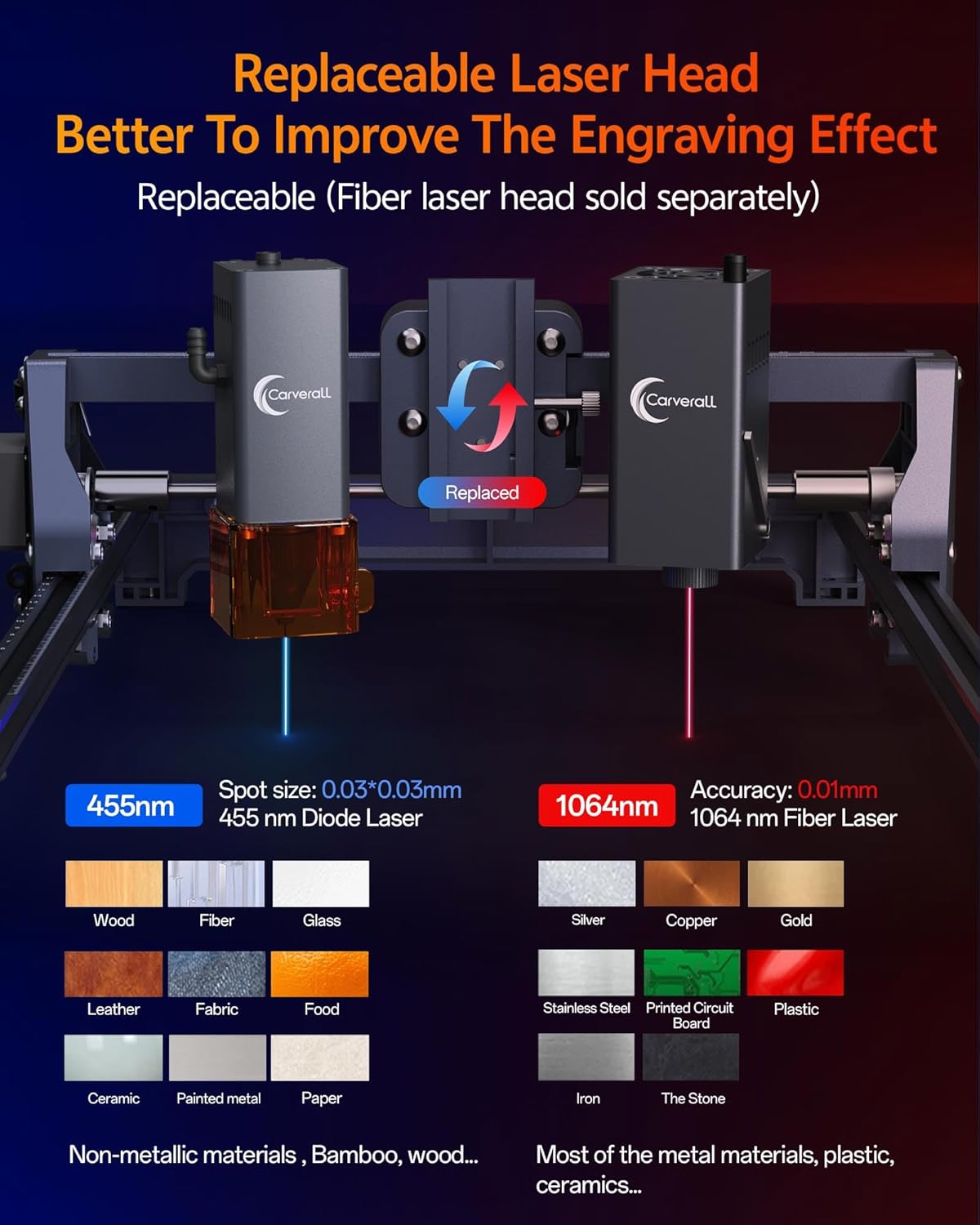
Image: A close-up view of the Carverall K15 Pro's replaceable laser head, highlighting its focus adjustment mechanism.
5.3 Engraving and Cutting Process
Once your design is loaded into the software and the laser is focused, you can initiate the engraving or cutting process. Always monitor the machine during operation.
Video: Demonstrates the Carverall K15 Pro engraving and cutting various materials like wood, stone, and glass, showcasing its versatility.
Video: Shows the process of engraving a metal bottle, emphasizing that matte or coated metals yield the best results, while shiny surfaces should be avoided.
Video: Illustrates the precise etching capabilities of the laser engraver on a glass bottle, creating a personalized design.
Video: Demonstrates the laser engraver creating intricate patterns on cotton fabric, highlighting its use for wearable art.
Video: Shows the laser engraver personalizing a tumbler with a class gift design, demonstrating its application for custom items.
Video: Features the laser engraver creating a professional logo on painted wood, showcasing its precision and quality.
6. Maintenance
To ensure the longevity and optimal performance of your Carverall K15 Pro, regular maintenance is recommended:
- Cleaning: Regularly clean the laser lens and the machine's rails to prevent dust and debris buildup, which can affect precision and laser output. Use a soft, lint-free cloth.
- Lubrication: Periodically apply a small amount of lubricant to the moving parts of the rails to ensure smooth operation.
- Firmware Updates: Check the official Carverall website for any available firmware updates to keep your machine's software current.
7. Troubleshooting
If you encounter issues with your Carverall K15 Pro, consider the following common solutions:
- Machine Not Powering On: Ensure the power adapter is securely connected to both the machine and a working power outlet.
- Software Connection Issues: Verify that the USB cable is properly connected to both the machine and your computer. Restart the software and/or your computer. Check device manager for driver issues.
- Poor Engraving Quality: Re-check the laser focus. Ensure the material is flat and securely placed. Adjust engraving speed and power settings in your software according to material type.
- Laser Not Firing: Confirm the laser module is correctly installed and connected. Check software settings to ensure the laser is enabled and power is set appropriately.
- Machine Movement Problems: Inspect the rails for any obstructions or debris. Ensure all mechanical connections are secure.
For further assistance, refer to the support section or contact Carverall customer service.
8. Specifications
| Feature | Detail |
|---|---|
| Brand | Carverall |
| Model Number | K15 Pro |
| Laser Power | 5.5W (5W+ actual output) |
| Working Area | 200x300mm (Near A4 size) |
| Precision | 0.01mm |
| Maximum Speed | 15,000mm/min |
| Power Source | AC (230 Volts) |
| Item Dimensions L x W x H | 17.32 x 13.39 x 6.3 inches |
| Item Weight | 5.59 pounds |
| Included Components | Laser Engraver Machine |
9. Warranty & Support
The Carverall K15 Pro is engineered for durability, with a laser tube rated for over 10,000 hours of use. For any questions or support needs, our dedicated US-based support team is available to assist you.
Please visit the official Carverall website or contact customer service for detailed warranty information and support resources.

