
Introduction
This manual provides detailed instructions for the safe and efficient use of your xdobo X8 Max Portable Bluetooth Speaker. Please read this manual thoroughly before operating the device and retain it for future reference.
The xdobo X8 Max is a high-performance portable Bluetooth speaker designed for both indoor and outdoor use, featuring powerful stereo sound, deep bass, and a durable, waterproof design.
Package Contents
- xdobo X8 Max Portable Bluetooth Speaker
- Charging Cable (USB-C)
- Audio Cable (3.5mm AUX)
- User Manual (this document)
Product Overview
Familiarize yourself with the speaker's components and controls.

Figure 1: Front and top view of the xdobo X8 Max speaker, showing the speaker grille and control panel with various buttons.
Control Panel Functions
- Power Button: Press and hold to turn the speaker on or off.
- Mode Button (M): Short press to switch between Bluetooth, AUX, USB, and TF card modes.
- Play/Pause Button (Triangle icon): Press to play or pause audio.
- Volume Up (+): Press to increase volume.
- Volume Down (-): Press to decrease volume.
- EQ Button: Press to cycle through different equalizer presets (Stereo 3D, Vocale, Super Bass).
- Microphone Button: For hands-free calling.
Setup
1. Charging the Speaker
Before first use, fully charge the speaker. Connect the provided USB-C charging cable to the speaker's charging port and the other end to a compatible USB power adapter (5V input voltage). The charging time is approximately 8 hours for a full charge.

Figure 2: Illustration indicating the speaker's long battery life, up to 12 hours on a single charge.
The speaker features a 20,000mAh battery, providing extended playtime. It can also be used to charge external devices like mobile phones in emergency situations.
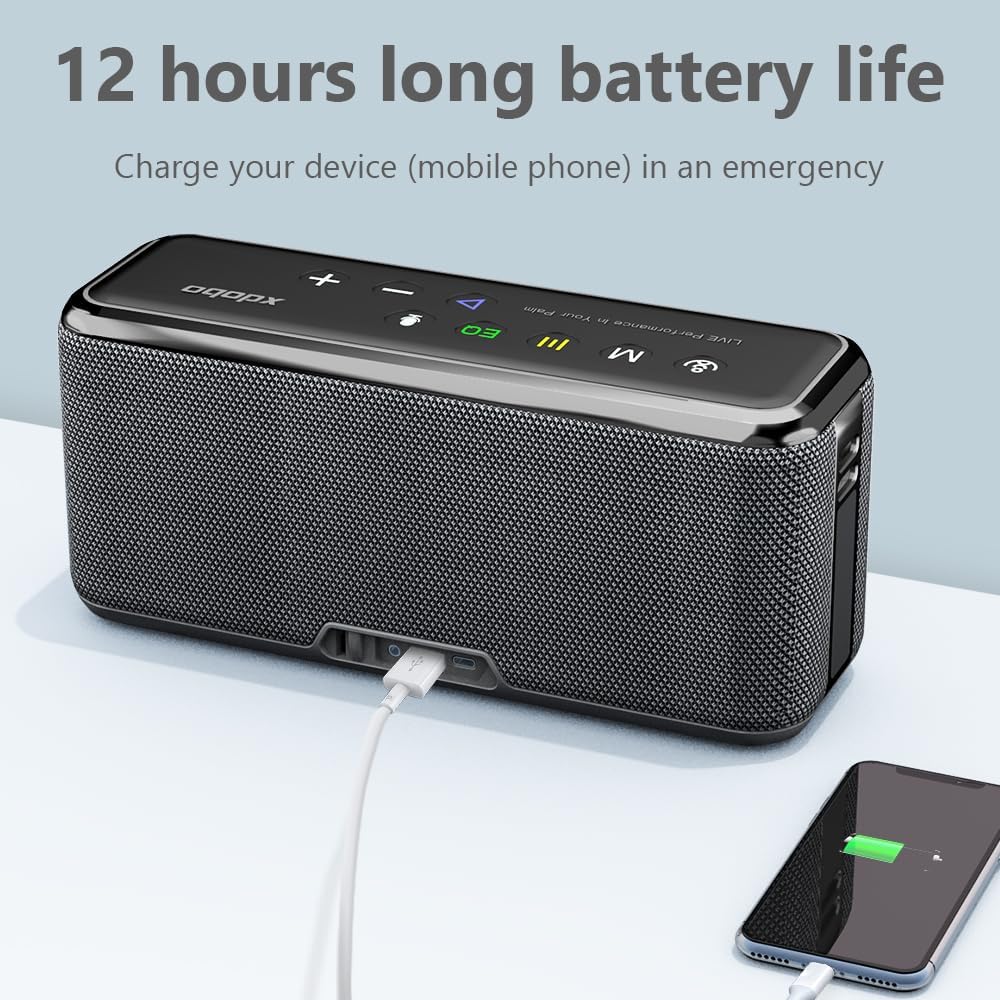
Figure 3: The xdobo X8 Max speaker connected via USB cable to a smartphone, demonstrating its ability to charge other devices.
2. Powering On/Off
- To Power On: Press and hold the Power button until the indicator lights illuminate.
- To Power Off: Press and hold the Power button until the indicator lights turn off.
3. Bluetooth Pairing
- Ensure the speaker is powered on and in Bluetooth mode (indicated by a flashing blue light). If not, press the 'M' button to switch to Bluetooth mode.
- On your device (smartphone, tablet, laptop), enable Bluetooth and search for available devices.
- Select "XDOBO X8 Max" from the list of devices.
- Once paired, the speaker will emit a confirmation sound, and the Bluetooth indicator light will become solid blue.
The speaker supports Bluetooth 5.0 technology, offering a stable connection up to 15 meters (approximately 33 feet).
4. True Wireless Stereo (TWS) Pairing
For an enhanced stereo experience, you can pair two xdobo X8 Max speakers together.
- Ensure both X8 Max speakers are powered on and in Bluetooth mode, but not yet connected to any device.
- On one of the speakers (this will be the primary speaker), double-click the Play/Pause button. The speaker will search for another X8 Max speaker.
- Once connected, both speakers will emit a confirmation sound, and their Bluetooth indicator lights will synchronize.
- Now, connect your device to the primary speaker via Bluetooth as described in step 3. Audio will play through both speakers in stereo.

Figure 4: Two xdobo X8 Max speakers set up for True Wireless Stereo (TWS) playback, positioned on either side of a laptop to create a wider soundstage.
Operating the Speaker
Audio Playback Modes
The X8 Max supports multiple audio input methods:
- Bluetooth Mode: Connect wirelessly to your device.
- AUX Mode: Connect via the 3.5mm audio cable to devices without Bluetooth.
- USB Mode: Insert a USB flash drive with audio files (MP3, WMA, WAV formats supported).
- TF Card Mode: Insert a TF (microSD) card with audio files (MP3, WMA, WAV formats supported).
Press the 'M' button to cycle through these modes.

Figure 5: The speaker's control panel highlighting the various input modes available: Bluetooth, AUX, TF card, and True Wireless Stereo (TWS) connectivity.
Adjusting Volume and EQ
- Volume: Use the '+' and '-' buttons on the speaker to adjust the playback volume.
- Equalizer (EQ): Press the 'EQ' button to switch between preset sound profiles:
- Stereo 3D: For an immersive, spatial audio experience.
- Vocale: Enhances vocal clarity, suitable for podcasts or audiobooks.
- Super Bass: Boosts low frequencies for a deeper bass response.

Figure 6: Visual representation of the three distinct equalizer modes available on the xdobo X8 Max speaker, allowing users to customize their audio experience.
Hands-Free Calling
When connected to a smartphone via Bluetooth, the X8 Max can be used for hands-free calls. Press the Microphone button to answer or end a call.
Maintenance
Cleaning
Wipe the speaker with a soft, damp cloth. Do not use abrasive cleaners, alcohol, or chemical solvents, as these may damage the surface or internal components.
Water Resistance
The xdobo X8 Max features an IPX5 waterproof rating, meaning it is protected against low-pressure water jets from any direction. It is suitable for outdoor use and can withstand splashes, rain, or accidental spills. Do not submerge the speaker in water. Ensure all port covers are securely closed before exposing the speaker to moisture.

Figure 7: The xdobo X8 Max speaker positioned outdoors in grass, illustrating its robust and waterproof design suitable for various environments.
Storage
Store the speaker in a cool, dry place away from direct sunlight and extreme temperatures. If storing for an extended period, charge the battery to approximately 50% every few months to maintain battery health.
Troubleshooting
- No Power:
- Ensure the speaker is fully charged.
- Verify the charging cable and adapter are working correctly.
- No Sound:
- Check the volume level on both the speaker and your connected device.
- Ensure the correct input mode (Bluetooth, AUX, USB, TF card) is selected.
- If using Bluetooth, ensure the speaker is properly paired and connected.
- Bluetooth Pairing Issues:
- Make sure the speaker is in Bluetooth pairing mode (flashing blue light).
- Disable and re-enable Bluetooth on your device.
- Move your device closer to the speaker (within 15 meters).
- Forget "XDOBO X8 Max" from your device's Bluetooth list and try pairing again.
- Ensure no other devices are currently connected to the speaker.
- TWS Pairing Failure:
- Ensure both speakers are X8 Max models and are not connected to any other Bluetooth device.
- Place the speakers close to each other during the pairing process.
- Repeat the TWS pairing steps carefully.
- Poor Sound Quality:
- Check the audio source quality.
- Adjust the EQ settings on the speaker.
- If using Bluetooth, ensure there are no obstructions between the speaker and your device.
Specifications
| Feature | Detail |
|---|---|
| Model Name | XD-X8M (X8 Max) |
| Brand | xdobo |
| Speaker Type | Portable Bluetooth Speaker |
| Connectivity Technology | Bluetooth 5.0, USB, AUX (3.5mm), TF Card |
| Audio Output Mode | Stereo |
| Speaker Maximum Output Power | 100 Watts |
| Frequency Response | 20 Hz - 20 kHz (typical) |
| Battery Capacity | 20000 mAh |
| Charging Time | Approximately 8 Hours |
| Playtime | Up to 12 Hours (varies by volume and content) |
| Bluetooth Range | Up to 15 Meters (33 Feet) |
| Water Resistance Level | IPX5 Waterproof |
| Product Dimensions | 3.7"D x 8.87"W x 3"H (approx. 94mm D x 225mm W x 76mm H) |
| Item Weight | 2860 Grams (6.31 pounds) |
| Material | ABS + Metal Grill + Silicone Rubber |
| Input Voltage | 5 Volts |
| Audio Driver Size | 52 Millimeters |
| Woofer Diameter | 3 Inches |
| Impedance | 4 Ohms |
Warranty and Support
Limited Warranty
The xdobo X8 Max Portable Bluetooth Speaker comes with a limited warranty. Please refer to the warranty card included in your package or contact xdobo customer support for details regarding warranty coverage and terms.
Customer Support
For any questions, technical assistance, or warranty claims, please contact xdobo customer support. Contact information can typically be found on the official xdobo website or on the product packaging.
Safety Information
- Do not expose the speaker to extreme temperatures or direct sunlight for prolonged periods.
- Avoid dropping or subjecting the speaker to strong impacts.
- Keep the speaker away from children and pets.
- Do not attempt to disassemble, repair, or modify the speaker yourself. This will void the warranty.
- Use only the provided charging cable or a certified equivalent.
- Dispose of the speaker and its battery responsibly according to local regulations.


