
EnergyPort H29
EnergyPort Smart Bracelet H29 User Manual
Model: H29
1. Introduction
This manual provides detailed instructions for the setup, operation, maintenance, and troubleshooting of your EnergyPort Smart Bracelet H29. This device is designed to assist you in monitoring various health and fitness metrics, including heart rate, blood oxygen, blood pressure, sleep patterns, and activity tracking.

Image 1.1: The EnergyPort Smart Bracelet H29 with both the blue silicone and blue nylon bands.
2. What's in the Box
Please verify that all items are present in your package:
- EnergyPort Smart Screenless Watch (1 unit)
- Instruction Manual (1 unit)
- Magnetic Charging Cable (1 unit)
- Replacement Straps (2 units)

Image 2.1: Package contents of the EnergyPort Smart Bracelet H29.
3. Setup Guide
3.1 Initial Power On and Bluetooth Activation
For the first use, it is necessary to activate the device's Bluetooth functionality.
- Power On: Press and hold the side button for 3 seconds. The device will vibrate once, and a green light will flash, indicating successful power-on.
- Activate Bluetooth: While the device is powered on, press and hold the side button for 10 seconds. The device will vibrate twice in succession, and the green light will flash again, confirming Bluetooth activation.
3.2 App Installation and Pairing
To utilize all features of your Smart Bracelet, download and install the companion application.
- Download App: Scan the QR code provided in the packaging or visit QWatch Pro App to download the 'QWatch Pro' application on your Android or iOS device.
- Enable Bluetooth: Ensure Bluetooth is enabled on your smartphone.
- Pair Device: Open the 'QWatch Pro' app, navigate to the device pairing section, and select 'H29' from the list of available devices to connect.

Image 3.1: Steps for initial Bluetooth activation and connecting the bracelet to the QWatch Pro app.
4. Operating Instructions
4.1 Fitness Tracking
The EnergyPort Smart Bracelet H29 offers over 170 professional sports modes and comprehensive activity tracking.
- Workout Modes: Select from over 170 sports modes, including running, hiking, yoga, and gym activities.
- GPS Tracking: For outdoor activities like city running or hiking, the device syncs GPS routes to your phone app, providing detailed route maps and distance data.
- Goal Setting: Set smart goals within the app to guide your fitness journey and track progress.

Image 4.1: The smart bracelet tracking outdoor running with GPS synchronization.

Image 4.2: Visual representation of the extensive range of sports modes supported by the device.
4.2 Health Monitoring
The device provides continuous monitoring of key health metrics.
- Heart Rate: Continuous heart rate monitoring with alerts for abnormal readings during activity or rest.
- Blood Oxygen (SpO2): Automatic detection of blood oxygen saturation, useful for high-altitude activities or sleep monitoring.
- Blood Pressure: Continuous blood pressure monitoring with trend analysis and alerts for abnormal values.
- Sleep Tracking: Monitors sleep stages (deep, light, awake) to provide insights into sleep quality.
- Stress Monitoring: Tracks stress levels and offers guided breathing exercises to help manage stress.
- Women's Health: AI-powered period prediction and exercise adjustments based on menstrual cycle.
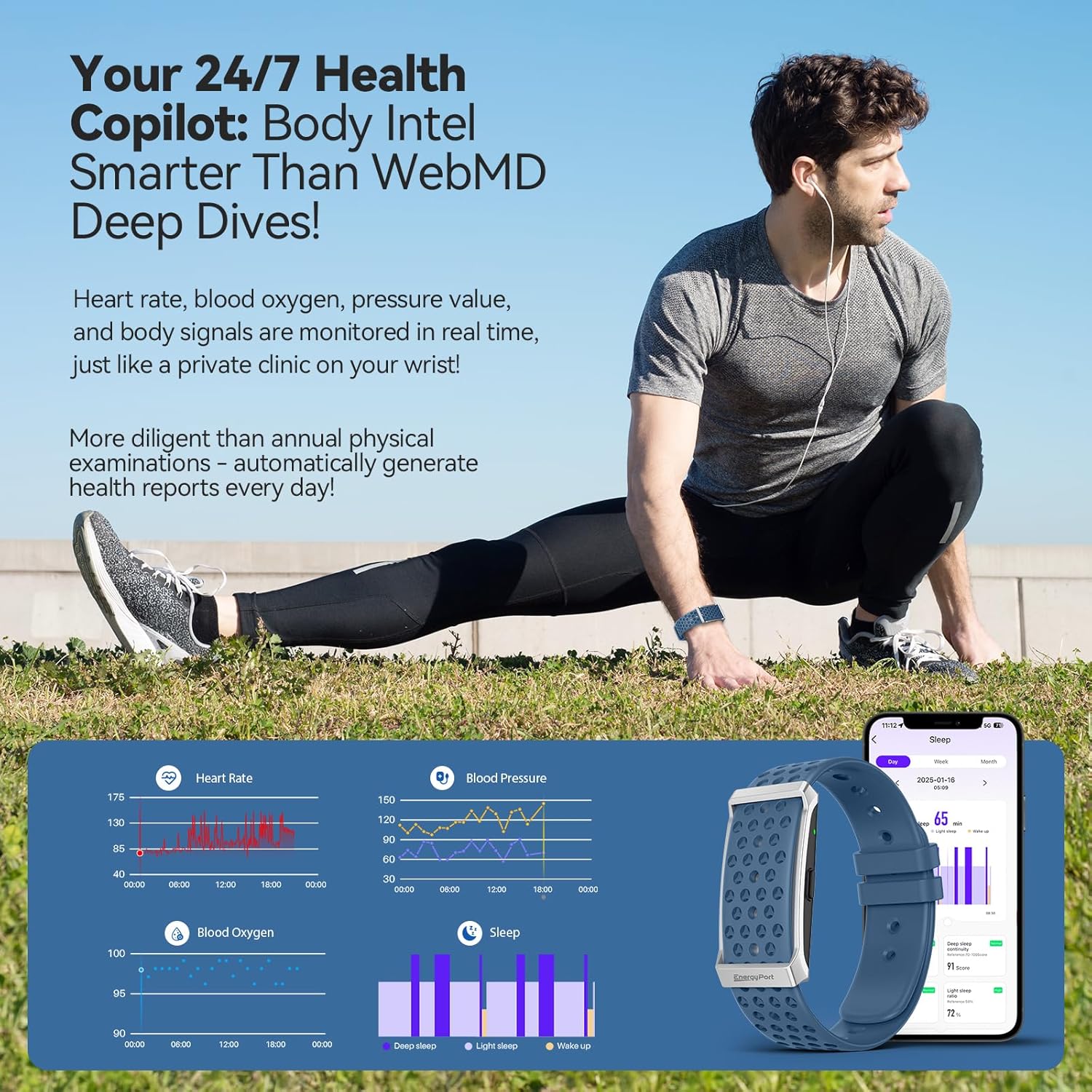
Image 4.3: Overview of health data tracked by the smart bracelet, including heart rate, blood pressure, blood oxygen, and sleep.

Image 4.4: Detailed sleep tracking and analysis provided by the device.
4.3 Smart Assistant Features
The bracelet integrates smart features to keep you connected and organized.
- Notifications: Receive customizable vibration alerts for incoming calls, messages, and app notifications.
- Camera Remote: Use the bracelet as a remote shutter for your smartphone camera.
- Reminders: Set gentle reminders for hydration, movement, or other custom alerts.
- Silent Alarms: Set vibrating alarms that wake you discreetly without disturbing others.

Image 4.5: Notification display and smart alerts on the bracelet.
5. Maintenance
5.1 Charging
The EnergyPort Smart Bracelet H29 features an extended battery life.
- Battery Duration: Expect 20-30 days of regular use and 45-60 days on standby from a single charge.
- Charging Process: Use the provided magnetic charging cable. Align the magnetic pins with the charging contacts on the back of the device.

Image 5.1: Charging the EnergyPort Smart Bracelet H29.
5.2 Water Resistance
The device is designed for daily water exposure.
- Rating: 1 ATM waterproof, suitable for depths up to 10 meters.
- Usage: Resistant to rain, sweat, and handwashing.
- Caution: Avoid immersion in hot water.

Image 5.2: The smart bracelet's 1 ATM water resistance for daily activities.
5.3 Cleaning and Strap Care
To maintain hygiene and comfort, regularly clean your bracelet and straps.
- Cleaning: Wipe the device and straps with a soft, damp cloth. Avoid harsh chemicals.
- Strap System: The device comes with a dual strap system (nylon and silicone) for various activities and comfort. Interchange straps as needed.

Image 5.3: The lightweight design and dual strap options for comfort.
6. Troubleshooting
If you encounter issues with your EnergyPort Smart Bracelet H29, refer to the following common solutions:
- Device Not Powering On: Ensure the device is fully charged. If it's the first use, follow the Bluetooth activation steps (Section 3.1) carefully.
- Unable to Pair with App:
- Confirm Bluetooth is enabled on both the bracelet and your smartphone.
- Ensure the 'QWatch Pro' app is updated to the latest version.
- Restart both the bracelet and your smartphone, then attempt pairing again.
- Inaccurate Health Readings (HR, SpO2, BP):
- Ensure the bracelet is worn snugly on your wrist, not too tight or too loose.
- Clean the sensor on the back of the device.
- Remain still during measurements for best accuracy.
- Sleep Tracking Issues: Ensure the bracelet is worn consistently throughout the night. Verify that the app has the correct time zone settings.
- Workout Tracking Not Starting/Stopping: Ensure you initiate the workout mode correctly within the app or on the device. Wait for any countdowns to complete before starting your activity.
- Unexpected Vibrations: Check your notification settings within the 'QWatch Pro' app to ensure only desired alerts are enabled.
- App Glitches or Typos: Ensure your 'QWatch Pro' app is updated. If issues persist, try reinstalling the app.
7. Specifications
| Feature | Detail |
|---|---|
| Model Name | H29 |
| Brand | EnergyPort |
| Product Dimensions | 2.4 x 4.3 x 4.3 inches |
| Item Weight | 5.9 ounces |
| Memory Storage Capacity | 64 MB |
| Operating System | Android, iOS |
| Connectivity Technology | Bluetooth |
| Wireless Communication Standard | Bluetooth |
| GPS | GPS Via Smartphone |
| Water Resistance | 1 ATM (10m depth) |
| Battery Life (Regular Use) | 20-30 days |
| Battery Life (Standby) | 45-60 days |
| Special Features | Day&Night Sleep Tracker, Call Reminder, Message Notification, Heart Rate Monitor, Blood Pressure Watch, Activity Tracker, Calorie Tracker, Pedometer, Camera Remote, Alarm, Sedentary Reminder, Water Drinking Reminder, GPS Running, 173 Exercise Modes |
8. Warranty and Support
8.1 Warranty Information
The EnergyPort Smart Bracelet H29 comes with a 3-year warranty covering all manufacturing defects. During this period, EnergyPort will cover repairs or replacements for eligible defects.
Image 8.1: EnergyPort's 3-year support commitment.
8.2 Lifetime Support and No Subscriptions
Enjoy free lifetime access to all core features of your EnergyPort Smart Bracelet H29. There are no subscription fees required to use the device's primary functionalities.
8.3 Customer Support
For further assistance, technical support, or warranty claims, please contact EnergyPort customer service through the official website or your purchase platform.
Ask a question about this manual
Ask about setup, troubleshooting, compatibility, parts, safety, or missing instructions. Manuals+ will review the question and use this page’s manual context to help answer it.