
1. Introduction
This manual provides detailed instructions for the assembly, operation, and maintenance of your Jocoevol 72-inch Coffee Bar Cabinet. This versatile furniture piece is designed to enhance your dining, kitchen, or living space with its integrated power outlet, RGB LED lighting, and extensive storage options. Please read this manual thoroughly before assembly and use to ensure proper function and safety.
2. Safety Information
Adhering to these safety guidelines is crucial for preventing injury and damage to the product.
- Always assemble the cabinet on a stable, level surface.
- Do not overload shelves or drawers beyond their weight capacity.
- Be cautious when opening and closing sliding doors to avoid pinching fingers.
- Unplug the cabinet from the power source when not in use or during cleaning.
- Always follow local electrical codes when using the integrated power outlets.
- Use appropriate safety gear, such as gloves, when assembling the cabinet.
- Ensure all connections are secure before placing items on or in the cabinet.
- This cabinet includes an anti-toppling device. It is highly recommended to secure the cabinet to a wall using this device to prevent accidental tipping, especially in households with children or pets.
3. Package Contents
Before beginning assembly, verify that all components are present and undamaged. Refer to the included parts list and hardware pack. If any parts are missing or damaged, contact customer support immediately.
- Cabinet panels (top, bottom, sides, shelves, doors, drawers)
- Hardware pack (screws, dowels, cam locks, hinges, drawer slides, handles)
- Power outlet unit with USB ports and power cord
- RGB LED light strip with remote control (and/or app instructions)
- Wooden sticks for DIY back panel
- Wine glass rack
- Detachable X-shaped wine rack
- Anti-toppling device
- Assembly instructions manual
4. Setup and Assembly
Assembly is required for this product. It is recommended that two adults perform the assembly, which typically takes 2-3 hours. Follow the step-by-step instructions provided in the separate assembly guide included in your package. All parts are labeled, and necessary tools are provided.
4.1 Preparation
- Clear a spacious, clean, and level area for assembly.
- Unpack all components and lay them out, matching them with the parts list.
- Keep children and pets away from the assembly area.
4.2 Assembly Steps Overview
- Assemble the base frame of the buffet section.
- Install the internal shelves and the detachable X-shaped wine rack in the buffet.
- Assemble and install the two spacious drawers. Ensure drawer slides are correctly oriented.
- Attach the sliding barn doors to the buffet section.
- Assemble the upper hutch section, including its adjustable shelves and built-in wine glass rack.
- Mount the upper hutch onto the buffet section.
- Install the DIY back panel with pre-set holes.
- Install the power outlet unit into the designated slot on the countertop.
- Apply the RGB LED light strip to the underside of the upper hutch.
- Secure the anti-toppling device to the cabinet and wall.
Refer to the detailed graphical instructions in the separate assembly manual for precise steps and diagrams.

Figure 1: Product dimensions (47.3"W x 15.8"D x 72.4"H) and internal measurements of the Jocoevol coffee bar cabinet.

Figure 2: Overview of key features including adjustable shelves, sliding barn door, DIY storage board, large countertop, storage drawers, hidden storage, and wine rack.
5. Operating Instructions
5.1 Charging Station
The cabinet is equipped with a built-in charging station located on the countertop. This station includes two 125V/12A AC outlets and two 5V/2A USB ports. To use, simply plug the cabinet's main power cord into a standard wall outlet. You can then connect coffee makers, blenders, toasters, or charge mobile devices directly from the cabinet.

Figure 3: Built-in charging station with AC outlets and USB ports.
5.2 RGB LED Light Strip
The integrated smart RGB LED light strip offers customizable illumination for your cabinet. It can be controlled via a dedicated remote control or a smartphone application (refer to the LED light manual for app download and pairing instructions).
- Color Selection: Choose from over 16 million colors to match your mood or decor.
- Preset Effects: Select from over 20 dynamic lighting effects.
- Smart Modes: Utilize various smart modes, including music sync and timing functions.
- Brightness Adjustment: Adjust the light intensity to your preference.

Figure 4: RGB LED light strip features and control options.
5.3 Storage Features
- Sliding Barn Doors: The two flexible sliding barn doors allow easy access to items while conserving space. Slide them horizontally to reveal or conceal sections of the upper hutch.
- Adjustable Shelves: The upper hutch features six adjustable shelves. These can be repositioned to accommodate items of various heights.
- Built-in Wine Glass Rack: Located in the upper hutch, this rack is designed to securely hold wine glasses.
- Spacious Drawers: Two large storage drawers are situated beneath the countertop, ideal for organizing smaller items, utensils, or accessories.
- Detachable X-shaped Wine Rack: The bottom buffet includes a removable X-shaped wine rack capable of holding up to 12 bottles. This can be removed to create a larger open storage space if desired.
- DIY Back Panel: The innovative back panel features 48 pre-set holes. Use the included wooden sticks to customize the panel for hanging coffee mugs, bottle openers, towels, or decorative items.
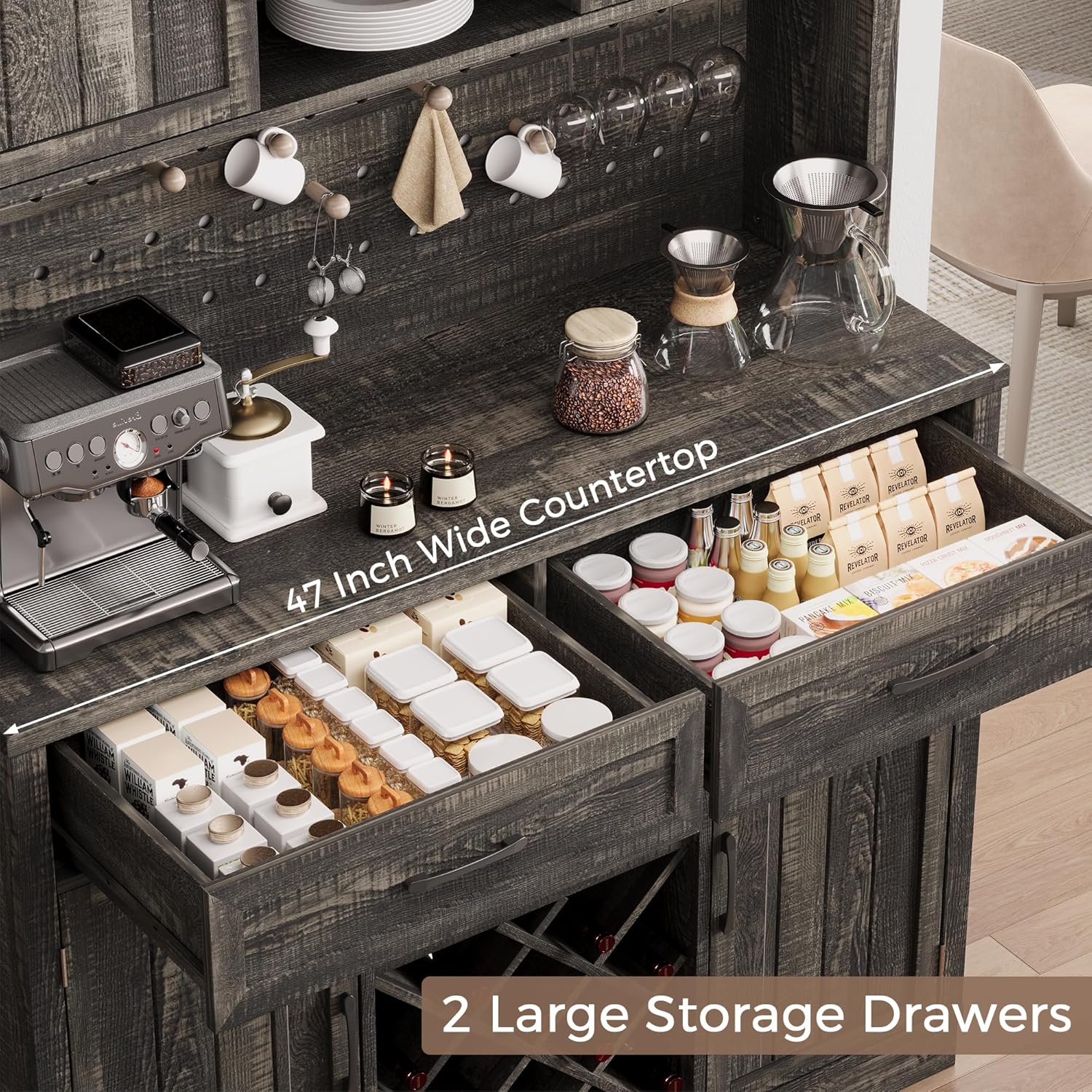
Figure 5: The 47-inch wide countertop and two large storage drawers.

Figure 6: Detailed view of sliding barn door, DIY storage board, removable wine rack, and hooks.
6. Maintenance
Proper maintenance will ensure the longevity and appearance of your coffee bar cabinet.
- Cleaning: The cabinet features a waterproof surface. For general cleaning, wipe surfaces with a soft, damp cloth. Avoid abrasive cleaners or harsh chemicals that could damage the finish.
- Spills: Immediately wipe up any spills to prevent moisture damage.
- Hardware: Periodically check all screws and fasteners to ensure they are tight. Retighten if necessary.
- LED Lights: If the LED lights stop working, check the power connection and ensure the remote control batteries are functional. Refer to the LED light manual for specific troubleshooting.
- Power Outlet: Ensure the power cord is not pinched or damaged. Do not attempt to repair the electrical components yourself; contact a qualified electrician if issues arise.
7. Troubleshooting
If you encounter issues with your Jocoevol Coffee Bar Cabinet, refer to the following common problems and solutions:
| Problem | Possible Cause | Solution |
|---|---|---|
| Cabinet feels unstable or wobbly. | Loose fasteners; uneven floor; anti-toppling device not installed. | Ensure all screws are tightened. Move to a level surface or use shims. Install the anti-toppling device as per instructions. |
| Sliding barn doors do not move smoothly. | Track obstruction; misaligned doors. | Check the track for debris and clean if necessary. Verify that the doors are correctly installed and aligned on the track. |
| LED lights are not working. | Power cord unplugged; remote control battery dead; loose connection. | Ensure the cabinet is plugged in. Check the LED light strip's power connection. Replace remote control batteries. Refer to the LED light manual for further troubleshooting. |
| Power outlets/USB ports are not functioning. | Cabinet power cord unplugged; circuit breaker tripped; faulty device. | Verify the cabinet's main power cord is securely plugged into a working wall outlet. Check your home's circuit breaker. Test with a different device to rule out a faulty appliance. |
| Drawers do not close completely or smoothly. | Misaligned drawer slides; obstruction; incorrect assembly. | Ensure drawer slides are properly aligned and installed. Check for any items obstructing the drawer's path. Re-check assembly steps for drawers. |
If the problem persists after attempting these solutions, please contact Jocoevol customer support.
8. Specifications
| Feature | Detail |
|---|---|
| Brand | Jocoevol |
| Model Name | Bar Cabinet (C-0612) |
| Color | Black Oak |
| Product Dimensions | 15.8"D x 47.3"W x 72.4"H |
| Material | Engineered Wood, MDF, Steel Hardware |
| Special Features | Adjustable Shelf, Built-In Charging Station, DIY Back Panel, Heavy Duty, LED Light |
| Mounting Type | Floor Mount |
| Room Type | Dining Room, Kitchen, Living Room |
| Door Style | Sliding Barn Door, Raised Panel |
| Included Components | Drawers, Shelves, Wine Glass Rack, Wine Bottle Rack, LED Light, Charging Station |
| Finish Type | Rustic, Powder-coated |
| Number of Shelves | 6 (adjustable) + 6 (fixed) |
| Item Weight | 77.6 Pounds |
| Assembly Required | Yes |
| Charging Station | 2 AC Outlets (125V/12A), 2 USB Ports (5V/2A), 6.6 ft Power Cord |
| LED Light | RGB, App/Remote Control, 16M+ Colors, 20+ Effects, Smart Modes |
9. Warranty
Jocoevol products are manufactured with quality and durability in mind. For specific warranty details regarding your coffee bar cabinet, please refer to the warranty card included in your package or visit the official Jocoevol website. Keep your purchase receipt as proof of purchase for any warranty claims.
10. Customer Support
Should you have any questions, require assistance with assembly, or encounter any issues with your Jocoevol Coffee Bar Cabinet, our dedicated support team is available to help. Please contact us via the methods listed on our official website or through your purchase platform. We aim to respond to all inquiries within 24 hours.
For faster service, please have your model number (C-0612) and purchase information ready when contacting support.