
1. Important Safety Instructions
When using electrical appliances, basic safety precautions should always be followed, including the following:
- Read all instructions before operating the toaster.
- Do not touch hot surfaces. Use handles or knobs.
- To protect against electrical shock, do not immerse cord, plug, or toaster in water or other liquid.
- Close supervision is necessary when any appliance is used by or near children.
- Unplug from outlet when not in use and before cleaning. Allow to cool before putting on or taking off parts.
- Do not operate any appliance with a damaged cord or plug, or after the appliance malfunctions or has been damaged in any manner. Return appliance to the nearest authorized service facility for examination, repair, or adjustment.
- The use of accessory attachments not recommended by the appliance manufacturer may cause injuries.
- Do not use outdoors.
- Do not let cord hang over edge of table or counter, or touch hot surfaces.
- Do not place on or near a hot gas or electric burner, or in a heated oven.
- To disconnect, turn any control to 'off', then remove plug from wall outlet.
- Do not use appliance for other than intended use.
- Oversize foods, metal foil packages, or utensils must not be inserted in a toaster as they may involve a risk of fire or electric shock.
- A fire may occur if toasters are covered or touching flammable material, including curtains, draperies, walls, and the like, when in operation.
- Do not attempt to dislodge food when toaster is plugged in.
- Do not operate unattended.
2. Product Overview
The WHALL KST088 Long Slot 4-Slice Toaster is designed for efficient and versatile toasting. It features a touch screen with a projection display for easy operation, extra-wide slots, and multiple settings for various bread types and browning preferences.
Components:
- Long, Wide Toasting Slots (1.5 inches wide)
- Touch Screen Control Panel
- Projection Display
- Toasting Lever
- Built-in Warming Rack
- Slide-Out Crumb Tray
- Cord Storage (underneath the unit)

Image: Overview of the WHALL KST088 Long Slot 4-Slice Toaster, showing its stainless steel body, control panel, and bread slots.
3. Setup
- Unpacking: Carefully remove the toaster and all packaging materials. Retain packaging for future storage or transport.
- Placement: Place the toaster on a stable, flat, heat-resistant surface, away from flammable materials such as curtains or walls. Ensure adequate ventilation around the unit.
- First Use: Before toasting food for the first time, operate the toaster empty for one cycle at the highest browning setting. This will burn off any manufacturing residues and eliminate odors. A slight smoke or odor is normal during this process.
- Power Connection: Plug the power cord into a standard 120V AC electrical outlet.
4. Operating Instructions
The WHALL KST088 Toaster features an intuitive touch screen and projection display for easy control.
Video: This video demonstrates the key features and operation of the WHALL Long Slot 4-Slice Toaster, including loading bread, using the touch screen, and activating various functions.
Basic Toasting:
- Load Bread: Place up to four slices of bread, bagels, or other items into the 1.5-inch wide slots. The long slots accommodate various bread sizes.
- Select Bread Type: Use the touch screen panel to select the appropriate bread type. Options include White, Bagel, Gluten-Free, English Muffin, and Waffle. The selected type will be projected onto the display.
- Choose Shade Setting: Swipe or click on the touch screen to select your desired browning shade from the 11 available settings. The projection display will show the chosen level.
- Lower Lever: Push the toasting lever down until it locks into place. The toasting cycle will begin, and the digital timer on the projection display will count down.
- Cancel: To stop the toasting cycle at any time, press the 'Cancel' button on the touch screen.

Image: Demonstrates placing bread slices into the extra-wide slots of the toaster.
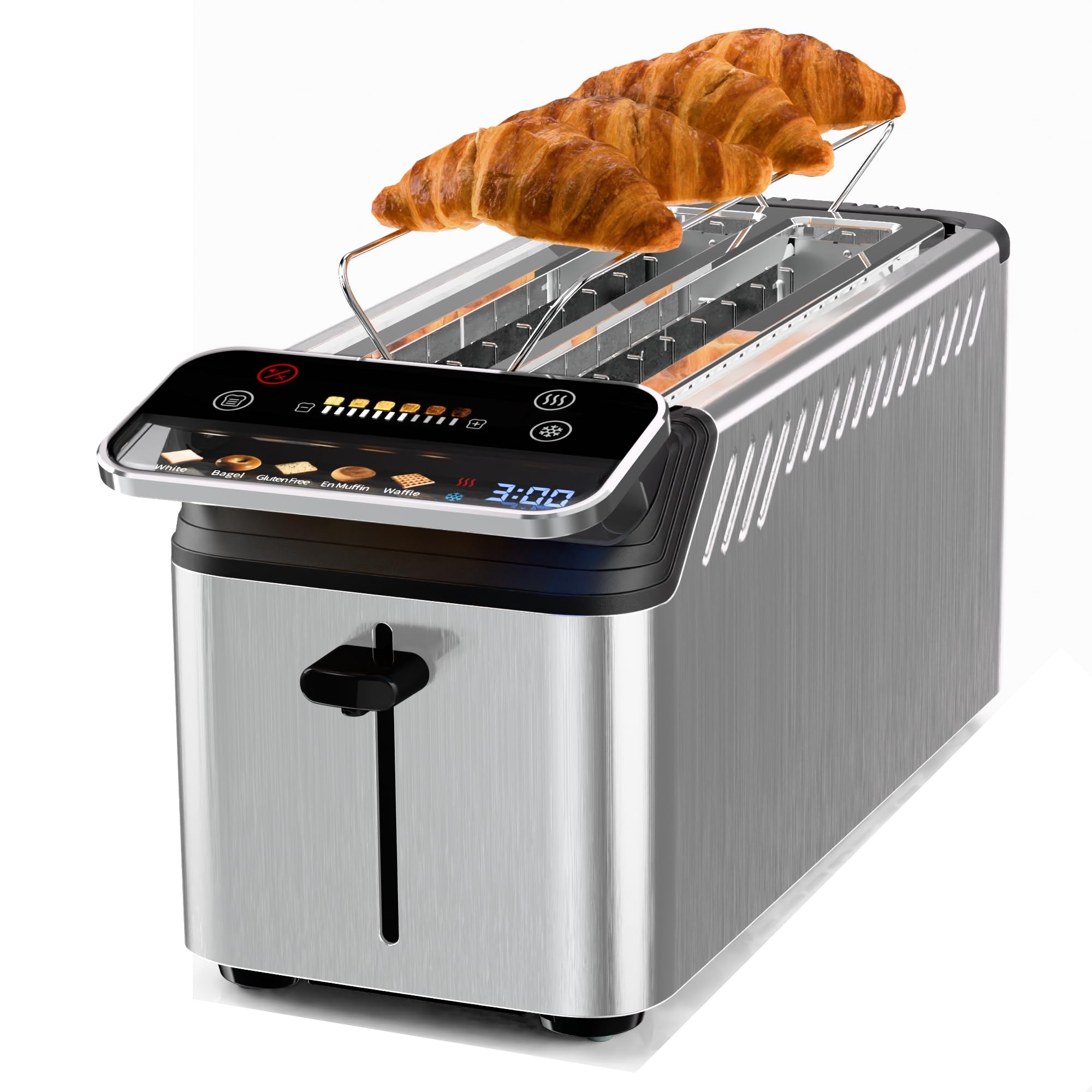
Image: Close-up of the touch screen control panel and projection display, showing bread type selections and browning levels.

Image: Visual representation of the 11 browning shade settings available on the toaster's display.
Special Functions:
- Reheat: Select the 'Reheat' function on the touch screen to warm previously toasted items without further browning.
- Defrost: Select the 'Defrost' function for frozen bread. This setting automatically adjusts the toasting time to account for thawing.
Using the Warming Rack:
The built-in warming rack is ideal for heating pastries, croissants, rolls, and other items that should not be directly toasted.
- Gently pull up the warming rack from the top of the toaster until it locks into position.
- Place items on the warming rack.
- Select a low heat setting or use the 'Reheat' function.
- Monitor items closely to prevent burning.
- Once warmed, push the rack back down for storage.

Image: The WHALL KST088 Toaster with its built-in warming rack extended, holding croissants for warming.
5. Maintenance
Regular cleaning ensures optimal performance and extends the life of your toaster.
Cleaning the Crumb Tray:
- Unplug: Always unplug the toaster from the power outlet and allow it to cool completely before cleaning.
- Remove Tray: Locate the slide-out crumb tray at the back of the toaster. Pull it out to remove accumulated crumbs.
- Clean Tray: Dispose of crumbs. Wash the tray with warm, soapy water, rinse thoroughly, and dry completely before reinserting.
- Reinsert Tray: Slide the clean, dry crumb tray back into its position until it clicks securely.

Image: A hand removing the slide-out crumb tray from the WHALL KST088 Toaster for cleaning.
Cleaning the Exterior:
- Wipe the exterior of the toaster with a soft, damp cloth. Do not use abrasive cleaners or metal scouring pads, as these can scratch the stainless steel finish.
- Ensure the toaster is completely dry before plugging it back in.
Storage:
- When not in use, the power cord can be neatly wrapped around the cord groove and secured with clips located on the bottom of the toaster.
- Store the toaster in a cool, dry place.

Image: Underside view of the toaster showing the integrated cord storage feature.
6. Troubleshooting
| Problem | Possible Cause | Solution |
|---|---|---|
| Toaster does not turn on. | Not plugged in; power outage; faulty outlet. | Ensure toaster is securely plugged in. Check circuit breaker. Try a different outlet. |
| Bread does not toast evenly. | Uneven bread thickness; inconsistent bread type; crumb buildup. | Ensure bread slices are of similar thickness. Clean crumb tray regularly. Adjust shade setting. |
| Smoke or burning smell. | Crumb buildup; food stuck in slots; first use residue. | Immediately unplug. Clean crumb tray. Remove any trapped food (only when cool and unplugged). First use smoke is normal. |
| Lever does not stay down. | Toaster not plugged in; internal malfunction. | Ensure toaster is plugged into a live outlet. If problem persists, contact customer support. |
| Touch screen unresponsive. | Temporary software glitch; dirty screen. | Unplug the toaster for 30 seconds, then plug back in. Clean the touch screen with a soft, dry cloth. |
7. Specifications
- Brand: WHALL
- Model Number: KST088
- Color: Silver
- Material: Stainless Steel
- Product Dimensions: 16.77"D x 7.24"W x 9.76"H
- Wattage: 1200 watts
- Number of Slices: 4 (Long Slot)
- Slot Width: 1.5 inches
- Special Feature: Touchscreen, Projection Display, Warming Rack, Reheat/Defrost
- Voltage: 120 Volts
- Number of Settings: 11 Shade Settings
- Item Weight: 4 Pounds
- UPC: 810118488252

Image: Diagram showing the dimensions of the WHALL KST088 Long Slot 4-Slice Toaster.
8. Warranty and Support
WHALL offers a 12-month guarantee for this product. If you encounter any issues during use, please do not hesitate to contact our after-sales support team. We are committed to resolving your problem in a satisfactory manner within 24 hours.
For support, please refer to the contact information provided with your purchase or visit the official WHALL website.
