
1. Introduction
Thank you for choosing the Airpher VC1 Cordless Stick Vacuum Cleaner. This manual provides essential information for the safe and efficient use, maintenance, and troubleshooting of your new vacuum cleaner. Please read it thoroughly before first use and retain it for future reference.
The Airpher VC1 is designed for versatile home cleaning, featuring powerful suction, a self-standing design, and an intuitive LED display. Its lightweight and ergonomic design, combined with a foldable tube and tangle-free brush head, aims to simplify your cleaning routine.
2. Safety Instructions
To reduce the risk of fire, electric shock, or injury, always follow basic safety precautions when using an electrical appliance.
- Do not use outdoors or on wet surfaces.
- Do not allow to be used as a toy. Close attention is necessary when used by or near children.
- Use only as described in this manual. Use only manufacturer’s recommended attachments.
- Do not use with damaged cord or plug. If appliance is not working as it should, has been dropped, damaged, left outdoors, or dropped into water, return it to a service center.
- Do not pull or carry by cord, use cord as a handle, close a door on cord, or pull cord around sharp edges or corners. Do not run appliance over cord. Keep cord away from heated surfaces.
- Do not unplug by pulling on cord. To unplug, grasp the plug, not the cord.
- Do not handle plug or appliance with wet hands.
- Do not put any object into openings. Do not use with any opening blocked; keep free of dust, lint, hair, and anything that may reduce airflow.
- Keep hair, loose clothing, fingers, and all parts of body away from openings and moving parts.
- Do not pick up anything that is burning or smoking, such as cigarettes, matches, or hot ashes.
- Do not pick up flammable or combustible liquids, such as gasoline, or use in areas where they may be present.
- Do not pick up toxic material, such as chlorine bleach, ammonia, or drain cleaner.
- Do not use without dust cup and/or filters in place.
- Turn off all controls before unplugging.
- Use extra care when cleaning on stairs.
- Store the appliance indoors.
- Do not immerse the vacuum cleaner in water or other liquids.
3. Product Overview and Package Contents
Familiarize yourself with the components of your Airpher VC1 vacuum cleaner.
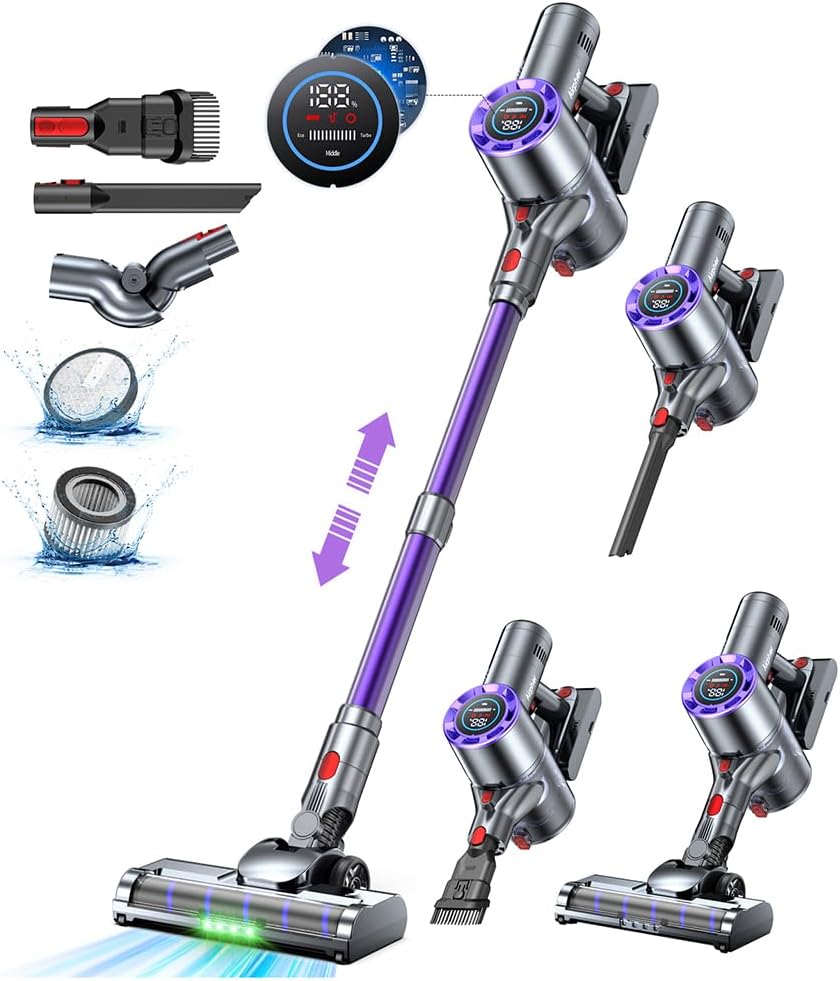
Image 3.1: Overview of the Airpher VC1 Cordless Stick Vacuum Cleaner and its included accessories. This image displays the main vacuum unit, extension wand, floor brush, crevice tool, dusting brush, and a flexible adapter, along with a visual representation of the LED display and filter components.
Package Contents:
- Main Vacuum Unit with Dustbin
- Extension Wand (Foldable Tube)
- Motorized Floor Brush with LED Lights
- Crevice Tool
- 2-in-1 Dusting Brush
- Flexible Adapter
- Wireless Charging Bracket
- Power Adapter
- HEPA Filter (pre-installed)
- User Manual
4. Setup
4.1 Assembly
- Attach the Extension Wand: Align the main vacuum unit with the extension wand and push until it clicks into place.
- Attach the Floor Brush: Connect the motorized floor brush to the other end of the extension wand, ensuring it clicks securely.
- Install Accessories: For specific cleaning tasks, attach the desired accessory (crevice tool, dusting brush, or flexible adapter) directly to the main unit or the extension wand.
4.2 Initial Charging
Before first use, fully charge the vacuum cleaner for approximately 4.5 hours.

Image 4.1: This image illustrates three methods for charging the Airpher VC1. On the left, the vacuum is mounted on a wireless charging bracket. In the center, the main unit is detached and charging directly via a power adapter. On the right, the detachable battery is removed and charging separately via a power adapter.
- Using the Wireless Charging Bracket: Mount the assembled vacuum onto the wireless charging bracket. The vacuum will automatically begin charging. This bracket also provides convenient storage for accessories.
- Direct Charging: Connect the power adapter directly to the charging port on the main vacuum unit.
- Detachable Battery Charging: Remove the battery from the main unit and connect the power adapter directly to the battery for charging.
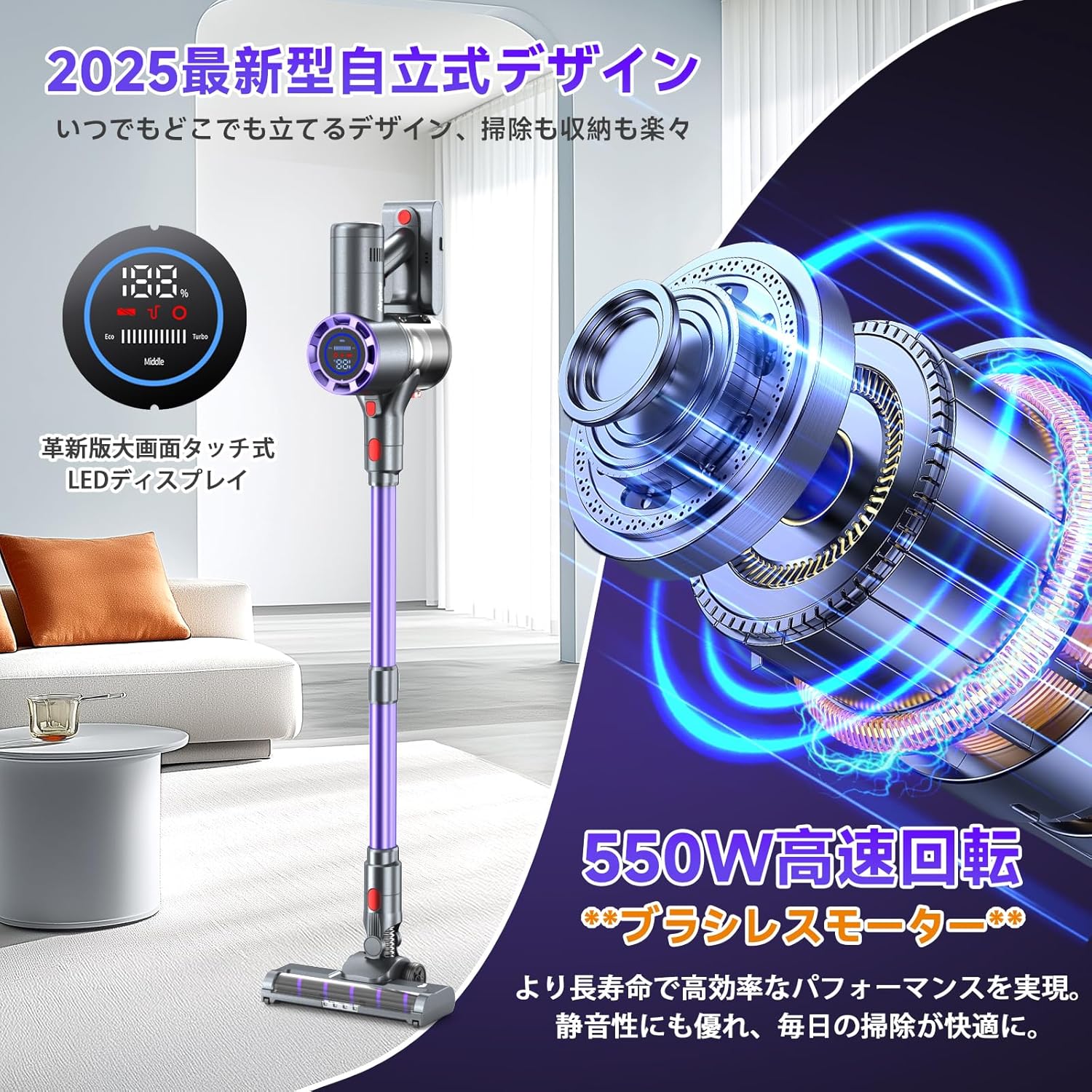
Image 4.2: The Airpher VC1 vacuum cleaner is shown in its self-standing position, highlighting the LED display on the main unit. This feature allows the vacuum to stand upright independently, offering convenient storage and pauses during cleaning without needing to lean against a wall.
The vacuum features a self-standing design, allowing it to stand upright independently for easy storage and convenient pauses during cleaning.
5. Operating Instructions
5.1 Power On/Off and Suction Modes
Press the power button to turn the vacuum on or off. The LED display will show the current battery level and suction mode.

Image 5.1: A detailed view of the Airpher VC1's LED display. The display clearly indicates the battery percentage, current suction mode (Eco, Middle, Turbo), and provides real-time status updates for efficient cleaning management.
Use the mode button on the handle to cycle through the available suction modes: Eco, Middle, and Turbo. Select the appropriate mode for your cleaning needs.
5.2 Using the Foldable Tube
The innovative foldable tube allows you to easily clean under low furniture without bending down. Simply press the hinge release button on the extension wand to fold it.
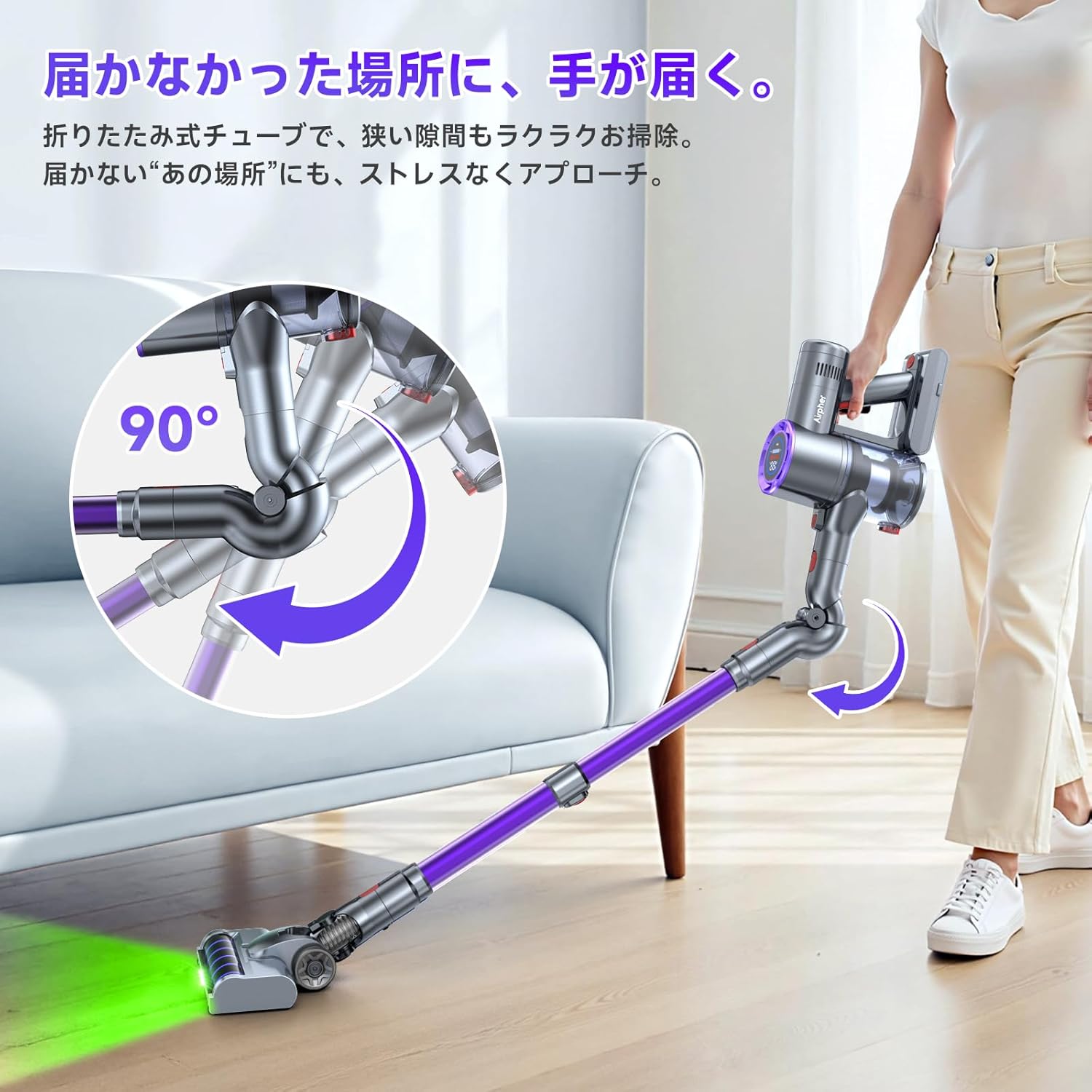
Image 5.2: This image demonstrates the Airpher VC1's foldable tube feature, showing the vacuum reaching effortlessly under a sofa. The inset diagram highlights the 90-degree folding mechanism of the extension wand, illustrating how it allows access to hard-to-reach areas.
5.3 LED Headlights
The motorized floor brush is equipped with four green LED lights that illuminate dark areas, making hidden dust and debris visible for thorough cleaning.

Image 5.3: A comparison illustrating the effectiveness of the Airpher VC1's green LED headlights versus traditional white headlights. The top panel shows how the green LEDs enhance visibility of fine dust, while the bottom panel demonstrates that white light often fails to reveal such particles, highlighting the improved cleaning efficiency with the Airpher's innovative lighting.
6. Maintenance
Regular maintenance ensures optimal performance and extends the lifespan of your vacuum cleaner.
6.1 Emptying the Dustbin
The dustbin features a one-touch release mechanism for easy and hygienic emptying. Press the release button to open the dustbin flap and dispose of collected debris.
6.2 Cleaning the Filters
The Airpher VC1 utilizes a 7-stage cyclone filtration system with a HEPA filter to capture fine dust and allergens. Regularly clean the filters to maintain suction power.

Image 6.1: This image illustrates the Airpher VC1's 7-stage cyclone filtration system, showing the internal components that separate dust from the airflow. An inset highlights the washable HEPA filter, emphasizing its role in capturing fine particles and the ease of maintenance.
- Twist and pull to remove the dustbin from the main unit.
- Remove the HEPA filter and metal mesh filter from the dustbin.
- Tap off loose dirt. Rinse the filters under cold running water until the water runs clear.
- Allow filters to air dry completely for at least 24 hours before reassembling. Do not use a hairdryer or other heating methods.
- Reassemble the filters and dustbin into the main unit.
6.3 Cleaning the Brush Head
The motorized floor brush features a tangle-free design to minimize hair wrapping. If necessary, use scissors to cut away any tangled hair or debris from the brush roll. The brush roll can be removed for deeper cleaning.
7. Troubleshooting
If you encounter issues with your Airpher VC1, refer to the following common problems and solutions:
| Problem | Possible Cause | Solution |
|---|---|---|
| Vacuum does not turn on | Battery is not charged; Battery not properly installed | Charge the battery; Ensure battery is securely clicked into place |
| Low suction power | Dustbin is full; Filters are clogged; Obstruction in nozzle/tube/hose | Empty the dustbin; Clean or replace filters; Remove any obstructions |
| Brush roll not spinning | Obstruction in brush roll; Brush roll not properly installed | Remove hair/debris from brush roll; Ensure brush roll is correctly inserted |
| Vacuum stops during use | Battery is depleted; Overheating protection activated | Recharge the battery; Turn off the vacuum and allow it to cool down for 30 minutes |
If the problem persists after attempting these solutions, please contact customer support.
8. Specifications
| Feature | Detail |
|---|---|
| Model | VC1 |
| Manufacturer | Airpher |
| Suction Power | Up to 55KPa |
| Motor Power | 550W Brushless Motor |
| Battery Type | Lithium-ion |
| Max Runtime | Up to 60 minutes |
| Charging Time | Approx. 4.5 hours |
| Noise Level | 68 dB |
| Filter Type | HEPA Filter |
| Dustbin Capacity | 1 Liter |
| Package Dimensions | 43 x 31 x 19 cm |
| Package Weight | 3.5 kg |
9. Warranty and Support
Your Airpher VC1 Cordless Stick Vacuum Cleaner comes with a 12-month warranty from the date of purchase. This warranty covers manufacturing defects and issues arising from normal use.
For warranty claims, product inquiries, or technical support, please contact our customer service team. If you experience any product malfunction or require an exchange, please reach out to us via email:
Email: support@airpher.jp
When contacting support, please provide your purchase details and a description of the issue to facilitate a quicker resolution.
