
1. Introduction
Thank you for choosing the CIGMAN CM-S04 4x360° Green Cross Line Laser Level. This device is designed for precise and efficient leveling tasks in various indoor construction and renovation projects. Featuring intelligent control, automatic self-leveling, and a clear LCD display, the CM-S04 provides reliable performance for professionals and DIY enthusiasts alike. Please read this manual thoroughly before operation to ensure safe and correct use of the product.
2. Safety Information
WARNING: This product is a Class 2 laser product. Avoid direct eye exposure to the laser beam. Do not stare into the laser aperture. Always operate the device in a safe manner to prevent injury.
- Do not attempt to modify or disassemble the laser level. Unauthorized modifications can result in hazardous laser radiation exposure.
- Keep the device out of reach of children.
- Use only specified batteries and power adapters.
- Ensure the work area is clear of obstacles and potential hazards.
- Do not operate the laser level in explosive atmospheres or near flammable materials.
3. Package Contents
Please check the package contents upon receipt to ensure all items are present and undamaged.

Figure 3.1: CIGMAN CM-S04 Package Contents. Includes the laser level, hard carrying case, magnetic mount, two lithium batteries, remote control, target plate, charging cable, anti-drop lanyard, 1/4" to 5/8" nut, and lifting base.
- CIGMAN CM-S04 Laser Level
- Hard Carrying Case
- Multi-Functional Magnetic Mount (with Metal Plates)
- Rechargeable Lithium Battery x 2
- Remote Control
- Target Plate
- Charging Cable (Type-C, without plug)
- Anti-Drop Lanyard
- 1/4" to 5/8" Adapter Nut
- Lifting Base
4. Product Features
4.1 Large LCD Screen Display

Figure 4.1: The CM-S04 features a large LCD screen for accurate leveling, battery status, and enhanced visibility in various lighting conditions.
The integrated large LCD screen provides real-time information on leveling status, battery life, and operational modes, ensuring clear visibility and control even in bright or dim environments.
4.2 High Precision
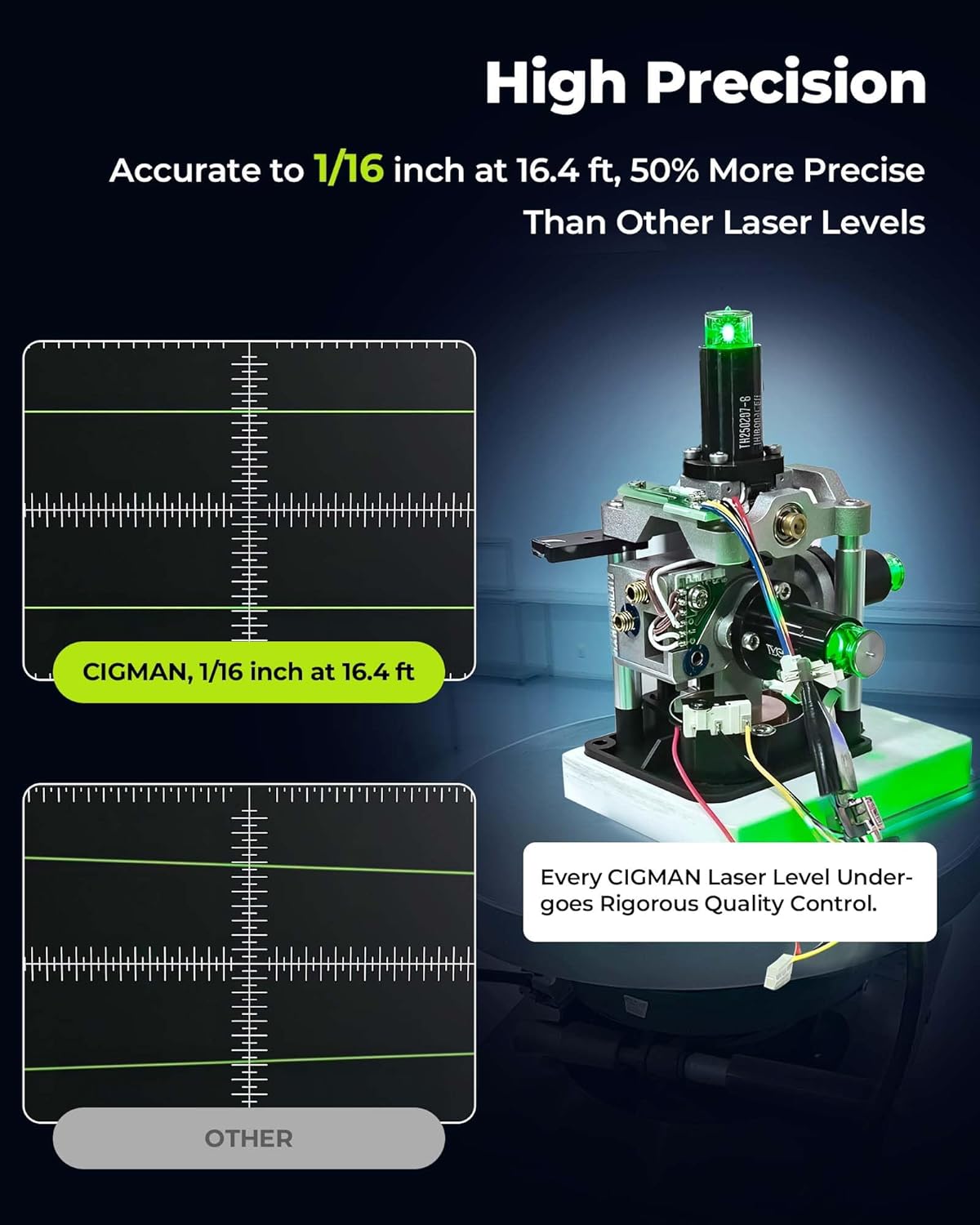
Figure 4.2: The CM-S04 offers high precision, accurate to 1/16 inch at 16.4 feet, ensuring reliable measurements for critical tasks.
The CM-S04 delivers exceptional accuracy, precise to 1/16 inch at 16.4 feet (5 meters), making it suitable for demanding professional applications.
4.3 Versatile Operating Modes

Figure 4.3: The CM-S04 supports Self-leveling Mode for automatic alignment, Manual Mode for angled projections, and Pulse Mode for use with a receiver over longer distances.
The device supports Self-leveling Mode for automatic horizontal and vertical alignment, Manual Mode for projecting lines at any angle, and Pulse Mode for extended range operation with a laser receiver (not included).
4.4 4x360° Green Laser Lines
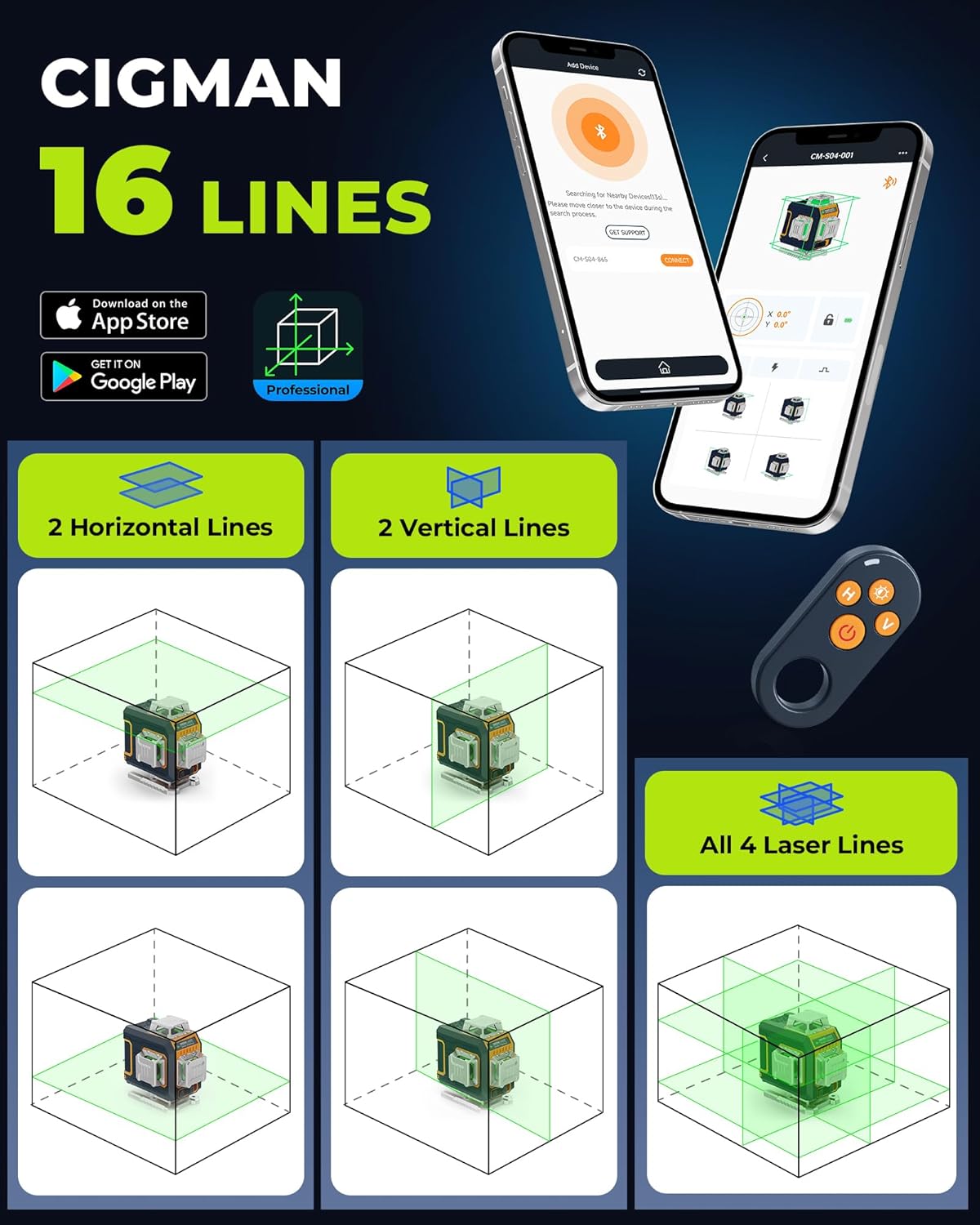
Figure 4.4: The CM-S04 projects four 360-degree green laser lines: two horizontal and two vertical, offering comprehensive coverage for various layout tasks.
Equipped with four 360° green laser lines (two horizontal and two vertical), the CM-S04 provides complete coverage for floor, wall, and ceiling alignment tasks.
4.5 Multiple Control Options

Figure 4.5: The CM-S04 can be controlled via physical buttons on the device, a remote control (up to 30m), or a smartphone application (up to 50m).
Control the laser level conveniently using the physical buttons on the device, the included remote control for distances up to 30 meters, or the dedicated smartphone application for control up to 50 meters.
4.6 Anti-Drop Safety Rope & Multifunctional Magnetic Bracket

Figure 4.6: The anti-drop safety rope prevents accidental falls, while the magnetic bracket offers versatile mounting and 360° multi-directional adjustment.
The included anti-drop safety rope provides an extra layer of security when working at heights. The multifunctional magnetic bracket allows for flexible mounting options and precise 360° multi-directional adjustment.
4.7 3-in-1 Versatile Power Options

Figure 4.7: The CM-S04 offers flexible power solutions: long-lasting rechargeable batteries, direct plug-in operation, and universal Type-C charging.
The CM-S04 offers three power options: two 5200mAh Li-ion batteries for long-lasting power with fast Type-C charging, direct plug-in operation without batteries, and universal compatibility with any Type-C powered device.
5. Setup
5.1 Battery Installation
- Open the battery compartment cover located on the side or back of the device.
- Insert the two provided 5200mAh Li-ion batteries, ensuring correct polarity (+/-).
- Close the battery compartment cover securely.
- To charge, connect the Type-C charging cable to the device and a suitable USB power adapter (not included). The LCD will indicate charging status.
5.2 Mounting the Device
The CM-S04 can be mounted in several ways:
- Tripod Mount: The device has a 1/4"-20 thread for standard tripods. Use the included 1/4" to 5/8" adapter nut for larger tripods.
- Magnetic Bracket: Attach the multifunctional magnetic bracket to the bottom of the laser level. The bracket can then be secured to metal surfaces using its strong magnets or mounted to a wall using screws (not included) through its mounting holes.
- Lifting Base: Use the lifting base for fine height adjustments on flat surfaces.
- Anti-Drop Lanyard: Always attach the anti-drop lanyard to a secure point when working at elevated positions to prevent accidental drops.
6. Operating Instructions
6.1 Power On/Off
- To power on, slide the ON/OFF switch to the "ON" position. The laser lines will activate, and the device will enter Self-leveling Mode.
- To power off, slide the ON/OFF switch to the "OFF" position.
6.2 Self-Leveling Mode
When the ON/OFF switch is in the "ON" position, the device automatically enters Self-leveling Mode. The laser will self-level within ±3.5°. If the device is outside its leveling range, the laser lines will flash rapidly, and an audible alarm may sound. Adjust the device's position until it is within range and the lines become steady.
6.3 Manual Mode (Tilt Mode)
To activate Manual Mode:
- With the device powered off, press and hold the 'H' or 'V' button (or the power button on some models) while sliding the ON/OFF switch to the "ON" position.
- The laser lines will activate, but they will not self-level, allowing you to project lines at any desired angle. The lines will typically flash slowly to indicate Manual Mode.
- To exit Manual Mode, power off the device and then power it back on normally.
6.4 Line Selection
Use the 'H' button to cycle through horizontal laser lines and the 'V' button to cycle through vertical laser lines. You can activate combinations of horizontal and vertical lines as needed.
6.5 Pulse Mode
Pulse Mode is used for working with a laser receiver (not included) to extend the working range or for outdoor use where laser lines may be difficult to see. To activate Pulse Mode, press the dedicated Pulse button (often indicated by a sun or pulse icon) on the device or remote control. The laser lines will become slightly dimmer but will be detectable by a compatible receiver.
6.6 Remote Control and App Control
The included remote control allows you to switch between laser lines and modes from a distance. For advanced control and greater range, download the CIGMAN app on your smartphone. Pair your device via Bluetooth to access all functions remotely.
7. Maintenance
- Cleaning: Regularly clean the laser aperture and housing with a soft, damp cloth. Do not use abrasive cleaners or solvents.
- Storage: When not in use, store the laser level in its hard carrying case in a dry, cool place, away from direct sunlight and extreme temperatures. Remove batteries if storing for extended periods.
- Calibration: While the device is factory-calibrated, regular checks for accuracy are recommended, especially after impacts or prolonged use. Refer to the CIGMAN website for calibration procedures if needed.
8. Troubleshooting
| Problem | Possible Cause | Solution |
|---|---|---|
| Laser lines are flashing rapidly and/or alarm sounds. | Device is outside its self-leveling range. | Place the device on a more level surface until the lines become steady. |
| Laser lines are dim or not visible. | Low battery; too much ambient light; Pulse Mode not activated with receiver. | Charge or replace batteries. Reduce ambient light. Activate Pulse Mode and use a laser receiver. |
| Device does not power on. | Batteries are dead or incorrectly installed; power switch is off. | Check battery installation and charge level. Ensure power switch is in the "ON" position. |
| Remote control or app not working. | Remote battery dead; device not paired with app; too far from device. | Replace remote battery. Ensure Bluetooth is on and device is paired. Move closer to the device. |
9. Specifications
| Feature | Detail |
|---|---|
| Model Number | CMS04 |
| Laser Class | Class 2 (IEC/EN60825-1/2014) |
| Laser Wavelength | 505-520nm (Green Laser) |
| Leveling Accuracy | ±1/16 inch at 16.4 ft (±1.5mm at 5m) |
| Self-Leveling Range | ±3.5° |
| Working Range | Up to 165 ft (50m) with receiver |
| Operating Mode | Automatic (Self-leveling), Manual, Pulse |
| Power Source | 2 x 5200mAh Lithium-ion batteries (included), Type-C direct power |
| Product Dimensions (L x W x H) | 10 x 7 x 0.1 cm (approx. 3.9 x 2.8 x 0.04 inches) |
| Weight | 750 grams (approx. 1.65 lbs) |
| Material | Acrylonitrile Butadiene Styrene (ABS) |
| Country of Origin | China |
10. Warranty and Support
CIGMAN products are designed and manufactured to the highest quality standards. This product comes with a standard manufacturer's warranty. For detailed warranty information, technical support, or service inquiries, please refer to the warranty card included in your package or visit the official CIGMAN website. Please have your model number (CMS04) and purchase date ready when contacting support.


