
Introduction
Thank you for choosing the Dyness 12V 20A Lithium Battery Charger. This manual provides essential information for the safe and efficient operation of your charger. Please read it thoroughly before use and retain it for future reference. This charger is specifically designed for 12V LiFePO4 batteries.
Safety Instructions
Always observe the following safety precautions to prevent injury or damage to the charger or battery:
- Read all instructions: Before using the charger, read all instructions and cautionary markings on the charger, the battery, and the product using the battery.
- Ventilation: Ensure adequate ventilation during charging. Do not operate the charger in a confined area or restrict airflow.
- Compatibility: This charger is designed exclusively for 12V LiFePO4 batteries. Do not attempt to charge other battery types (e.g., lead-acid, Ni-Cd, Ni-MH) as this may cause explosion, personal injury, or damage.
- Avoid moisture: Do not expose the charger to rain, moisture, or operate it in damp conditions.
- Proper connection: Ensure correct polarity when connecting the charger to the battery. Reverse polarity can damage the charger and battery.
- Damaged equipment: Do not operate the charger if it has received a sharp blow, been dropped, or otherwise damaged. Contact customer support for assistance.
- Disconnect power: Always disconnect the AC power from the charger before making or breaking connections to the battery.
- Children and pets: Keep the charger and battery out of reach of children and pets.
Product Features
Fast Charging Capability
The Dyness 12V 20A charger offers rapid charging for your LiFePO4 batteries. For example, a 12V 100Ah battery can be fully charged in approximately 5 hours, which is twice as fast as a standard 10A charger.

Image: This image illustrates the fast charging capabilities of the Dyness 12V 20A charger, showing estimated charging times for various battery capacities: 50Ah in 2.5 hours, 100Ah in 5 hours, and 200Ah in 10 hours.
0V Battery Activation Function
This charger can reactivate LiFePO4 batteries that have entered a protection mode (0V state) due to the Battery Management System (BMS). It restores the battery to a normal voltage, allowing for continued charging.
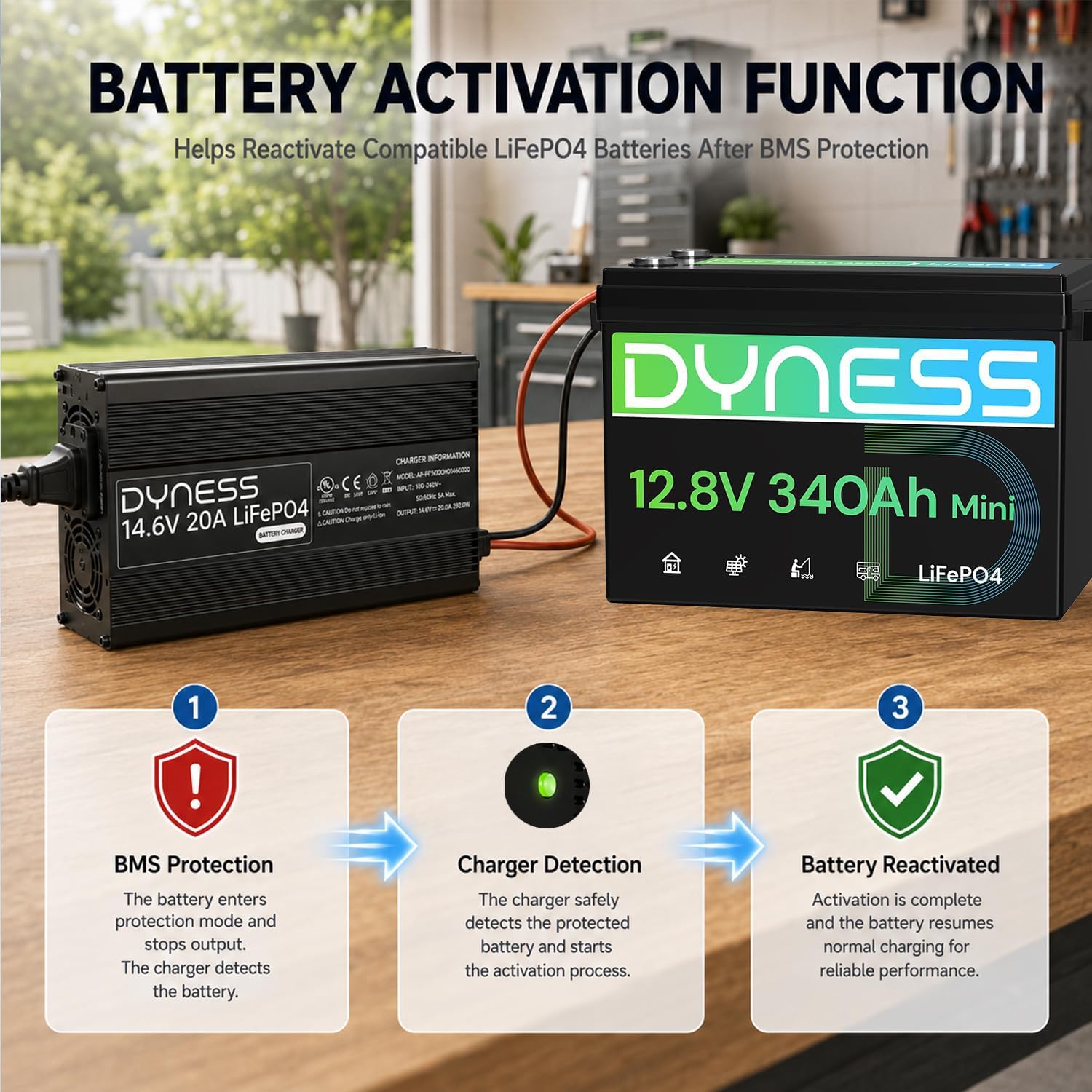
Image: A diagram detailing the battery activation function. It shows a battery in BMS protection, followed by the charger detecting and activating the battery, and finally the battery being reactivated for normal charging.
Multi-Protection Safety System
The charger incorporates multiple safety features to protect both the charger and your battery from potential damage. These include over-temperature, short-circuit, reverse polarity, and over-voltage protection.

Image: This image displays the Dyness charger and icons representing its safety features: over-temperature protection, short-circuit protection, reverse polarity protection, and over-voltage protection.
Efficient Heat Dissipation
Constructed with an aluminum alloy casing, the charger ensures superior heat dissipation. A built-in cooling fan further reduces internal temperature, contributing to durability and safe operation.

Image: A close-up view of the Dyness charger, emphasizing its cooling fan and aluminum alloy casing, which are designed for excellent heat dissipation.
Smart 3-Stage Charging Mode
The charger utilizes a smart 3-stage charging process: Precharge (T1) for battery restoration, Fast Charge (T2) for rapid charging, and Constant Voltage (T3) for a safe, full charge, extending battery life.

Image: A graph showing the voltage and current curves during the three stages of charging: T1 (Precharge), T2 (Fast Charge), and T3 (Constant Voltage).
Upgraded Connection Options
The charger features an M8 terminal for reliable, tight connections and an added 50A Anderson connector for convenient and safe plug-and-play use.

Image: This image highlights the various connection points on the Dyness charger, including the DC port, AC port, M8 terminals, and the Anderson connector, emphasizing their safety and ease of use.
Package Contents
Upon opening the package, you should find the following items:
- Dyness 12V 20A LiFePO4 Battery Charger
- AC Power Cable
- DC Output Cable with M8 Terminals
- Anderson Connector Cable
- User Manual (this document)
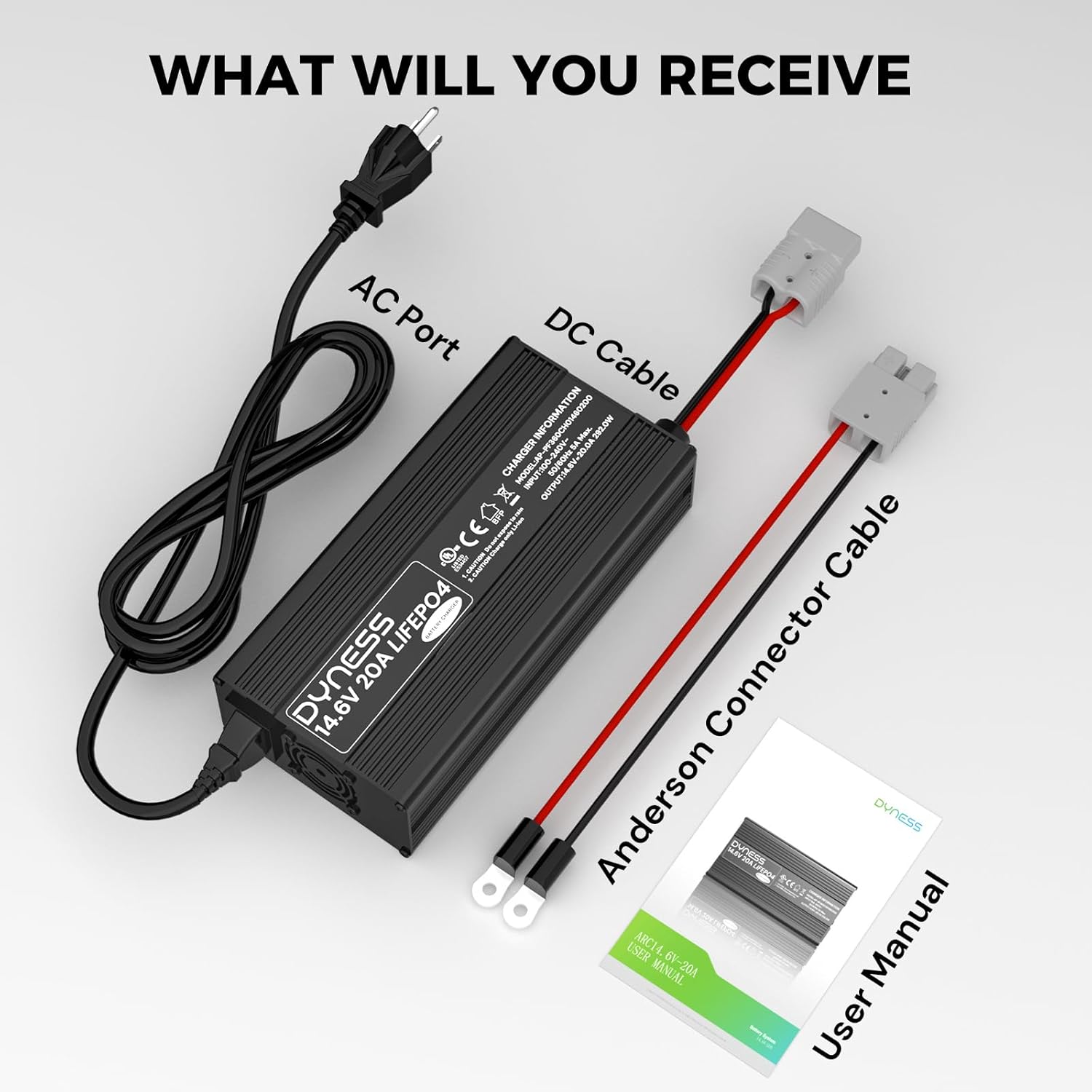
Image: An overhead view of the Dyness 12V 20A LiFePO4 Battery Charger, AC power cable, DC cable with M8 terminals, Anderson connector cable, and the user manual, showing all included items.
Setup Instructions
- Inspect the Charger: Before initial use, carefully inspect the charger and all cables for any signs of damage. Do not use if any damage is found.
- Connect to Battery: Connect the DC output cable from the charger to your 12V LiFePO4 battery. Ensure correct polarity: red to positive (+), black to negative (-). You can use either the M8 terminals or the Anderson connector, depending on your battery's interface.
- Connect to AC Power: Plug the AC power cable into the charger's AC input port, then plug the other end into a standard 100-240V AC wall outlet.
- Verify Connection: Once connected, the charger's LED indicator will show its status.
Operating Instructions
Once the charger is properly connected to both the battery and AC power, it will automatically begin the charging process. The intelligent 3-stage charging algorithm will optimize the charge for your battery.
LED Status Indicators
The charger features a clear LED indicator to show its operational status:
- Red light (solid): The battery is currently charging.
- Green light (solid): The battery is fully charged, or the charger is not connected to a battery (no load).
- Red light (blinking): Indicates an error or that the charger has entered a protection mode. Refer to the Troubleshooting section.

Image: A visual guide to the LED status indicator on the Dyness charger, explaining what solid red, solid green, and blinking red lights signify.
Maintenance
To ensure the longevity and optimal performance of your Dyness charger, follow these maintenance guidelines:
- Cleaning: Disconnect the charger from all power sources before cleaning. Use a soft, dry cloth to wipe the exterior. Do not use liquid cleaners or solvents.
- Storage: Store the charger in a cool, dry place away from direct sunlight and extreme temperatures when not in use.
- Cable Inspection: Periodically check all cables for cuts, fraying, or other damage. Replace damaged cables immediately.
- Ventilation: Ensure the cooling fan and ventilation openings remain clear of dust and debris.
Troubleshooting
If you encounter issues with your charger, refer to the following table:
| Problem | LED Indicator | Possible Cause | Solution |
|---|---|---|---|
| Charger not operating | No light | No AC power; faulty connection | Check AC power outlet and cable connections. Ensure charger is plugged in securely. |
| Battery not charging | Solid Green | Battery already full; incorrect battery connection | Verify battery charge level. Recheck DC cable connections for correct polarity. Ensure battery is 12V LiFePO4. |
| Error/Protection Mode | Blinking Red | Over-temperature, short-circuit, reverse polarity, or over-voltage detected. | Disconnect charger from AC and battery. Allow to cool if hot. Check for short circuits or reverse polarity. Reconnect carefully. If issue persists, contact support. |
| Battery in 0V state | Initially no light, then solid red (if activation successful) | BMS protection activated on battery. | Connect the charger to the battery and AC power. The charger will attempt to reactivate the battery. If unsuccessful after a few minutes, the battery may be severely damaged. |
Specifications
| Feature | Specification |
|---|---|
| Brand | Dyness |
| Model Number | 12V20A-CHA |
| Input Voltage | 100-240V AC, 50/60Hz |
| Output Voltage | 14.6V DC |
| Output Current | 20 A |
| Compatible Devices | 12V Lithium LiFePO4 Batteries |
| Battery Charge Time (100Ah) | Approx. 5 hours |
| Product Dimensions (D x W x H) | 3.94" x 7.99" x 2.13" (100mm x 203mm x 54mm) |
| Item Weight | 2.9 pounds (1.3 kg) |
| Connector Type | M8 Terminal, Anderson Connector |
| Operating Temperature | -10°C to 40°C |
| Storage Temperature | -40°C to 70°C |
| Certifications | CE, RoHS, UL |
Warranty
The Dyness 12V 20A Lithium Battery Charger comes with a 1-year warranty from the date of purchase. This warranty covers manufacturing defects and workmanship under normal use. Please retain your proof of purchase for warranty claims. The warranty does not cover damage caused by misuse, accidents, unauthorized modifications, or improper installation.
Customer Support
For any questions, technical assistance, or warranty inquiries, please contact Dyness customer support. Refer to the product packaging or the official Dyness website for the most current contact information.


