1. Introduction
Thank you for choosing the VIAFLY V10-8 Cordless Stick Vacuum Cleaner. This manual provides essential information for the safe operation, maintenance, and troubleshooting of your new vacuum cleaner. Please read it thoroughly before first use and retain it for future reference.
The VIAFLY V10-8 is designed for efficient home cleaning, featuring a powerful 550W brushless motor providing up to 48KPa suction. Its self-standing design, touch screen controls, and anti-tangle floor brush make cleaning various surfaces, including carpets and hardwood floors, convenient and effective. The removable battery offers up to 70 minutes of runtime and charges quickly via the included wall dock.
2. Product Overview and Components
Familiarize yourself with the parts of your VIAFLY V10-8 Cordless Stick Vacuum Cleaner.

Image: The VIAFLY V10-8 Cordless Vacuum Cleaner shown with all its included accessories, including the main unit, extension tube, floor brush, various nozzles, wall mount, and charger.
Included Components:
- Cordless Vacuum Cleaner Main Unit (1)
- Removable Battery (1)
- Floor Brush (1)
- HEPA Filter (2)
- 2-in-1 Brush (1)
- Sofa Brush (1)
- Telescopic Pole (1)
- Adaptor (1)
- Wall Mount (1)
- User Manual (1)
- Quick Guide (1)
3. Setup
3.1 Assembly
- Attach the Telescopic Pole: Insert the telescopic pole into the main unit until it clicks securely into place.
- Attach the Floor Brush: Connect the floor brush to the other end of the telescopic pole, ensuring it locks firmly.
- Install Battery: Slide the removable battery into the designated slot on the main unit until it clicks.
- Attach Accessories: For handheld use, attach desired accessories (2-in-1 brush, sofa brush) directly to the main unit or the telescopic pole.
3.2 Initial Charging
Before first use, fully charge the vacuum cleaner's battery.
- Wall Mount Installation (Optional): Secure the wall mount to a suitable wall using the provided hardware. Ensure it is near a power outlet.
- Charging: Place the vacuum cleaner onto the wall mount or connect the adaptor directly to the battery charging port. The battery indicator on the LED touch screen will show charging progress. A full charge takes approximately 4 hours.

Image: The VIAFLY V10-8 vacuum cleaner is shown mounted on its wall dock, connected to a power outlet for charging. This setup allows for convenient storage and charging.
4. Operating Instructions
4.1 Power On/Off
Press the power button on the main unit to turn the vacuum cleaner on or off.
4.2 Adjusting Suction Modes
The VIAFLY V10-8 features a responsive LED touch screen for easy control.
- Access Touch Screen: The touch screen is located on the main unit.
- Switch Modes: Tap the appropriate icon on the touch screen to cycle through the 3 available suction modes (Min, Mid, Max). The screen also displays battery status and fault prompts.

Image: A detailed view of the vacuum's LED touch screen, showing clear indicators for battery charge level and the three adjustable suction power settings. A finger is shown interacting with the screen.
4.3 Self-Standing Feature
The vacuum cleaner is designed to stand upright independently, providing convenience during cleaning breaks.
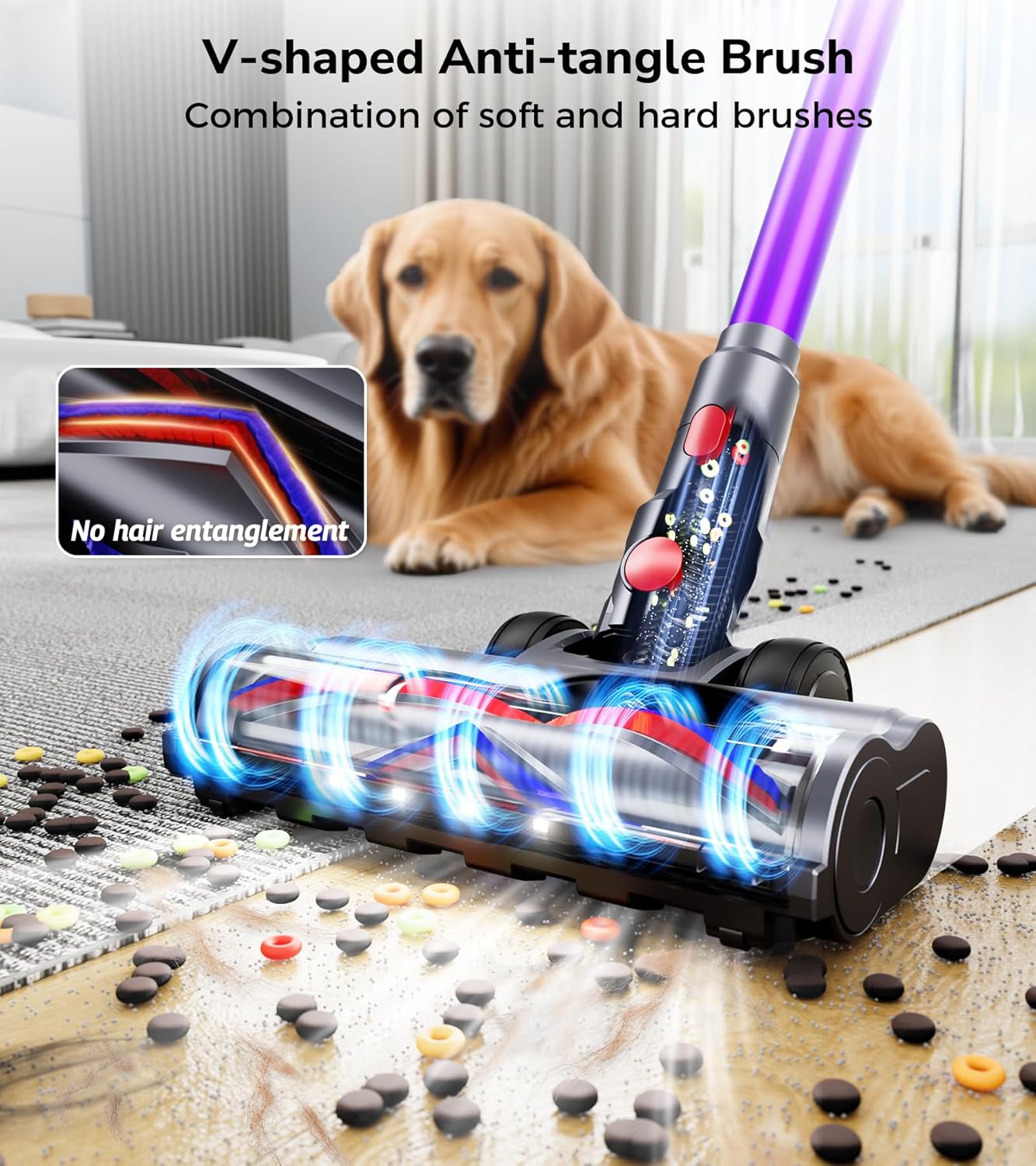
Image: The VIAFLY V10-8 vacuum cleaner is shown standing freely and upright in a living room setting, demonstrating its self-standing design. An inset shows the locking mechanism for the self-standing feature.
4.4 Floor Brush Operation
The floor brush features a V-shaped anti-tangle design and LED lights for enhanced visibility.
- Anti-Tangle Design: The combination of soft and hard bristles effectively prevents hair and debris from tangling around the brush roll.
- Flexible Steering: The brush supports 0° to 180° lateral steering and 0° to 90° up and down rotation, allowing easy maneuverability around furniture and into tight spaces.
- LED Lights: Six bright LED lights illuminate dark corners and under furniture, ensuring no dust is missed.

Image: A close-up view of the vacuum's floor brush, highlighting its V-shaped anti-tangle bristle design and integrated LED lights. The image shows debris being vacuumed, with an inset illustrating the anti-tangle mechanism.
4.5 Handheld Mode
Detach the telescopic pole and floor brush to use the main unit with accessories for handheld cleaning.

Image: The VIAFLY V10-8 vacuum cleaner is shown in handheld configuration, demonstrating its versatility for cleaning surfaces like sofas, keyboards, and beds with different attachments.
5. Maintenance
Regular maintenance ensures optimal performance and extends the lifespan of your vacuum cleaner.
5.1 Emptying the Dust Cup
The 1.6L dust cup should be emptied regularly, especially when full, to maintain suction power.
- One-Click Empty: Position the dust cup over a trash bin. Press the one-click release button to open the bottom flap and empty the contents.
- Re-attach: Close the dust cup flap securely until it clicks.

Image: The vacuum's dust cup is shown being emptied into a waste bin with a single click, illustrating the ease of maintenance. An inset shows the lightweight design of the vacuum.
5.2 Cleaning the Filtration System
The 8-layer filtration system, including HEPA filters, should be cleaned periodically.
- Disassemble: Twist and pull to remove the dust cup and filter components from the main unit.
- Clean Filters: Tap out loose dust from the HEPA filters and other filter components. For thorough cleaning, rinse washable parts under cold running water. Ensure all parts are completely dry before reassembly.
- Reassemble: Reinsert the dry filters and reattach the dust cup to the main unit.
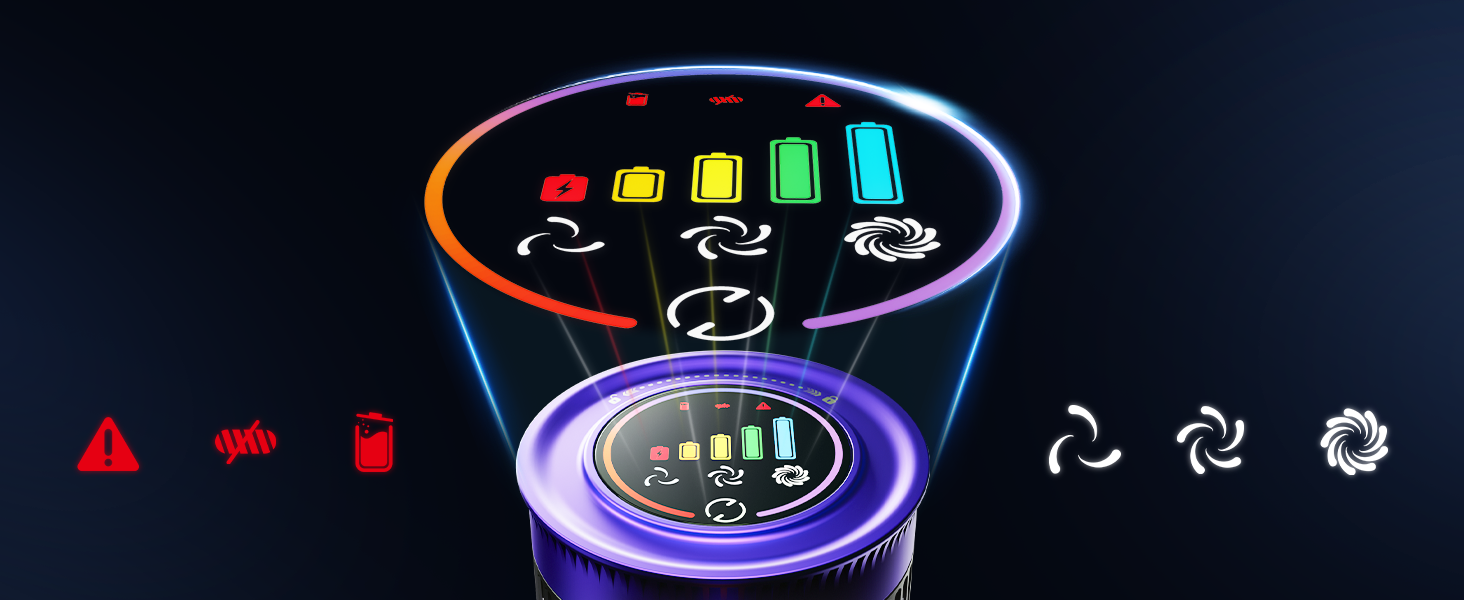
Image: An exploded diagram illustrating the VIAFLY V10-8's 8-layer filtration system, showing how air passes through multiple stages to capture dust and allergens.
5.3 Cleaning the Brush Roll
Periodically check the floor brush for tangled hair or debris and remove as necessary.
- Remove Brush Roll: Follow instructions in the quick guide to safely remove the brush roll from the floor head.
- Clean: Use scissors or a brush to remove any tangled hair or fibers.
- Reinstall: Reinsert the brush roll, ensuring it is properly seated and secured.
6. Troubleshooting
If you encounter issues with your VIAFLY V10-8, refer to the following common problems and solutions:
| Problem | Possible Cause | Solution |
|---|---|---|
| Vacuum does not turn on | Battery is not charged or not properly installed. | Ensure battery is fully charged and securely inserted. Check power adapter connection. |
| Low suction power | Dust cup is full, filters are clogged, or blockage in the nozzle/tube. | Empty dust cup. Clean or replace filters. Check for and remove any blockages. |
| Brush roll not spinning | Hair or debris tangled in brush roll, or brush roll is not properly installed. | Clean brush roll of any obstructions. Ensure brush roll is correctly installed. |
| Short battery runtime | Battery not fully charged, or operating in Max suction mode for extended periods. | Ensure battery is fully charged. Use lower suction modes for longer runtime. |
| Unusual noise | Blockage in the air path or foreign object in the brush head. | Check for and remove any blockages or foreign objects. |
If the problem persists after attempting these solutions, please contact VIAFLY customer support.
7. Specifications
| Feature | Detail |
|---|---|
| Brand | VIAFLY |
| Model Name | V10-8 |
| Motor Power | 550W Brushless Motor |
| Suction Power | Up to 48KPa |
| Battery Type | Rechargeable Lithium-ion (8*2800 mAh) |
| Battery Life | Up to 70 minutes (Min mode) |
| Charging Time | Approximately 4 hours |
| Dust Cup Capacity | 1.6 Liters |
| Filtration System | 8-Layer, including HEPA Filter |
| Noise Level | ≤ 62 dB |
| Special Features | Self-standing design, LED touch screen, Anti-tangle V-shaped brush, LED lights on floor brush, Adjustable extension tube, Wall-mounted charging |
| Product Dimensions | 11"L x 10"W x 49"H |
| Item Weight | 6 pounds |
8. Warranty and Support
VIAFLY is committed to providing high-quality products and customer satisfaction.
8.1 Warranty Information
Your VIAFLY V10-8 Cordless Stick Vacuum Cleaner comes with a 2-year service support warranty from the date of purchase. This warranty covers manufacturing defects and ensures repair or replacement of faulty parts under normal use conditions.
8.2 Customer Support
For any questions, technical assistance, or warranty claims, please contact our customer service team. We offer 24-hour all-day after-sales support to assist you.
- Contact Information: Please refer to the contact details provided on the product packaging or the official VIAFLY website.
- Return Policy: We offer a 30-day unsatisfied return policy. If you are not completely satisfied with your purchase within 30 days, you may return it for a refund.

Image: Graphic indicating 2 Years Service Support.

Image: Graphic indicating 24 Hours All Day After-Sales Support.

Image: Graphic indicating a 30 Day Unsatisfied Return Policy.


