
Douk Audio NS-01G-MAX
Nobsound NS-01G-MAX 2-Channel 200W Bluetooth Amplifier User Manual
Model: NS-01G-MAX | Brand: Douk Audio
1. Introduction
The Nobsound NS-01G-MAX is a compact 2-channel Bluetooth 5.0 power amplifier designed for versatile audio applications. It delivers up to 100W per channel, suitable for driving passive speakers in home, desktop, car, or marine audio systems. This manual provides essential information for setting up, operating, and maintaining your amplifier.
2. Package Contents
Verify that all items are present in the package:
- 1x Nobsound NS-01G-MAX Amplifier
- 1x DC 19V Power Adapter
- 1x 3.5mm AUX Cable
- 1x 3.5mm AUX to RCA Cable
- 1x User Manual

3. Product Overview
The NS-01G-MAX features a compact design with essential controls and connectivity options.

Front Panel:
- Mode Indicator: LED light indicating current input mode.
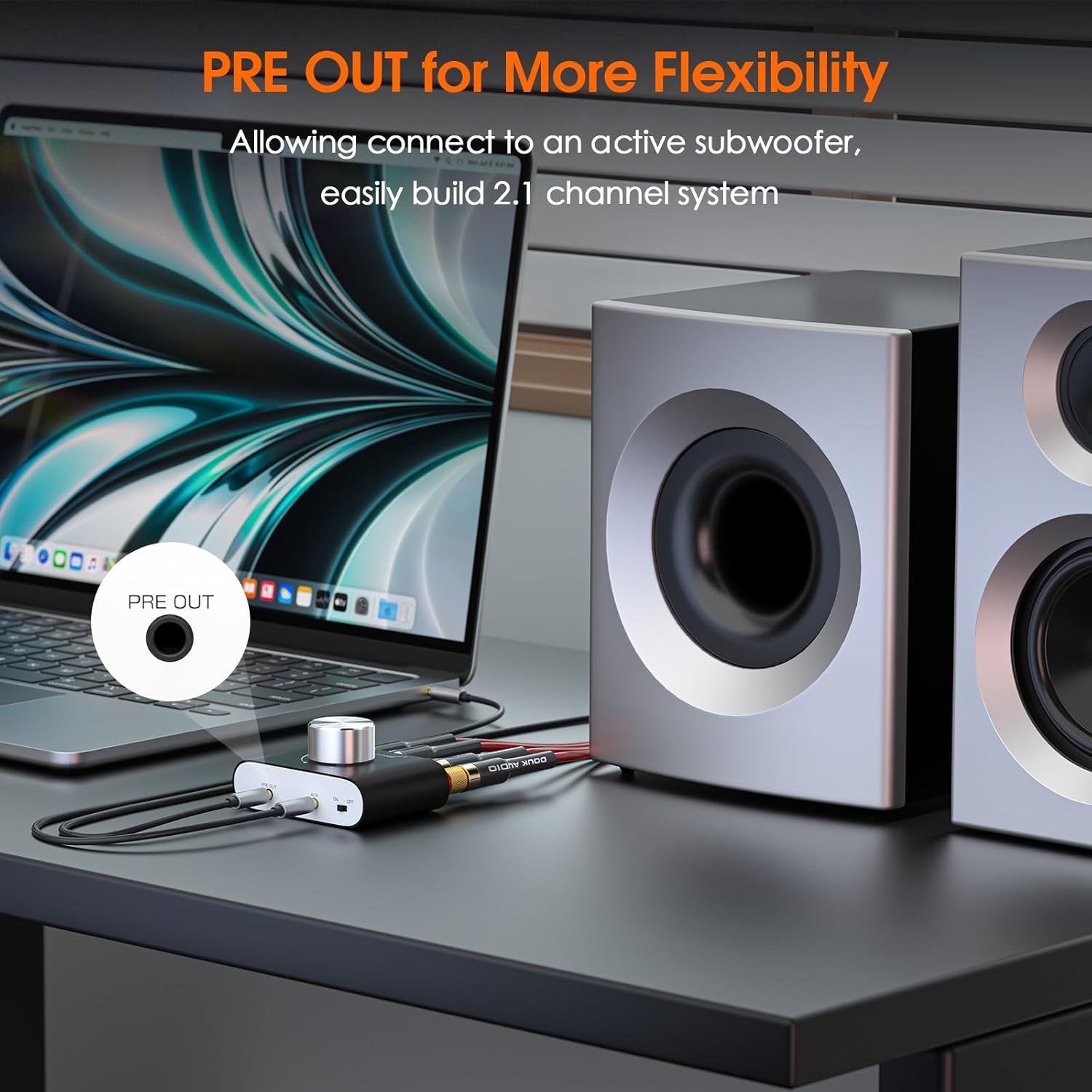
- PRE OUT: 3.5mm output for active subwoofer or another amplifier.
- AUX: 3.5mm audio input.
- ON/OFF Switch: Power toggle for the unit.
- Mode/Volume Knob: Rotates to adjust volume and presses to switch input modes.
Rear Panel:
- DC 9V-24V IN: Power input port.
- Right Speaker Output (R+, R-): Connects to the right passive speaker.
- Left Speaker Output (L+, L-): Connects to the left passive speaker.
4. Setup and Connections
4.1 Connecting Speakers
Connect your passive speakers (3-8Ω, 20-120W) to the speaker output terminals on the rear panel. Ensure correct polarity (red to positive, black to negative) for each channel.
4.2 Connecting Power
Connect the included DC 19V power adapter to the 'DC 9V-24V IN' port on the rear panel, then plug the adapter into a power outlet. The amplifier supports 9-24V DC input for flexible power options.
4.3 Connecting Audio Sources
The amplifier supports both wired and wireless audio inputs:
- Bluetooth 5.0: For wireless streaming from devices like smartphones, tablets, or computers.
- 3.5mm AUX Input: For wired connection to devices such as TVs, CD players, or PCs using the provided 3.5mm AUX cable or 3.5mm AUX to RCA cable.

4.4 Subwoofer/External Amplifier Connection
Use the 3.5mm PRE OUT port to connect an active subwoofer for enhanced bass or to feed the audio signal to another amplifier or active speakers. This allows for easy expansion to a 2.1-channel system or multi-amp setups.
5. Operating Instructions
5.1 Power On/Off
Toggle the ON/OFF switch on the front panel to power the amplifier on or off. The mode indicator LED will illuminate when the unit is powered on.
5.2 Volume Control and Input Selection
Rotate the Mode/Volume knob to adjust the audio output level. Press the knob to cycle through available input modes (Bluetooth, AUX).

5.3 Bluetooth Pairing
When the amplifier is powered on and in Bluetooth mode (indicated by the LED), enable Bluetooth on your source device. Search for 'Nobsound NS-01G-MAX' in the list of available devices and select it to pair. A confirmation tone may sound upon successful pairing.
6. Maintenance
To ensure optimal performance and longevity of your Nobsound NS-01G-MAX amplifier, follow these maintenance guidelines:
- Cleaning: Use a soft, dry cloth to clean the exterior of the amplifier. Avoid using liquid cleaners or solvents.
- Ventilation: Ensure the amplifier is placed in a well-ventilated area to prevent overheating. Do not block the ventilation holes.
- Power Disconnection: Disconnect the power adapter from the wall outlet when the amplifier is not in use for extended periods.
- Environmental Conditions: Avoid exposing the amplifier to extreme temperatures, humidity, or direct sunlight.
7. Troubleshooting
If you encounter issues with your amplifier, refer to the following common problems and solutions:
- No Sound:
- Ensure the amplifier is powered on and the volume is not at minimum.
- Verify that the correct input mode (Bluetooth/AUX) is selected.
- Check all cable connections (power, speakers, audio source) for secure fit and correct polarity.
- Confirm that your audio source device is playing and its volume is adequate.
- Distorted Sound:
- Reduce the volume on both the amplifier and the audio source.
- Ensure speaker impedance (3-8Ω) and wattage (20-120W) are compatible with the amplifier.
- Check for loose speaker wire connections.
- Bluetooth Pairing Issues:
- Ensure the amplifier is in Bluetooth mode.
- Disable and re-enable Bluetooth on your source device.
- Move the source device closer to the amplifier (within 10-15m / 32-49ft range).
- If previously paired, try forgetting the device on your source and re-pairing.
- White Noise/Hiss in USB Mode:
- This may be a characteristic of the USB audio input. If noticeable, consider using Bluetooth or AUX input for quieter operation.
- Annoying Voice Announcements:
- The amplifier's voice announcements for mode changes are integrated and cannot be disabled.
8. Specifications
| Feature | Specification |
|---|---|
| Model Number | NS-01G-MAX |
| Output Power | 100W x 2 (into 4Ω) |
| Speaker Impedance | 3-8Ω |
| Compatible Speakers | 20-120W Passive Speakers |
| Bluetooth Version | 5.0 |
| Bluetooth Range | 10-15m / 32-49ft |
| Input Options | Bluetooth, 3.5mm AUX |
| Output Options | Speaker Outputs, 3.5mm PRE OUT |
| Power Input | DC 9V-24V |
| THD | ≤0.01% |
| SNR | ≥98dB |
| Dimensions | 2.76 x 3.07 x 1.54 inches |
| Item Weight | 4.5 ounces |
9. Warranty and Support
Douk Audio products are warranted free from defects in material and workmanship for a specified period from the date of purchase. For warranty claims or technical support, please contact Douk Audio customer service. Refer to the product packaging or official website for specific warranty duration and contact information.
Built-in protection circuitry (overheat, overload, short-circuit) ensures stable, safe operation.
Related documentsNS-01G-MAX


Ask a question about this manual
Ask about setup, troubleshooting, compatibility, parts, safety, or missing instructions. Manuals+ will review the question and use this page’s manual context to help answer it.