
Introduction
Thank you for choosing the Rulefiss X29 Wireless Earbuds. These earbuds are designed to provide a high-quality audio experience with features like Bluetooth 5.4 connectivity, Environmental Noise Cancellation (ENC), IP7 waterproofing, and a comfortable over-ear hook design, ideal for sports and active lifestyles. This manual will guide you through the setup, operation, and maintenance of your new earbuds to ensure optimal performance and longevity.
Package Contents
Please check the package for the following items:
- Rulefiss X29 Wireless Earbuds (Left and Right)
- Wireless Charging Case
- USB Charging Cable
- Multiple Sizes of Eartips (S, M, L)
- User Manual
Product Overview
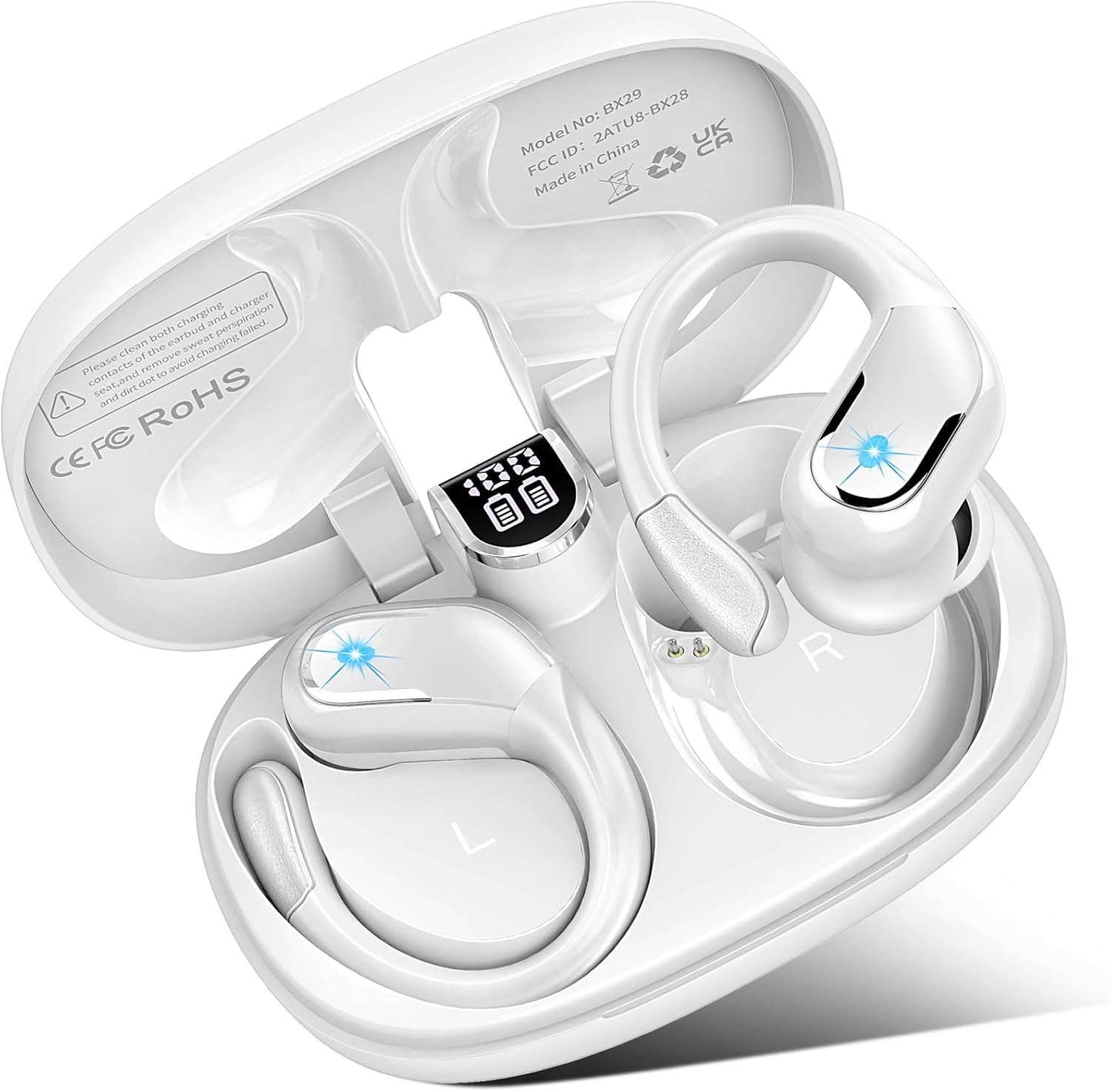
Image: The Rulefiss X29 Wireless Earbuds with their charging case. The earbuds feature an over-ear hook design and in-ear tips. The charging case is compact with a lid.
Earbud Components:
- Earhook: Provides a secure fit during physical activity.
- Touch Control Area: For managing music, calls, and voice assistant.
- LED Indicator: Displays pairing status and battery level.
- Microphone: For calls and voice commands.
- Eartip: Interchangeable silicone tips for comfort and sound isolation.
Charging Case Components:
- Charging Port: USB-C port for charging the case.
- Charging Indicators: LEDs to show case battery status.
- Earbud Charging Slots: Magnetic slots to hold and charge the earbuds.
Setup
1. Charging the Earbuds and Case
Before first use, fully charge both the earbuds and the charging case.
- Charge the Case: Connect the USB charging cable to the charging port on the case and a power source. The case's LED indicators will show charging progress.
- Charge the Earbuds: Place the earbuds into their respective slots in the charging case. Ensure they are correctly seated. The earbuds will begin charging automatically. The earbud LED indicators will show charging status (e.g., red while charging, off when fully charged).
Image: The Rulefiss X29 charging case with a USB cable connected, indicating the charging process.
2. Bluetooth Pairing
Pair your earbuds with your device for the first time.
- Power On: Open the charging case. The earbuds will automatically power on and enter pairing mode. The LED indicator on one earbud will flash red and blue alternately, indicating it's ready to pair.
- Activate Bluetooth: On your device (smartphone, tablet, laptop), go to the Bluetooth settings and turn on Bluetooth.
- Select Device: Look for "Rulefiss X29" in the list of available devices and select it.
- Confirm Pairing: Once connected, the earbud LED indicator will turn off or flash blue slowly. You will hear an audible confirmation.
Note: The earbuds will automatically reconnect to the last paired device when taken out of the case, if Bluetooth is enabled on the device.
Image: A smartphone screen showing Bluetooth settings with "Rulefiss X29" highlighted as a discoverable device.
3. Wearing the Earbuds
Proper fit is essential for sound quality and comfort.
- Choose Eartips: Select the eartips that best fit your ear canals. A snug fit provides better bass and noise isolation.
- Position Earbuds: Place the earbud into your ear canal and gently rotate it until it feels secure and comfortable.
- Adjust Earhooks: Position the over-ear hook around your ear for added stability, especially during exercise.
Image: A close-up of an ear showing the Rulefiss X29 earbud correctly inserted with the earhook positioned for a secure fit.
Operating Instructions
The Rulefiss X29 earbuds feature touch controls for various functions.
Power On/Off
- Power On: Open the charging case, or long-press the touch control area for 3 seconds.
- Power Off: Place the earbuds back into the charging case and close the lid, or long-press the touch control area for 5 seconds.
Music Playback
- Play/Pause: Single tap on either earbud.
- Next Track: Double tap on the right earbud.
- Previous Track: Double tap on the left earbud.
- Volume Up: Triple tap on the right earbud.
- Volume Down: Triple tap on the left earbud.
Call Management
- Answer/End Call: Single tap on either earbud.
- Reject Call: Long-press on either earbud for 2 seconds.
Voice Assistant
- Activate Voice Assistant: Long-press on either earbud for 2 seconds (when not on a call).
Environmental Noise Cancellation (ENC)
The Rulefiss X29 earbuds feature ENC for clearer calls. This feature is automatically active during calls to reduce background noise for the person you are speaking with.
Maintenance
Cleaning
Regular cleaning helps maintain sound quality and hygiene.
- Use a soft, dry, lint-free cloth to wipe the earbuds and charging case.
- Gently remove any earwax or debris from the eartips and speaker mesh using a small brush or cotton swab.
- Do not use abrasive cleaners, alcohol, or chemical solvents.
Storage
Store your earbuds properly to prolong their lifespan.
- Always store the earbuds in their charging case when not in use.
- Keep the charging case closed to protect the earbuds from dust and damage.
- Store in a cool, dry place, away from extreme temperatures and direct sunlight.
Troubleshooting
If you encounter issues, try the following solutions:
- Earbuds not pairing with device:
- Ensure earbuds are charged and out of the case.
- Turn off and on your device's Bluetooth.
- Forget "Rulefiss X29" from your device's Bluetooth list and re-pair.
- Try pairing with a different device to rule out device-specific issues.
- No sound from one or both earbuds:
- Check earbud battery levels.
- Ensure earbuds are properly connected to your device.
- Clean the speaker mesh for any blockages.
- Adjust the volume on both your device and the earbuds.
- Charging issues:
- Ensure the charging cable is securely connected to both the case and the power source.
- Try a different charging cable or power adapter.
- Clean the charging contacts on both the earbuds and inside the case.
- Earbuds keep disconnecting:
- Ensure you are within the Bluetooth range (typically 10 meters/33 feet) without significant obstacles.
- Avoid strong electromagnetic interference.
- Re-pair the earbuds with your device.
Specifications
- Brand:
- Rulefiss
- Model Name:
- X29
- Ear Placement:
- In Ear
- Form Factor:
- In Ear
- Noise Control:
- Active Noise Cancellation (ENC for calls)
- Control Method:
- Touch
- Battery Average Life:
- 75 Hours (with charging case)
- Water Resistance Level:
- IP7 Waterproof
- Connectivity Technology:
- Wireless
- Wireless Technology:
- Bluetooth
- Bluetooth Version:
- 5.4
- Item Weight:
- 0.14 Kilograms
- Enclosure Material:
- Plastic, Silicone
- Specific Uses For Product:
- Sport
- Compatible Devices:
- Television, Cellphones, Laptops
Warranty and Support
Rulefiss products are designed for reliability and performance. For warranty information or technical support, please refer to the contact details provided with your purchase documentation or visit the official Rulefiss website. Please retain your proof of purchase for warranty claims.
If you experience issues not covered in the troubleshooting section, please contact customer support for assistance.
