1. Introduction
This manual provides essential instructions for the safe and efficient operation of your Hisense R632 3.1 Channel 380W Soundbar with Wireless Subwoofer and Dolby Atmos. Please read this manual thoroughly before using the product and retain it for future reference.

Image 1.1: The Hisense R632 Soundbar and its accompanying wireless subwoofer, designed to deliver immersive audio.
2. Safety Information
Observe the following safety precautions to prevent electric shock, fire, or damage to the unit:
- Do not expose this appliance to rain or moisture.
- Do not block any ventilation openings.
- Ensure proper grounding for all electrical connections.
- Use only attachments/accessories specified by the manufacturer.
- Unplug the apparatus during lightning storms or when unused for long periods.
- Refer all servicing to qualified service personnel.
3. Package Contents
Verify that all items listed below are included in your package:
- Soundbar
- Wireless Subwoofer
- HDMI Cable
- Optical Cable
- Remote Control with Batteries (2 AAA batteries required)
- AC Power Cables (for Soundbar and Subwoofer)
- Wall Mount Kit
- User Guide (this document)
4. Setup
4.1 Placement
Place the soundbar on a stable, flat surface directly in front of your television. The wireless subwoofer can be placed anywhere in the room, ideally within 30 feet of the soundbar, for optimal bass distribution.
4.2 Connections
Connect the soundbar to your television or other audio sources using one of the following methods:
- HDMI eARC (Recommended): Connect one end of the HDMI cable to the HDMI eARC port on the soundbar and the other end to the HDMI eARC/ARC port on your television. This connection supports the highest quality audio formats, including Dolby Atmos.
- Optical: Connect one end of the optical cable to the OPTICAL port on the soundbar and the other end to the optical digital output port on your television.
- Bluetooth: For wireless audio streaming from mobile devices, refer to Section 5.2 for Bluetooth pairing instructions.
- AUX/USB: For other devices, use the AUX or USB ports as appropriate.

Image 4.1: Rear view of the soundbar showing HDMI eARC, Optical, AUX, and USB input ports for various connectivity options.
4.3 Power Connection
Connect the AC power cables to the soundbar and the wireless subwoofer, then plug them into a wall outlet. The soundbar will enter standby mode.
4.4 Wireless Subwoofer Pairing
The wireless subwoofer should automatically pair with the soundbar upon power-up. If the subwoofer does not connect, refer to the troubleshooting section or the full user manual for manual pairing instructions.
5. Operating Instructions
5.1 Basic Controls
Use the included remote control to manage your soundbar. Functions include:
- Power: Turn the soundbar On/Off.
- Input Selection: Switch between HDMI eARC, Optical, Bluetooth, AUX, and USB inputs.
- Volume Control: Adjust master volume levels.
- Bass/Treble Control: Fine-tune bass and treble levels.
- EQ Modes: Select from various audio enhancement modes.

Image 5.1: The remote control for the Hisense R632 Soundbar, enabling easy adjustment of settings and input sources.
5.2 Bluetooth Pairing
- Press the Bluetooth button on the remote control or soundbar. The soundbar display will show "BT" and begin flashing.
- Enable Bluetooth on your mobile device and search for "Hisense R632".
- Select "Hisense R632" to pair. Once connected, the "BT" indicator will stop flashing.
5.3 Audio Enhancement Modes
The soundbar features 7 tailored sound modes to optimize your listening experience:
- AI EQ Mode
- Music Mode
- Night Mode
- Game Mode
- Movie Mode
- News Mode
- Sport Mode
Select the appropriate mode using the remote control to match your content or preference.
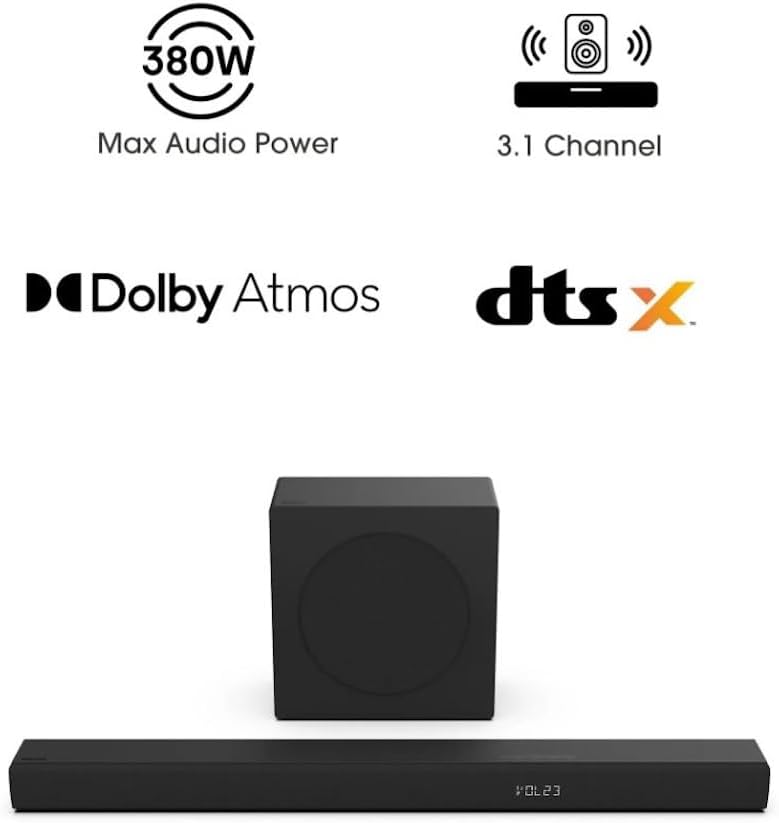
Image 5.2: Visual representation of the 7 tailored sound modes available on the Hisense R632 Soundbar, including AI EQ, Music, Night, Game, Movie, News, and Sport modes.
5.4 Dolby Atmos and DTS:X
The Hisense R632 soundbar supports Dolby Atmos and DTS:X, providing a spatial sound experience that immerses you in the audio. Ensure your source content and connected device (e.g., TV, streaming box) also support these formats for the full effect.

Image 5.3: Depiction of the immersive audio experience provided by Dolby Atmos and DTS:X technologies, with sound appearing to come from all directions.

Image 5.4: The 6.5-inch wireless subwoofer, illustrating its role in delivering deep and impactful bass frequencies to enhance the audio experience.
6. Maintenance
To ensure the longevity and optimal performance of your soundbar:
- Cleaning: Use a soft, dry cloth to clean the surfaces of the soundbar and subwoofer. Do not use liquid cleaners or abrasive materials.
- Ventilation: Ensure that the ventilation openings are not blocked to prevent overheating.
- Storage: If storing the unit for an extended period, disconnect it from power and store it in a cool, dry place.
7. Troubleshooting
If you encounter issues with your soundbar, refer to the following common problems and solutions:
- No Power:
- Ensure both the soundbar and subwoofer are properly plugged into a working power outlet.
- Check if the power indicator lights are on.
- No Sound:
- Verify the correct input source is selected on the soundbar.
- Check the volume level on both the soundbar and your television/source device.
- Ensure cables (HDMI, Optical) are securely connected.
- If using Bluetooth, ensure the device is paired and within range.
- Subwoofer Not Connecting:
- Ensure the subwoofer is powered on.
- If automatic pairing fails, consult the full user manual for manual pairing instructions (usually involves pressing a pair button on both units).
- Remote Control Not Working:
- Check and replace the AAA batteries (2 required).
- Ensure there are no obstructions between the remote and the soundbar's sensor.
8. Specifications
| Feature | Detail |
|---|---|
| Model Name | R632 |
| Speaker Type | Soundbar with Wireless Subwoofer |
| Surround Sound Channel Configuration | 3.1 |
| Speaker Maximum Output Power | 380 Watts |
| Special Features | Dolby Atmos & DTS:X, 5-Speaker Array, Wireless Subwoofer |
| Connectivity Technology | Bluetooth, HDMI eARC, Optical |
| Wireless Communication Technology | Bluetooth |
| Subwoofer Connectivity Technology | Wireless |
| Product Dimensions (Soundbar) | 2.4"D x 36.2"W x 3.5"H |
| Item Weight | 17 Pounds (total) |
| Input Voltage | 120 Volts |
| Control Method | Remote |
| UPC | 888143019710 |
9. Warranty Information
This Hisense R632 Soundbar is covered by a Limited Warranty. For specific terms and conditions, including duration and coverage details, please refer to the warranty card included in your product packaging or visit the official Hisense website.
10. Customer Support
For technical assistance, troubleshooting beyond this manual, or warranty inquiries, please contact Hisense customer support:
- Website: Visit the official Hisense support website for FAQs, downloads, and contact information.
- Phone: Refer to your product packaging or the Hisense website for regional support telephone numbers.


