
Introduction
This manual provides comprehensive instructions for the Comfort Direct UC7229T Ceiling Fan Remote Control. It covers setup, operation, maintenance, and troubleshooting to ensure optimal performance and longevity of your remote. This remote is designed to replace original UC7229T, CHQ7229T, 2968A-7229T, and TR240A models, offering control over fan speed, light, breeze mode, and timer functions.
Setup
1. Battery Installation
The remote control requires two (2) AAA batteries (not included). Follow these steps to install them:
- Locate the battery compartment cover on the back of the remote control.
- Slide the cover downwards to open the compartment.
- Insert two AAA batteries, ensuring the positive (+) and negative (-) terminals align correctly with the markings inside the compartment.
- Slide the battery compartment cover back into place until it clicks securely.
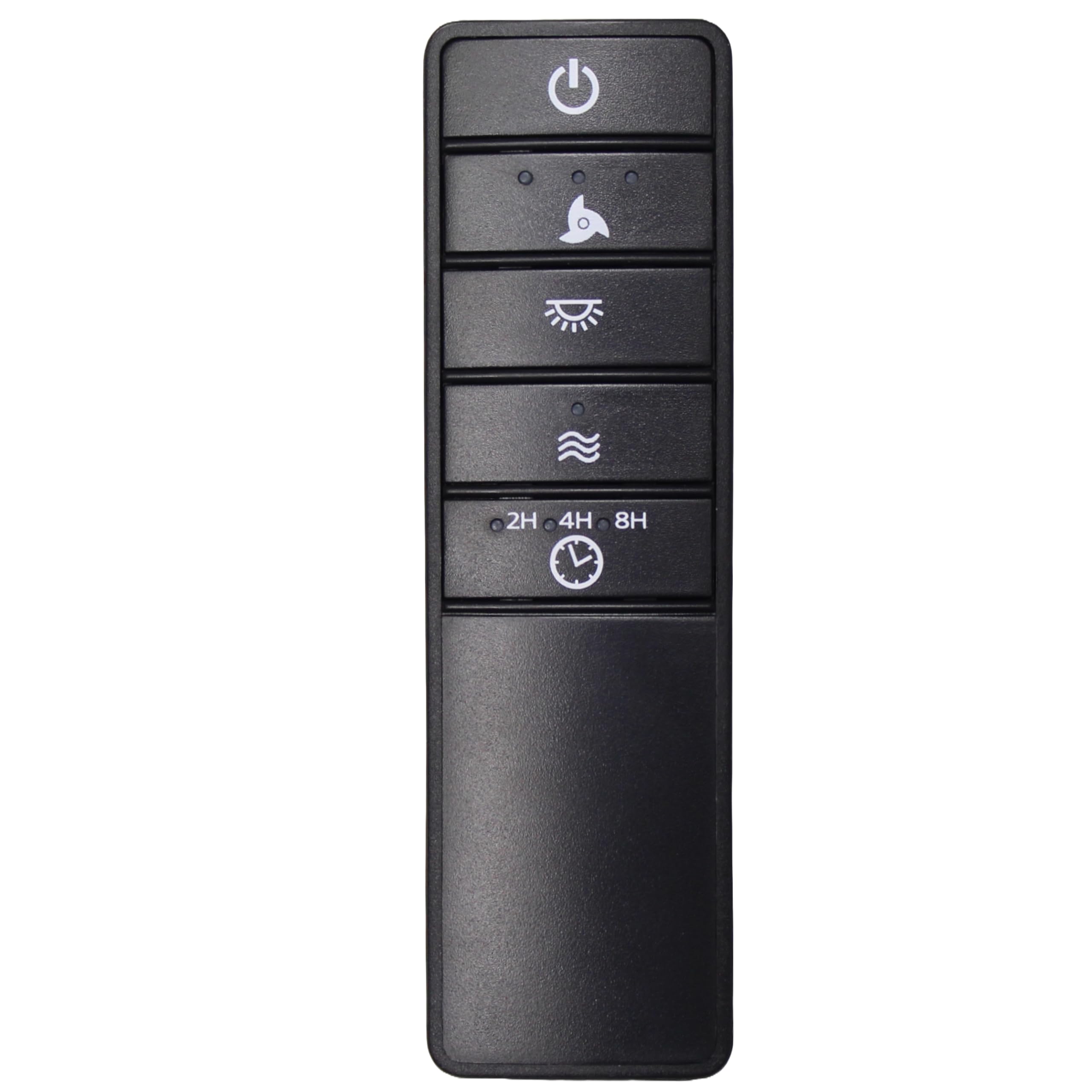
Image: Back of the remote control with the battery compartment open, showing slots for two AAA batteries and the DIP switches. The battery cover is shown detached.
2. Setting the DIP Switches
For the remote control to communicate with your ceiling fan's receiver, the DIP switch settings on the remote must match those on the receiver. The DIP switches are small numbered switches located inside the battery compartment.
- Before installing batteries, observe the position of the four DIP switches (numbered 1, 2, 3, 4) on your existing fan receiver. Each switch can be in an 'ON' or 'OFF' position.
- Carefully adjust the DIP switches on your new UC7229T remote control to exactly match the pattern of your fan's receiver. Use a small, non-metallic tool if necessary.
- Once the DIP switches are matched, install the batteries and replace the cover as described in the "Battery Installation" section.
- Test the remote control to ensure proper function. If the fan or light does not respond, re-check the DIP switch settings on both the remote and the receiver.
Operating Instructions
The UC7229T remote control provides intuitive control over your ceiling fan's functions. Familiarize yourself with the buttons:
- Power Button (⏻): Press to turn the fan and light ON or OFF.
- Fan Speed Button (Fan Icon): Cycles through fan speeds (Low, Medium, High, Off). Press repeatedly to adjust the fan speed.
- Light Button (💡): Turns the light ON or OFF. If your fan supports dimming, press and hold to adjust light brightness.
- Breeze Mode Button (Wave Icon): Activates a natural breeze effect, varying fan speed to simulate outdoor breezes. Press again to deactivate.
- Timer Buttons (2H, 4H, 8H): Sets the fan to turn off automatically after 2, 4, or 8 hours, respectively. Press the desired time button to activate.
Maintenance
Battery Replacement
When the remote control's range decreases or the fan/light response becomes inconsistent, it is likely time to replace the batteries. Follow the "Battery Installation" steps to replace the two AAA batteries. Always use fresh batteries and dispose of old batteries responsibly.
Troubleshooting
- Remote not responding:
- Check if the batteries are correctly installed and not depleted. Replace if necessary.
- Ensure the DIP switch settings on the remote match those on the fan receiver.
- Verify that the fan's power supply is ON at the wall switch or circuit breaker.
- Fan or light operates intermittently:
- Replace the batteries with new ones.
- Check for any obstructions between the remote and the fan receiver.
- Ensure you are within the maximum operating range (approximately 30 feet).
- Fan runs but light does not, or vice-versa:
- Check the light bulb in the fan for proper installation or if it needs replacement.
- Confirm the correct button is being pressed for the desired function.
Specifications
| Model Name: | UC7229T (also compatible with CHQ7229T, 2968A-7229T, TR240A) |
| Brand: | Comfort Direct |
| Color: | Black |
| Connectivity Technology: | Radio Frequency (RF) |
| Compatible Devices: | Ceiling Fans |
| Number of Supported Devices: | 1 |
| Controller Type: | Button Control |
| Button Quantity: | 4 (Power, Fan Speed, Light, Breeze Mode, Timer functions integrated) |
| Maximum Range: | 30 Feet |
| Batteries Required: | 2 x AAA (Alkaline recommended, not included) |
| Item Dimensions (L x W x H): | 4.57"L x 1.8"W x 2.76"H |
| FCC ID: | CHQ7229T |
| IC: | 2968A-7229T |
Warranty and Support
This Comfort Direct UC7229T remote control comes with a 1-Year Manufacturer Warranty. For warranty claims or technical support, please refer to the contact information provided with your purchase or visit the Comfort Direct official website.
