1. Introduction
Thank you for choosing the Generic M10 Bluetooth 5.3 Wireless Earbuds. This manual provides detailed instructions for setting up, operating, and maintaining your earbuds to ensure optimal performance and longevity. Please read this manual thoroughly before using the product.
2. Package Contents
- M10 Bluetooth 5.3 Wireless Earbuds (Left and Right)
- High-Capacity Charging Case
- USB Charging Cable
- User Manual
- Multiple sizes of Eartips (S, M, L)

Image: M10 Bluetooth Earbuds product packaging, showing the earbuds and charging case on the box.
3. Product Features
- Bluetooth 5.3 Technology: Ensures fast, stable, and low-latency wireless connection up to 10 meters.
- Digital LED Display: Clearly shows battery levels for both earbuds and the charging case.
- High-Capacity Charging Case: Extends playtime significantly.
- IPX5 Waterproof Rating: Resistant to sweat and light rain, suitable for sports and outdoor activities.
- Ergonomic Design: Provides a comfortable and secure fit for extended wear.
- Touch Control: Intuitive controls for music playback, call management, and voice assistant activation.
- Adaptive Noise Cancellation: Enhances audio experience by reducing ambient noise.
- Wide Compatibility: Supports A2DP/HFP/HSP/AVRCP profiles for various devices.
4. Setup
4.1 Charging the Earbuds and Case
- Before first use, fully charge the earbuds and the charging case.
- Place the earbuds into the charging case. Ensure they are correctly seated.
- Connect the USB charging cable to the charging port on the case and to a power source (e.g., USB wall adapter, computer USB port).
- The digital LED display on the charging case will show the current battery percentage and charging status of the earbuds.
- Charging typically takes about 1.5 hours for a full charge.

Image: The M10 charging case connected to a USB-C charging cable, displaying battery information on its LED screen.
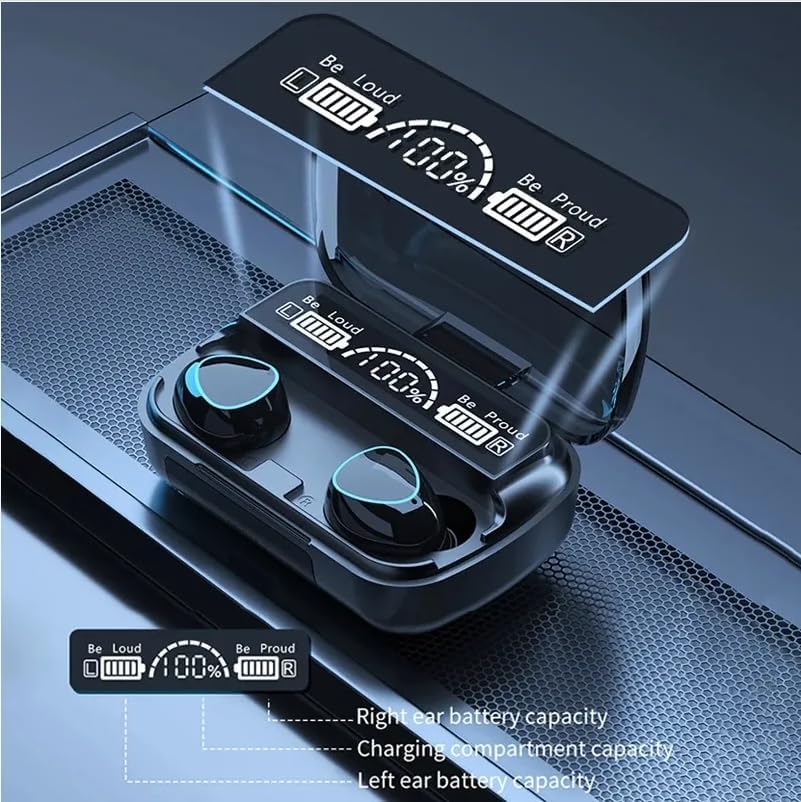
Image: Close-up of the M10 charging case's digital LED display, showing battery levels for the left earbud, right earbud, and the charging compartment.
4.2 Pairing with a Device
- Open the charging case. The earbuds will automatically power on and enter pairing mode.
- On your device (smartphone, tablet, etc.), enable Bluetooth.
- Search for available Bluetooth devices and select "M10" from the list.
- Once connected, you will hear a confirmation tone, and the earbuds' indicator lights will turn off or flash slowly.
- The earbuds will automatically reconnect to the last paired device when taken out of the case, if Bluetooth is enabled on the device.
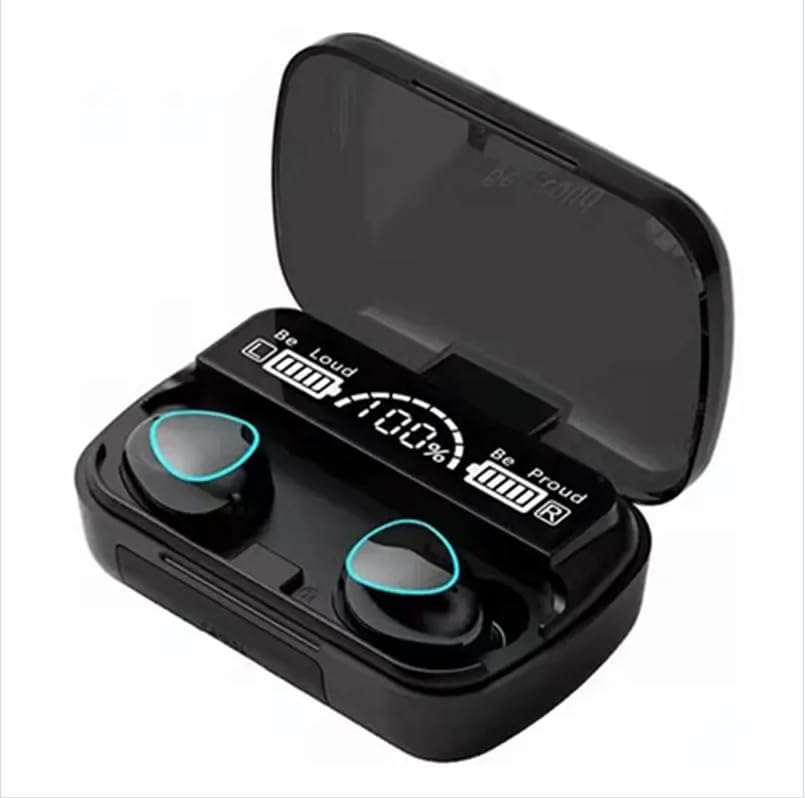
Image: The M10 Bluetooth earbuds resting in their open charging case, with the digital LED display showing "Be Loud" and "Be Proud" along with battery percentages.
5. Operating Instructions
5.1 Wearing the Earbuds
- Identify the Left (L) and Right (R) earbuds.
- Gently insert the earbud into your ear canal and rotate it slightly to find a comfortable and secure fit.
- Choose the correct size of eartips for optimal sound quality and comfort.
5.2 Touch Controls
The M10 earbuds feature intuitive touch controls on each earbud. The specific functions are:
| Action | Function |
|---|---|
| Single Tap (Left/Right) | Play/Pause Music, Answer/End Call |
| Double Tap (Right) | Next Track |
| Double Tap (Left) | Previous Track |
| Triple Tap (Left/Right) | Activate Voice Assistant |
| Long Press (Left/Right) | Reject Call |
5.3 Power On/Off
- Power On: Open the charging case, and the earbuds will automatically power on. Alternatively, long-press the touch area on both earbuds for 3 seconds.
- Power Off: Place the earbuds back into the charging case and close the lid. Alternatively, long-press the touch area on both earbuds for 5 seconds.
6. Maintenance
- Clean the earbuds and charging case regularly with a soft, dry cloth.
- Avoid using harsh chemicals or abrasive materials.
- Keep the charging contacts on the earbuds and inside the case clean to ensure proper charging.
- Store the earbuds in their charging case when not in use to protect them and conserve battery.
- Avoid extreme temperatures and direct sunlight.
- Do not immerse the earbuds or case in water, despite their IPX5 rating, as this rating is for splashes and sweat, not submersion.
7. Troubleshooting
| Problem | Possible Solution |
|---|---|
| Earbuds not pairing | Ensure earbuds are charged. Turn off and on Bluetooth on your device. Forget "M10" from your device's Bluetooth list and re-pair. |
| Only one earbud working | Place both earbuds back into the charging case, close the lid, then open it again. Ensure both earbuds are charged. |
| Low volume or poor sound quality | Adjust volume on your device and earbuds. Ensure eartips are the correct size and fit securely. Clean any debris from the earbud speakers. |
| Charging case not charging | Check the USB cable and power adapter. Ensure the charging port is clean and free of debris. |
| Earbuds falling out | Try different sizes of eartips to find the best fit for your ears. Ensure earbuds are inserted and twisted correctly. |
8. Specifications
| Feature | Detail |
|---|---|
| Model Name | M10 |
| Bluetooth Version | 5.3 |
| Bluetooth Range | Up to 10 meters (33 feet) |
| Water Resistance | IPX5 (Sweat and splash resistant) |
| Earbud Playtime | Approximately 5 hours |
| Charging Time | Approximately 1.5 hours |
| Standby Time | Approximately 280 hours |
| Control Method | Touch Control |
| Noise Control | Adaptive Noise Cancellation |
| Material | Plastic |
| Compatible Profiles | A2DP/HFP/HSP/AVRCP |
9. Product Video
Video: A short demonstration of the M10 game headset, showcasing its features and design.
10. Warranty and Support
The Generic M10 Bluetooth 5.3 Wireless Earbuds come with a standard manufacturer's warranty. Please refer to the product packaging or contact your retailer for specific warranty terms and conditions.
For technical support or customer service inquiries, please contact the seller or manufacturer through the platform where you purchased the product.


