
darkFlash DG240
darkFlash DG240 All-in-one Liquid CPU Cooler User Manual
Model: DG240
1. Introduction
The darkFlash DG240 is an all-in-one liquid CPU cooler designed to provide efficient and reliable thermal management for your computer's central processing unit. This manual provides essential information regarding the installation, operation, maintenance, and troubleshooting of your DG240 AIO cooler. Please read this manual thoroughly before installation to ensure proper setup and optimal performance.
2. Key Features
- Efficient & Durable High-Speed Pump: Features a 3-phase 6-pole motor for smooth and efficient operation, reaching up to 3000 RPM and handling up to 315W TDP. Equipped with a ceramic bearing for enhanced durability and resistance to heat and wear.
- Superior Cooling Performance: Delivers an airflow of up to 81.5 CFM with a low noise level of just 33dBA. PWM control allows for dynamic fan speed adjustment based on system load, ensuring optimal cooling when needed and quiet operation otherwise.
- Optimized Heat Dissipation: Incorporates a high-density cooling radiator and a high polymer rubber hose protective water pipe, designed for low resistance and high cooling efficiency. The 400mm long pipe offers flexibility for various PC case layouts.

Figure 2.1: Radiator design for efficient heat dissipation. This diagram illustrates the high-density cooling radiator and the dual-material (IIR+EPDM) protective water pipe, optimized for efficient heat transfer and pressure resistance.
- Dynamic ARGB Lighting: Supports 5V 3-pin ARGB sync via the motherboard, providing unified and vibrant lighting effects on both the fan and pump head with a soft 1600W color glow. Compatible with major motherboard ARGB Sync technologies including ASUS Aura Sync, Gigabyte RGB Fusion, and MSI Mystic Light Sync.
- Broad Compatibility: Supports a wide range of CPU cooling sockets, including Intel LGA 1200/115X/1700/1851 and AMD AM4/AM5. Includes all necessary mounting plates and fasteners for dual CPU platforms.
3. Package Contents
Verify that all components are present in the package before proceeding with installation.
- darkFlash DG240 All-in-one Liquid CPU Cooler (240mm AIO)
- Mounting hardware for Intel LGA 1200/115X/1700/1851 sockets
- Mounting hardware for AMD AM4/AM5 sockets
- Thermal paste (pre-applied or in a small tube)
- User Manual (this document)
4. Specifications
| Attribute | Value |
|---|---|
| Model Number | DG240 |
| Cooling Method | Water Cooling |
| Radiator Material | Aluminium |
| Cold Plate Material | Copper, Micro Skived Fins |
| Pump Motor Type | 3-phase 6-pole |
| Pump Speed | Up to 3000 RPM |
| TDP Support | Up to 315W |
| Fan Speed (Max) | 1800 RPM |
| Air Flow Capacity (Max) | 81.5 CFM |
| Noise Level (Max) | 33 dB |
| Pipe Length | 400mm |
| Power Connector Type | 5-Pin |
| Voltage | 12 Volts |
| Wattage | 1.8 watts |
| Compatible Devices | Desktop |
| Package Dimensions | 12.64 x 8.07 x 5.67 inches |
| Weight | 3.68 Pounds |
5. Compatibility
The darkFlash DG240 AIO cooler is compatible with the following CPU sockets:
- Intel: LGA 1200, LGA 115X (1150, 1151, 1155, 1156), LGA 1700, LGA 1851
- AMD: AM4, AM5

This image displays the two primary mounting brackets provided with the darkFlash DG240 cooler, one for Intel CPUs and one for AMD CPUs, illustrating the broad compatibility of the product.
6. Setup and Installation
Proper installation is crucial for optimal cooling performance. Always refer to your motherboard and PC case manuals for specific guidance on component placement and cable routing. The following steps provide a general overview:
- Prepare the CPU and Motherboard: Ensure your CPU is correctly seated in its socket. Clean the CPU surface thoroughly if old thermal paste is present.
- Install the Backplate: Attach the appropriate backplate for your CPU socket (Intel or AMD) to the rear of the motherboard.
- Mount the Radiator: Secure the radiator and fans to an available mounting location in your PC case (e.g., top, front, or rear). Ensure fans are oriented for optimal airflow (intake or exhaust).
- Apply Thermal Paste: If not pre-applied, apply a small amount of thermal paste to the center of your CPU's integrated heat spreader (IHS).
- Install the Pump/Cold Plate: Carefully place the pump/cold plate assembly onto the CPU, aligning it with the mounting posts. Secure it using the provided screws, tightening them in a diagonal pattern to ensure even pressure.
- Connect Cables:
- Connect the pump's power cable to the designated AIO_PUMP or CPU_FAN header on your motherboard.
- Connect the fan PWM cables to the CPU_FAN or SYS_FAN headers. The DG240 supports daisy chain connection for fans.
- Connect the 5V 3-pin ARGB cable from the pump and fans to the motherboard's 5V ARGB header for lighting synchronization.
- Cable Management: Route cables neatly to ensure proper airflow and a clean build.

This image provides a full view of the darkFlash DG240 liquid CPU cooler, showcasing its radiator, two ARGB fans, and the illuminated pump head, illustrating the complete unit before installation.

This image shows the darkFlash DG240 AIO cooler installed inside a computer case, highlighting its ARGB lighting synchronized with other system components, demonstrating its aesthetic integration.
7. Operating Instructions
7.1. Fan and Pump Control (PWM)
The DG240's fans and pump utilize Pulse Width Modulation (PWM) technology, allowing your motherboard to dynamically adjust their speeds based on CPU temperature and system load. This ensures efficient cooling when needed and quieter operation during lighter tasks.
- Access your motherboard's BIOS/UEFI settings to configure fan curves and pump speeds.
- Most motherboards offer automatic fan control profiles (e.g., Standard, Silent, Performance) that can be selected.
- For advanced users, custom fan curves can be set to fine-tune the balance between cooling performance and noise levels.
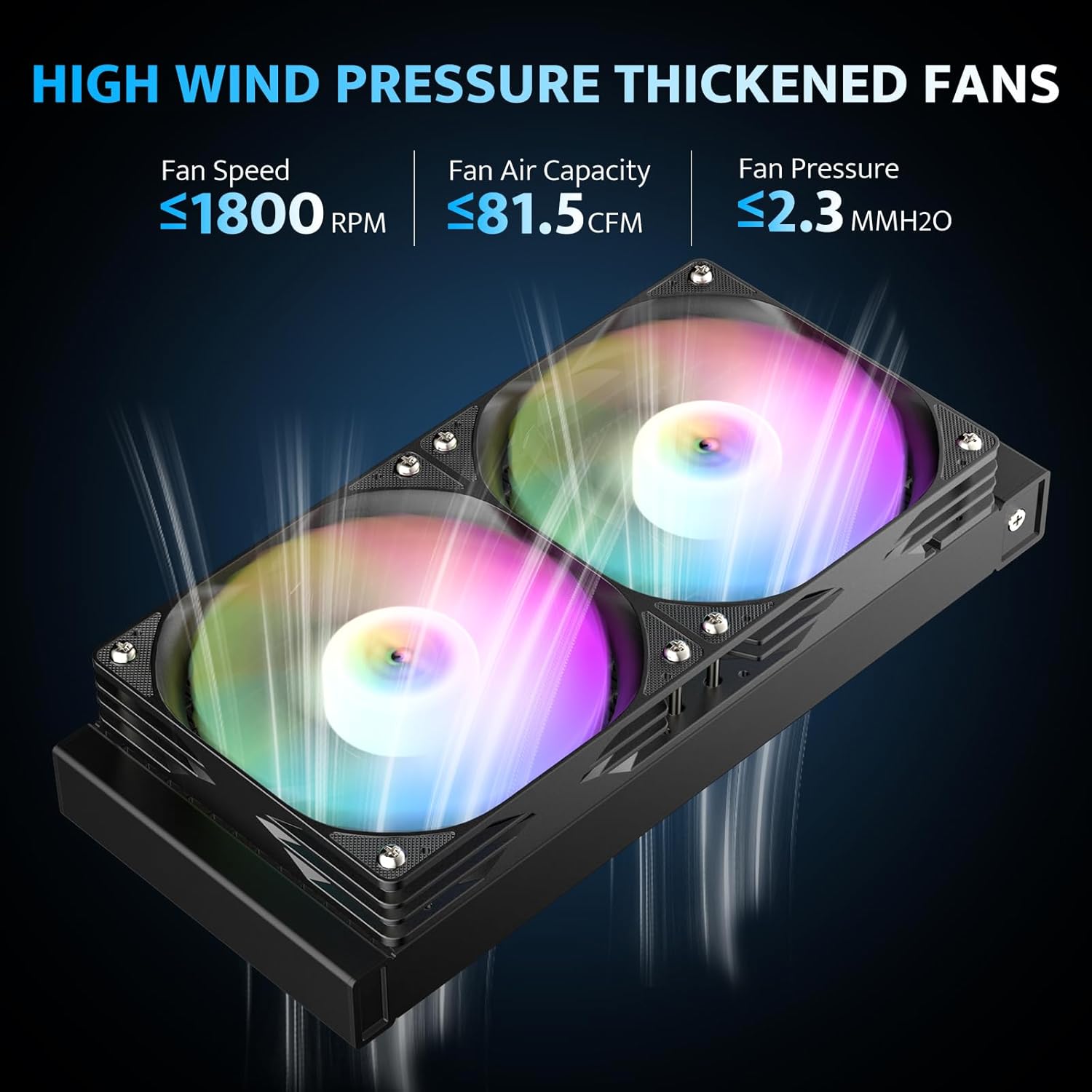
This image highlights the performance characteristics of the DG240's fans, including fan speed (≤1800 RPM), air capacity (≤81.5 CFM), and fan pressure (≤2.3 MMH2O), demonstrating their high wind pressure capabilities.

This image provides an exploded view of the DG240's 3-phase 6-pole motor water pump, detailing its internal structure, ceramic bearing, and copper cold plate, emphasizing its high-performance design.
7.2. ARGB Lighting Control
The DG240 features Addressable RGB (ARGB) lighting on both the fans and the pump head, which can be synchronized with your motherboard's ARGB software.
- Ensure the 5V 3-pin ARGB cable is connected to the correct header on your motherboard.
- Install the corresponding ARGB control software for your motherboard brand (e.g., ASUS Aura Sync, MSI Mystic Light Sync, Gigabyte RGB Fusion, ASRock Polychrome RGB).
- Use the software to customize lighting effects, colors, and synchronization with other ARGB components in your system.
8. Maintenance
Regular maintenance helps ensure the longevity and optimal performance of your AIO cooler.
- Dust Cleaning: Periodically clean dust from the radiator fins and fan blades using compressed air or a soft brush. Accumulated dust can impede airflow and reduce cooling efficiency.
- Fan Inspection: Check fan blades for any obstructions or signs of wear. Ensure fans spin freely and quietly.
- Hose and Connection Check: Inspect the rubber hoses and connections for any signs of leaks, kinks, or damage. While the system is sealed, visual checks are recommended.
- Thermal Paste (Long-Term): The thermal paste applied between the CPU and cold plate typically lasts for several years. If you notice a significant increase in CPU temperatures over time, reapplying fresh thermal paste might be necessary. This requires carefully removing the pump, cleaning both surfaces, and applying new paste.
9. Troubleshooting
If you encounter issues with your darkFlash DG240 AIO cooler, refer to the following common problems and solutions:
| Problem | Possible Cause | Solution |
|---|---|---|
| High CPU Temperatures |
|
|
| Fans Not Spinning / No ARGB Lighting |
|
|
| Unusual Noise from Cooler |
|
|
10. Warranty and Support
darkFlash provides a 3-year assurance for the DG240 All-in-one Liquid CPU Cooler. This warranty covers defects in materials and workmanship under normal use. For warranty claims or technical support, please contact darkFlash customer service through their official website or the retailer where the product was purchased.
Please retain your proof of purchase for warranty validation.
Related documentsDG240


Ask a question about this manual
Ask about setup, troubleshooting, compatibility, parts, safety, or missing instructions. Manuals+ will review the question and use this page’s manual context to help answer it.