
Juboos Juboos Kids Watch Set (Analog + Digital)
Juboos Kids Analog and Digital Watch Set Instruction Manual
Introduction
This manual provides detailed instructions for the setup, operation, and maintenance of your new Juboos Kids Analog and Digital Watch Set. Please read these instructions carefully to ensure proper use and longevity of your watches.

Image: The Juboos Kids Analog and Digital Watch Set, featuring a blue analog watch on the left and a black digital watch on the right.
Juboos Analog Kids Watch
The analog watch features a classic dial with clear numbers, a durable plexiglass mirror, and a comfortable strap, designed for everyday wear and outdoor activities.
Features
- High-definition plexiglass mirror with rounded edges, anti-fogging.
- 3D three-dimensional case, shockproof design.
- 7-color night light with flashing modes.
- Soft and comfortable strap, adjustable for wrist sizes from 5.31" (13.5cm) to 8.07" (20.5cm).
- Japanese imported movement for accurate timekeeping.
Setup and Operation
- Setting the Time:
Pull out the crown (the small knob on the right side of the watch case) gently. Rotate the crown to adjust the hour and minute hands to the correct time. Once set, push the crown back in to start the watch.

Image: A close-up view of the analog watch dial, showing the numbers, hands, and the crown on the side.
- Operating the Night Light:
The analog watch features a backlight button on the right side. Long press this button for 3 seconds to switch between 7 different colors and flashing modes. The dial is black, and the colors represent the backlight effect.

Image: The analog watch displaying its 7 colorful night light options, showing the watch face illuminated in various hues.
Maintenance and Water Resistance
The analog watch is designed to be 30M/98FT water resistant, suitable for daily activities such as hand-washing, face-washing, and rainy days. It is not recommended for swimming, diving, or hot water activities.

Image: Illustrations showing the analog watch being suitable for hand-washing, face-washing, and use on a rainy day, demonstrating its water resistance.
Juboos Digital Kids Watch
The digital watch offers precise timekeeping with additional functions like an alarm and hourly chime, presented in a clear digital display with easy-to-use buttons.
Features
- Clear digital display with time, date, and seconds.
- Light, Start, Mode, and Reset buttons for various functions.
- Alarm and hourly chime functions.
- Comfortable and adjustable strap.
Setup and Operation
The digital watch has four buttons: LIGHT (top left), MODE (bottom left), START (top right), and RESET (bottom right).
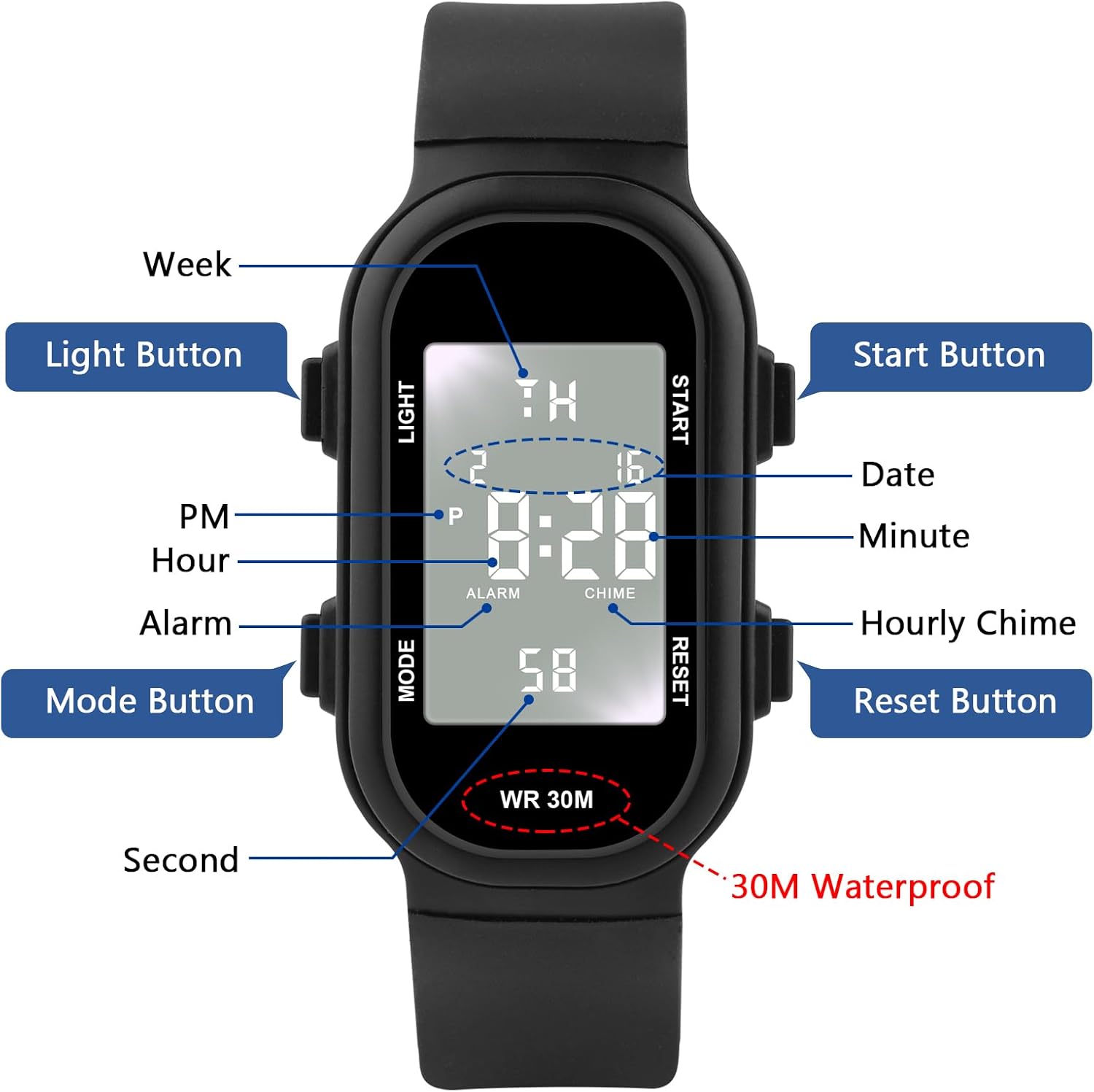
Image: A diagram of the digital watch highlighting and labeling each of its four buttons: Light, Start, Mode, and Reset, along with their corresponding functions.
- Displaying Time and Date:
In normal time mode, the display shows hour, minute, and second. Press the START button to view the date (month and day).
- Setting Time and Date:
Press the MODE button repeatedly to cycle through modes: Normal Time > Alarm Setting > Stopwatch > Time Setting. When in Time Setting mode, the seconds will flash. Press RESET to zero the seconds. Press START to select the next setting (hour, minute, month, date, day of week). Press MODE to adjust the selected value. Once all settings are complete, press MODE to return to normal time mode.
- Alarm and Hourly Chime:
Press MODE to enter Alarm Setting mode. Press START to select hour or minute. Press MODE to adjust the value. Press RESET to turn the alarm ON/OFF. Press MODE again to return to normal time. To activate/deactivate the hourly chime, press and hold RESET, then press MODE. The chime icon will appear/disappear.
- Using the Light:
Press the LIGHT button to illuminate the display for a few seconds.
Maintenance and Water Resistance
The digital watch is also 30M/98FT water resistant, suitable for everyday exposure to water like hand-washing and rain. Avoid prolonged submersion or exposure to hot water.
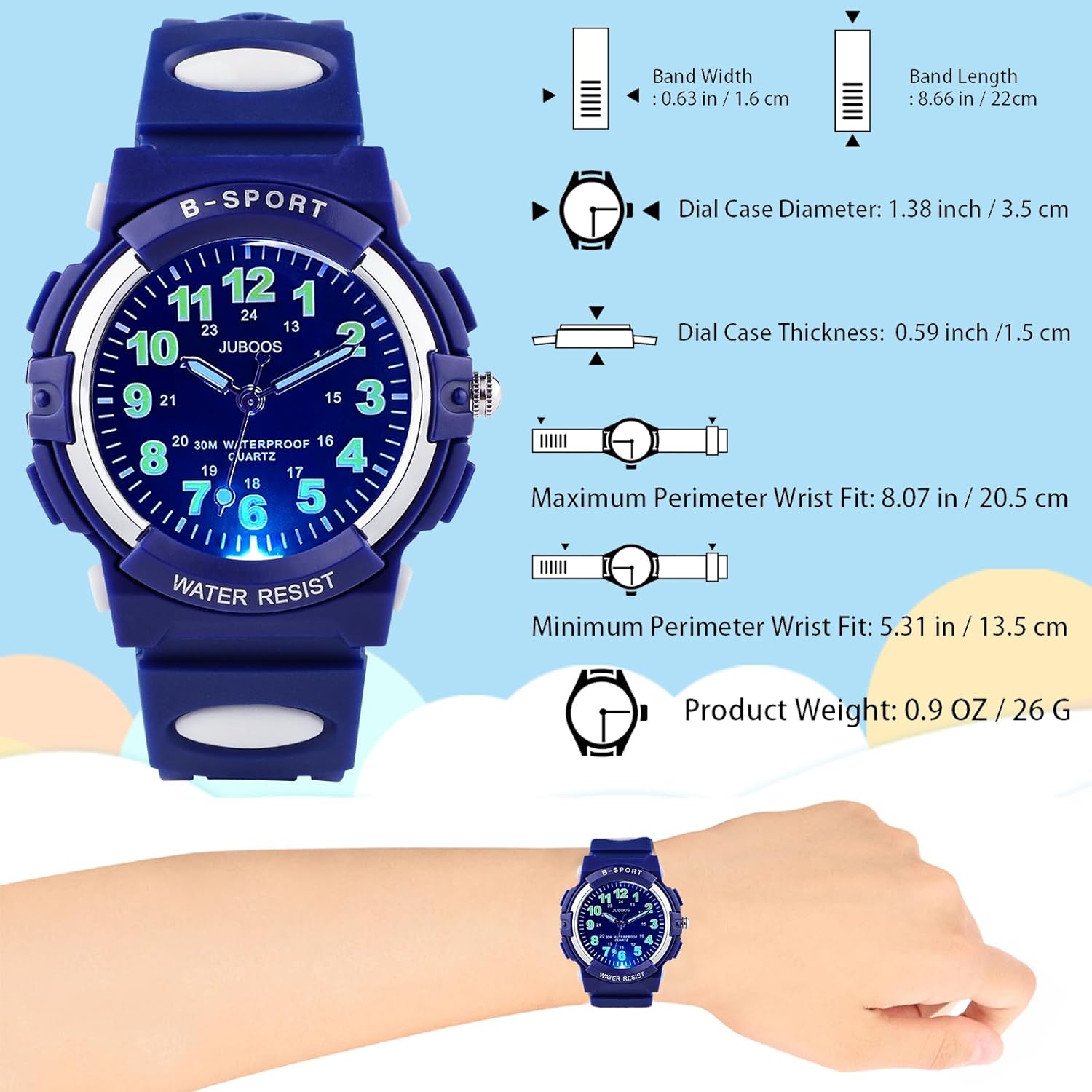
Image: Children washing hands, illustrating the 30M/98FT water resistance of the watches, suitable for activities like hand washing, rainwater, and sweat.
General Maintenance
- Cleaning: Wipe the watch case and strap with a soft, damp cloth. Avoid harsh chemicals.
- Storage: Store watches in a dry place away from direct sunlight and extreme temperatures.
- Battery: When the watch display dims or stops, the battery may need replacement. It is recommended to have a professional replace the battery to maintain water resistance.
Troubleshooting
- Watch not working: Check if the crown on the analog watch is pushed in completely. For both watches, a dead battery is a common cause.
- Analog watch hands not moving: Ensure the crown is fully pushed in. If still not working, the battery may be depleted.
- Digital display dim or blank: The battery needs replacement.
- Water inside watch: Although water resistant, prolonged exposure to hot water or steam can compromise seals. Do not press buttons underwater. If water enters, seek professional repair immediately.
Specifications
Juboos Analog Kids Watch
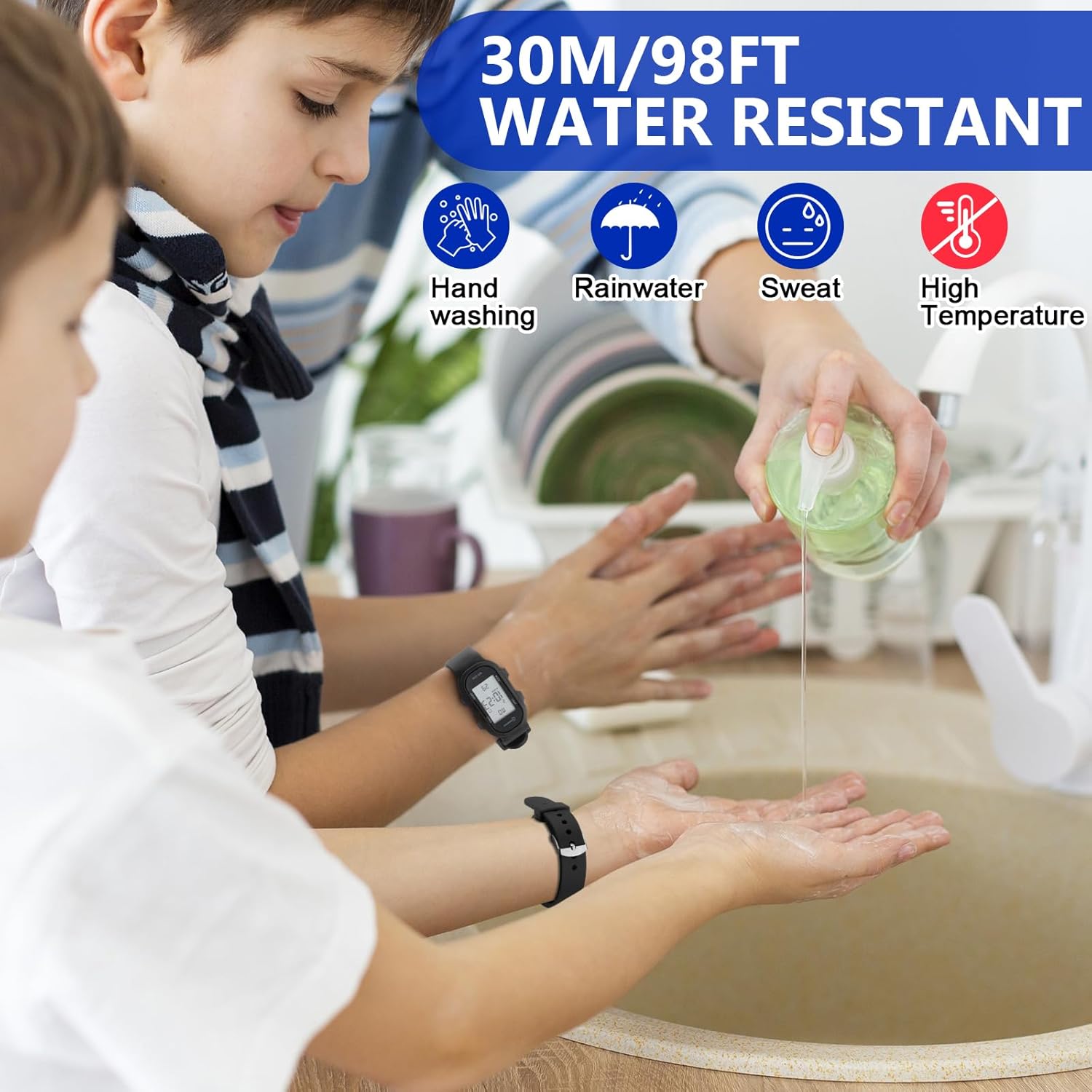
Image: A diagram illustrating the dimensions of the analog watch, including band width, band length, dial case diameter, dial case thickness, and wrist fit ranges.
- Dial Case Diameter: 1.38 inches / 3.5 cm
- Dial Case Thickness: 0.59 inches / 1.5 cm
- Band Width: 0.63 inches / 1.6 cm
- Band Length: 8.66 inches / 22 cm
- Maximum Wrist Fit: 8.07 inches / 20.5 cm
- Minimum Wrist Fit: 5.31 inches / 13.5 cm
- Product Weight: 0.9 oz / 26 g
Juboos Digital Kids Watch

Image: A diagram illustrating the dimensions of the digital watch, including case width, case height, dial thickness, and wrist fit ranges.
- Case Width: 0.67 inches / 1.7 cm
- Case Height: 1.38 inches / 3.5 cm
- Dial Thickness: 0.43 inches / 1.1 cm
- Total Length: 9.25 inches / 23.5 cm
- Maximum Wrist Fit: 8.07 inches / 20.5 cm
- Minimum Wrist Fit: 5.91 inches / 15 cm
- Product Weight: 0.057 lb / 26 g
General
- Water Resistance: 30M / 98FT (suitable for splashes, rain, hand-washing; not for swimming or hot water).
- Movement: Japanese Quartz (Analog), Digital (Digital)
Warranty and Support
Juboos products are manufactured with quality in mind. While specific warranty details are not provided in this manual, please retain your proof of purchase. For any issues, questions, or support needs, please contact Juboos customer service through the retailer where the product was purchased or visit the official Juboos store page.
Juboos Store Link: Visit the Juboos Store on Amazon
Related documentsJuboos Kids Watch Set (Analog + Digital)


Ask a question about this manual
Ask about setup, troubleshooting, compatibility, parts, safety, or missing instructions. Manuals+ will review the question and use this page’s manual context to help answer it.