
Introduction
Welcome to the VULKKANO TD10 Turntable user manual. This guide provides essential information for the proper setup, operation, maintenance, and troubleshooting of your new turntable. Please read these instructions carefully before using the product to ensure optimal performance and longevity.
What's in the Box
Verify that all components listed below are included in your package.
- VULKKANO TD10 Turntable Base with Tonearm
- Aluminum Platter
- Dust Cover
- Felt Mat
- Counterweight
- 45 RPM Adapter
- RCA Cable with Ground Wire
- Power Adapter (EU)
- User Manual (this document)

Setup Instructions
Follow these steps to set up your VULKKANO TD10 Turntable.
- Unpacking: Carefully remove all components from the packaging. Retain packaging for future transport or storage.
- Placement: Place the turntable on a stable, level surface away from direct sunlight, heat sources, and excessive vibration.
- Platter Installation: Gently place the aluminum platter onto the spindle.
- Belt Installation: Locate the drive belt. Carefully stretch the belt around the inner rim of the platter and hook it onto the motor pulley. Ensure the belt is not twisted.
- Felt Mat Placement: Place the felt mat on top of the platter.
- Dust Cover: Attach the dust cover hinges to the rear of the turntable base.
- Counterweight Installation: Slide the counterweight onto the rear of the tonearm. Rotate it until it is approximately balanced.
- Tonearm Balancing and Tracking Force Adjustment:
- Remove the stylus protector.
- Carefully lower the tonearm lift lever.
- Adjust the counterweight by rotating it until the tonearm floats horizontally.
- Once balanced, hold the counterweight steady and rotate the tracking force ring to "0".
- Rotate the entire counterweight (including the ring) counter-clockwise to the recommended tracking force (refer to cartridge specifications, typically 2.0-3.0 grams for the ATL-3600).
- Anti-Skate Adjustment: Set the anti-skate dial to match the tracking force value.
- Connections:
- Connect the RCA cable from the turntable's output to your active speakers or amplifier's input. Ensure the ground wire is connected to the ground terminal on your amplifier if available, to minimize hum.
- Select the appropriate output on the turntable: PHONO if connecting to an amplifier with a dedicated phono input, or LINE if connecting to active speakers or an amplifier's auxiliary input (the TD10 has a built-in phono preamp).
- Connect the power adapter to the turntable and then to a power outlet.


Operating Instructions
Follow these steps to play your vinyl records on the VULKKANO TD10 Turntable.
- Power On: Flip the power switch located at the rear of the turntable to the "ON" position.
- Place Record: Carefully place a vinyl record on the felt mat on the platter. For 7-inch records with a large center hole, use the included 45 RPM adapter.
- Select Speed: Use the speed selector knob (usually marked 33/45) to choose the correct playback speed for your record (33 1/3 RPM or 45 RPM).
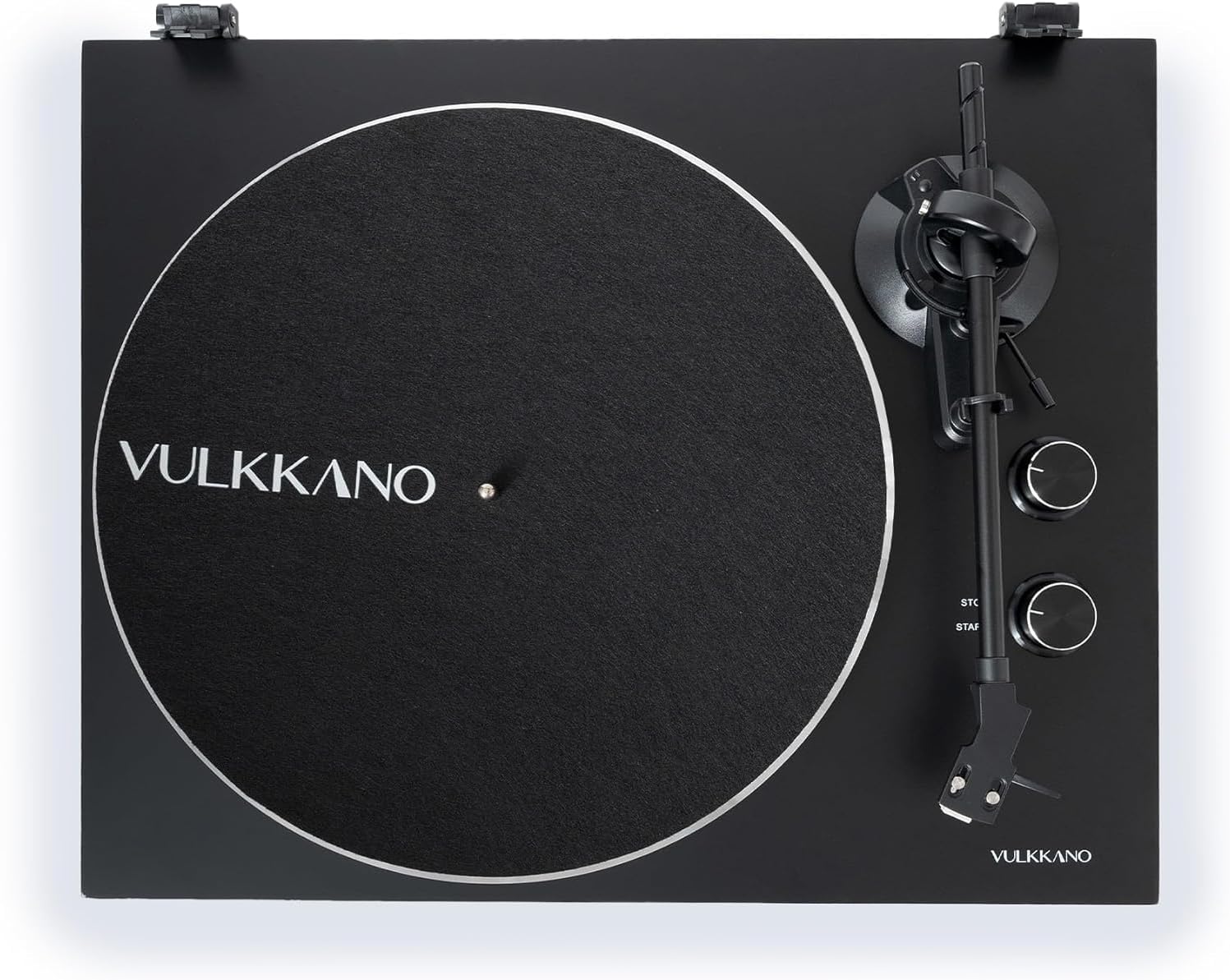
- Start Platter Rotation: Turn the START/STOP knob to "START" to begin platter rotation.
- Position Tonearm: Gently lift the tonearm using the tonearm lift lever. Move the tonearm over the desired starting groove of the record.
- Lower Tonearm: Slowly lower the tonearm lift lever to allow the stylus to descend onto the record.
- Enjoy Playback: The record will now play.
- Stop Playback: At the end of the record, or when you wish to stop, gently lift the tonearm using the lift lever and return it to the tonearm rest. Turn the START/STOP knob to "STOP" to halt platter rotation.

Maintenance
Regular maintenance ensures the longevity and optimal performance of your turntable.
- Dust Cover: Keep the dust cover closed when the turntable is not in use to prevent dust accumulation on the platter and stylus. Clean the dust cover with a soft, dry cloth. Avoid abrasive cleaners.
- Stylus Cleaning: Gently clean the stylus regularly using a soft brush designed for stylus cleaning, brushing from back to front. Avoid touching the stylus with your fingers.
- Record Cleaning: Clean your vinyl records before playback using a record brush or a dedicated record cleaning solution to remove dust and static.
- Platter and Mat: Periodically remove the felt mat and clean the platter surface with a soft, dry cloth.
- Belt Inspection: Inspect the drive belt periodically for wear or stretching. A worn belt can affect playback speed stability. Replace if necessary.
- General Cleaning: Wipe the turntable's chassis with a soft, slightly damp cloth. Do not use harsh chemicals or solvents.

Troubleshooting
If you encounter issues with your VULKKANO TD10 Turntable, refer to the following common problems and solutions.
| Problem | Possible Cause | Solution |
|---|---|---|
| No power | Power cable not connected; Power switch off; Outlet malfunction. | Ensure power cable is securely connected. Turn the power switch to "ON". Test the outlet with another device. |
| No sound or low volume | RCA cables not connected correctly; Wrong PHONO/LINE setting; Amplifier/speakers off or volume low; Stylus damaged. | Check RCA cable connections. Ensure PHONO/LINE switch matches your setup. Turn on amplifier/speakers and adjust volume. Inspect stylus for damage. |
| Distorted sound | Dirty stylus/record; Incorrect tracking force; Damaged stylus; Turntable not level. | Clean stylus and record. Re-adjust tracking force. Replace stylus if damaged. Ensure turntable is on a level surface. |
| Skipping or jumping | Dirty/scratched record; Incorrect tracking force; Turntable not level; Anti-skate setting incorrect. | Clean record. Re-adjust tracking force. Ensure turntable is level. Adjust anti-skate to match tracking force. |
| Humming noise | Ground wire not connected; Interference; Loose connections. | Ensure ground wire is securely connected. Move turntable away from other electronic devices. Check all cable connections. |
| Incorrect playback speed | Wrong speed selected; Worn drive belt. | Select the correct speed (33 or 45 RPM). Inspect and replace the drive belt if it appears worn or stretched. |
Specifications
Key technical specifications for the VULKKANO TD10 Turntable.
| Brand | VULKKANO |
| Model Name | TD10 |
| Dimensions (L x W x H) | 50.1 x 43.6 x 21.6 cm |
| Weight | 6.68 kg |
| Material | Aluminum (Platter), Wood (Chassis) |
| Rotation Speeds | 33 1/3 RPM, 45 RPM |
| Motor Type | Belt-drive motor |
| Cartridge | ATL-3600 (Moving Magnet) |
| Phono Preamp | Integrated (switchable PHONO/LINE output) |
| Compatible Devices | Active speakers, Amplifiers |
| Power Source | Electric with cable |
| Included Components | Turntable, user manual, EU power adapter, RCA to RCA cable |
Warranty and Support
For detailed warranty information, please refer to the warranty card included with your product or visit the official VULKKANO website.
If you require technical support or have questions not covered in this manual, please contact VULKKANO customer service or the retailer from whom you purchased the product.


