
TOPPING TP-D900
TOPPING D900 Ultra-Flagship DAC User Manual
Model: TP-D900
Introduction
This manual provides comprehensive instructions for the setup, operation, and maintenance of your TOPPING D900 Ultra-Flagship DAC. The D900 is engineered for high-fidelity audio reproduction, featuring a self-developed PSRM 1-Bit decoding architecture, advanced I/V conversion, and extensive connectivity options.
Key features include:
- Self-Developed PSRM 1-Bit Decoding Architecture for exceptional fidelity.
- Proprietary I/V Conversion Circuit ensuring clean and detailed analog output.
- Wide Format Compatibility with USB-C, USB-B, optical, coaxial, AES, IIS-LVDS, and Bluetooth 5.1 (LDAC/aptX/HD/AAC/SBC).
- Precision Preamp Functionality with high-accuracy volume control.
- Ultra-Low Jitter Performance via advanced CPLD clock processing.
- Customizable 10-Band PEQ for fine-tuning sound.
- Interactive Full-Color Display with multiple views and customizable background colors.
- Premium CNC-Machined Remote for convenient control.
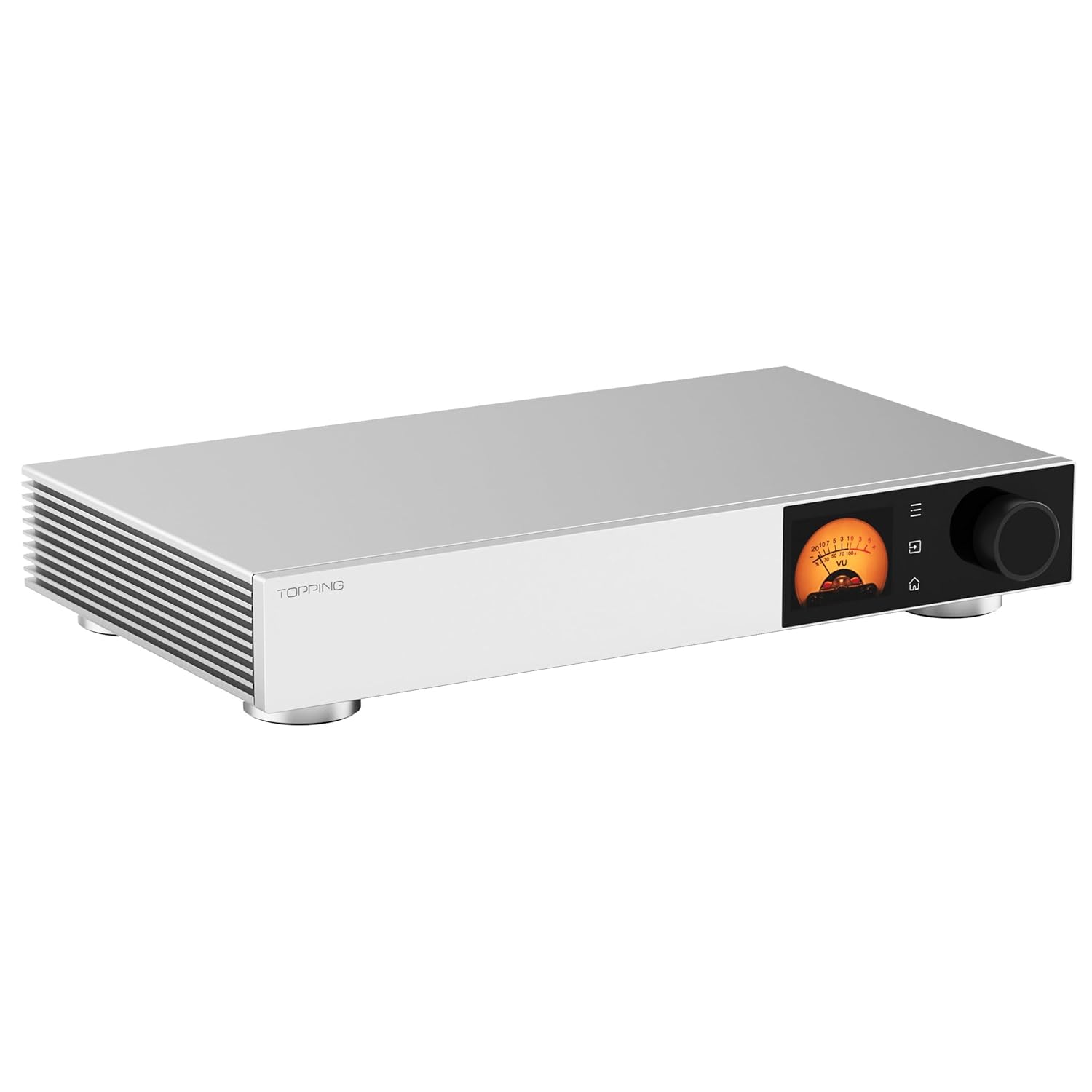
Figure 1: Front view of the TOPPING D900 DAC, showcasing its sleek silver chassis and integrated display.
Video 1: An overview of the TOPPING D900 DAC, highlighting its design and key features in operation.
Setup
1. Unpacking and Placement
Carefully remove the D900 from its packaging. Ensure all accessories, including the power cable and remote control, are present. Place the unit on a stable, flat surface with adequate ventilation to prevent overheating. Avoid placing it near strong magnetic fields or heat sources.
2. Power Connection
Connect the provided power cable to the AC inlet on the rear panel of the D900 and then to a suitable wall outlet. Ensure the power switch is in the OFF position before connecting.
3. Audio Connections
The D900 offers a variety of input and output options. Select the appropriate cables for your audio system.

Figure 2: Front and rear panel overview of the TOPPING D900, showing all available connections.

Figure 3: Angled view of the TOPPING D900 rear panel, detailing the various input and output ports.
- Analog Outputs:
- XLR Balanced Output: Connect to balanced inputs of an amplifier or active speakers using XLR cables.
- RCA Single-Ended Output: Connect to single-ended inputs of an amplifier or active speakers using RCA cables.
- Digital Inputs:
- USB-B / USB-C: Connect to a computer or digital audio player.
- Optical (TOSLINK): Connect to devices with optical digital output (e.g., CD players, TVs).
- Coaxial (RCA): Connect to devices with coaxial digital output.
- AES (XLR): Connect to professional audio equipment with AES/EBU digital output.
- IIS-LVDS (HDMI): Connect to compatible devices for high-quality digital audio transmission.
- Bluetooth: For wireless audio streaming from compatible devices.
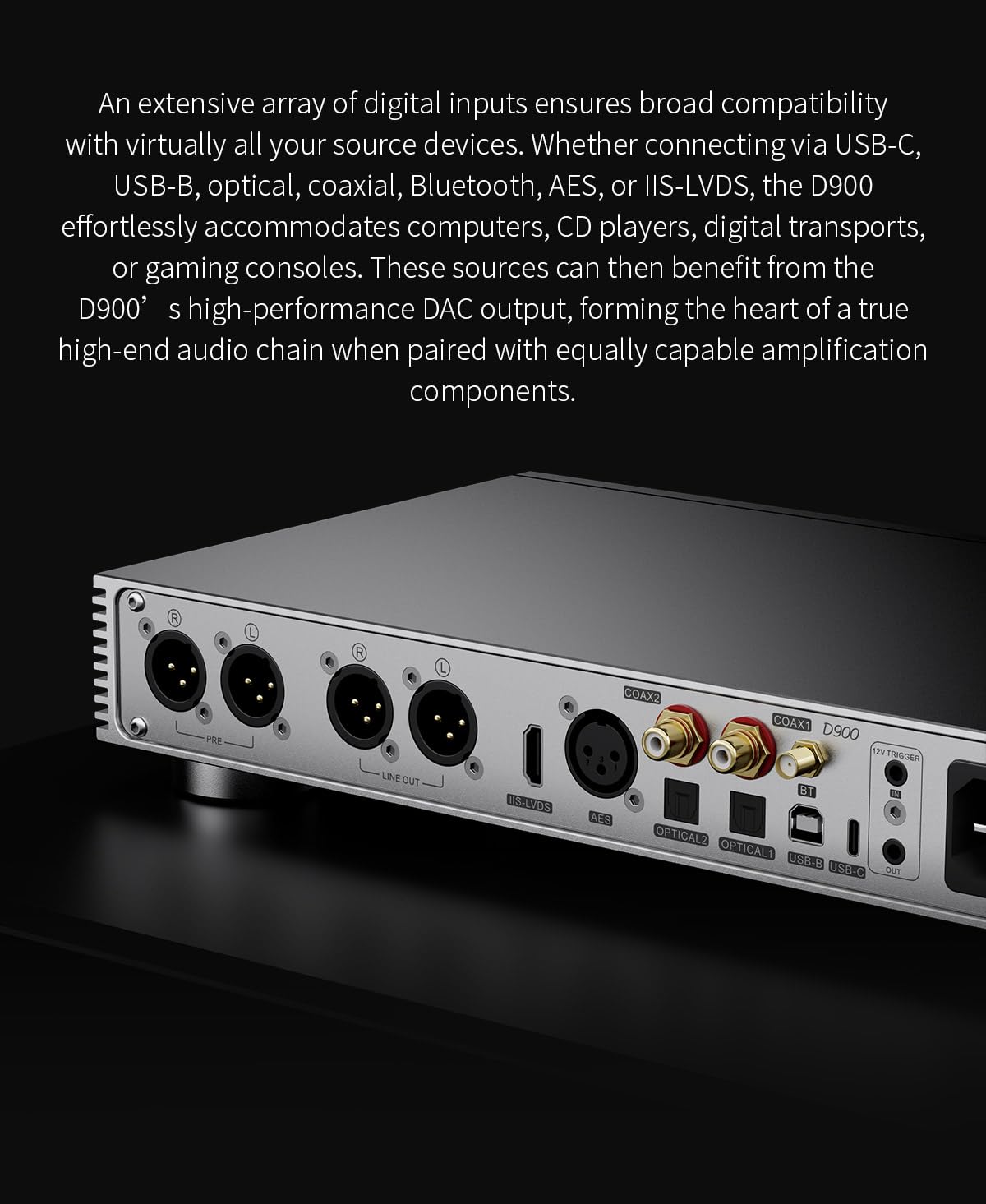
Figure 4: Close-up view of the TOPPING D900's rear panel, clearly labeling each input and output port for easy connection.
Operating Instructions
1. Powering On/Off
After connecting all cables, flip the power switch on the rear panel to the ON position. The unit will power on and display the TOPPING logo before showing the main interface.
2. Front Panel Controls and Display
The D900 features a full-color display and a multi-function knob for intuitive control.
- Multi-function Knob: Rotate to adjust volume or navigate menus. Press to confirm selections.
- Display: Shows current input, volume level, sample rate, and various display modes (e.g., FFT spectrum, VU meter).

Figure 5: The interactive full-color display of the TOPPING D900, showing various customizable display modes and background color options.
3. Input Selection
Use the front panel knob or the remote control to cycle through available digital inputs (USB-B, USB-C, Optical 1/2, Coaxial 1/2, AES, IIS-LVDS, Bluetooth). The selected input will be indicated on the display.
4. Volume Control and Preamp Function
The D900 can function as a DAC with fixed output or as a preamplifier with variable volume control. Rotate the knob to adjust the volume in 0.5dB steps. The current volume level is shown on the display. For direct connection to active speakers or power amplifiers, enable the preamp function in the settings menu.
5. Bluetooth Pairing
To pair a Bluetooth device, select the Bluetooth input. The D900 will enter pairing mode. On your device, search for "TOPPING D900" and connect. The D900 supports LDAC, aptX HD, aptX, AAC, and SBC codecs.
6. PEQ Tuning (Parametric Equalizer)
The D900 features a customizable 10-band parametric equalizer. This function requires the use of TOPPING's desktop PEQ software (available for download from the official TOPPING website). The software allows you to adjust frequency, gain, and Q value for each band, supporting target curve matching and multiple user profiles. The PEQ function supports PCM up to 192kHz/32bit.

Figure 6: Screenshot of the TOPPING PEQ software interface, demonstrating the 10-band adjustment capabilities.
7. Remote Control
The included CNC-machined aluminum remote control provides full functionality for the D900, including power, input selection, volume adjustment, and menu navigation.

Figure 7: The premium CNC-machined remote control for the TOPPING D900, offering convenient operation.
Maintenance
To ensure the longevity and optimal performance of your TOPPING D900, follow these maintenance guidelines:
- Cleaning: Use a soft, dry cloth to wipe the exterior of the unit. Avoid using abrasive cleaners, solvents, or chemical sprays, as these can damage the finish.
- Ventilation: Ensure the ventilation slots on the sides and rear of the unit are not obstructed. Proper airflow is crucial for heat dissipation.
- Storage: If storing the unit for an extended period, disconnect it from power and store it in a cool, dry place, ideally in its original packaging.
- Handling: Handle the unit with care. Avoid dropping or subjecting it to strong impacts.
Troubleshooting
If you encounter issues with your D900, refer to the following common problems and solutions:
| Problem | Possible Cause | Solution |
|---|---|---|
| No power | Power cable not connected; Power switch off; Power outlet issue. | Check power cable connection; Ensure power switch is ON; Test power outlet with another device. |
| No sound output | Incorrect input selected; Volume too low; Amplifier/speaker issue; Incorrect cable connection. | Verify correct input on D900; Increase volume; Check amplifier/speaker status; Ensure audio cables are securely connected to correct outputs. |
| Bluetooth connection unstable or failing | Device too far; Interference; D900 not in pairing mode. | Move device closer to D900; Reduce interference from other wireless devices; Re-enter Bluetooth pairing mode on D900 and re-pair. |
| Distorted audio | Input signal too high; Cable issues; Sample rate mismatch. | Reduce source volume; Check and replace audio cables if damaged; Ensure source output sample rate is compatible. |
If the problem persists after attempting these solutions, please contact TOPPING customer support or refer to the official TOPPING website for further assistance.
Specifications
The following table outlines the key specifications of the TOPPING D900 DAC:
| Feature | Detail |
|---|---|
| Product Dimensions | 12.99 x 8.27 x 2.24 inches; 10.5 Pounds |
| Item Model Number | TP-D900 |
| Manufacturer | TOPPING |
| Interface Type | Optical, USB-C, USB-B, Coaxial, AES, IIS-LVDS, Bluetooth |
| Number of Channels | 2 |
| THD (Total Harmonic Distortion) | As low as -140dB |
| SNR (Signal-to-Noise Ratio) | 131dB |
| Bluetooth Version | 5.1 (LDAC/aptX/HD/AAC/SBC) |
| PEQ | Customizable 10-Band Parametric Equalizer |
Note: Specifications are subject to change without prior notice. For the most up-to-date information, please refer to the official TOPPING website.
Warranty and Support
Warranty Information
The TOPPING D900 comes with a manufacturer's warranty. Please refer to the warranty card included in your product packaging or visit the official TOPPING website for detailed warranty terms and conditions. Keep your purchase receipt as proof of purchase for warranty claims.
Customer Support
For technical assistance, troubleshooting, or service inquiries, please contact TOPPING customer support. You can find contact information on the official TOPPING website or through the seller, Toppingaudio, on Amazon.
Additional resources:
- A Quick Start Guide is included with your product.
- Visit the official TOPPING Store on Amazon for more product information and updates.
Related documentsTP-D900

Ask a question about this manual
Ask about setup, troubleshooting, compatibility, parts, safety, or missing instructions. Manuals+ will review the question and use this page’s manual context to help answer it.