1. Introduction
Thank you for choosing the KODAK V500 Video Light. This professional-grade video light is designed to provide powerful, adjustable illumination for various photography and videography needs. Featuring a wide color temperature range from 2800K to 6500K, a high Color Rendering Index (CRI) of 96, and dimmable brightness, the V500 ensures accurate and versatile lighting. Its lightweight design, intuitive LCD display, and wireless remote control make it an essential tool for both studio and on-location use.
2. Important Safety Instructions
Please read all safety instructions carefully before using the KODAK V500 Video Light. Failure to follow these instructions may result in electric shock, fire, or serious injury.
- Do not operate the light with wet hands or in wet conditions.
- Do not block the ventilation openings on the light fixture. Overheating can cause damage or fire.
- Do not look directly into the light source when it is operating at high brightness. This can cause eye damage.
- Keep the light away from flammable materials and liquids.
- Ensure the light is securely mounted on a stable stand before operation.
- Use only the specified power adapter and accessories.
- Disconnect the power supply before cleaning or when not in use.
- This product is not a toy. Keep out of reach of children.
- If any malfunction occurs, immediately disconnect power and contact customer support.
3. Package Contents
Verify that all items are present in your package:
- KODAK V500 Video Light Unit
- Wireless Remote Control
- Power Adapter
- Standard Reflector
- Instruction Manual
4. Product Overview
Familiarize yourself with the components of your KODAK V500 Video Light and its remote control.
4.1. KODAK V500 Video Light Unit
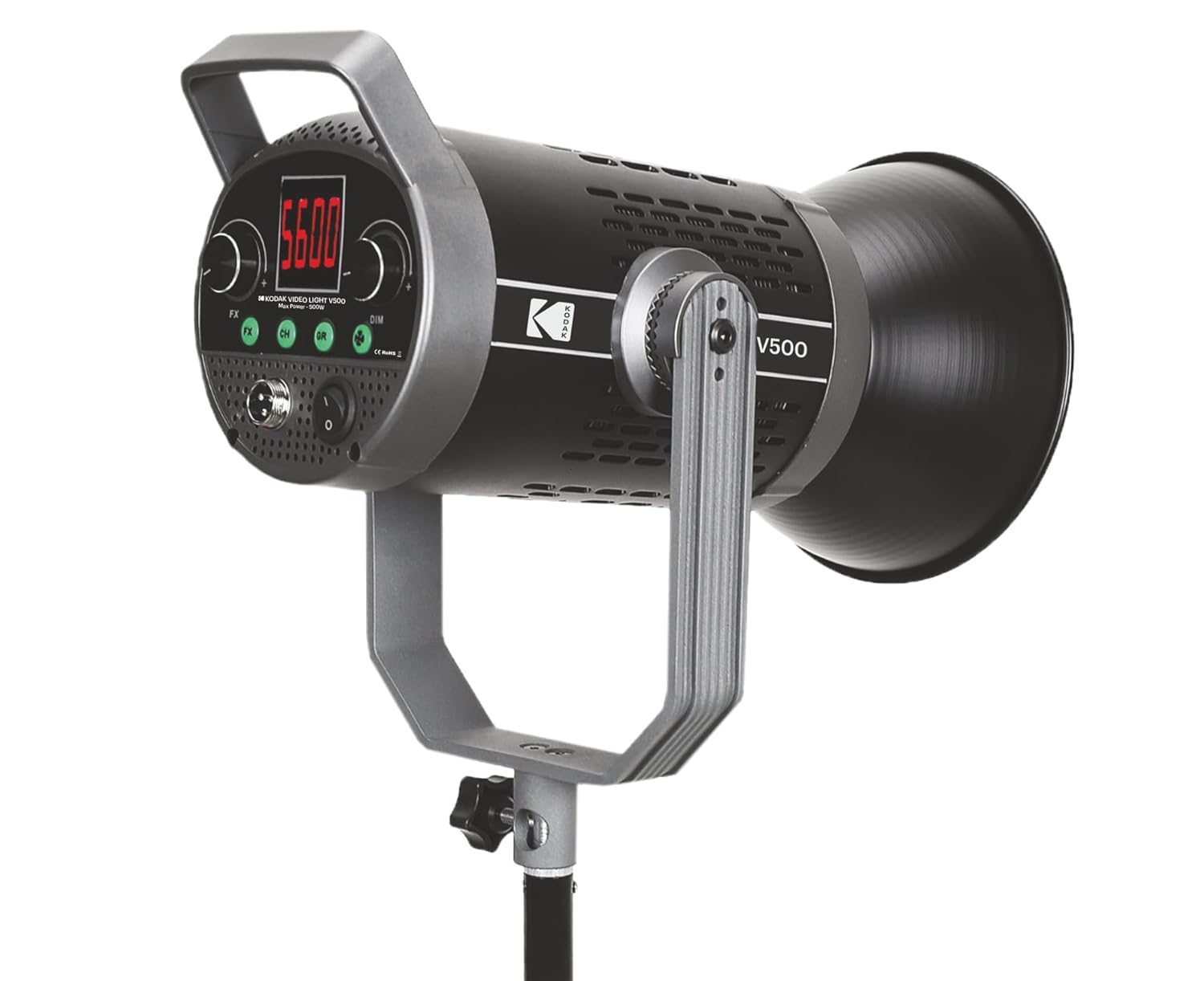
Figure 1: Front view of the KODAK V500 Video Light with reflector attached, mounted on a light stand.

Figure 2: Rear control panel of the KODAK V500 Video Light.
- Reflector: Directs and focuses the light output.
- LED Light Source: High-power LED array.
- Mounting Bracket: Allows attachment to a light stand and adjustment of tilt angle.
- Locking Knob: Secures the light's tilt angle.
- LCD Display: Shows current settings such as color temperature, brightness, and channel/group.
- FX Button: Activates special effects modes (if available).
- CH/GR Buttons: Selects the operating channel or group for wireless control.
- DIM Dial: Adjusts brightness intensity.
- CCT Dial: Adjusts color temperature (Correlated Color Temperature).
- Power Input (DC IN): Connects to the power adapter.
- Power Switch: Turns the light ON or OFF.
4.2. Wireless Remote Control

Figure 3: KODAK V500 Wireless Remote Control.
- Power Button: Turns the light ON or OFF.
- CCT/MODE Button: Switches between Color Temperature adjustment and other modes.
- SET Button: Confirms selections or enters menu.
- +/- Buttons: Adjusts values (brightness, color temperature) or navigates menus.
- KODAK Logo: Brand identification.
5. Setup Instructions
Follow these steps to set up your KODAK V500 Video Light for use.
- Mounting the Light:
- Attach the KODAK V500 Video Light to a compatible light stand using the mounting bracket.
- Tighten the locking knob on the light stand to secure the light.
- Adjust the tilt angle of the light using the locking knob on the light's mounting bracket, then tighten to secure.
- Attaching the Reflector:
- Align the reflector with the front of the light unit.
- Twist the reflector clockwise until it locks securely into place.
- Connecting Power:
- Connect the power adapter cable to the DC IN port on the rear of the light unit.
- Plug the power adapter into a suitable electrical outlet.
6. Operating Instructions
Learn how to power on, adjust settings, and utilize the features of your KODAK V500 Video Light.
6.1. Powering On/Off
Press the Power Switch on the rear control panel of the light unit to turn the light ON or OFF. Alternatively, use the Power Button on the wireless remote control.
6.2. Adjusting Brightness
The KODAK V500 offers dimmable brightness control:
- On the Light Unit: Rotate the DIM Dial clockwise to increase brightness and counter-clockwise to decrease brightness. The brightness level will be displayed on the LCD.
- Using the Remote Control: Press the +/- Buttons to adjust the brightness level.
6.3. Adjusting Color Temperature
The color temperature can be adjusted from 2800K (warm) to 6500K (cool):
- On the Light Unit: Rotate the CCT Dial clockwise to increase the color temperature (cooler light) and counter-clockwise to decrease it (warmer light). The color temperature will be displayed on the LCD.
- Using the Remote Control: Press the CCT/MODE Button to enter CCT adjustment mode, then use the +/- Buttons to change the color temperature.
6.4. Wireless Control (Channel and Group)
The KODAK V500 supports wireless control, allowing you to manage multiple lights simultaneously.
- Setting Channel (CH): Press the CH Button on the light unit or remote. Use the +/- Buttons (on remote) or DIM/CCT Dials (on light) to select a channel (e.g., 1-16). Ensure all lights you wish to control together are set to the same channel.
- Setting Group (GR): Press the GR Button on the light unit or remote. Use the +/- Buttons (on remote) or DIM/CCT Dials (on light) to select a group (e.g., A, B, C). This allows for independent control of lights within the same channel but different groups.
- Pairing Remote: The remote should automatically pair with lights on the same channel and group. If not, ensure both the light and remote are set to the desired channel and group.
6.5. Special Effects (FX)
The KODAK V500 may include various special effects modes for creative lighting scenarios.
- Press the FX Button on the light unit to cycle through available special effects.
- Use the DIM/CCT Dials to adjust parameters within the selected effect, if applicable.
7. Maintenance
Proper maintenance ensures the longevity and optimal performance of your KODAK V500 Video Light.
- Cleaning: Use a soft, dry cloth to wipe the exterior of the light. For stubborn dirt, a slightly damp cloth can be used, followed by a dry cloth. Do not use harsh chemicals, solvents, or abrasive cleaners.
- Storage: When not in use, store the light in a cool, dry place, away from direct sunlight and excessive humidity.
- Lens Care: Keep the LED light source clean and free of dust. Use a lens blower or a soft brush to remove dust. Avoid touching the LED surface directly.
8. Troubleshooting
If you encounter issues with your KODAK V500 Video Light, refer to the following common problems and solutions.
| Problem | Possible Cause | Solution |
|---|---|---|
| Light does not turn on. | No power supply; Power adapter not connected; Power switch off. | Ensure power adapter is securely connected and plugged into a working outlet. Check if the power switch is in the ON position. |
| Remote control not working. | Remote batteries low/dead; Incorrect channel/group setting; Obstruction between remote and light. | Replace remote batteries. Ensure the remote and light are set to the same channel and group. Remove any obstructions. Operate within effective range. |
| Brightness or color temperature cannot be adjusted. | Controls locked; Malfunction. | Check if any lock function is active (refer to advanced settings if applicable). If the issue persists, contact customer support. |
| Light flickers or behaves erratically. | Unstable power supply; Overheating; Internal fault. | Ensure a stable power source. Allow the light to cool down if it has been operating for an extended period. If the problem continues, discontinue use and contact support. |
9. Specifications
Detailed technical specifications for the KODAK V500 Video Light.
| Feature | Detail |
|---|---|
| Model Number | V500 |
| Power Output | 500W |
| Color Temperature Range | 2800K - 6500K |
| Color Rendering Index (CRI) | 96 |
| Brightness Adjustment | Dimmable |
| Control Method | On-board controls, Wireless Remote Control |
| Product Dimensions (LxWxH) | 33.5 x 19.5 x 15.5 cm |
| Item Weight | 2.88 kg |
| Country of Origin | China |
10. Warranty and Customer Support
KODAK products are manufactured to high-quality standards. For warranty information, please refer to the warranty card included with your product or visit the official KODAK website. For technical assistance, troubleshooting, or service inquiries, please contact KODAK customer support.
Manufacturer Contact:
BHATIA PHOTO INDUSTRIES PVT LTD
Floor No.3, Kundan House, Nehru Place, New Delhi, Delhi, 110019
Contact: 9999535381
Email: Lapstuffmart204@gmail.com


