
1. Introduction
This manual provides detailed instructions for the installation, operation, and maintenance of your Eonon FDF1X7 (Upgraded FDF1X6) Android 14 Car Stereo. This unit is specifically designed to integrate seamlessly with 2009-2014 Ford F150 models, enhancing your in-car entertainment and connectivity experience.

Image: The Eonon FDF1X7 Android 14 Car Stereo, showcasing its 9-inch display, along with the included external microphone and backup camera.
2. Applicable Models
The Eonon FDF1X7 car stereo is custom-designed for the 2009-2014 Ford F150 radio, ensuring a perfect match with your dashboard without requiring additional frame modifications. It offers plug-and-play functionality and retains original equipment manufacturer (OEM) features such as steering wheel controls, stock amplifier integration, door reminder, and AC controls.
Image: Visual guide indicating suitable and unsuitable dashboard configurations for the 2009-2014 Ford F150, ensuring proper fitment.
Please verify your vehicle's model year and dashboard dimensions to ensure compatibility before purchase. The installation process is simplified by following the provided wiring diagram and video instructions.

Image: Detailed comparison of various Ford F150 dashboard types, highlighting which ones are compatible with the Eonon FDF1X7 unit.
3. Key Features
3.1. Powerful Performance
The Eonon FDF1X7 operates on a REAL Android 14 OS, allowing for extensive app installations and customization. It is powered by an RK3562 Quad-core ARM Cortex-A53 @ 2.0GHz CPU, ensuring smooth and responsive performance for multitasking and navigation. With 3GB RAM and 32GB ROM, it provides ample memory for applications, media, and system operations.
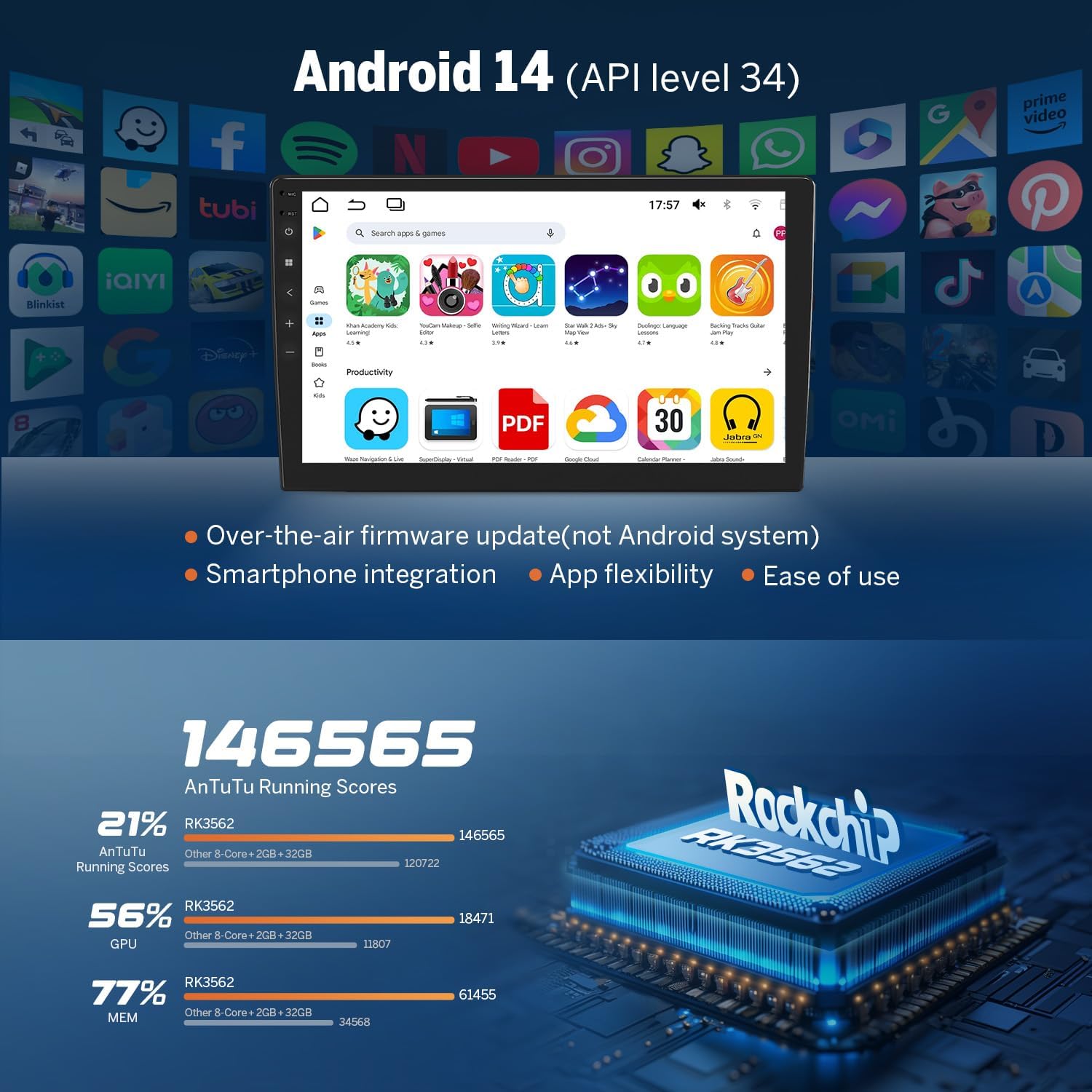
Image: Screenshot of the Android 14 interface, demonstrating app flexibility and ease of use, alongside performance benchmarks for the RK3562 processor.

Image: Instructions on how to verify the true specifications of the device, including Android version, processor, RAM, and ROM, using a 'Fake Device Test' application.

Image: An exploded view of the Eonon X7 series internal components, highlighting the ST 4x45W amplifier, Wi-Fi 6 & Bluetooth 5.4 module, Silicon Labs Si4755 tuner, Samsung & Micron memory, and a 4-layer automotive PCB.
3.2. Seamless Connectivity
Experience effortless smartphone integration with Wireless & Wired Apple CarPlay and Android Auto, enabling navigation, calls, and media playback directly from your car stereo. Screen Mirroring allows you to display your phone’s screen on the unit for enhanced convenience. Bluetooth 5.4 ensures fast and stable connections for hands-free calls and audio streaming. The unit also includes a 1080P AHD Rearview Camera for improved safety during reversing. It is compatible with other Eonon accessories, such as Eonon dash cams and V0056 OBD2 diagnostic tools.

Image: Demonstrates the seamless integration of Wireless Apple CarPlay and Android Auto, showing their respective interfaces on the car stereo display.
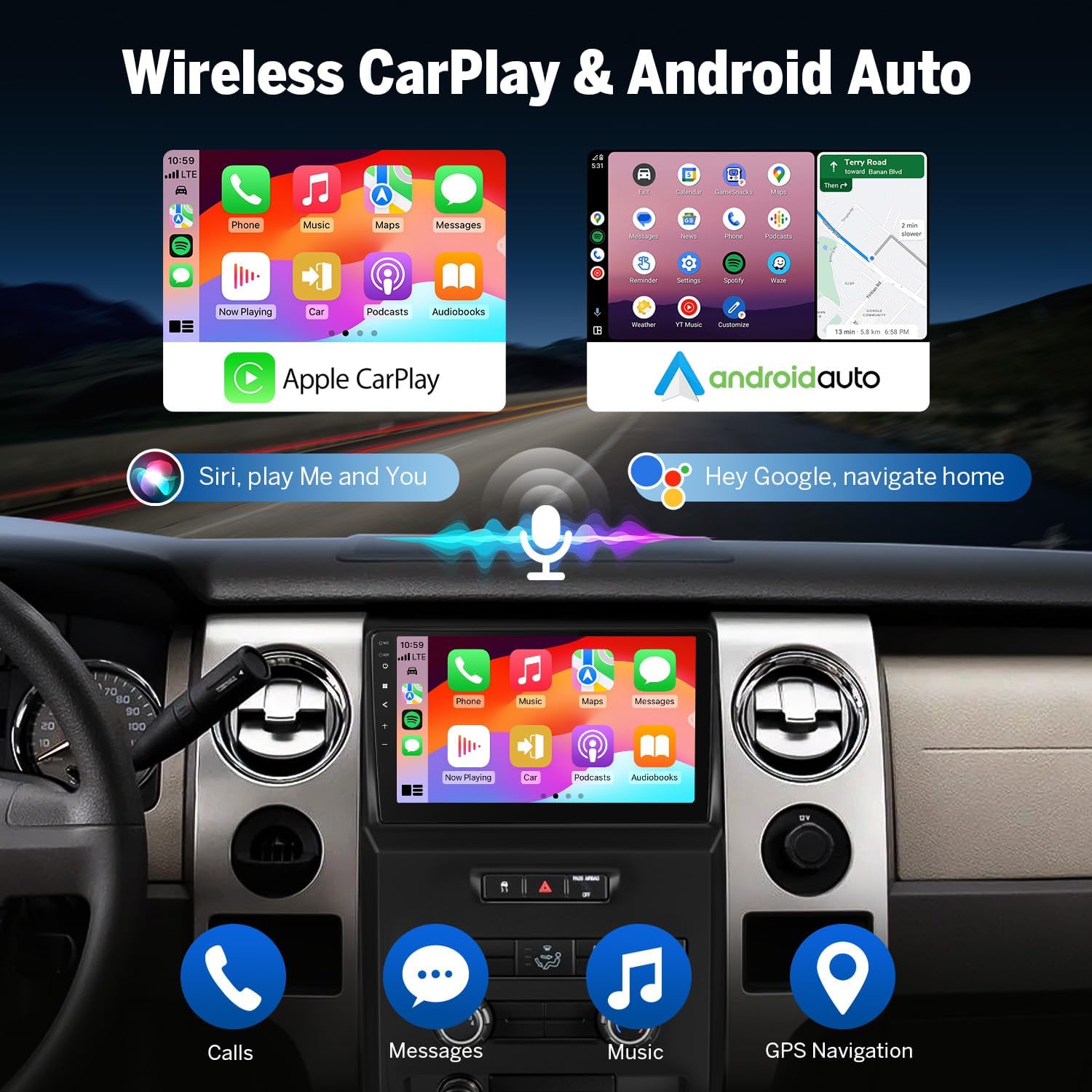
Image: Highlights the independent Bluetooth module and extra Bluetooth antenna, emphasizing quick and stable connection, noise reduction, crystal-clear call quality, and high-quality Bluetooth music streaming.

Image: Illustrates the integration of essential Android car stereo accessories, including the A100 dash cam (not included), A0125 backup camera (included), and V0056 OBD2 diagnostic tool (not included).
3.3. Immersive Audio Experience
The Eonon FDF1X7 features a built-in DSP Audio Processor with a 48-band equalizer for precise sound customization. The ST TDA7388 Amplifier delivers 4x45W surround sound output, providing a rich audio experience. It includes 4-Channel FR/FL/RR/RL RCA audio outputs plus 1 Subwoofer output for professional-grade audio setups. EQ Modes such as Custom, Standard, Popular, Rock, Classical, and Jazz are available for tailored sound profiles.

Image: Depicts the professional 32-bit DSP with FFT acceleration, highlighting its ability to deliver ultra-precise, dynamic sound, a 48-band EQ with 3D surround & virtual bass, and optimization for car acoustics.
3.4. User-Friendly Design
Personalize your car's interior with customizable button lights. Choose from 3 preloaded UI themes to suit your preference. The Power-Off Playback Memory feature ensures that playback resumes from where you left off, even after restarting the car.
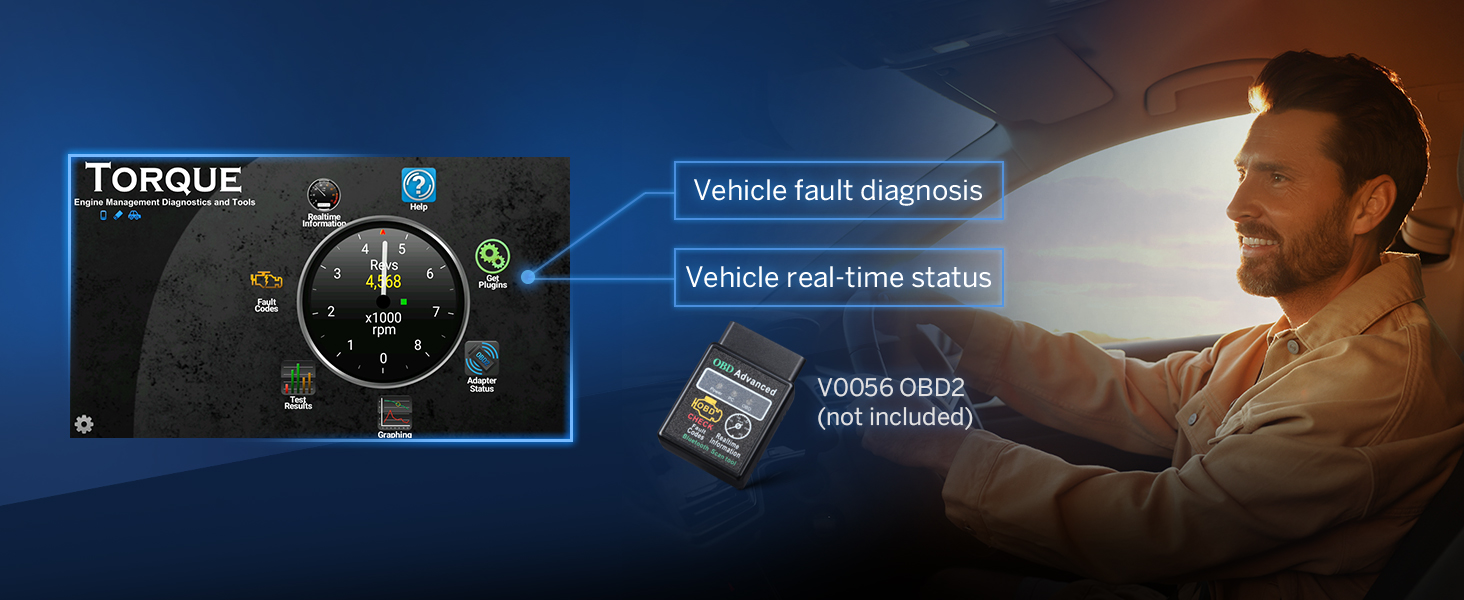
Image: Shows three distinct user interface themes available for customization, allowing users to personalize the look of their car stereo display.
4. Setup and Installation
4.1. What's in the Box
Verify that all components listed below are included in your package:

Image: A visual representation of all items included in the product package, such as cables, antennas, screws, brackets, and the user manual.
- Audio Video Adapter Cable x1
- Audio Adapter Cable x1
- CarPlay & Android Auto USB Adapter Cable x1
- USB Adapter Cable x1
- Backup Camera Video Input Cable x1
- Radio Antenna Adapter Cable x1
- Power Cable x1
- GPS Antenna x1
- Screw x8
- Bracket x2
- Radio Antenna Adapter x1
- External Microphone x1
- Adhesive Pad x1
- CAN Bus x1
- Spare Fuse x1
- User Manual x1
4.2. Wiring Diagram
Follow the detailed wiring diagram for proper installation. Ensure all connections are secure to prevent malfunctions.

Image: Comprehensive wiring diagram illustrating all connection points and cable types for the Eonon FDF1X7 head unit, including CAN Bus, power, audio outputs, and accessory inputs.
5. Operating Instructions
5.1. Wireless Apple CarPlay Connection
To connect your iPhone wirelessly to Apple CarPlay:
- Click the Zlink5 app on the car stereo.
- Turn on Wi-Fi and Bluetooth on your iPhone.
- Find 'EONON' in your phone's Bluetooth device list and enter '0000' to pair.
- Once connected, tap 'Use CarPlay' and wait a few seconds to complete the connection.

Image: Step-by-step visual guide for connecting an iPhone to the car stereo via wireless Apple CarPlay, detailing app selection, Bluetooth pairing, and confirmation.
5.2. Wireless Android Auto Connection
To connect your Android phone wirelessly to Android Auto:
- Click the Zlink5 app on the car stereo.
- Turn on Wi-Fi and Bluetooth on your Android phone.
- Find 'EONON' in your phone's Bluetooth device list, enter '0000' and click 'OK'.
- Wait a few seconds to complete the connection.

Image: Step-by-step visual guide for connecting an Android phone to the car stereo via wireless Android Auto, detailing app selection, Bluetooth pairing, and confirmation.
5.3. Screen Mirroring for iOS
To mirror your iOS device screen:
- Click the Zlink5 app on the car stereo. Set the car stereo to iPhone wireless screen mirroring mode.
- Turn on the iPhone hotspot and connect to the car stereo.
- Turn on the iPhone screen mirroring function and select 'zj-airplay'.

Image: Visual instructions for setting up screen mirroring from an iOS device to the car stereo, including Zlink5 app settings, hotspot connection, and AirPlay selection.
5.4. Screen Mirroring for Android
To mirror your Android device screen:
- Click the Zlink5 app on the car stereo. Set the car stereo to Android wireless screen mirroring mode.
- Turn on your phone's Bluetooth. Find 'EONON' in your phone's Bluetooth device list, enter '0000' to pair.
- Turn on your phone's hotspot and connect to the car stereo.
- Install the Zplus app on your phone. Turn on the app and select 'wireless connection'.
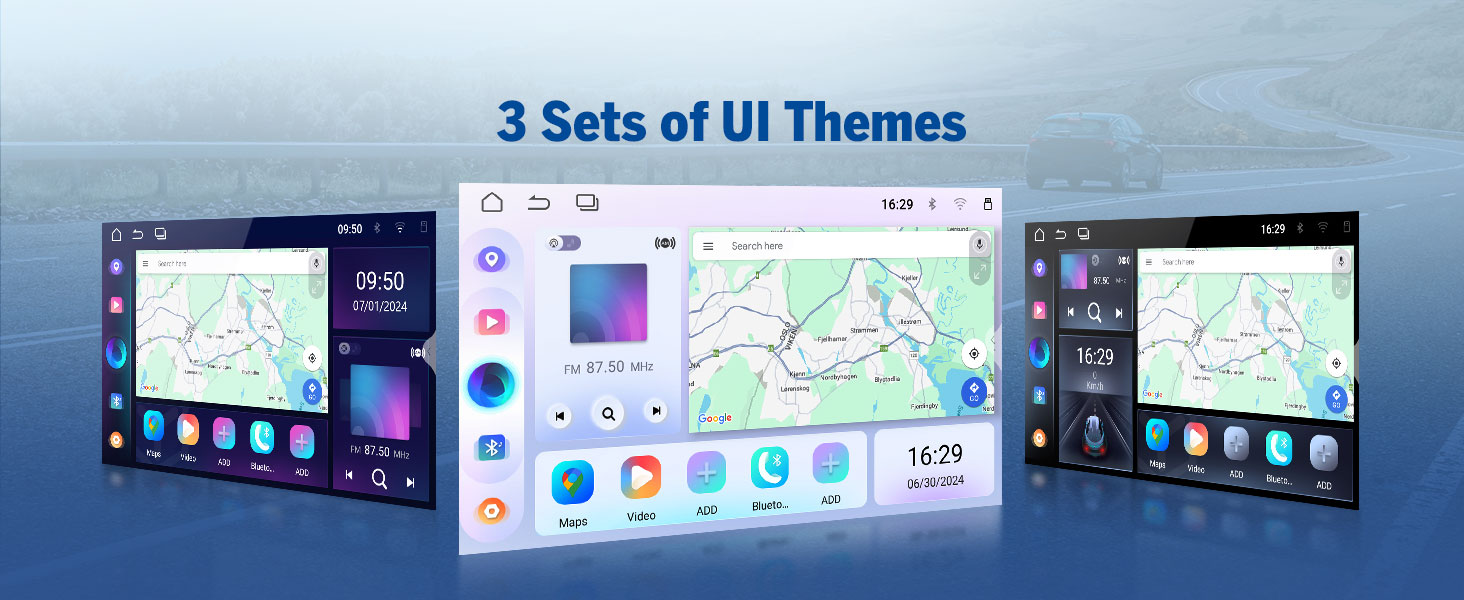
Image: Visual instructions for setting up screen mirroring from an Android device to the car stereo, including Zlink5 app settings, Bluetooth pairing, hotspot connection, and Zplus app usage.
5.5. Backup Camera Operation
The included 1080P AHD Rearview Camera enhances safety by providing a clear view while reversing. It features reversing guidelines and a 140° rear viewing angle. The camera is IP68 waterproof for durability.

Image: A simulated view from the backup camera, showing reversing guidelines and the wide 140-degree viewing angle for safe parking maneuvers.
5.6. Dash Cam and OBD2 Integration
The unit supports integration with Eonon dash cams (e.g., A100, not included) for recording driving footage with a 120° viewing angle and video playback. It also works seamlessly with V0056 OBD2 diagnostic tools (not included) to provide vehicle fault diagnosis and real-time status information.

Image: Illustrates the view from a compatible dash cam, highlighting its 120-degree viewing angle and adjustable features for comprehensive road recording.

Image: Shows the interface of the Torque app with an OBD2 diagnostic tool, displaying vehicle fault diagnosis and real-time status information.
6. Maintenance
To ensure the longevity and optimal performance of your Eonon car stereo, follow these maintenance guidelines:
- Cleaning the Screen: Use a soft, lint-free cloth to gently wipe the display. For stubborn smudges, slightly dampen the cloth with water or a screen-safe cleaner. Avoid abrasive materials or harsh chemicals.
- General Cleaning: Keep the unit free from dust and debris. Use a soft brush or compressed air to clean vents and ports.
- Software Updates: Periodically check for firmware updates via Over-The-Air (OTA) updates to ensure the system runs efficiently and securely. Note that Android system upgrades are not supported, but firmware updates address software issues and enhance security.
7. Troubleshooting
If you encounter issues with your Eonon car stereo, refer to the following common troubleshooting tips:
- No Power: Check all power connections and the vehicle's fuse box. Ensure the unit is properly seated in its harness.
- No Sound: Verify speaker connections and audio output settings. Check the volume level and ensure the mute function is not activated. If using an external amplifier, confirm its power and connections.
- Bluetooth Connectivity Issues: Ensure Bluetooth is enabled on both the stereo and your mobile device. Delete previous pairings and attempt to re-pair. Check for interference from other devices.
- CarPlay/Android Auto Not Connecting: Ensure the Zlink5 app is running. Verify Wi-Fi and Bluetooth are active on your phone. For wired connections, try a different USB cable.
- Touchscreen Unresponsive: Try restarting the unit. If the issue persists, a factory reset may be necessary (refer to the system settings for this option).
- GPS Signal Loss: Ensure the GPS antenna is properly installed and has a clear line of sight to the sky. Avoid placing it under metal objects.
- Software Bugs: While the software is generally stable, minor bugs may occur. Ensure your firmware is up to date via OTA updates. If a persistent bug affects core functionality, contact Eonon support.
For more complex issues, please refer to the comprehensive troubleshooting section in the full user manual or contact Eonon customer support.
8. Specifications
Technical specifications for the Eonon FDF1X7 (Upgraded FDF1X6) Android 14 Car Stereo:
| Feature | Specification |
|---|---|
| Operating System | REAL Android 14 |
| Processor | RK3562 Quad-core ARM Cortex-A53 @ 2.0GHz |
| RAM | 3GB |
| ROM | 32GB |
| Display Size | 9 Inches |
| Display Resolution | 1280*720 |
| Viewing Angle | 178° |
| Bluetooth Version | 5.4 |
| Amplifier | ST TDA7388 (4x45W) |
| DSP | Built-in 32-bit DSP Audio Processor with 48-band EQ |
| Connectivity Technology | Bluetooth, USB, Wi-Fi (5GHz) |
| Audio Output Mode | Stereo (4-Channel FR/FL/RR/RL + 1 Subwoofer output) |
| Control Method | Touch, Voice |
| Supported Internet Services | Netflix, Pandora, Skype, YouTube |
| Video Encoding | MPG, DAT, TS, AVI, MP4, MOV, 3GP, ASF, VOB, MKV, FLV, RM, RMVB |
| Parcel Dimensions | 44.6 x 31.1 x 13.4 cm; 2.57 kg |
| Country of Origin | China |
9. Warranty and Support
Eonon provides comprehensive support for its products:
- Warranty: The Eonon FDF1X7 comes with a 2-year warranty.
- Returns: Enjoy 30-day free returns.
- Replacements: Replacements are available within 90 days of purchase.
- Customer Service: Quick replies within 24 hours (except weekends) and lifelong after-sales service are provided.
For further assistance, visit the official Eonon store or contact their customer support team.