
1. Product Overview
The BITIWEND Wireless Doorbell Chime Extender is designed to enhance your Blink Video Doorbell experience by providing an audible chime within your home. This system ensures you never miss a visitor, even when you are away from your smartphone or in a different part of your house. It is compatible with both the Blink Video Doorbell and the Blink Video Doorbell (2nd Gen).
The package includes a doorbell extender transmitter, a plug-in chime receiver, a double-sided adhesive sticker for mounting, a screwdriver, and a user manual.

Image: Overview of the BITIWEND Wireless Doorbell Chime Extender components, including the transmitter, receiver, and accessories.
2. Package Contents
- 1 x Doorbell Extender Transmitter
- 1 x Chime Receiver (Plug-in)
- 1 x Double-sided Adhesive Sticker
- 1 x Screwdriver
- 1 x User Manual

Image: All items included in the BITIWEND Wireless Doorbell Chime Extender package, laid out on a surface.
3. Compatibility
This product is compatible with the following Blink Video Doorbell models:
- Blink Video Doorbell (1st Generation)
- Blink Video Doorbell (2nd Generation)
Important Note:
If your Blink Video Doorbell is currently connected to a wired doorbell, you must remove the wires from the existing wired doorbell before connecting the BITIWEND transmitter. This product cannot be connected to a wired doorbell simultaneously with the existing wiring.

Image: Two Blink Video Doorbell models (1st and 2nd Gen) with checkmarks, indicating compatibility with the BITIWEND chime extender.
4. Setup and Installation
4.1 Connecting the Transmitter to your Blink Video Doorbell
- Ensure your Blink Video Doorbell is powered off or disconnected from any existing wired chime system.
- Locate the wiring terminals on the back of your Blink Video Doorbell.
- Connect the wires from the doorbell extender transmitter to these terminals. The connection is non-polarized, meaning it does not matter which wire connects to which terminal.
- Secure the transmitter to the back of the Blink Video Doorbell using the provided double-sided adhesive sticker.

Image: Diagram showing how to connect the small black transmitter unit to the back of the Blink Video Doorbell using the included wires.

Image: A detailed diagram illustrating the internal wiring connection of the expander to the Blink Video Doorbell and its wireless communication with the chime receiver.
4.2 Pairing the Chime Receiver with the Transmitter
- Plug the chime receiver into a standard electrical outlet in your desired location.
- On the chime receiver, press and hold the volume button for 5-7 seconds until you hear a "ding" sound and the indicator light flashes rapidly. This indicates the receiver is in pairing mode.
- Press the button on your Blink Video Doorbell. The transmitter's indicator light will illuminate, sending a signal to the receiver.
- Upon successful pairing, the receiver will play the selected chime, and the indicator light will stop flashing rapidly.

Image: Step-by-step visual guide on how to pair the doorbell extender transmitter with the plug-in chime receiver.
Video: Demonstrates the process of pairing the doorbell expander and the chime receiver. This video shows pressing the volume and music down buttons simultaneously on the receiver to enter pairing mode, then triggering the doorbell to complete the pairing.
5. Operating Instructions
5.1 Changing Chime Melodies
The chime receiver offers 58 different melodies. To change the melody:
- Short press the "Music Up" or "Music Down" buttons on the side of the chime receiver to cycle through the available melodies.
- Once you find a melody you prefer, it will be automatically saved.
Video: Illustrates how to change the doorbell receiver's music. It shows short pressing the music up and down buttons to switch melodies and selecting a favorite.
5.2 Adjusting Volume
The chime receiver provides 5 levels of volume adjustment (0-110dB). To adjust the volume:
- Short press the "Volume" button on the side of the chime receiver to cycle through the 5 volume levels.
- Select the desired volume level.

Image: Close-up of the plug-in chime receiver, highlighting the volume and melody selection buttons on its side.
5.3 Multi-Receiver Connection
One doorbell extender transmitter can connect up to 20 chime receivers. This allows for wider coverage in larger homes or properties. To add more receivers, repeat the pairing process (Section 4.2) for each additional receiver.

Image: An illustration showing a house layout with a Blink Video Doorbell and multiple chime receivers placed in various rooms, demonstrating wide coverage.
6. Maintenance
- Cleaning: Use a soft, dry cloth to clean the surfaces of the transmitter and receiver. Do not use liquid cleaners or abrasive materials.
- Placement: Ensure the receiver is plugged into a stable outlet and not obstructed by furniture or other objects that could block the sound.
- Environmental Conditions: The devices are designed for indoor use. Avoid exposing them to extreme temperatures, direct sunlight, or moisture.
7. Troubleshooting
| Problem | Possible Cause | Solution |
|---|---|---|
| Chime receiver does not ring when doorbell is pressed. |
|
|
| Chime volume is too low or too high. | Volume setting needs adjustment. | Adjust the volume using the "Volume" button on the receiver (Section 5.2). |
| Cannot change chime melody. | Incorrect button usage. | Short press the "Music Up" or "Music Down" buttons to cycle through melodies (Section 5.1). |
| Transmitter indicator light not on. |
|
|
8. Specifications
- Model: B22
- Brand: BITIWEND
- Compatibility: Blink Video Doorbell, Blink Video Doorbell (2nd Gen)
- Wireless Range: Up to 656 feet (approx. 200 meters)
- Chime Melodies: 58 options
- Volume Levels: 5 levels (0-110dB)
- Power Source (Receiver): AC Plug-in (US standard)
- Dimensions (Product): 3.62 x 3.35 x 7.6 inches
- Item Weight: 11.7 ounces
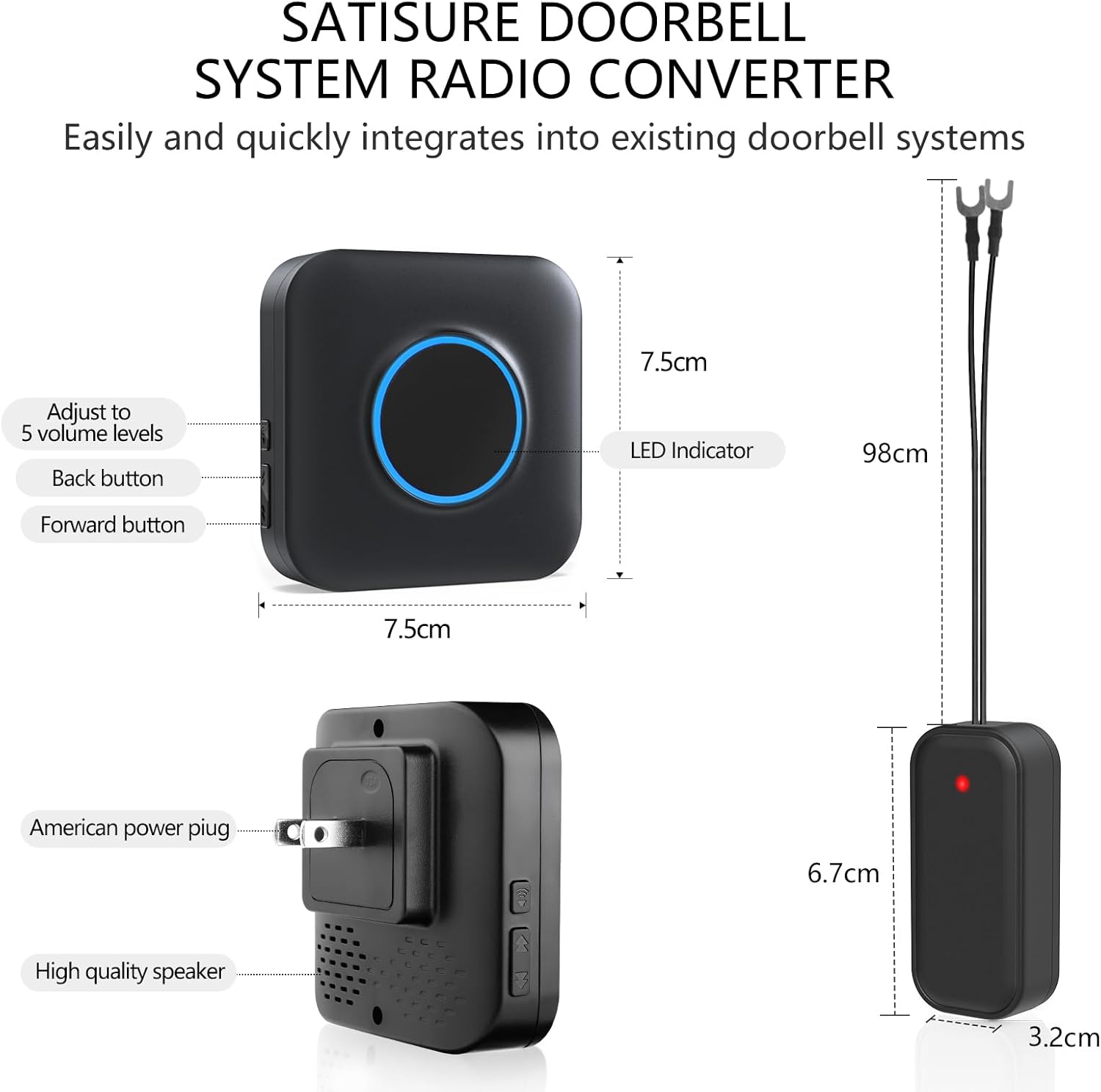
Image: Technical diagram showing the dimensions and key features of the BITIWEND Doorbell System Radio Converter, including the receiver and transmitter.
9. Warranty and Support
BITIWEND offers a 30-day money-back guarantee for this product. For any questions, concerns, or technical support, please contact the BITIWEND customer service team. Contact information can typically be found on the product packaging or through your purchase platform.
For additional support and resources, you may visit the BITIWEND Store on Amazon.


