
1. Introduction
Thank you for choosing the OLEVS Chronograph Quartz Watch Model 3678. This manual provides essential information for the proper setup, operation, and maintenance of your new timepiece. Please read these instructions carefully to ensure optimal performance and longevity of your watch.
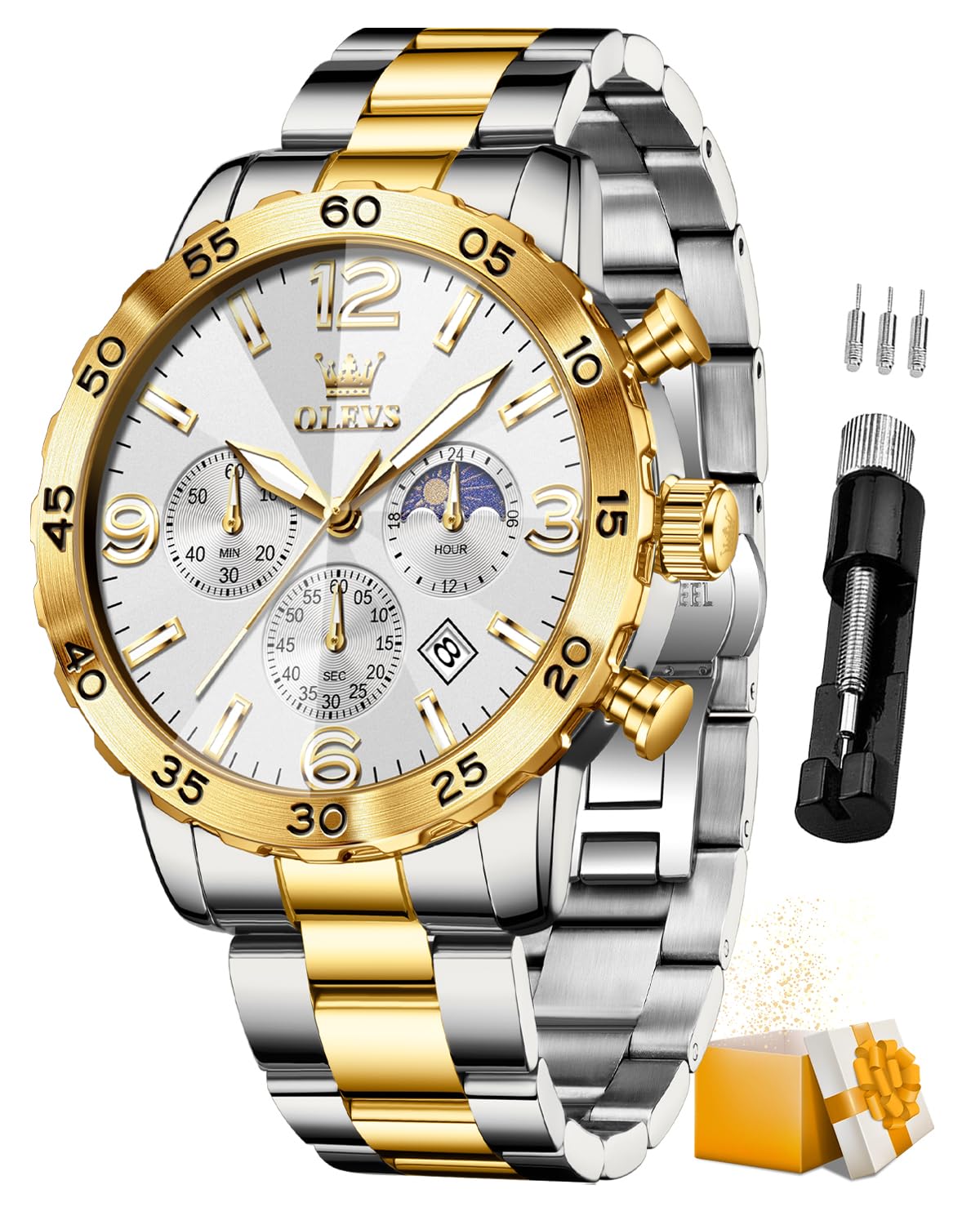
Image 1.1: OLEVS Chronograph Quartz Watch Model 3678.
2. Product Overview
The OLEVS Model 3678 is a sophisticated men's chronograph watch featuring a 44mm large dial, precise quartz movement, and a durable stainless steel construction. It includes a date display, chronograph subdials, and a 24-hour moon phase indicator. The watch is designed for daily wear with 30 meters of water resistance.
Key Features:
- Chronograph Function: For precise time measurement.
- 24-Hour Moon Phase Dial: Indicates day/night cycle.
- Date Display: Convenient calendar window.
- 30M Water Resistance: Suitable for daily splashes and rain.
- Rhombic Clear Coated Mirrors: Enhanced clarity and durability.
- Push Button Hidden Clasp: Secure and comfortable fit.

Image 2.1: Key features of the OLEVS Chronograph Watch.

Image 2.2: Watch dial and button functions.
Watch Components:
- Crown: Used for setting time and date.
- Top Pusher: Starts and stops the chronograph.
- Bottom Pusher: Resets the chronograph.
- Minute Subdial: Measures elapsed minutes for the chronograph.
- Seconds Subdial: Measures elapsed seconds for the chronograph.
- 24-Hour Moon Phase Dial: Displays the 24-hour cycle and moon phase.
- Date Window: Displays the current date.
3. Setup
Setting the Time:
- Pull the crown out to the second click position.
- Rotate the crown to adjust the hour and minute hands to the correct time. Ensure the 24-hour moon phase dial also aligns with AM/PM.
- Push the crown back to the normal position.
Setting the Date:
- Pull the crown out to the first click position.
- Rotate the crown to set the correct date. Avoid setting the date between 9 PM and 3 AM, as this may interfere with the date change mechanism.
- Push the crown back to the normal position.
Adjusting the Bracelet:
The stainless steel bracelet can be adjusted by removing or adding links. A specialized tool is often required for this process. If you are unsure, it is recommended to have a professional watchmaker adjust the bracelet to prevent damage.
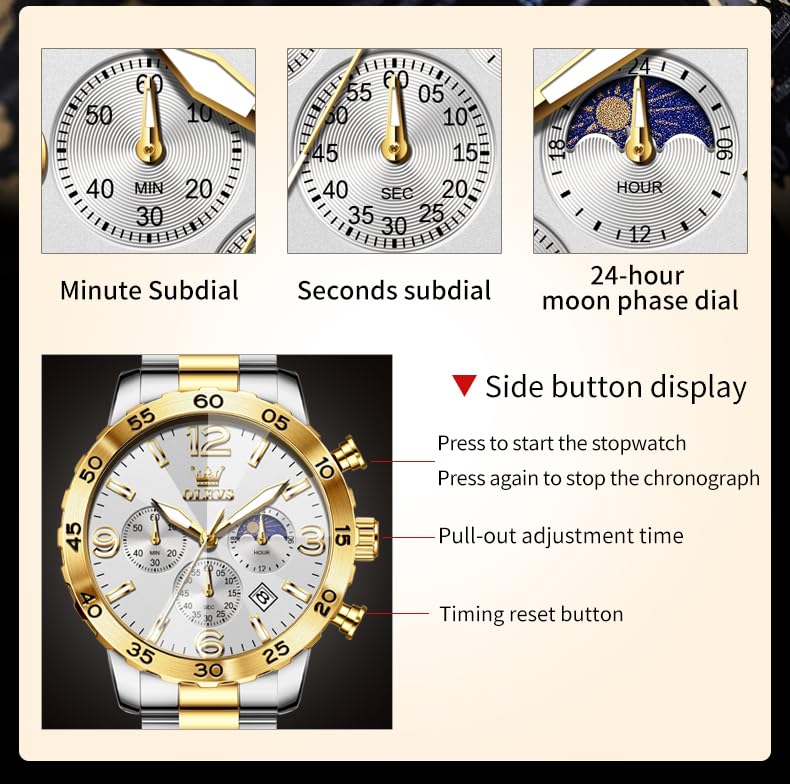
Image 3.1: Watch with band adjustment tool.
4. Operating the Chronograph
Using the Chronograph:
- To Start: Press the top pusher (at the 2 o'clock position) to start the chronograph. The seconds subdial will begin to move.
- To Stop: Press the top pusher again to stop the chronograph. The elapsed time will be indicated by the seconds and minute subdials.
- To Reset: Press the bottom pusher (at the 4 o'clock position) to reset the chronograph hands to zero. This can only be done when the chronograph is stopped.
Reading the 24-Hour Moon Phase Dial:
The subdial at the 6 o'clock position indicates the 24-hour cycle, with a sun icon for daytime and a moon icon for nighttime. This dial moves in conjunction with the main hour hand, providing a visual representation of the time of day.
5. Maintenance
Water Resistance:
Your OLEVS watch is rated for 30 meters (3ATM) of water resistance. This means it is suitable for daily use and can withstand splashes, rain, and hand-washing. It is not suitable for swimming, bathing, diving, or any prolonged water immersion. Always ensure the crown is fully pushed in to maintain water resistance.
Cleaning:
To clean your watch, wipe it gently with a soft, dry cloth. For the stainless steel bracelet, a slightly damp cloth can be used, followed by a dry cloth. Avoid using harsh chemicals or abrasive materials, as these can damage the watch's finish.
Battery Replacement:
This watch uses a quartz movement, powered by a battery. When the watch stops or the second hand begins to jump erratically, it indicates a low battery. Battery replacement should be performed by a qualified watch technician to ensure proper sealing and function.
6. Troubleshooting
Watch Not Running:
- Check if the crown is fully pushed in.
- The battery may need replacement.
Incorrect Time/Date:
- Refer to the "Setting the Time" and "Setting the Date" sections in this manual.
- Ensure the crown is fully pushed in after adjustment.
Chronograph Not Resetting to Zero:
- Ensure the chronograph is stopped before pressing the reset button.
- If the issue persists, a professional adjustment may be required.
7. Specifications
| Feature | Detail |
|---|---|
| Brand Model | OLEVS / 3678 |
| Case Diameter | 44 Millimetres |
| Case Thickness | 12 Millimetres |
| Band Width | 20 Millimetres |
| Band Length | 21 Centimetres |
| Movement Type | Original Quartz Movement |
| Crystal Material | Rhombic High Hardness Coated Glass |
| Strap Material | Stainless Steel |
| Clasp Type | Push Button Hidden Clasp (Double Butterfly Button) |
| Water Resistance Depth | 30 Metres |
| Item Weight | 130 Grams |
| Display Type | Analog |
| Case Shape | Round |
8. Warranty Information
This OLEVS watch comes with a warranty provided by both the Manufacturer and the Seller. For specific details regarding the warranty period and coverage, please refer to the warranty card included with your purchase or contact the seller directly. Keep your proof of purchase for warranty claims.
9. Support
For any questions, technical assistance, or service requests not covered in this manual, please contact the OLEVS customer support or the seller from whom you purchased the watch. Please have your model number (3678) and purchase details ready when contacting support.


