
OLEVS 3639
OLEVS 3639 Men's Chronograph Quartz Watch Instruction Manual
Model: 3639
1. Product Overview
This manual provides instructions for the OLEVS 3639 Men's Chronograph Quartz Watch. This timepiece features a precise quartz movement, chronograph functionality, a moon phase display, and a date window. It is designed for everyday wear and business occasions.
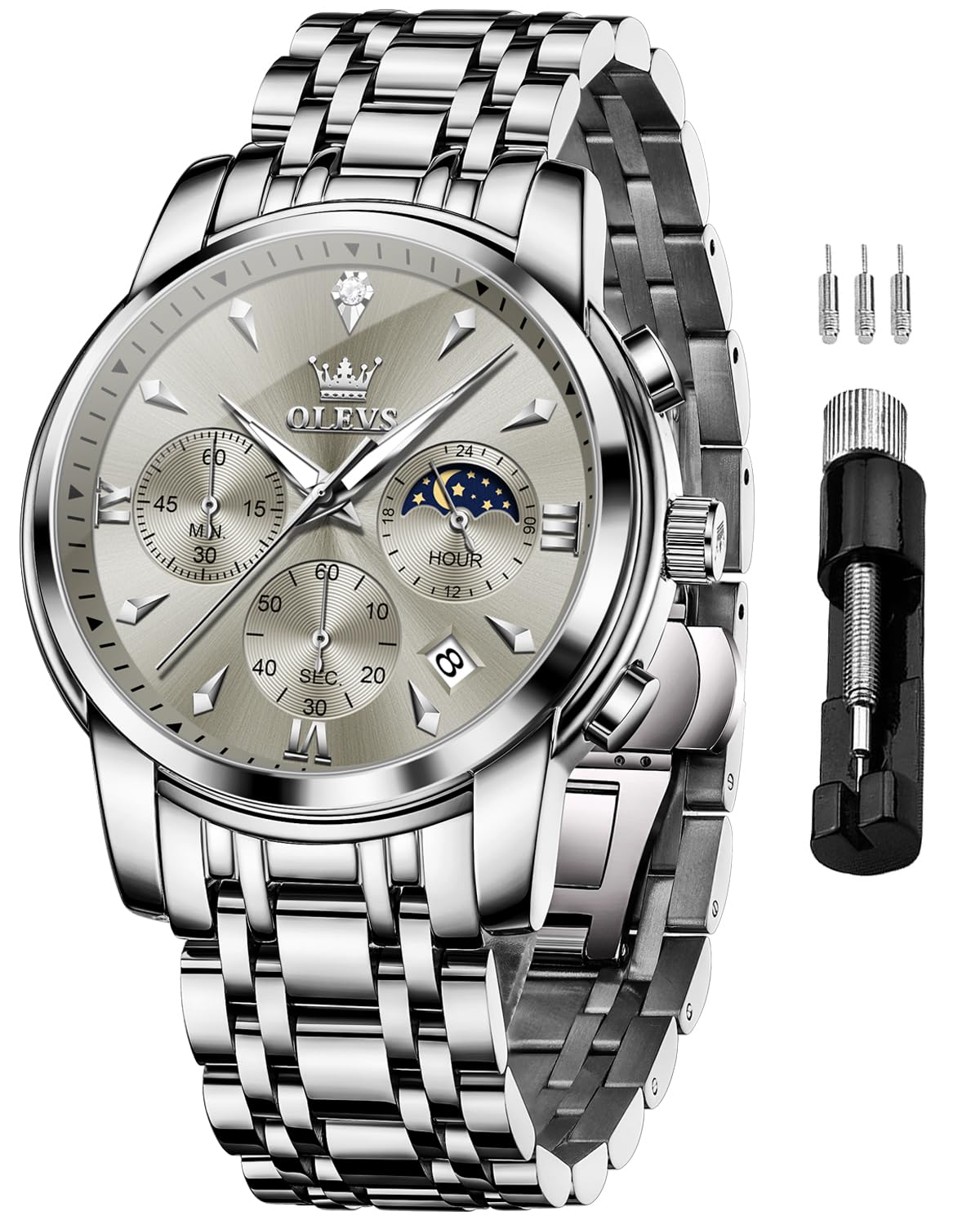
Image: The OLEVS 3639 watch with a silver-gray dial and stainless steel band, worn on a wrist.
Key Features:
- Precise Quartz Movement: Ensures accurate timekeeping.
- Chronograph Function: Includes minute and second subdials for timing events.
- Moon Phase Display: A 24-hour subdial indicating the moon phase.
- Date Display: A window showing the current date.
- Durable Construction: Stainless steel case and band with a high hardness coated mirror.
- Water Resistance: 30 meters (100 feet) for daily use (splashes, brief immersion).
2. Setup and Initial Adjustment
Before using your OLEVS 3639 watch, please follow these steps to set the time, date, and moon phase.

Image: Close-up diagram of the watch's right side, indicating the crown and two push-buttons for adjustments.
Setting the Time:
- Pull the crown (middle button on the right side) out to position 2.
- Rotate the crown to move the hour and minute hands to the correct time. Ensure AM/PM is correctly set if adjusting the date.
- Push the crown back into position 0 to start the watch.
Setting the Date:
- Pull the crown out to position 1.
- Rotate the crown to adjust the date in the date window.
- Once the correct date is displayed, push the crown back into position 0.
- Note: Avoid setting the date between 9 PM and 3 AM, as this can interfere with the automatic date change mechanism. If the date needs adjustment during this period, first set the time outside this range, adjust the date, then reset the time.
Adjusting the Bracelet:
The stainless steel bracelet can be adjusted for a comfortable fit. A free adjustment tool is typically provided by the seller. Refer to the instructions provided with the tool for proper link removal or addition.
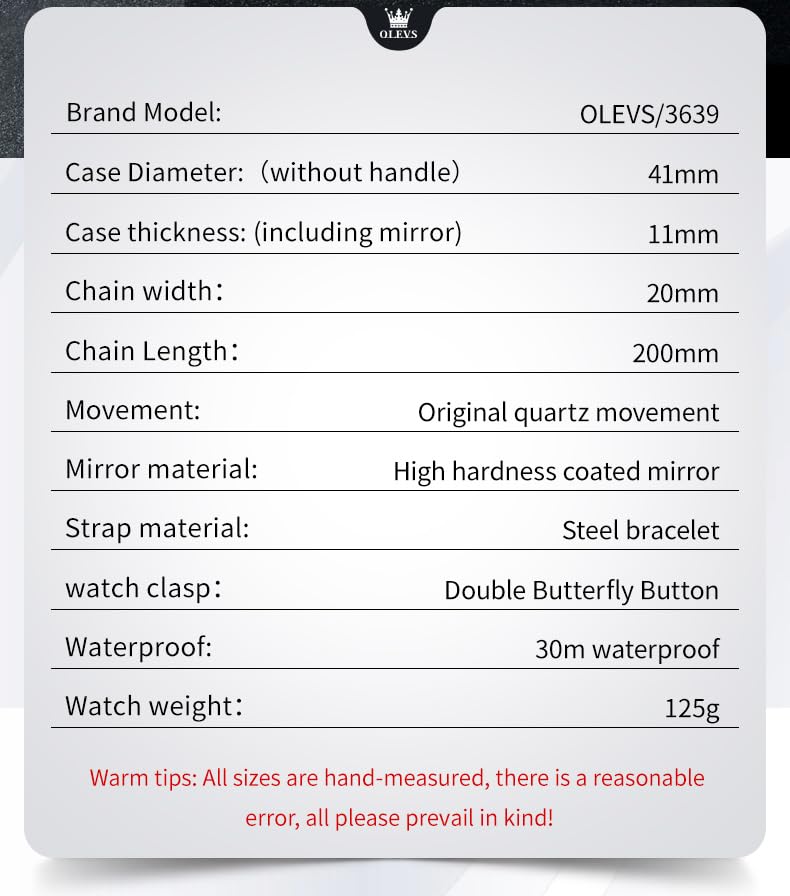
Image: Close-up of the watch's stainless steel bracelet and the push-button hidden clasp mechanism.
3. Operating Instructions
Using the Chronograph (Stopwatch):

Image: Detailed view of the watch face highlighting the minute subdial, seconds subdial, and 24-hour moon phase dial.
- Start: Press the upper push-button (A) to start the chronograph. The seconds hand of the chronograph will begin to move.
- Stop: Press the upper push-button (A) again to stop the chronograph. The elapsed time will be indicated by the chronograph hands.
- Reset: Press the lower push-button (B) to reset the chronograph hands to their zero positions. This can only be done when the chronograph is stopped.
Moon Phase Display:
The watch features a 24-hour subdial, often integrated with a moon phase indicator. This subdial typically rotates once every 24 hours, showing whether it is AM or PM and sometimes a visual representation of the moon's phase. This is usually synchronized with the main time setting.
4. Maintenance and Care
Water Resistance:

Image: The OLEVS watch partially submerged in water, demonstrating its 30M water resistance.
This watch is water resistant to 30 meters (100 feet). This means it can withstand splashes, rain, or brief immersion in water. It is not suitable for swimming, diving, or bathing. Avoid operating the crown or push-buttons when the watch is wet or submerged to prevent water ingress.
General Care:
- Clean the watch regularly with a soft, dry cloth.
- Avoid exposing the watch to extreme temperatures, direct sunlight for prolonged periods, or strong magnetic fields.
- Keep the watch away from chemicals, solvents, and detergents, as these can damage the case, strap, or seals.
- If the watch crystal becomes dirty, wipe it gently with a slightly damp cloth and then dry it immediately.
5. Troubleshooting
Watch Not Running or Running Intermittently:
- Battery: As a quartz watch, it is powered by a battery. If the watch stops, the battery may need replacement. Contact a professional watch repair service.
- Crown Position: Ensure the crown is fully pushed in (position 0). If it is pulled out, the watch will not run.
Chronograph Hands Not Resetting to Zero:
- Ensure the chronograph is stopped before pressing the reset button. If the issue persists, a professional adjustment may be required.
Water Inside the Watch:
- If moisture or condensation appears inside the watch, take it to a professional watch repair service immediately to prevent damage to the movement.
6. Specifications
| Brand | OLEVS |
| Model Number | 3639 (MJ-IND-G3639-BHUI) |
| Movement Type | Quartz |
| Display Type | Analog |
| Case Diameter | 41 Millimetres |
| Case Thickness | 11 Millimetres |
| Band Material | Stainless Steel |
| Band Length | 20 Centimetres |
| Band Width | 20 Millimetres |
| Clasp Type | Push Button Hidden Clasp |
| Crystal Material | Glass (High hardness coated mirror) |
| Water Resistance Depth | 30 Metres (100 Feet) |
| Item Weight | 125 Grams |
| Country of Origin | China |

Image: A graphic displaying key specifications of the OLEVS 3639 watch, including case diameter, thickness, chain width, chain length, movement, mirror material, strap material, watch clasp, waterproof rating, and watch weight.
7. Warranty and Support
Warranty Information:
The OLEVS 3639 watch comes with a manufacturer's warranty. For specific details regarding the warranty period and coverage, please refer to the warranty card included with your purchase or contact OLEVS customer service.
Warranty Type: Manufacturer and Seller.
Customer Support:
If you have any questions about the product, require assistance with setup, or need to address any issues, please contact OLEVS customer service. Contact information can typically be found on the product packaging or the official OLEVS website.
Manufacturer: OLEVS, VALUECART PRIVATE LIMITED
Importer/Packer: VALUECART PRIVATE LIMITED
Related documents3639


Ask a question about this manual
Ask about setup, troubleshooting, compatibility, parts, safety, or missing instructions. Manuals+ will review the question and use this page’s manual context to help answer it.