
Introduction
Welcome to the user manual for your new JUMMICO JETSTREAM Ergonomic Gaming Chair. This guide provides essential information for assembly, operation, maintenance, and troubleshooting to ensure optimal performance and longevity of your chair. Please read these instructions carefully before assembly and use.
Safety Warning:
- Assemble the chair carefully according to the instructions provided.
- The maximum weight capacity for this chair is 150 kg (330 lbs). Do not exceed this limit to prevent accidents or damage.
- Do not stand on the chair or use it as a step stool.
- Keep children away from moving parts during assembly.
Setup and Assembly
The JUMMICO JETSTREAM chair is designed for straightforward assembly. Please ensure all components are present before beginning. A hex key is typically included for assembly.
- Unpack Components: Carefully remove all parts from the packaging and lay them out on a clean, soft surface to prevent scratches. Verify that all parts listed in the included assembly guide are present.
- Attach Casters to Base: Insert the five casters into the holes at the end of each leg of the chair base. Push firmly until they click into place.
- Install Gas Lift: Place the gas lift cylinder into the center hole of the chair base.
- Assemble Seat and Backrest: Attach the backrest to the seat base using the provided screws and tools. Ensure all connections are secure.
- Attach Armrests: Secure the armrests to the seat base using the designated screws.
- Connect Mechanism to Seat: Attach the seat mechanism to the underside of the seat using the appropriate screws. Ensure the front of the mechanism faces the front of the seat.
- Mount Seat onto Gas Lift: Carefully place the assembled seat onto the gas lift cylinder, ensuring it is centered and stable.
- Attach Lumbar and Headrest Cushions: Position the lumbar support cushion and headrest cushion as desired. The lumbar cushion may have a USB cable for the massage function.
For detailed visual instructions, refer to the assembly diagram typically included in the product packaging.
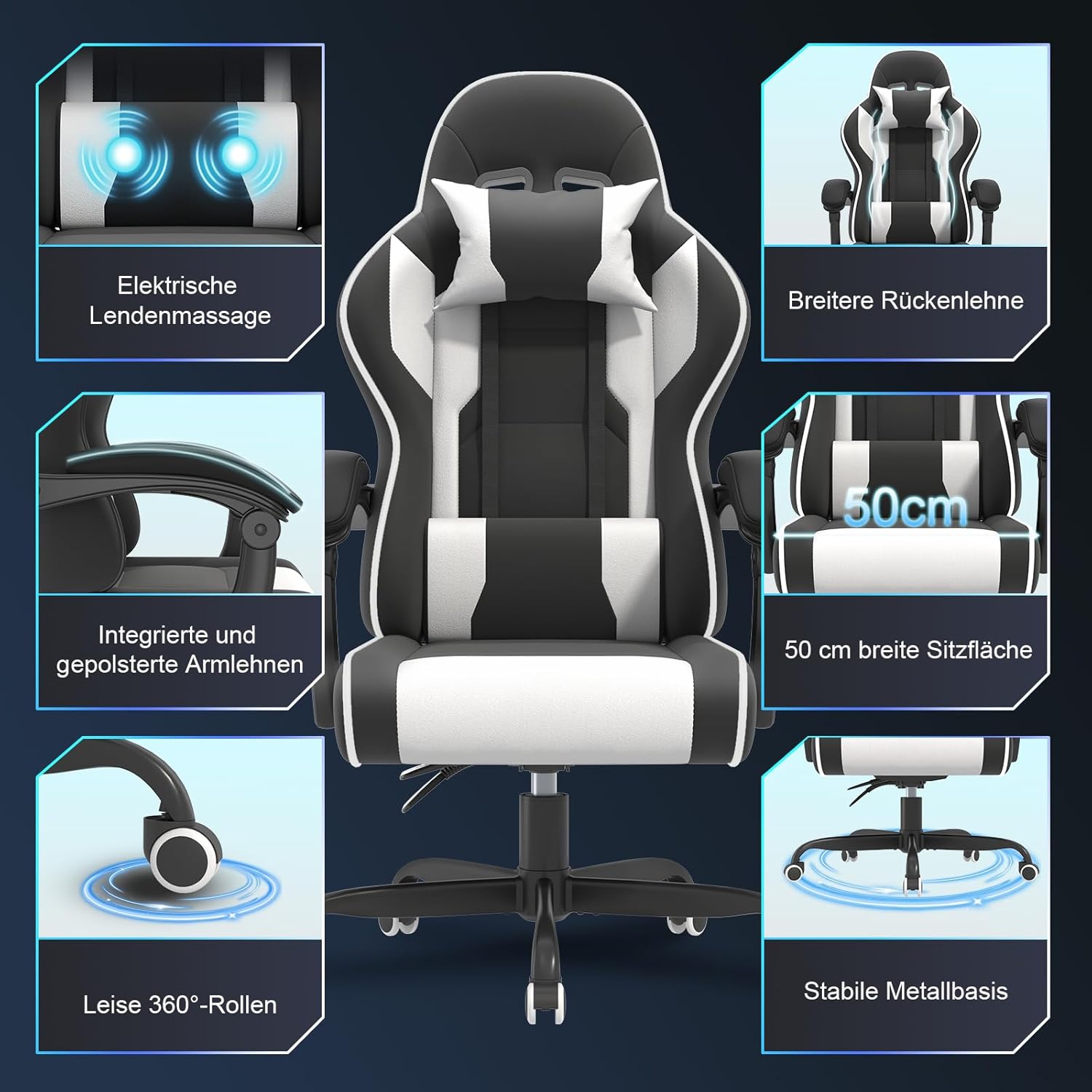
Image: Overview of chair components and features, including electric lumbar massage, wider backrest, integrated armrests, quiet 360-degree casters, 50 cm wide seat, and stable metal base.
Operating Instructions
Your JUMMICO JETSTREAM gaming chair offers several adjustable features for personalized comfort.
- Height Adjustment: Locate the lever on the right side beneath the seat. To raise the chair, lift the lever while taking your weight off the seat. To lower the chair, lift the lever while seated. Release the lever to lock the height.
- Backrest Recline: Use the recline lever, typically located on the left side of the seat. Pull the lever up to unlock the backrest, adjust to your desired angle (90, 120, or 150 degrees), and release the lever to lock it in place.
- Footrest Operation: The retractable footrest can be pulled out from beneath the seat when desired. Extend it fully for leg support and push it back in when not in use.
- Lumbar Massage Function: The lumbar cushion features an electric massage function. Connect the USB cable from the cushion to a compatible USB power source (e.g., computer, power bank, USB wall adapter). The massage function helps alleviate fatigue during long sessions.
- Movable Armrests: The armrests are designed to move with the recline of the backrest, providing continuous support in various positions.
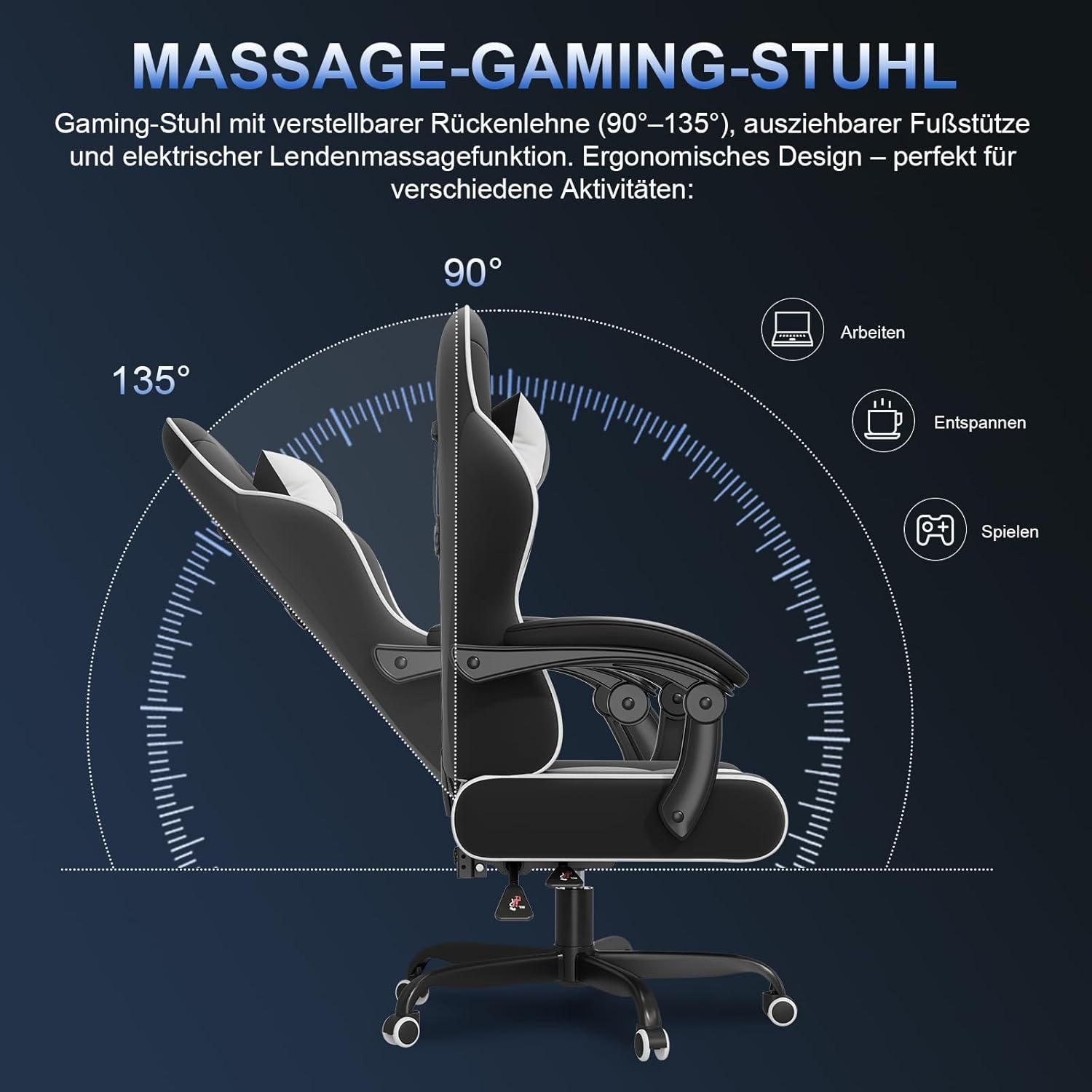
Image: Illustration of the chair's adjustable backrest, demonstrating 90-degree (working), 120-degree (relaxing), and 150-degree (gaming/resting) recline positions.

Image: Detail of the electric lumbar massage feature, showing two vibrating points designed to relieve fatigue. Simply plug the USB connector to activate.

Image: Illustration of the movable armrests, highlighting how they provide optimal support in both working mode (upright) and relaxation mode (reclined).
Maintenance
Regular maintenance will help preserve the appearance and functionality of your JUMMICO JETSTREAM chair.
- Cleaning: Wipe the chair's PU leather surfaces with a soft, damp cloth. For stubborn stains, use a mild soap solution and then wipe with a clean, damp cloth. Avoid harsh chemicals or abrasive cleaners.
- Hardware Check: Periodically check all screws and bolts to ensure they are tight. Re-tighten if necessary to maintain stability and prevent squeaks.
- Caster Care: Keep the casters clean from hair and debris to ensure smooth movement.
- Avoid Direct Sunlight: Prolonged exposure to direct sunlight can cause the PU leather to fade or crack.
Troubleshooting
If you encounter any issues with your JUMMICO JETSTREAM chair, refer to the following common problems and solutions:
- Chair is Wobbly:
Solution: Ensure all assembly screws are securely tightened. Check that the gas lift is properly seated in the base. - Chair Does Not Adjust Height:
Solution: Verify that the height adjustment lever is functioning correctly and not obstructed. Ensure the gas lift is not damaged. - Backrest Does Not Recline/Lock:
Solution: Check the recline lever for any obstructions. Ensure the mechanism is not jammed. - Massage Function Not Working:
Solution: Ensure the USB cable is securely connected to both the lumbar cushion and a working USB power source. Try a different USB port or power source. - Squeaking Noises:
Solution: Re-tighten all screws. A small amount of silicone lubricant can be applied to moving parts if necessary, avoiding contact with upholstery. - Damaged or Missing Parts:
Solution: If you received the product with damaged or missing parts, please contact customer support immediately.
Specifications
| Brand | JUMMICO |
| Model | 0482A |
| Color | Black and White |
| Product Dimensions (D x W x H) | 50 x 50 x 130 cm (approx. 19.7 x 19.7 x 51.2 inches) |
| Item Weight | 18.7 kg (approx. 41.2 lbs) |
| Maximum Weight Capacity | 150 kg (330 lbs) |
| Material | PU Leather, High-Density Foam, Metal Base |
| Recline Angles | 90°, 120°, 150° |
| Special Features | Electric Lumbar Massage, Retractable Footrest, Adjustable Headrest & Lumbar Cushions, Pneumatic Height Adjustment, Movable Armrests |
Warranty Information
JUMMICO products are covered by a manufacturer's warranty. For specific details regarding the warranty period and terms, please refer to the warranty card included with your product or contact JUMMICO customer support directly. Keep your purchase receipt as proof of purchase for warranty claims.
Customer Support
If you have any questions, concerns, or require assistance with your JUMMICO JETSTREAM Ergonomic Gaming Chair, please do not hesitate to contact our customer support team. You can typically reach us through the platform where you purchased the product (e.g., Amazon) or via the contact information provided on the official JUMMICO website.
When contacting support, please provide your product model (0482A) and a detailed description of the issue to facilitate a quicker resolution.
