
Della 1D4-TL+D1218
DELLA 35K BTU ODU 2 Dual Zone Mini Split AC & Heat Pump User Manual
Model: 1D4-TL+D1218
Product Overview
The DELLA 35K BTU ODU 2 Dual Zone Mini Split AC & Heat Pump system provides energy-efficient cooling and heating for multiple rooms. Featuring a 19 SEER2 rating and DC Inverter technology, it offers significant power savings. This ductless system includes two indoor air handlers (12,000 BTU and 18,000 BTU) and one outdoor condenser, allowing for individual temperature control in different zones. It operates quietly and includes smart functions like 4D airflow, I Feel mode, 24-hour timer, sleep mode, eco energy saving mode, multiple fan speeds, and turbo function. The system uses environmentally friendly R454B refrigerant.

Image: Complete DELLA 35K BTU Dual Zone Mini Split AC and Heat Pump system, showing the outdoor unit, two indoor units, remote controls, and installation kits.
Key Features
- Energy Efficient: 19 SEER2 rating with DC Inverter technology for up to 30% power savings. Uses R454B refrigerant.
- Dual Zone Comfort: Two indoor air handlers (12,000 BTU + 18,000 BTU) with separate controllers for individual room temperature management.
- Wide Coverage: Cools and heats up to 1550 Sq. Ft. (550 Sq. Ft. for one unit, 1000 Sq. Ft. for the other). Operates in temperatures as low as 5°F.
- Smart Functions: Features 4D air flow (up-down, left-right), I Feel mode, 24-hour timer, sleep mode, eco energy saving mode, multiple fan speeds, turbo function, heating, cooling, and dry mode for dehumidifying.
- Quiet Operation: Ultra-silent operation at only 49 dBa.
- Voice Control & App Integration: Compatible with smart home systems for convenient control.

Image: Visual representation highlighting the 19 SEER2 rating and 36% energy savings compared to a 14 SEER2 system.

Image: Diagram illustrating a house with two separate mini-split zones, demonstrating individual temperature control for different areas (e.g., 78°F in one zone, 72°F in another).
Setup and Installation
This DELLA mini split system requires professional installation. It is not designed for DIY installation. Line-set vacuuming is required during installation, and any alteration of line-set length necessitates adjusting freon levels. Please consult a qualified HVAC professional for proper installation to ensure optimal performance and to maintain warranty validity.
Included Components:
- 2 Indoor Air Handlers (12,000 BTU + 18,000 BTU)
- 1 Outdoor Condenser
- 2 pcs 16ft copper pipes (Standard size 1/4" & 3/8" outer dimension)
- 2 Installation Kits
- Remote Controls
- Manual
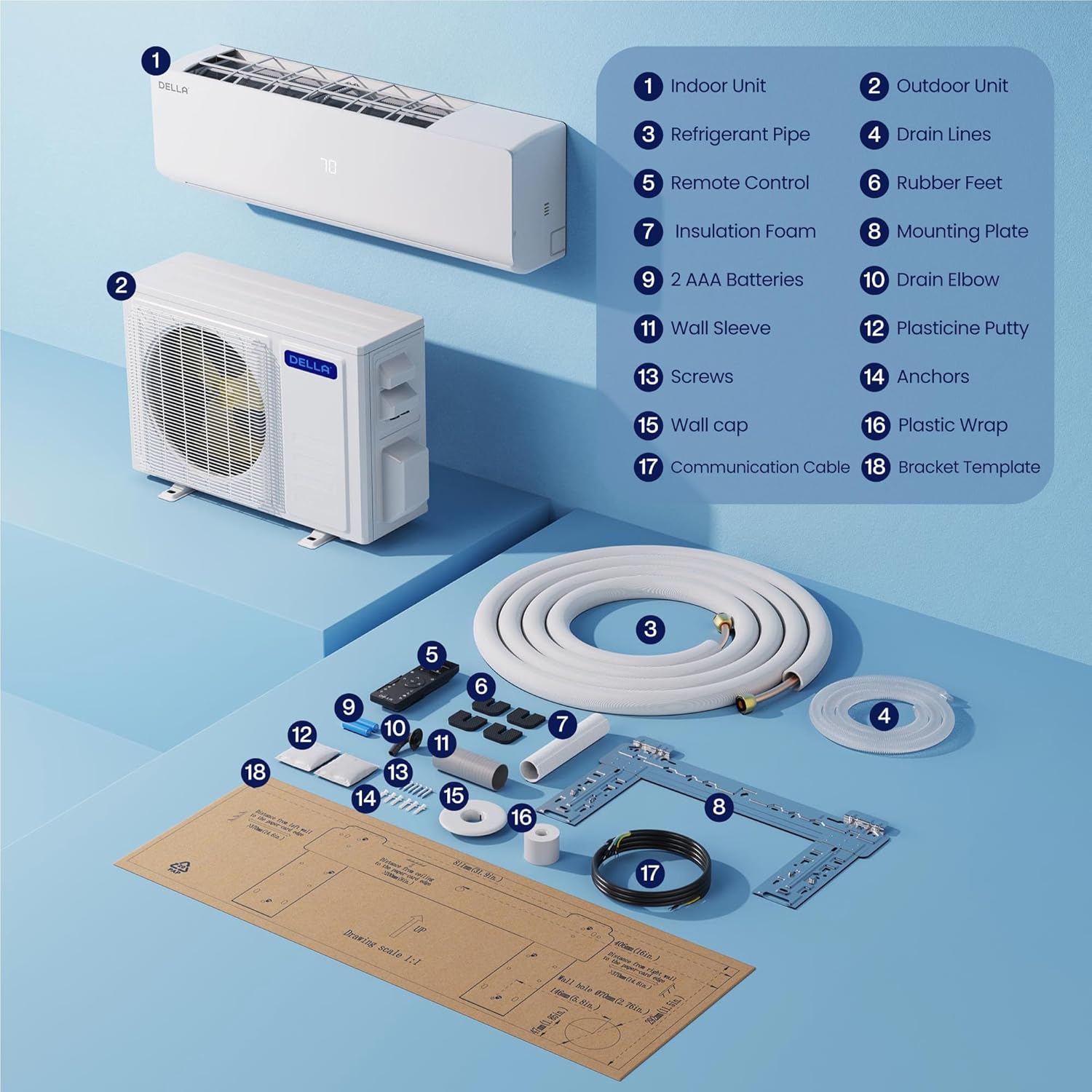
Image: Detailed diagram showing all components included with the DELLA mini split system, such as indoor unit, outdoor unit, refrigerant pipe, remote control, and various installation accessories.
Operating Instructions
The DELLA mini split system offers various modes and smart features for optimal comfort and convenience.
Remote Control Operation:
Use the provided remote control to adjust settings such as mode (Cool, Heat, Dry, Fan Only), fan speed, temperature, and activate special functions like Turbo or Sleep mode. The remote allows for precise control over each indoor unit.
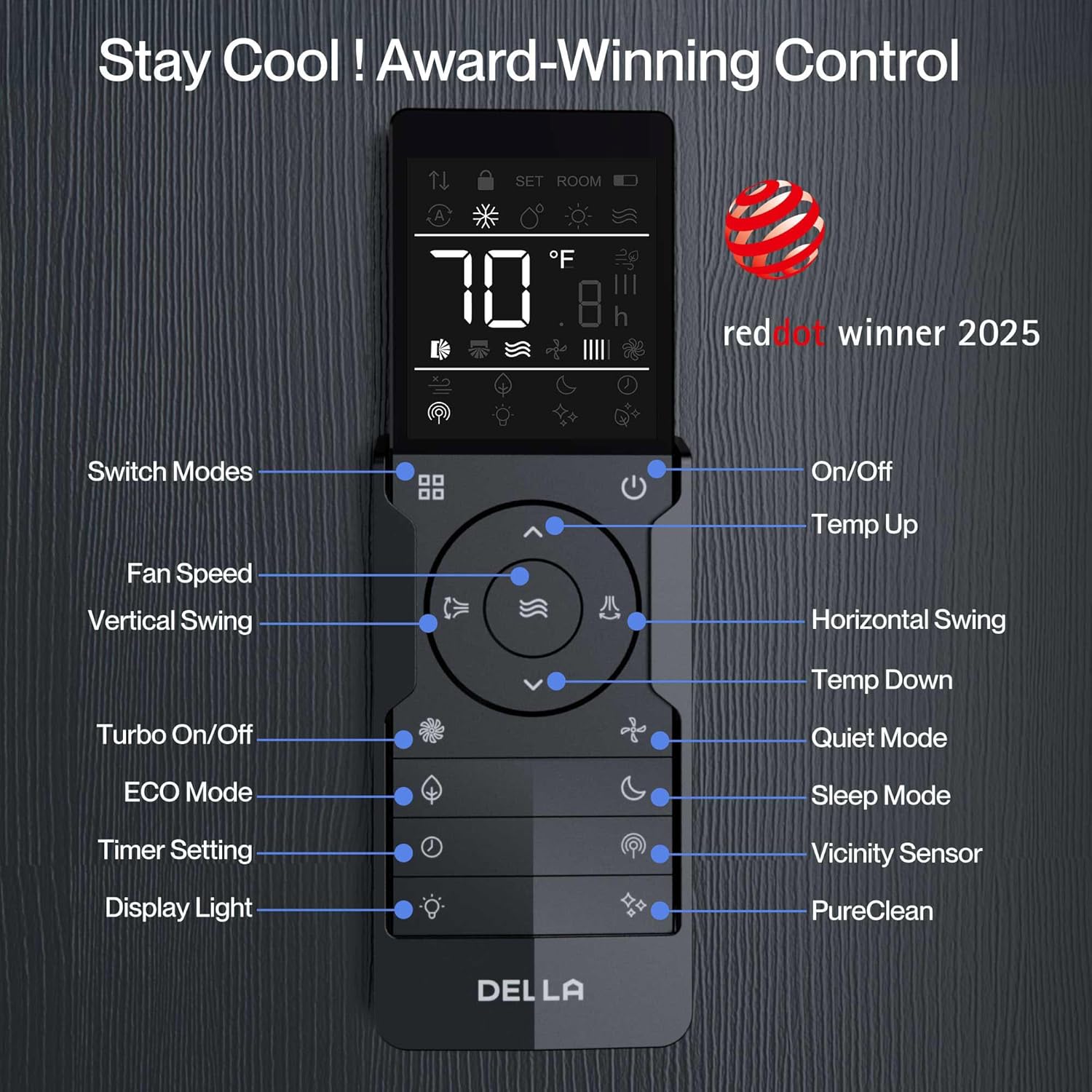
Image: Close-up of the DELLA mini split remote control, with labels indicating the function of each button, such as mode switch, fan speed, vertical swing, turbo, ECO mode, timer, display light, on/off, temp up/down, horizontal swing, quiet mode, sleep mode, and PureClean.
Smart App & Voice Control:
Control your DELLA system remotely using the dedicated smartphone app. The app allows for comprehensive control, including setting schedules, timers, and adjusting modes. The system is also compatible with voice assistants like Alexa and Google Assistant, enabling hands-free operation.

Image: A smartphone displaying the DELLA app interface, highlighting the Smart Geo Location feature which automatically adjusts the AC based on user's proximity to home.

Image: Three smartphone screens showcasing various features of the DELLA app, including timer settings, scheduling options, and different operational modes (Cool, Heat, Dehumidify, Fan Only, ECO).
Sleep Mode:
The sleep mode function operates at a whisper-quiet 22 dBa and uses a scientific curve to adjust temperature throughout the night, ensuring optimal comfort and energy efficiency for a perfect night's sleep.
Video: Official DELLA Mini Split Air Conditioner overview, demonstrating features such as geo-location, multi-zone temperature control, app functionality, voice control compatibility, and the quiet sleep mode. This video provides a visual guide to the system's smart features and user experience.
Maintenance
Regular maintenance is crucial for the longevity and efficient operation of your DELLA mini split system. It is recommended to:
- Clean or replace air filters regularly (check your specific model's manual for frequency).
- Ensure the outdoor unit is free from obstructions like leaves, dirt, and debris.
- Periodically check the refrigerant lines for any signs of leaks or damage.
- Schedule professional inspections and maintenance at least once a year to ensure all components are functioning correctly and to prevent potential issues.
Note: This model does not support the Self-Cleaning Function, even if the option appears on the display. The self-cleaning operation will not be performed.
Troubleshooting
If you encounter issues with your DELLA mini split system, consider the following basic troubleshooting steps before contacting support:
- No Power: Check the circuit breaker and ensure the unit is properly plugged in.
- Not Cooling/Heating Effectively: Verify that the correct mode is selected, temperature settings are appropriate, and air filters are clean. Ensure no obstructions are blocking airflow to either indoor or outdoor units.
- Unusual Noises: Minor noises during operation are normal. If you hear loud or unusual sounds, contact professional support.
- Remote Control Not Working: Check battery levels and ensure there are no obstructions between the remote and the indoor unit.
For complex issues or if troubleshooting steps do not resolve the problem, please contact DELLA customer support.
Specifications
| Feature | Detail |
|---|---|
| Brand | Della |
| Model Number | 1D4-TL+D1218 |
| BTU Capacity | 35,000 BTU/h (Dual Zone: 12,000 BTU + 18,000 BTU) |
| SEER2 Rating | 19 SEER2 |
| Voltage | 208-230V |
| Wattage | 2930 watts |
| Coverage Area | Up to 1550 Sq. Ft. |
| Refrigerant Type | R454B (Pre-Charged) |
| Noise Level | 49 dBa (Ultra Silent) |
| Special Features | Dehumidifier, Fast Cooling, Remote Control, WiFi Enabled, 4D Airflow, I Feel Mode, 24-hour Timer, Sleep Mode, Eco Energy Saving Mode, Turbo Function |
| Item Weight | 19.8 pounds |
| Product Dimensions | 31.94 x 8 x 11.5 inches |
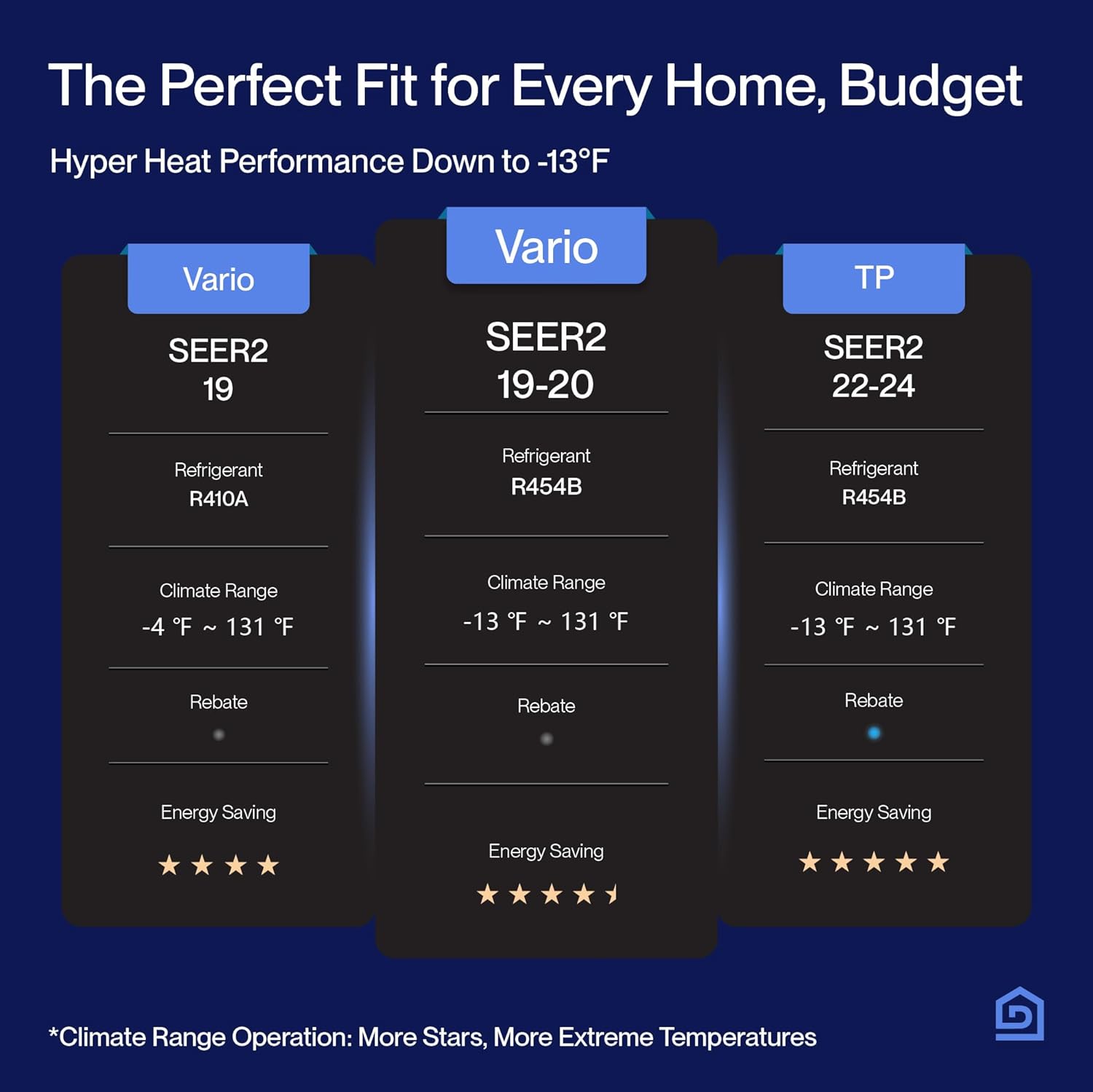
Image: A table comparing various DELLA mini split models, showcasing differences in SEER2 ratings, refrigerant types, climate ranges, and energy saving stars.
Warranty and Support
DELLA offers an unbeatable in-class lifetime warranty for this product, providing peace of mind and ensuring long-term reliability. This warranty covers the product against manufacturing defects and ensures support throughout its lifespan.
Customer Support:
Our dedicated customer support team is available 24/7 via chat on the app or website to assist with any inquiries or issues. For direct technical assistance, you can reach our in-house technicians Monday to Friday.
- 24/7 Chat Support: Available through the DELLA app or website.
- Phone Support: Contact in-house technicians Monday to Friday.

Image: Graphic illustrating "Lifetime Coverage" and "Unmatched Warranty" with icons for "Best In-Class", "No Additional Costs", and "24/7 Customer Support".
Ask a question about this manual
Ask about setup, troubleshooting, compatibility, parts, safety, or missing instructions. Manuals+ will review the question and use this page’s manual context to help answer it.