
AVERA VENTOR06
AVERA VENTOR06 3-in-1 Heater, Air Purifier, and Fan User Manual
Model: VENTOR06
Introduction
This manual provides essential information for the safe and efficient operation, maintenance, and troubleshooting of your AVERA VENTOR06 3-in-1 device. Please read this manual thoroughly before using the product and retain it for future reference.
Important Safety Instructions
- Always unplug the device before cleaning or performing any maintenance.
- Do not operate the device with a damaged cord or plug.
- Keep the device away from water or other liquids.
- Ensure the device is placed on a stable, level surface to prevent tipping. The anti-tip system will automatically shut off the device if it falls.
- Do not insert objects into any openings.
- This appliance is not intended for use by persons (including children) with reduced physical, sensory or mental capabilities, or lack of experience and knowledge, unless they have been given supervision or instruction concerning use of the appliance by a person responsible for their safety.
- Children should be supervised to ensure that they do not play with the appliance.
- For indoor use only.
Package Contents
- AVERA VENTOR06 3-in-1 Device
- Remote Control
- User Manual
- HEPA Filter (pre-installed)
Product Overview
The AVERA VENTOR06 combines the functions of a heater, air purifier, and fan into a single, sleek unit. It features a bladeless design for safety and quiet operation, a HEPA filter for air purification, and multiple control options.

Figure 1: AVERA VENTOR06 3-in-1 device with included remote control.

Figure 2: Device dimensions: 66 cm height, 16 cm width, 16 cm depth. Weight: 3.2 kg.
Key Components:
- Bladeless Air Outlet: Provides smooth, consistent airflow.
- Digital Touch Panel: Intuitive controls for various functions.
- HEPA Filter: Captures airborne particles for cleaner air.
- Base with Air Intake: Houses the motor and filter, draws in air.
- Remote Control: Full control over all device functions.
- Power Cord: 1.7m length for flexible placement.
- Anti-Tip System: Safety feature for automatic shutdown.
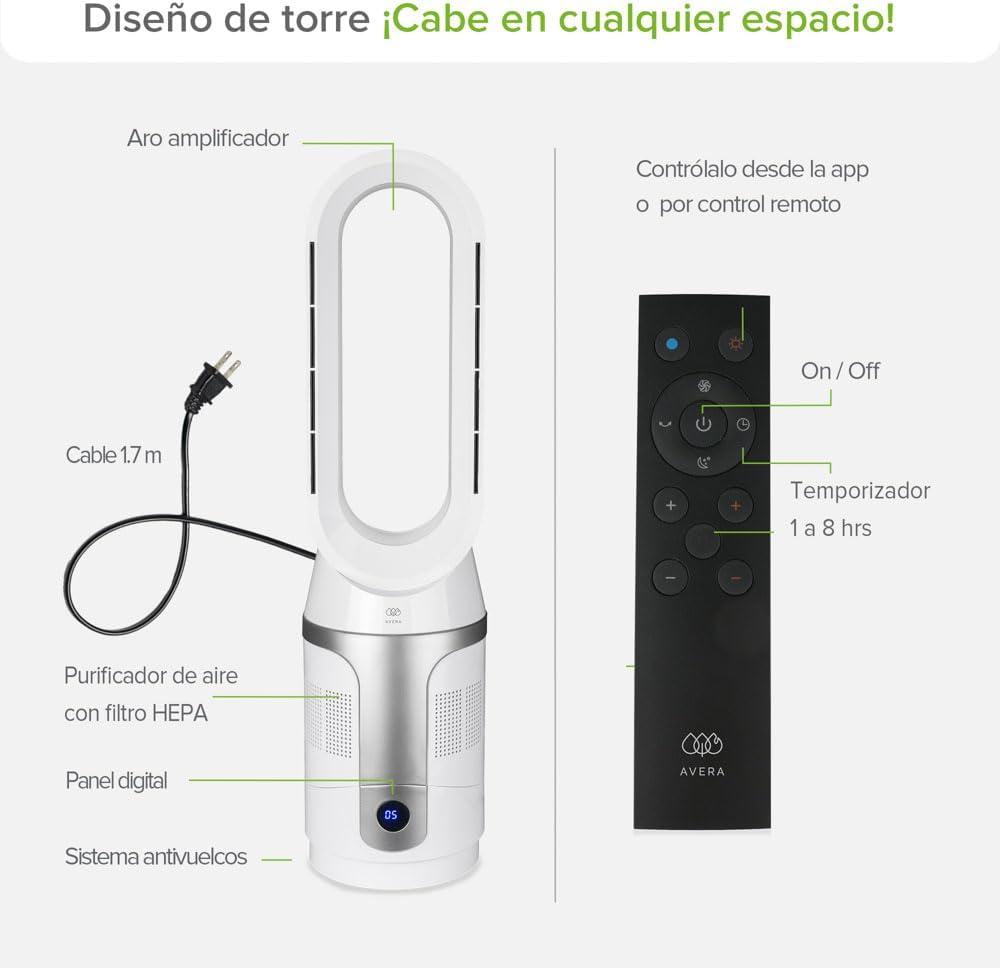
Figure 3: Remote control layout with buttons for On/Off, Timer (1-8 hours), Oscillation, Fan Speed, and Heat Levels.
Setup
- Unpack: Carefully remove the device and all accessories from the packaging.
- Placement: Place the device on a firm, level surface. Ensure there is at least 20 cm (8 inches) of clear space around the air intake for optimal performance.
- Filter Installation: The HEPA filter comes pre-installed. To check or replace, refer to the "Maintenance" section.
- Power Connection: Plug the power cord into a standard 110V, 60Hz electrical outlet.
- Initial Power On: The device will enter standby mode. Press the power button on the touch panel or remote control to turn it on.
Operating Instructions
Control Options:
- Touch Panel: Use the intuitive LED touch panel on top of the device for direct control.
- Remote Control: The included remote control allows convenient operation from a distance.
- Smartphone App (Wi-Fi): Download the AVERA app to control the device via Wi-Fi from your smartphone.

Figure 4: The VENTOR06 offers three primary functions: Fan (8 speeds), Air Purifier (with HEPA filter), and Heater (3 levels).
Modes and Functions:
- Fan Mode: Select from 8 fan speeds to adjust airflow intensity.
- Heater Mode: Choose from 3 heat levels to warm areas up to 20m². The device can heat up to 35°C.
- Air Purifier Mode: The integrated HEPA filter continuously purifies the air, removing particles and improving air quality.
- Oscillation: Activate 90° oscillation for wider air distribution.
- Manual Tilt: Adjust the device's tilt by 30° manually to direct airflow.
- Sleep Mode: Reduces fan speed and dims the display for quiet operation (≤52dB), ideal for nighttime use.
- Timer: Set the device to automatically turn off after a specified duration (e.g., 1-8 hours).

Figure 5: The device can be conveniently controlled using the smartphone application or the provided remote control.

Figure 6: Manual tilt adjustment of 30 degrees allows for precise airflow direction.

Figure 7: The bladeless design ensures safety and provides a smooth, consistent air current.
Demonstration Video:
Video 1: This video demonstrates the 3-in-1 functionality (heater, fan, purifier), oscillation, vertical adjustment, bladeless design, silent mode, and filter replacement for a similar AVERA product. While the model shown is AERO 1400, the core features and operation are representative of the VENTOR06.
Maintenance
Cleaning the Device:
- Always unplug the device before cleaning.
- Wipe the exterior surfaces with a soft, damp cloth. Do not use abrasive cleaners or solvents.
- Use a soft brush or vacuum cleaner with a brush attachment to clean the air intake and outlet grilles.
HEPA Filter Replacement:
The HEPA filter should be replaced every 6-8 months, depending on usage and air quality. A light indicator on the device will signal when replacement is needed.
- Unplug the device from the power outlet.
- Unlock the base by twisting it counter-clockwise (refer to product diagram for unlock mechanism).
- Remove the old HEPA filter.
- Insert the new HEPA filter, ensuring it is correctly seated.
- Reattach the base and twist clockwise to lock it securely.
- Plug in the device and reset the filter indicator (refer to specific instructions in the app or device manual for reset procedure).

Figure 8: Illustration of the filter replacement process, showing the unlock mechanism and filter removal.
Troubleshooting
| Problem | Possible Cause | Solution |
|---|---|---|
| Device does not turn on. | Not plugged in; power outlet malfunction; power button not pressed. | Ensure the power cord is securely plugged into a working outlet. Press the power button on the device or remote. |
| Weak airflow. | Air intake/outlet blocked; filter clogged; low fan speed setting. | Check for obstructions around air intake/outlet. Clean or replace the HEPA filter. Increase fan speed. |
| Device makes unusual noise. | Foreign object inside; unstable placement; filter not properly installed. | Unplug and check for foreign objects. Ensure the device is on a stable surface. Reinstall the HEPA filter correctly. |
| Heater function not working. | Heat level not selected; ambient temperature too high for heating. | Ensure a heat level is selected. The heater may not activate if the room temperature is already high. |
| App control not working. | Wi-Fi connection issue; incorrect app settings. | Check your Wi-Fi connection. Ensure the device is properly paired with the app. Refer to the app's help section for pairing instructions. |
If the problem persists after trying these solutions, please contact AVERA customer support.
Specifications
| Feature | Detail |
|---|---|
| Model | VENTOR06 |
| Functions | 3-in-1: Fan, Heater, Air Purifier |
| Dimensions (H x W x D) | 66 x 16 x 16 cm |
| Weight | 3.2 kg |
| Power | 900 Watts |
| Voltage | 110V |
| Frequency | 60 Hz |
| Fan Speeds | 8 |
| Heat Levels | 3 |
| Oscillation | 90° |
| Tilt Adjustment | 30° (Manual) |
| Noise Level | ≤52 dB (Normal), 15 dB (Night Mode) |
| Filter Type | HEPA |
| Control Methods | Touch Panel, Remote Control, Wi-Fi App |
| Safety Features | Anti-tip system, Automatic shut-off |
Warranty and Support
Your AVERA VENTOR06 device comes with a 2-year warranty covering manufacturing defects. Please retain your proof of purchase for warranty claims.
For technical support, troubleshooting assistance, or to inquire about replacement parts (such as HEPA filters), please contact AVERA customer service through their official website or the contact information provided in your purchase documentation.
You can also visit the AVERA Brand Store on Amazon for more product information and support resources.
Related documentsVENTOR06


Ask a question about this manual
Ask about setup, troubleshooting, compatibility, parts, safety, or missing instructions. Manuals+ will review the question and use this page’s manual context to help answer it.