
Welcome
Thank you for choosing the Saaf Baby Monitor L-127. This manual provides essential information for the safe and effective operation of your new baby monitor. Please read it thoroughly before use and keep it for future reference.
What's Included
Carefully unpack the box and ensure all items are present:
- 1x Camera Unit
- 1x 5-inch Monitor Unit
- 2x Power Adapters
- 2x USB-A to Barrel Jack Cables
- 1x Mounting Kit (Plug and Screw)
- 1x User Guide

Image showing the contents of the Saaf Baby Monitor package, including the camera unit, 5-inch monitor, two power adapters, two USB-A to barrel jack cables, mounting screws and plugs, and the user guide.
Key Features
The Saaf Baby Monitor L-127 is equipped with several features designed to provide peace of mind:
- 5-inch LCD Monitor: Large display for clear viewing.
- Pan-Tilt-Zoom (PTZ) Camera: Remotely control camera movement with 355° horizontal and 120° vertical rotation, plus digital zoom.
- Two-Way Talk Function: Communicate with your baby from another room.
- VOX Mode (Voice Activation/Cry Detection): Monitor activates automatically upon detecting sound.
- Infrared Night Vision: Clear black and white video in low-light conditions.
- Built-in Lullabies: Soothe your baby with pre-programmed melodies.
- Adjustable Brightness: Customize monitor screen brightness.
- Temperature Monitoring: Keep track of the room temperature.
- Secure & Private Connection: Utilizes 2.4 GHz FHSS technology for reliable and interference-free communication.
- Timer, Alarm & Clock: Convenient time management features.
- Flexible Mounting Stand: For versatile camera placement.
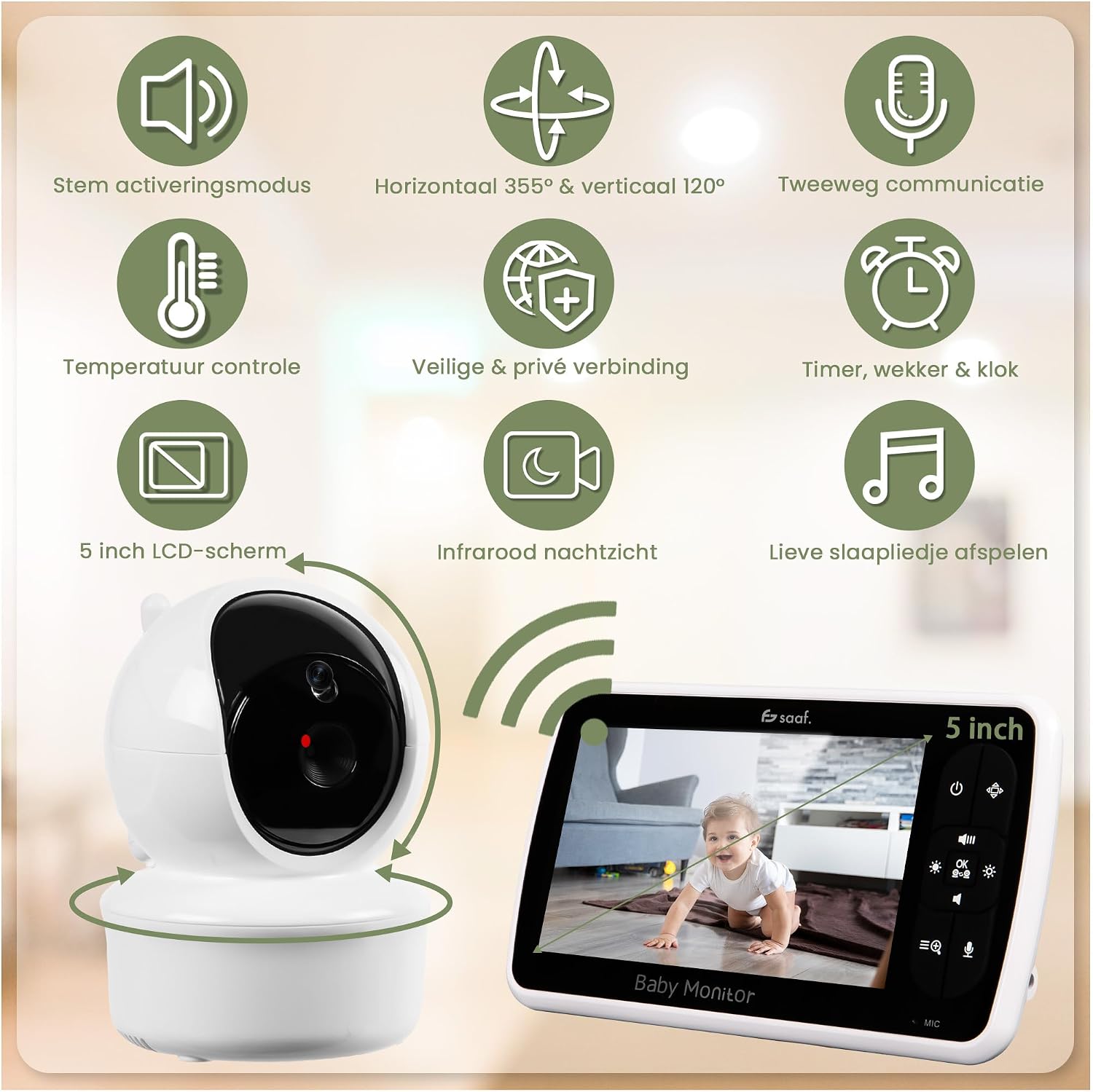
Image illustrating the key features of the Saaf Baby Monitor, including voice activation mode, 355° horizontal and 120° vertical camera movement, two-way communication, temperature control, secure and private connection, timer/alarm/clock, 5-inch LCD screen, infrared night vision, and lullaby playback.
Setup Guide
Camera Placement
Place the camera in a location that provides a clear view of your baby's crib or play area. Ensure it is out of reach of children. The included flexible stand can be used for versatile mounting options, such as attaching it to a crib or shelf.
Power Connection
Connect the camera and monitor to their respective power adapters and plug them into a power outlet. The monitor has a built-in rechargeable battery for portable use, but the camera requires continuous power.
Initial Pairing
The camera and monitor are typically pre-paired at the factory. If pairing is required, refer to the on-screen menu for instructions. Ensure both units are powered on and within range during the pairing process.
Operating Your Monitor
Monitor Overview
Familiarize yourself with the buttons and display on the 5-inch monitor unit. The user guide provides a detailed diagram of the monitor's interface.
Camera Control (Pan, Tilt, Zoom)
Use the navigation buttons on the monitor to remotely pan the camera horizontally by 355° and tilt it vertically by 120°. The zoom function allows for closer inspection of your baby.

Image showing the Saaf Baby Monitor camera unit and monitor, illustrating the 355° horizontal and 120° vertical rotation capability of the camera to keep the baby always in view.
Two-Way Talk Function
Press and hold the talk button on the monitor to speak to your baby through the camera's speaker. Release the button to hear your baby. This feature allows you to soothe your baby with your voice from another room.

Image demonstrating the two-way talk function of the Saaf Baby Monitor, showing a parent communicating with their baby through the monitor and camera.
VOX Mode (Voice Activation)
In VOX mode, the monitor's screen will automatically activate when sound is detected from the baby's room, such as crying. This conserves battery life. You can adjust the microphone sensitivity to suit your environment.

Image illustrating the VOX mode and sleep mode. The top shows a baby sleeping with the camera in sleep mode (video only). The bottom shows a crying baby with the monitor displaying a cry alert in VOX mode.
Night Vision
The camera automatically switches to infrared night vision in low-light conditions, providing a clear black and white image of your baby without disturbing their sleep.

Image showing the adjustable brightness feature for day and night vision. The top panel shows a baby in a crib with a wide-angle day view. The bottom panel shows the same baby in night vision with 4x zoom.
Built-in Lullabies
Select from a variety of soothing lullabies to play through the camera unit to help your baby relax and fall asleep. The lullabies can be controlled directly from the monitor.
Adjustable Brightness
Adjust the brightness of the monitor screen to your preference for comfortable viewing in various lighting conditions, both day and night.
Stable Connection
The monitor uses 2.4 GHz FHSS technology for a consistent and reliable connection with reduced interference, ensuring you always have a clear view and sound from your baby's room.

Image demonstrating the stable 2.4 GHz FHSS connection of the Saaf Baby Monitor, showing the monitor in a living room connected to the camera in a baby's room.
Care and Maintenance
Cleaning
Wipe the camera and monitor surfaces with a soft, dry cloth. Do not use abrasive cleaners, solvents, or chemical cleaning agents, as these can damage the components.
Battery Care
To prolong the monitor's built-in battery life, avoid fully discharging it frequently. Charge it regularly, especially if it will not be used for an extended period. Store the monitor in a cool, dry place.
Troubleshooting
No Signal / Poor Connection
- Ensure both the camera and monitor are powered on and within range.
- Reduce obstacles between the camera and monitor, such as thick walls or other electronic devices that may cause interference.
- Recharge the monitor battery if it is low.
- Try re-pairing the camera and monitor if the connection is lost completely.
No Sound / Poor Sound Quality
- Check the volume settings on the monitor and increase if necessary.
- Ensure the microphone on the camera is not obstructed.
- Move the monitor closer to the camera to improve signal strength.
Image Not Clear
- Clean the camera lens with a soft, dry cloth.
- Adjust the camera's position to ensure optimal lighting.
- Ensure night vision is active in dark conditions; the image will be black and white.
Product Specifications
| Feature | Specification |
|---|---|
| Brand | Saaf |
| Model Name | L-127 |
| Connectivity Technology | Wireless (2.4 GHz FHSS) |
| Special Features | 2-way audio, Cry detection (VOX), Night vision, PTZ technology (Pan-Tilt-Zoom) |
| Indoor/Outdoor Use | Indoor |
| Power Source | Corded Electric |
| Video Recording Resolution | 720p |
| Night Vision Range | 2.5 meters |
| Item Dimensions | 11 x 9 x 8 cm |
| Material | Plastic |
| Color | White |
| Included Components | Instruction Manual, Mounting Screw, Charging Cable, Power Adapter |
Warranty and Customer Support
For warranty information or technical assistance, please contact Saaf customer support. Keep your purchase receipt as proof of purchase. Details for contacting support can typically be found on the product packaging or the official Saaf website.