1. Introduction
Thank you for choosing the Coleshome 120x70cm L-Shaped Gaming Desk. This desk is designed to optimize your workspace with its versatile L-shape and reversible shelving, making it ideal for gaming, home office, or study environments. This manual provides detailed instructions for assembly, operation, and maintenance to ensure you get the most out of your new desk.

Image 1.1: The Coleshome L-shaped gaming desk fully assembled and in use, showcasing its spacious design and integrated shelving.
2. Product Features
- Reversible Corner Design: The side shelf unit can be installed on either the left or right side, allowing for flexible adaptation to your room layout and personal preferences.
- Ample Storage: Features two spacious, multi-level shelves, providing dedicated space for keyboards, gaming headsets, controllers, collectibles, and other essential accessories.
- Spacious Work Surface: The main desktop combined with the L-shaped extension offers a generous area for monitors, laptops, tablets, books, and office supplies, ensuring comfort during long work or gaming sessions.
- Durable and Stable Construction: Built with a robust steel frame and reinforced side supports, creating a dual support system for exceptional stability and resistance to bending.
- Easy Assembly: Comes with all necessary tools and clear, illustrated instructions for quick and straightforward setup.
3. Setup and Assembly
Please follow these steps carefully to assemble your Coleshome L-shaped gaming desk. Ensure all parts are present before beginning.
- Unpack Components: Carefully remove all parts from the packaging. Verify that all components listed in the parts list (provided in the box) are present and undamaged.
- Identify Reversible Shelf Orientation: Decide whether you want the shelf unit on the left or right side of the main desk. This decision will dictate the initial assembly steps for the frame.
- Assemble Frame: Connect the steel frame components according to the chosen orientation, using the provided screws and tools. Ensure all connections are secure but do not fully tighten until the desk is mostly assembled.
- Attach Shelf Panels: Secure the two shelf panels to the designated frame sections.
- Install Desktop Panels: Place the main desktop and the L-shaped extension panel onto the assembled frame. Align all holes and secure them with the remaining screws.
- Final Tightening: Once all parts are in place and aligned, fully tighten all screws.
- Adjust Leveling Feet: The desk is equipped with adjustable feet. Turn them to ensure the desk is stable and level on uneven floors.

Image 3.1: Illustration demonstrating the reversible nature of the shelf unit, allowing installation on either the left or right side of the desk.

Image 3.2: Detail of the desk's robust construction, highlighting the steel frame and adjustable feet for enhanced stability.
4. Operating Instructions
The Coleshome L-shaped gaming desk is designed for versatile use. Here are some tips for optimal operation:
- Utilize Storage: Place your mechanical keyboard, gaming headphones, controllers, and other accessories on the two spacious shelves to keep your main desktop clear and organized.
- Ergonomic Setup: Position your monitor(s) at an appropriate height and distance to maintain good posture. The L-shape allows for multi-monitor setups or dedicated areas for different tasks.
- Cable Management: While not explicitly included, consider using adhesive cable clips or ties (not included) to manage cables neatly under the desk, preventing clutter and potential hazards.
- Weight Distribution: Distribute heavy items evenly across the desktop and shelves to maintain stability and prevent undue stress on any single point.
5. Maintenance
Proper care will extend the life and appearance of your Coleshome desk:
- Cleaning: Wipe the desk surfaces with a soft, damp cloth. Avoid abrasive cleaners or harsh chemicals that could damage the finish. For stubborn marks, a mild soap solution can be used, followed by drying with a clean cloth.
- Spills: Immediately wipe up any spills to prevent staining or damage to the desktop material.
- Heat Protection: Use coasters or heat-resistant pads under hot items to protect the surface from heat damage.
- Regular Checks: Periodically check all screws and fasteners to ensure they remain tight. Retighten if necessary to maintain structural integrity.
6. Troubleshooting
If you encounter any issues with your desk, refer to these common solutions:
- Desk is Wobbly:
- Ensure all assembly screws are fully tightened.
- Adjust the leveling feet on the bottom of the desk legs to compensate for uneven flooring.
- Difficulty During Assembly:
- Refer to the illustrated instruction manual provided in the packaging.
- Double-check that you are using the correct screws for each step.
- Ensure components are oriented correctly, especially the reversible shelf unit.
- Missing Parts:
- Carefully check all packaging materials. If parts are still missing, contact Coleshome customer support.
7. Specifications
| Attribute | Value |
|---|---|
| Brand | Coleshome |
| Model | hryj-09 |
| Color | Grey |
| Product Dimensions (L x W x H) | 120 cm x 70 cm x 75.7 cm |
| Weight | 10.8 kg |
| Special Feature | Desk with shelves, Reversible |
| Shape | Rectangular (L-shaped configuration) |
| Assembly Required | Yes |
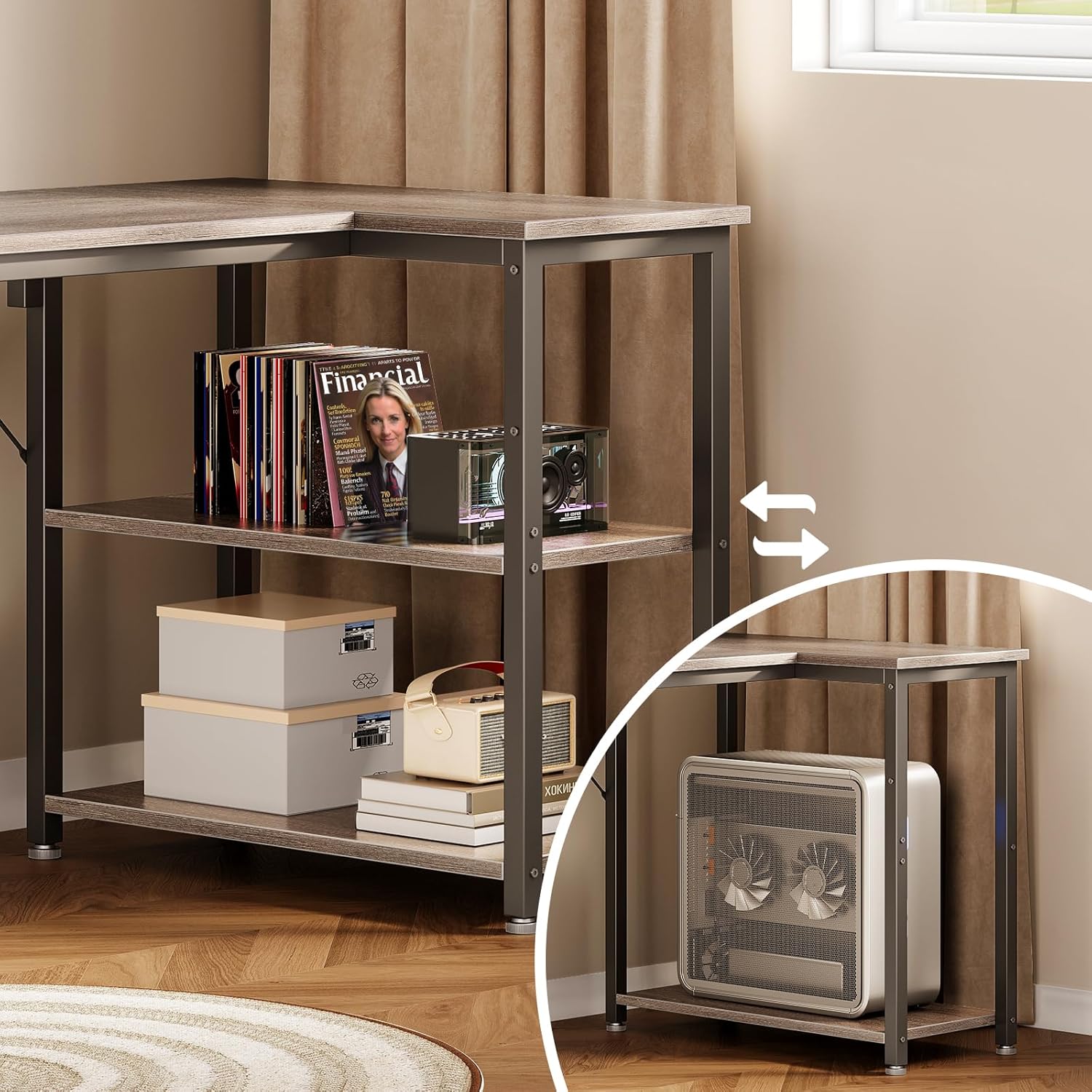
Image 7.1: Detailed dimensions of the Coleshome L-shaped gaming desk.
8. Warranty Information
Coleshome products are manufactured to high-quality standards. This product is covered by a manufacturer's warranty against defects in materials and workmanship. Please refer to the warranty card included with your purchase for specific terms, conditions, and duration. Keep your proof of purchase for warranty claims.
9. Customer Support
For further assistance, missing parts, or warranty inquiries, please contact Coleshome customer support through the retailer where you purchased the product or visit the official Coleshome website for contact information. Please have your model number (hryj-09) and purchase details ready when contacting support.


