
Introduction
This manual provides detailed instructions for the installation, operation, and maintenance of your Binardat NSP-1T3G 1 to 3 Gigabit Network Splitter. This device is designed to expand your network interfaces, allowing multiple devices to share a single Gigabit input port simultaneously. Please read this manual thoroughly before using the product to ensure proper function and longevity.

Figure 1: Binardat NSP-1T3G Network Splitter Overview
Package Contents
Please verify that all items listed below are included in your package. If any items are missing or damaged, contact customer support.
- 1 x Binardat NSP-1T3G Gigabit Network Splitter
- 1 x Type-C Power Cable
Product Features
The Binardat NSP-1T3G Network Splitter offers the following key features:
- 4 x 1 Gigabit Ports: Includes one input Gigabit Ethernet port and three output Gigabit Ethernet ports. Supports 10/100/1000Mbps rate auto-negotiation and auto MDI-MDIX.
- TYPE-C Power Supply: Utilizes a DC5V 1A Type-C power supply. Maximum power consumption is 1.4W. A USB power cable is included for connection to a USB port or power adapter.
- Simultaneous Operation: All three output ports can operate simultaneously, sharing the input port's Gigabit rate without requiring manual switching. Ideal for expanding network interfaces.
- Plug & Play: No configuration required. Simply connect the power and network cables.
- Durable Metal Case: Features a metal case for enhanced durability and protection.
- Fanless Design: Operates silently without a fan, suitable for various environments.
- Good Heat Dissipation: The metal casing and design contribute to efficient heat dissipation, ensuring stable performance.
- Compact Size: Mini size for convenient placement in various locations.
- Wide Compatibility: Compatible with Cat 5, Cat 5e, Cat 6, Cat 7, and Cat 8 Ethernet cables.
- LED Indicators: Provides clear visual status of device and port operation.

Figure 2: Full Gigabit Speed Capability
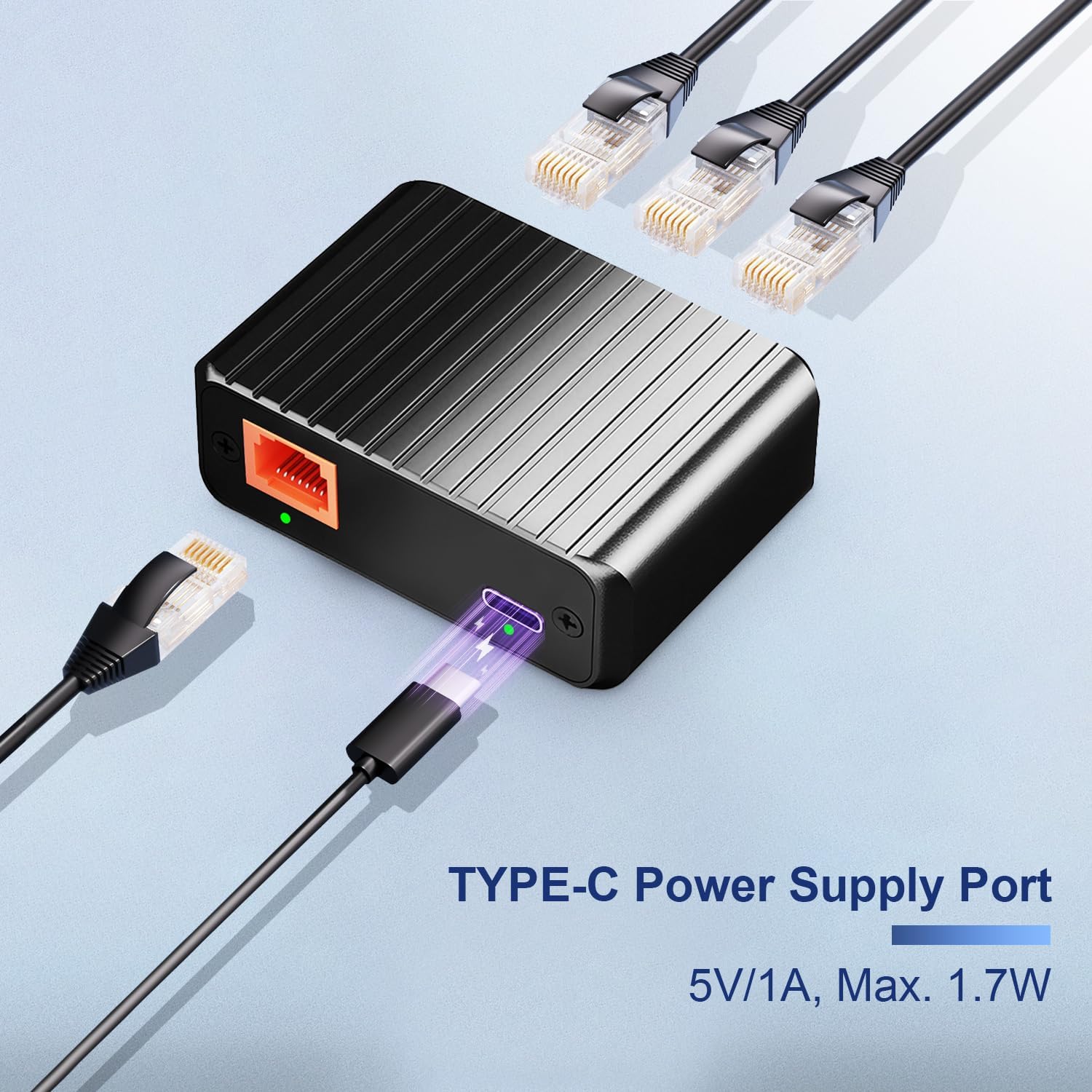
Figure 3: Type-C Power Supply Port

Figure 4: Efficient Heat Dissipation
Setup Instructions
Follow these steps to set up your Binardat NSP-1T3G Network Splitter:
- Connect Power: Connect the included Type-C power cable to the Type-C port on the splitter. Plug the other end of the USB power cable into a compatible USB port (e.g., on a computer, router, or USB power adapter) to supply DC5V 1A power.
- Connect Input Network: Connect an Ethernet cable from your uplink network device (such as a router, modem, or existing network switch) to the single input port on the Binardat splitter. This port is typically labeled or visually distinct.
- Connect Output Devices: Connect Ethernet cables from your desired devices (e.g., desktop computer, laptop, printer, IP camera) to the three output ports on the Binardat splitter.
- Verify Connection: Once all cables are connected, observe the LED indicators on the splitter. Green LEDs should illuminate for active connections, indicating successful data transmission.

Figure 5: Typical Connection Diagram
Operating Instructions
The Binardat NSP-1T3G Network Splitter is designed for simple, plug-and-play operation. No software installation or complex configuration is required.
- Power On: The device powers on automatically when the Type-C power cable is connected to a power source.
- Network Activity: The LED indicators next to each Ethernet port will light up when a device is connected and actively transmitting data. A solid green light typically indicates a stable link, while a blinking light indicates data activity.
- Simultaneous Use: All three output ports can be used simultaneously. The splitter intelligently manages traffic to ensure all connected devices share the available Gigabit bandwidth from the input port.
Maintenance
To ensure optimal performance and extend the lifespan of your network splitter, follow these maintenance guidelines:
- Cleaning: Use a soft, dry cloth to clean the exterior of the device. Do not use liquid cleaners or aerosols.
- Ventilation: Ensure the device is placed in a well-ventilated area. Although it has good heat dissipation and a fanless design, proper airflow helps maintain optimal operating temperatures.
- Cable Management: Keep Ethernet cables neatly organized to prevent damage and ensure secure connections.
- Power Supply: Use only the provided Type-C power cable or a compatible DC5V 1A power source. Using an incorrect power supply can damage the device.
- Environment: Avoid exposing the device to extreme temperatures, humidity, or direct sunlight.
Troubleshooting
If you encounter issues with your Binardat NSP-1T3G Network Splitter, refer to the following common problems and solutions:
| Problem | Possible Cause | Solution |
|---|---|---|
| No power/LEDs off | Power cable not connected or faulty; power source issue. | Ensure the Type-C power cable is securely connected to both the splitter and a working USB power source (DC5V 1A). Try a different USB port or power adapter. |
| No network connection on a device | Loose Ethernet cable; faulty cable; incorrect port connection; device network settings. |
|
| Slow network speed | Cable quality; network congestion; uplink speed limitation. |
|
| Intermittent connection | Loose cables; interference; faulty device. |
|
Specifications
Detailed technical specifications for the Binardat NSP-1T3G Network Splitter:
| Feature | Detail |
|---|---|
| Brand | Binardat |
| Model Number | NSP-1T3G |
| Number of Ports | 4 (1 Input, 3 Output) |
| Interface | RJ45 Ethernet |
| Data Transfer Rate | 10/100/1000 Mbps (Gigabit) |
| Switch Type | Unmanaged |
| Power Supply | Type-C, DC5V 1A |
| Max Power Consumption | 1.4W |
| Compatible Cables | Cat 5/5e/6/7/8 |
| Compatible Devices | Desktop, Laptop, Printer, IP Camera, etc. |
| Housing Material | Metal |
| Color | Black Yellow |
| Dimensions (L*W*H) | 64mm x 45.7mm x 21.5mm |

Figure 6: Compact Size of the Network Splitter
Warranty and Support
Warranty: The Binardat NSP-1T3G Network Splitter comes with a 1-Year Limited Warranty from the date of purchase. This warranty covers manufacturing defects and malfunctions under normal use. It does not cover damage caused by misuse, accidents, unauthorized modifications, or improper installation.
Technical Support: Binardat provides lifelong technical support for this product. If you encounter any issues that cannot be resolved using the troubleshooting guide, or if you require further assistance, please contact Binardat customer support through the retailer's platform or the official Binardat website.