
Introduction
Thank you for choosing the ALFORDSON Arco-Grey Ergonomic Office Chair. This manual provides essential information for the safe assembly, operation, and maintenance of your new chair. Designed for comfort and support during long hours, this chair features a breathable mesh back, dynamic lumbar support, an adjustable headrest, and versatile flip-up armrests. Please read these instructions carefully before assembly and use.

Image: The ALFORDSON Arco-Grey Ergonomic Office Chair in use, demonstrating its suitability for a home office environment.
Safety Information
- Maximum Weight Capacity: This chair is designed to support a maximum weight of 180 kg (396 lbs). Do not exceed this limit.
- Assembly: Ensure all parts are correctly assembled and all screws are tightened before use. Periodically check and re-tighten screws.
- Stability: Do not stand on the chair. Avoid leaning excessively to one side or backward to prevent tipping.
- Children: Keep children away from the chair during assembly. Do not allow children to play on or with the chair.
- Movement: Use caution when moving the chair, especially on uneven surfaces.
- Maintenance: Do not use abrasive cleaners or harsh chemicals on any part of the chair.
Package Contents
Please verify that all components are present before beginning assembly. Refer to the assembly diagram for a visual representation of all parts.
- Chair Base (5-star)
- Casters (5 pieces)
- Gas Lift Cylinder
- Seat Mechanism
- Seat Cushion
- Backrest
- Armrests (2 pieces)
- Headrest
- Hardware Pack (screws, washers, Allen key)

Image: Key structural components of the chair, highlighting the reinforced steel base, SGS certified gas lift, durable nylon base, and smooth-rolling universal wheels.
Setup and Assembly
Follow these steps to assemble your ALFORDSON Arco-Grey Ergonomic Office Chair. It is recommended to assemble the chair on a soft, clean surface to prevent damage.
- Attach Casters to Base: Insert each caster into the holes at the end of each leg of the 5-star chair base until it clicks securely into place.
- Insert Gas Lift: Place the gas lift cylinder into the center hole of the assembled chair base. Ensure it is seated firmly.
- Attach Seat Mechanism: Align the seat mechanism with the pre-drilled holes on the underside of the seat cushion. Secure it using the provided screws and Allen key. Ensure the front of the mechanism faces the front of the seat.
- Attach Armrests: Attach the armrests to the sides of the seat cushion using the provided screws. Do not fully tighten yet.
- Attach Backrest: Align the backrest with the mounting plates on the seat mechanism and armrests. Secure it with screws. Once the backrest is attached, fully tighten all armrest screws.
- Attach Headrest: Slide the headrest into the designated slots at the top of the backrest. Adjust to your preferred height and angle.
- Connect Seat to Gas Lift: Carefully place the assembled seat and backrest onto the gas lift cylinder, ensuring the center hole of the seat mechanism aligns with the top of the gas lift. Press down firmly to secure.
Operating Instructions
Your ALFORDSON Arco-Grey chair offers several adjustment features to customize your seating experience.
1. Seat Height Adjustment
To adjust the seat height, pull the lever located under the right side of the seat upwards. While holding the lever, stand up to raise the seat or remain seated and apply pressure to lower it. Release the lever to lock the height.
2. Backrest Recline Function
The backrest can recline up to 120 degrees. To recline, pull the lever located under the left side of the seat upwards and lean back. Release the lever at your desired angle to lock the recline. To return to an upright position, pull the lever again and lean forward slightly.

Image: Visual guide to the chair's adjustable recline, 360-degree swivel capability, and the 10 cm seat height adjustment range.
3. Flip-Up Armrests
The armrests can be flipped up by 60 degrees. This allows the chair to be pushed closer to your desk, saving space. Simply lift the armrests upwards until they lock into the vertical position. To lower them, pull them down.
4. Adjustable Headrest
The headrest can be adjusted in both height and angle. Gently push or pull the headrest to set it to your preferred position for neck and head support.
5. Dynamic Lumbar Support
The chair features integrated dynamic lumbar support that adapts to your lower back curve, providing continuous support. No manual adjustment is typically needed for this feature.

Image: Detailed view of the chair's ergonomic features, including integrated lumbar support, adjustable headrest angle and height, and adjustable armrests.
6. 360-Degree Swivel
The chair offers full 360-degree swivel rotation, allowing for easy movement and access to different areas of your workspace without needing to reposition the entire chair.
Maintenance
- Cleaning: For the mesh and fabric parts, use a soft cloth dampened with mild soap and water. Avoid harsh detergents or abrasive cleaners. Wipe dry immediately.
- Frame and Base: Wipe metal and plastic parts with a soft, dry cloth.
- Casters: Periodically clean hair and debris from the casters to ensure smooth rolling.
- Fasteners: Regularly check all screws and bolts to ensure they are tight. Re-tighten as necessary to maintain stability and prevent squeaking.
Troubleshooting
| Problem | Possible Cause | Solution |
|---|---|---|
| Chair is unstable or wobbly. | Loose screws or improper assembly. | Check all assembly screws and tighten them securely. Ensure the gas lift is fully seated in the base. |
| Chair makes squeaking or creaking noises. | Loose fasteners or friction between parts. | Tighten all screws. Apply a small amount of silicone lubricant to moving parts or connection points if noises persist. |
| Seat height adjustment not working. | Gas lift malfunction or lever issue. | Ensure the lever is fully engaged. If the issue persists, the gas lift may need replacement. Contact customer support. |
| Casters do not roll smoothly. | Debris caught in casters. | Turn the chair over and remove any hair, dust, or debris from the caster wheels. |
Specifications
- Model: Arco-Grey
- Dimensions (L x W x H): 51 x 59 x 128 cm (20.1 x 23.2 x 50.4 inches)
- Item Weight: 10.8 kg (23.8 lbs)
- Maximum Weight Recommendation: 180 kg (396 lbs)
- Color: Arco - Grey
- Materials: Class A1 breathable mesh, high-resilience foam, reinforced steel base, robust nylon base, SGS certified gas lift.
- Assembly Required: Yes
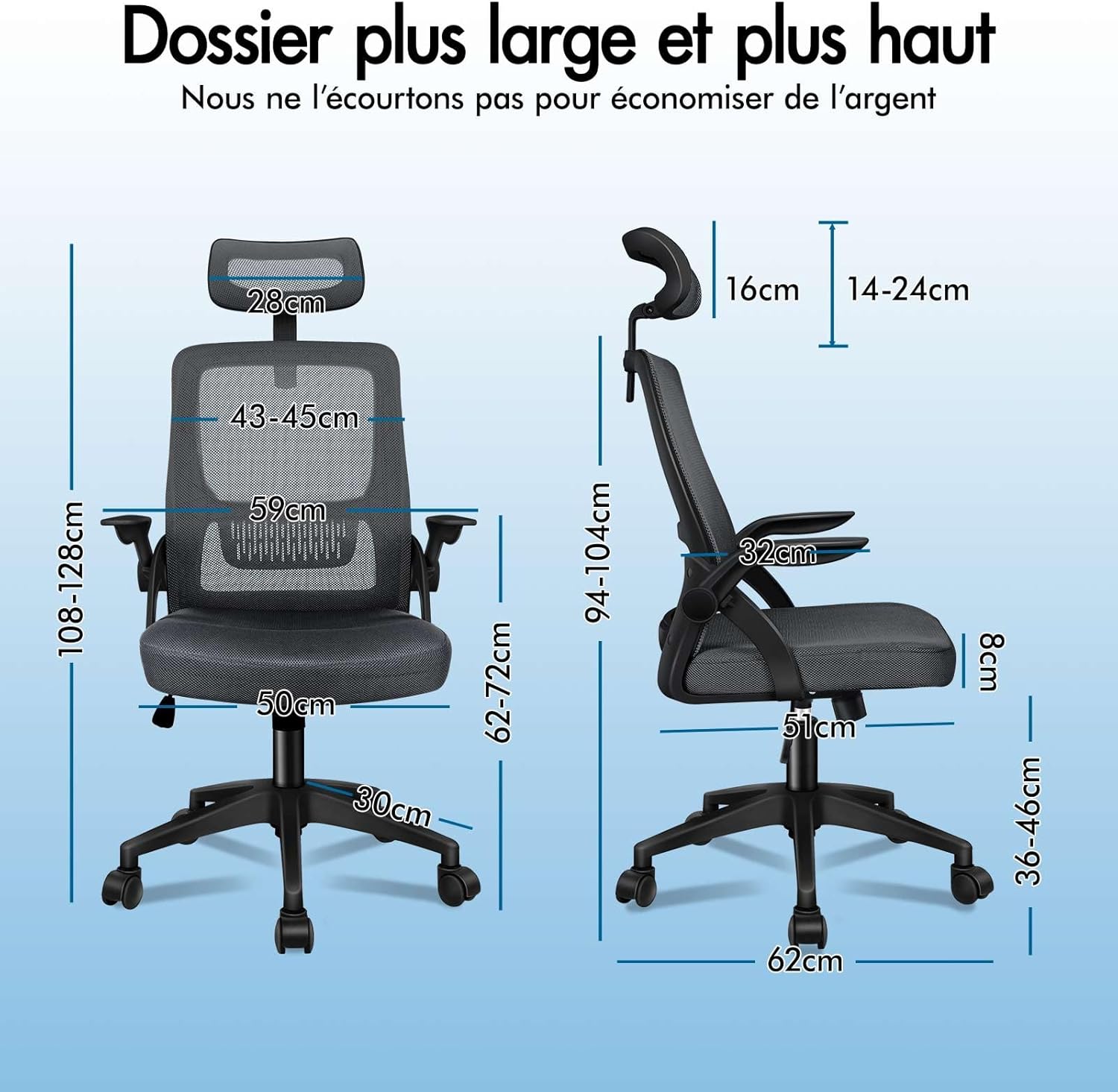
Image: Comprehensive dimensions of the chair, including seat height, backrest height, and overall width and depth.

Image: Illustration of the quality materials used, including Class A1 mesh and high-resilience foam for the seat.
Warranty and Support
The ALFORDSON Arco-Grey Ergonomic Office Chair comes with a Two-Year Warranty against manufacturing defects. This warranty covers parts and components under normal use.
For warranty claims, technical support, or any questions regarding your product, please contact ALFORDSON customer service through the retailer where you purchased the chair or visit the official ALFORDSON website for contact information.