
Ulefone Armor X16 Pro 5G
Ulefone Armor X16 Pro 5G Rugged Smartphone User Manual
Model: Armor X16 Pro 5G
Introduction
Welcome to the user manual for your Ulefone Armor X16 Pro 5G Rugged Smartphone. This guide provides essential information on setting up, operating, maintaining, and troubleshooting your device. Designed for durability and high performance, the Armor X16 Pro 5G is equipped with advanced features to support your daily activities and outdoor adventures.
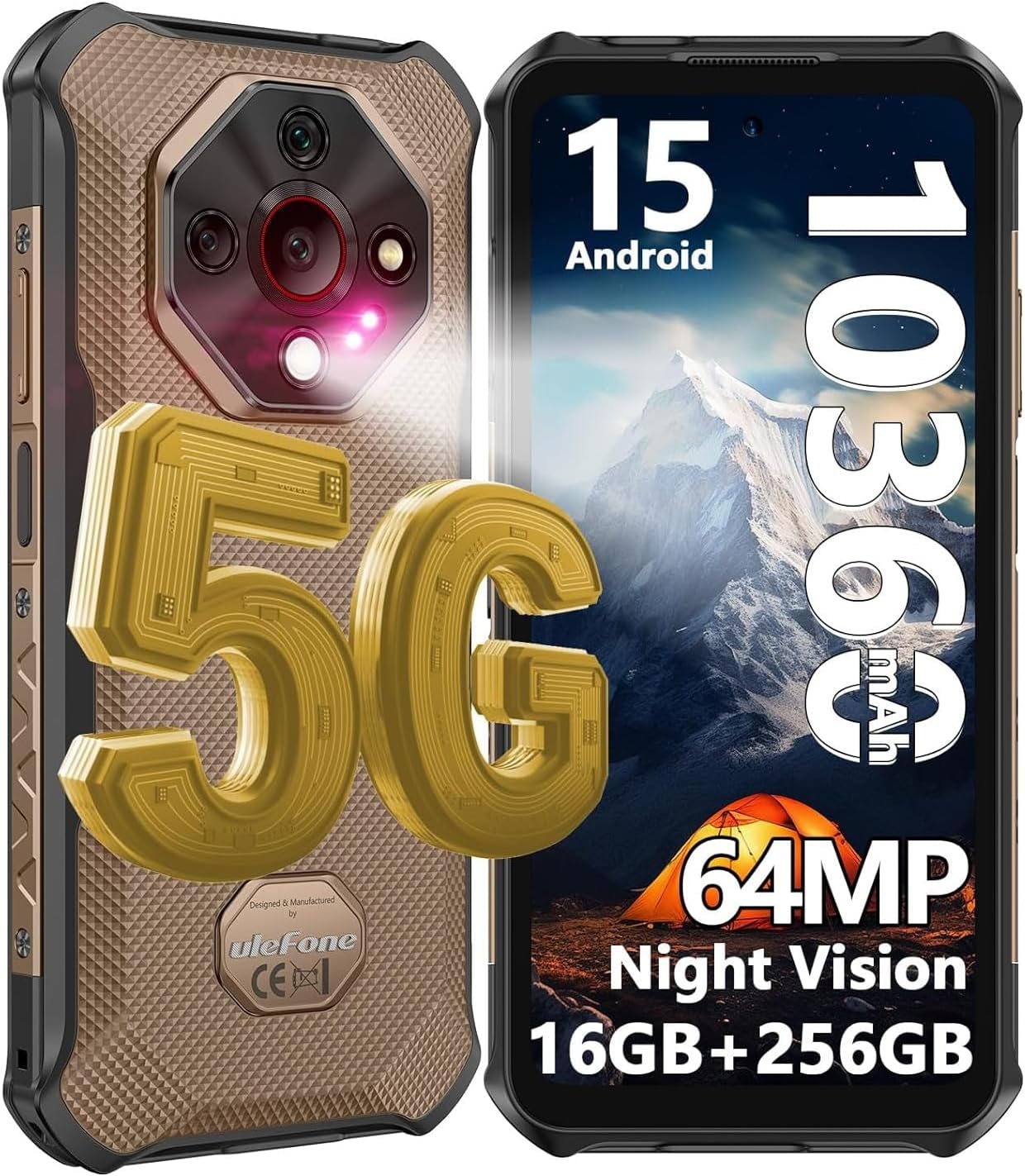
Figure 1: Ulefone Armor X16 Pro 5G Rugged Smartphone. This image displays the front and back of the Ulefone Armor X16 Pro 5G, highlighting its rugged design and key specifications like Android 15, 10360mAh battery, 64MP camera, and 16GB+256GB memory.
1. Setup
1.1 Package Contents
Before you begin, ensure all items are present in the package:
- 1x Ulefone Armor X16 Pro 5G Smartphone
- 1x AC Power Charger (100~240V Plug)
- 1x Data Cable (100cm)
- 1x Protective Film (Pre-installed)
- 1x Tempered Glass Screen Protector
- 1x SIM Pick
- 1x Lanyard
- 1x Multi-language User Manual
- 1x Multi Function Instruction Card
- 1x Charging Instruction Card
- 1x Safety Prompt Card

Figure 2: Package List. This image shows the complete contents included with the Ulefone Armor X16 Pro 5G smartphone, such as the phone, charger, cables, and documentation.
1.2 SIM Card and SD Card Installation
The Armor X16 Pro 5G supports dual SIM dual standby and a dedicated microSD card slot for expanded storage up to 2TB. Use the provided SIM pick to open the SIM tray.
- Locate the SIM tray on the side of the device.
- Insert the SIM pick into the small hole next to the tray and press gently until the tray ejects.
- Place your Nano-SIM cards and/or microSD card into the designated slots on the tray. Ensure they are correctly oriented.
- Carefully push the tray back into the slot until it is flush with the phone's body.

Figure 3: Dual 5G Connectivity and 3 Card Slot. This image illustrates the phone's capability for dual 5G connectivity and the physical SIM/SD card tray, showing its three distinct slots.
1.3 Initial Charging and Power On
For optimal performance, fully charge your device before first use.
- Connect the USB Type-C cable to the phone's charging port and the other end to the AC power charger.
- Plug the charger into a power outlet. The phone supports 33W fast charging.
- Once sufficiently charged, press and hold the Power button (usually on the right side) until the Ulefone logo appears.
- Follow the on-screen prompts to complete the initial setup, including language selection, Wi-Fi connection, and Google account setup.
2. Operating Your Device
2.1 Display and Interaction
The Armor X16 Pro 5G features a 6.56-inch FHD+ display with a 120Hz refresh rate for smooth visuals and a resolution of 720 x 1612. With 910 nits brightness, it ensures visibility even under bright sunlight. The screen is protected by Corning Gorilla Glass 5 for enhanced durability.

Figure 4: 6.56" 120Hz Display. This image highlights the key features of the phone's display, including its size, 120Hz refresh rate, 910 nits brightness, and 720x1612 resolution.

Figure 5: Corning Gorilla Glass 5. This image illustrates the robust protection offered by Corning Gorilla Glass 5 on the display, emphasizing its durability against drops and scratches.
2.2 Performance and Storage
Powered by the MediaTek Dimensity 6300 5G chipset with a 2.4GHz 8-core CPU, the Armor X16 Pro 5G delivers smooth performance. It comes with 16GB RAM (8GB physical + 8GB virtual) and 256GB internal storage, expandable up to 2TB via microSD card.

Figure 6: MediaTek Dimensity 6300 5G. This image showcases the MediaTek Dimensity 6300 5G processor, highlighting its 8-core CPU and 6nm advanced process for hyper-fast multitasking and gaming.

Figure 7: 16GB RAM + 256GB ROM. This image illustrates the phone's memory configuration, including 8GB physical RAM, 8GB dynamic RAM, and 256GB internal storage with 2TB SD card expansion.
2.3 Camera System
Capture stunning photos and videos with the versatile camera system:
- 64MP Main Camera: Featuring a Sony IMX682 sensor for high-resolution images.
- 25MP Night Vision Camera: For clear photos in low-light conditions.
- 2MP Macro Camera: To capture intricate details up close.
- 16MP Front Camera: For enhanced selfies and video calls.
- Underwater Mode: Allows taking photos and videos while submerged.

Figure 8: Camera System Overview. This image provides a visual summary of the Ulefone Armor X16 Pro 5G's camera setup, including the 64MP main, 25MP night vision, 2MP macro, and 16MP front cameras.

Figure 9: Macro and Underwater Camera. This image demonstrates the capabilities of the 2MP macro camera for close-up shots and the underwater camera mode for use in aquatic environments.
2.4 Battery and Charging
The device is equipped with a robust 10360mAh battery, providing extended usage times. It supports 33W PD fast charging and can also function as a portable power bank via reverse charging.
- Standby Time: Up to 555 hours
- Talk Time: Up to 56 hours
- Music Playback: Up to 42 hours
- Video Playback: Up to 13 hours

Figure 10: 10360mAh Mega Battery. This image highlights the large battery capacity and the 33W fast charging capability, along with estimated usage times for standby, talk, music, and video playback.
2.5 Connectivity and Navigation
The Armor X16 Pro 5G supports global 5G networks, ensuring fast and reliable connectivity. It also includes NFC for convenient mobile payments and comprehensive navigation support.
- Network: Global 5G (Dual SIM Dual Standby)
- NFC: For Google Pay and other contactless transactions.
- Navigation: GPS + GLONASS + Beidou + Galileo for accurate positioning.
- Bluetooth: BT5.2 for wireless accessory connection.

Figure 11: Connectivity and Security Features. This image displays the phone's support for NFC and Google Pay, GPS navigation, and biometric security options like Face Unlock and Fingerprint ID.
2.6 Special Features
The Armor X16 Pro 5G includes several unique features for enhanced usability:
- Android 15: Provides a seamless, secure, and efficient user experience with enhanced privacy features.
- Google Gemini: Integrated AI assistant for intelligent interactions.
- AI Recorder: Automatically transcribes calls/meetings and generates instant summaries.
- 133 Lumen Flashlight: Independent, powerful flashlight for various lighting needs.
- Widevine L1: Allows access to HD video streaming on platforms like Netflix, Amazon Prime Video, and Hulu.
- Custom Key: Programmable button for quick access to preferred functions.
- Headset-Free FM Radio: Enjoy radio without needing wired headphones.
- IR Blaster: Control compatible infrared devices.
- Gloves Mode: Enables touch screen operation while wearing gloves.

Figure 12: Android 15 and Google Gemini. This image highlights the phone's operating system, Android 15, and the integration of Google Gemini as an AI assistant.

Figure 13: 133 Lumen Flashlight. This image showcases the powerful built-in 133 lumen flashlight, ideal for illuminating dark environments.

Figure 14: Widevine L1 Certification. This image confirms the phone's Widevine L1 certification, enabling high-definition video streaming on popular platforms like Netflix, Amazon Prime Video, and Hulu.

Figure 15: Additional Features. This image highlights various convenient features such as Gloves Mode, a customizable key, headset-free FM radio, and an IR Blaster.
3. Maintenance
3.1 Rugged Durability
The Ulefone Armor X16 Pro 5G is built to withstand harsh environments, certified with IP68/IP69K ratings and MIL-STD-810H compliance.
- IP68: Submersible up to 2 meters for 30 minutes.
- IP69K: Protected against high-pressure, high-temperature water jets.
- MIL-STD-810H: Shockproof, enduring drops from up to 2 meters.
- Dustproof: Fully protected against dust, dirt, and sand.

Figure 16: IP68/IP69K Defender. This image visually represents the phone's robust build, highlighting its IP68/IP69K waterproof and dustproof ratings, and its 2-meter drop resistance.
3.2 Cleaning and Care
To maintain your device's condition:
- Wipe the screen and body with a soft, lint-free cloth.
- For stubborn dirt, use a slightly damp cloth. Avoid harsh chemicals.
- Ensure all port covers are securely closed before exposing the phone to water or dust.
- Avoid extreme temperatures and direct sunlight for prolonged periods.
4. Troubleshooting
If you encounter issues with your Ulefone Armor X16 Pro 5G, try the following common solutions:
- Device unresponsive: Press and hold the Power button for about 10-15 seconds to force a restart.
- Poor network signal: Check your SIM card installation. Move to an area with better network coverage.
- Battery draining quickly: Close unused apps running in the background. Reduce screen brightness. Check for app updates.
- Camera not working: Restart the phone. Clear the cache and data of the Camera app in Settings.
- Apps crashing: Ensure apps are updated to their latest versions. Clear app cache or reinstall the app.
- Storage full: Delete unnecessary files, photos, or videos. Move large files to an SD card.
If the problem persists, refer to the official Ulefone support resources or contact customer service.
5. Specifications
Detailed technical specifications for the Ulefone Armor X16 Pro 5G:
| Feature | Specification |
|---|---|
| Brand | Ulefone |
| Model Name | Armor X16 Pro Sand Dune Color |
| Operating System | Android 15 |
| Processor | MediaTek Dimensity 6300 (8-core, 2.4GHz) |
| RAM | 16 GB (8GB physical + 8GB virtual) |
| Internal Storage | 256 GB |
| Expandable Storage | Up to 2 TB (microSD) |
| Screen Size | 6.56 Inches |
| Display Type | FHD+ LCD, 120Hz Refresh Rate, 910 nits brightness |
| Display Resolution | 720 x 1612 |
| Display Protection | Corning Gorilla Glass 5 |
| Main Camera | 64 MP (Sony IMX682 sensor) |
| Night Vision Camera | 25 MP |
| Macro Camera | 2 MP |
| Front Camera | 16 MP |
| Battery Capacity | 10360 mAh |
| Charging | 33W Fast Charging, Reverse Charging |
| Cellular Technology | 5G (Dual SIM Dual Standby) |
| Wireless Connectivity | Wi-Fi, Bluetooth 5.2, NFC |
| Navigation | GPS, GLONASS, Beidou, Galileo |
| Durability Ratings | IP68, IP69K, MIL-STD-810H |
| Special Features | 133 Lumen Flashlight, AI Recorder, Widevine L1, Fingerprint Unlock, Face Unlock, Custom Key, Headset-Free FM Radio, IR Blaster, Gloves Mode |
| Dimensions | 14 x 8.2 x 1.36 cm |
| Weight | 300 g |
6. Warranty and Support
6.1 Warranty Information
Your Ulefone Armor X16 Pro 5G comes with a standard manufacturer's warranty. Please refer to the warranty card included in your package for specific terms and conditions, including coverage period and limitations. Keep your proof of purchase for warranty claims.
6.2 Customer Support
For technical assistance, troubleshooting, or any product-related inquiries, please contact Ulefone customer support. You can typically reach support via the Amazon messaging system by sending a message to the seller, as indicated in the product listing. Provide your product model and a detailed description of the issue for efficient assistance.
For more information, visit the official Ulefone website or the Ulefone store on Amazon.
Related documentsArmor X16 Pro 5G


Ask a question about this manual
Ask about setup, troubleshooting, compatibility, parts, safety, or missing instructions. Manuals+ will review the question and use this page’s manual context to help answer it.