
1. Introduction
Welcome to the DUSKTEC Smart Recessed Lighting system. This manual provides essential information for the safe installation, effective operation, and proper maintenance of your 6-inch smart recessed lights. Please read these instructions thoroughly before installation and retain them for future reference.
2. Product Overview
The DUSKTEC Smart Recessed Lighting offers advanced features for modern home illumination. These 6-inch LED lights provide a wide range of color and brightness options, controllable via a dedicated app or voice commands through compatible smart assistants.
Key Features:
- Smart Control: Compatible with Alexa for voice control and the BRmesh App for comprehensive smartphone management.
- Dynamic Lighting: Offers 16 million RGBCW (Red, Green, Blue, Cool White, Warm White) colors and adjustable white light from 2700K (warm) to 6000K (cool daylight).
- Dimmable: Brightness can be adjusted from 1% to 100%.
- High Color Rendering Index (CRI >90): Ensures colors appear vivid and accurate.
- Flicker-Free: Designed to provide stable illumination, reducing eye strain.
- Bluetooth Mesh Technology: Utilizes a Bluetooth 5.0 chip for stable connections, allowing control of up to 255 lights without requiring an internet connection or registration.
- Group Control: Manage multiple lights simultaneously by grouping them within the app.
- Customizable Modes: Access preset scene modes, music sync functionality, and DIY options to create personalized lighting atmospheres.


3. Safety Information
Please observe the following safety precautions to prevent injury or damage to the product:
- Always turn off the power at the circuit breaker before installation, removal, or maintenance.
- This product is designed for indoor use only and is moisture resistant, but not waterproof. Avoid direct exposure to water.
- Do not use with traditional dimmer switches. This product is dimmable via the BRmesh App or Alexa voice control only. Using a dimmer switch may cause flickering or damage to the lights.
- Ensure all electrical connections are secure and comply with local electrical codes. If you are unsure about electrical wiring, consult a qualified electrician.
- Do not disassemble or modify the light fixture. This will void the warranty.
- Keep packaging materials away from children.
4. What's in the Box
Your DUSKTEC Smart Recessed Lighting package includes:
- DUSKTEC Smart Recessed Light Units (Quantity as per pack size, e.g., 12 units for a 12-pack)
- Instruction Manual
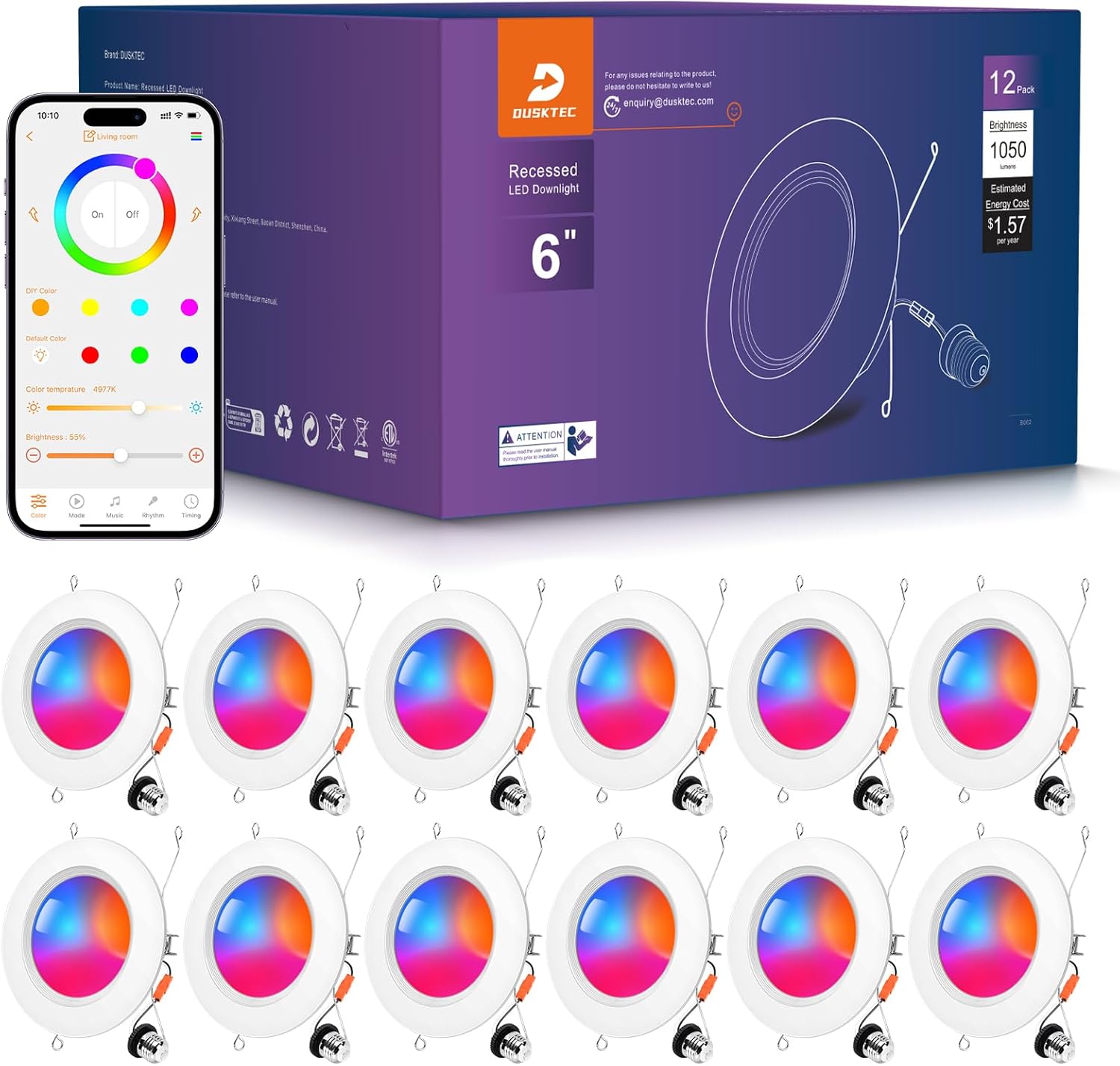
5. Specifications
| Feature | Specification |
|---|---|
| Brand | DUSKTEC |
| Model Number | TD3C002 |
| Size | 6 Inch |
| Light Source Type | LED |
| Wattage | 13 Watts |
| Luminous Flux | 1050 Lumens |
| Color Temperature | 2700K - 6000K |
| Color Options | 16 Million RGBCW |
| Dimmable | 1% - 100% (via App/Voice) |
| Voltage | 120 Volts (AC) |
| Control Method | App (BRmesh), Voice (Alexa) |
| Connectivity | Bluetooth 5.0 (BT Mesh) |
| Color Rendering Index (CRI) | >90 |
| Indoor/Outdoor Usage | Indoor (Moisture Resistant) |
| Material | Alloy Steel, Aluminum, Plastic |
| Product Dimensions | 6.7 x 6.7 x 0.7 inches |
| Item Weight (12-pack) | 4.52 Pounds |
| Certification | ETL |

6. Installation
Follow these steps for easy installation. Ensure power is off at the circuit breaker before beginning.
- Screw the E26 Base: Carefully screw the E26 base of the recessed light into an existing E26 socket in your ceiling fixture.
- Attach Connectors: Connect any additional wiring connectors as required, ensuring a secure fit.
- Mount the Light: Gently push the light unit into the ceiling opening. The spring clips will secure the light in place.
- Control with App: Once installed, restore power and proceed to control the downlight using the BRmesh App or Alexa.
Important Note: These lights are designed for smart control and are not compatible with traditional dimmer switches. Using a dimmer switch may cause malfunction or damage.

7. Operation
Your DUSKTEC Smart Recessed Lights can be controlled via the BRmesh App or voice commands through Alexa.
7.1. BRmesh App Control
- Download the App: Search for and download the 'BRmesh' app from your smartphone's app store (iOS or Android).
- Pairing: Open the BRmesh app. Ensure Bluetooth is enabled on your phone. The app will automatically detect nearby DUSKTEC lights. Follow the in-app instructions to pair your lights. No internet connection or registration is required for initial pairing due to Bluetooth Mesh technology.
- Basic Controls:
- On/Off: Tap the power icon to turn lights on or off.
- Brightness: Use the slider to adjust brightness from 1% to 100%.
- Color Selection: Choose from 16 million colors or adjust white light temperature between 2700K and 6000K.
- Scene Modes: The app offers various preset scene modes (e.g., Night, Reading, Work, Leisure, Relax, Dance Party) to instantly change the ambiance. You can also create and save your own custom DIY scenes.
- Music Sync: Activate the music sync mode to have your lights change color and brightness in rhythm with music played through your phone.
- Timing Function: Set schedules for your lights to automatically turn on or off at specific times.


7.2. Voice Control with Alexa
To enable voice control, you need to link your DUSKTEC lights with your Alexa account:
- Set up Alexa Device: Ensure your Amazon Alexa device (e.g., Echo Dot) is properly set up and connected to your home network.
- Discover Devices: In the Alexa app, navigate to 'Devices' and select 'Add Device'. Choose 'Light' and follow the instructions to discover your DUSKTEC lights. Alternatively, you can say, "Alexa, discover my devices."
- Voice Commands: Once discovered, you can use commands such as:
- "Alexa, turn on [Light Name]."
- "Alexa, turn off [Light Name]."
- "Alexa, set [Light Name] to 50 percent."
- "Alexa, change [Light Name] to blue."
- "Alexa, set [Light Name] to warm white."


7.3. Group Control
The BRmesh App allows you to group multiple lights together for simultaneous control:
- Create a Group: In the BRmesh app, navigate to the group settings and select the lights you wish to include in a group (e.g., "Living Room Lights").
- Control Group: Once grouped, any command (on/off, color change, brightness adjustment) applied to the group will affect all lights within that group.

7.4. Sharing Control with Multiple Phones
You can share control of your DUSKTEC lights with other family members or devices:
- On Main Phone (Step 1): Open the BRmesh app and tap 'More'.
- Select Sharing Option (Step 2): Choose 'Sharing Device(s) with Other Phones' from the list.
- Generate QR Code (Step 3): The app will generate a QR code.
- On Second Phone (Step 4): Open the BRmesh app on the second phone, tap 'More', and use the scan function to scan the QR code from the main phone. This will grant control to the second device.

8. Troubleshooting
If you encounter issues with your DUSKTEC Smart Recessed Lighting, refer to the following common problems and solutions:
| Problem | Possible Cause | Solution |
|---|---|---|
| Light not turning on | No power; loose connection; faulty light. | Check power at the circuit breaker. Ensure the E26 base is securely screwed in. Verify all connectors are properly attached. If issues persist, contact support. |
| Light is flickering | Incompatible dimmer switch; unstable power supply. | Ensure no traditional dimmer switches are in use. This product is only dimmable via the app or Alexa. Check for stable power supply. |
| Cannot connect to BRmesh App | Bluetooth off; light out of range; app error. | Ensure Bluetooth is enabled on your smartphone. Move closer to the light. Restart the BRmesh app. Try restarting the light by cycling its power. |
| Alexa not responding to commands | Light not paired with Alexa; incorrect command; Alexa device offline. | Verify the light is successfully paired with Alexa in the Alexa app. Use correct voice commands (refer to Section 7.2). Check if your Alexa device has an active internet connection. |
| Colors or brightness not changing | App/voice command error; light malfunction. | Ensure the app is updated and the light is selected. Try a different color or brightness setting. Restart the light and app. |
9. Care and Maintenance
To maintain the performance and appearance of your DUSKTEC Smart Recessed Lighting:
- Cleaning: Wipe the surface of the light with a soft, dry cloth. Do not use abrasive cleaners, solvents, or harsh chemicals, as these can damage the finish or electronic components.
- Disassembly: Do not attempt to disassemble the light fixture. There are no user-serviceable parts inside.
- Storage: If storing the lights for an extended period, keep them in a cool, dry place away from direct sunlight and extreme temperatures.
10. Warranty and Support
DUSKTEC is committed to providing reliable products and customer satisfaction.
- Warranty: This product comes with a 2-year limited manufacturer's support.
- Customer Support: We offer a 24-hour quick response service for any inquiries or issues you may have.
- Certifications: Our products are certified with UKCA, CE, and ROHS standards, ensuring safety and quality.
For support, please refer to the contact information provided on the product packaging or visit the official DUSKTEC website.
