
Introduction
The Fenix PD35R ACE is a high-performance, USB rechargeable LED tactical flashlight designed for various lighting needs, including outdoor activities and law enforcement. It features a powerful 2000 lumen output, a 380-meter beam distance, and Fenix's patented SET output customization system, offering three distinct mode selection profiles. This manual provides detailed instructions for its safe and effective use.
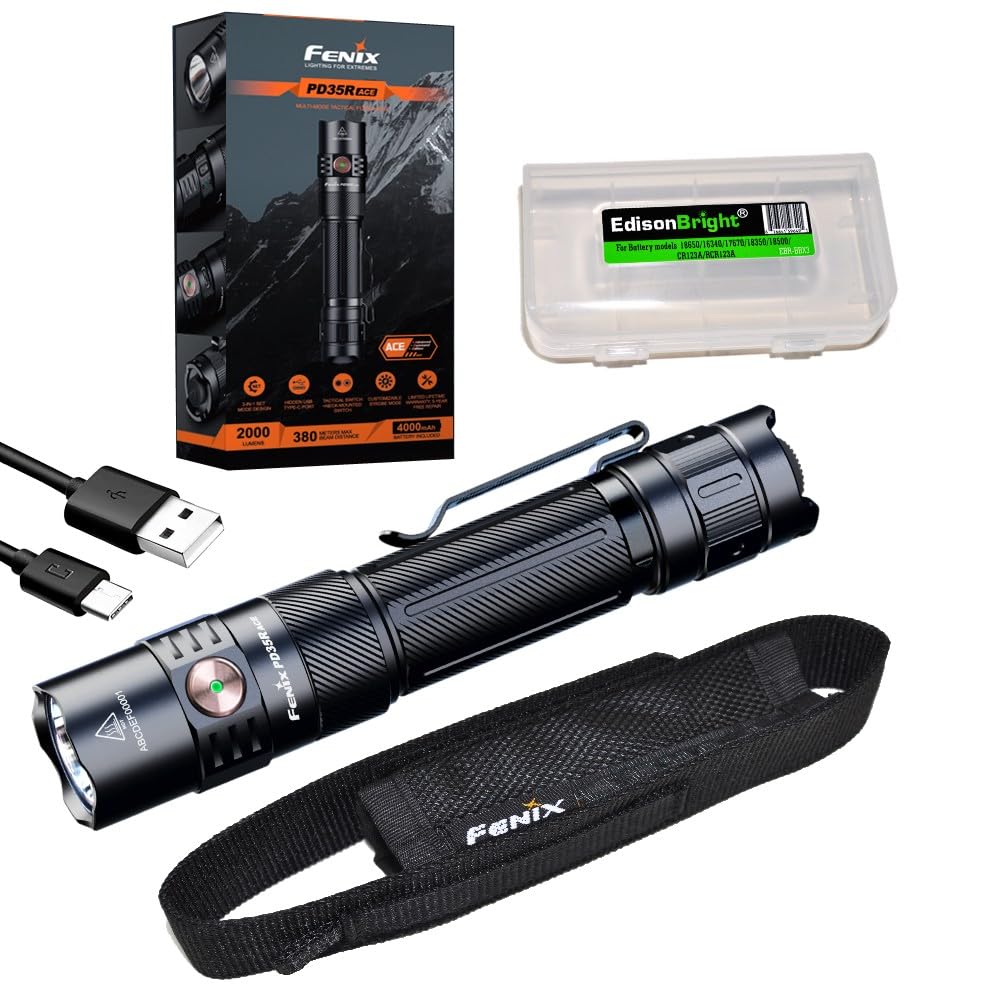
Image: The Fenix PD35R ACE flashlight, highlighting its robust construction and side switch.
What's in the Box
- Fenix PD35R ACE Flashlight
- Rechargeable Lithium-Ion Battery (included)
- USB Type-C Charging Cable
- Holster
- Lanyard
- Spare O-ring
- EdisonBright Accessory Case
Setup
Battery Installation
- Unscrew the tail cap of the flashlight counter-clockwise.
- Insert the included Fenix ARB-L18-4000P Lithium-Ion battery with the anode (+) end facing towards the flashlight head.
- Screw the tail cap back on clockwise until it is fully tightened. Ensure a secure connection for proper operation and waterproofing.
Initial Charging
Before first use, it is recommended to fully charge the battery. The PD35R ACE features a hidden USB-C charging port.
- Locate the rubber cover on the side of the flashlight head, near the side switch.
- Lift the rubber cover to expose the USB Type-C charging port.
- Connect the USB Type-C cable to the flashlight and the other end to a USB power source (e.g., wall adapter, power bank, computer).
- The charging indicator light will show the charging status. A red light indicates charging, and a green light indicates a full charge.
- Once charging is complete, securely close the rubber cover to maintain the flashlight's waterproof rating.

Image: Overview of Fenix PD35R ACE features, including the hidden USB-C charging port.
Operating Instructions
The Fenix PD35R ACE utilizes a dual-switch system: a tactical tail switch for momentary/constant on/off and a side switch for output selection and mode switching.
Power On/Off
- Momentary On: Half-press the tactical tail switch. Release to turn off.
- Constant On/Off: Fully press the tactical tail switch until a click is heard to turn the flashlight on or off.
Output Selection
With the flashlight on, single-click the side switch to cycle through Eco, Low, Med, High, and Turbo modes.
SET Mode Selection (ACE System)
The PD35R ACE features three distinct SET modes (Tactical Operation, Military and Duty, Outdoor Activity) that customize the available output levels and their order. To switch between SET modes:
- With the flashlight off, press and hold the side switch for 3 seconds. The flashlight will flash to indicate the current SET mode.
- Release the side switch, then quickly single-click it to cycle through the three SET modes.
- Once the desired mode is indicated by its unique flash pattern, press the tactical tail switch to confirm and exit.

Image: The SET 3-in-1 system, illustrating the customizable output options for different operational profiles.
Strobe and SOS Modes
- Strobe: With the flashlight on, press and hold the side switch for 0.8 seconds to activate Strobe mode. Single-click the side switch to return to the previously used general mode.
- SOS: In Outdoor Activity SET mode, cycle through the general modes until SOS is reached.
Charging
The Fenix PD35R ACE features a convenient USB Type-C charging port. Ensure the flashlight is off during charging for optimal performance.
- Open the rubber cover on the flashlight head to access the USB-C port.
- Connect the provided USB-C cable to the flashlight and a power source.
- The charging indicator will be red during charging and turn green when fully charged.
- Charging time for a fully depleted battery is approximately 3-4 hours, depending on the power source.
- Always close the rubber cover tightly after charging to maintain water resistance.
Maintenance
- Cleaning: Periodically clean the flashlight body with a soft cloth. For stubborn dirt, use a damp cloth. Avoid harsh chemicals.
- O-rings: Inspect the O-rings regularly for wear and tear. Replace them if damaged to maintain the waterproof seal. Lubricate O-rings with silicone grease as needed.
- Threads: Keep the threads of the tail cap clean and lubricated to ensure smooth operation and good electrical contact.
- Battery Care: Store the battery in a cool, dry place. If the flashlight will not be used for an extended period, remove the battery to prevent leakage. Recharge the battery every four months to prolong its lifespan.
Troubleshooting
If your Fenix PD35R ACE flashlight is not functioning correctly, please refer to the following common issues and solutions:
- Flashlight does not turn on or flickers:
- Check if the battery is inserted correctly with the positive (+) end facing the head.
- Ensure the tail cap is fully tightened. Loose connections can prevent power flow.
- The battery may be low on charge. Try charging the battery fully.
- Clean the contact points of the battery and flashlight with an alcohol swab.
- Flashlight won't charge:
- Ensure the USB-C cable is securely connected to both the flashlight and the power source.
- Try a different USB-C cable or power adapter to rule out faulty accessories.
- Verify the charging port is clean and free of debris.
- The battery might be deeply discharged. Allow it to charge for a longer period, or try a different battery if available.
- Output modes are not cycling correctly:
- Ensure the battery has sufficient charge.
- Refer to the 'Operating Instructions' section for correct mode selection procedures, especially for SET modes.
Specifications
The following table details the performance specifications of the Fenix PD35R ACE flashlight:

Image: Detailed technical specifications for the Fenix PD35R ACE across all output modes.
| Feature | Detail |
|---|---|
| Light Source | LED |
| Maximum Output | 2000 Lumens |
| Maximum Beam Distance | 380 meters (1247 feet) |
| Power Source | 1 x 18650 Lithium-Ion Battery (included) |
| Charging Port | USB Type-C |
| Water Resistance | IP68 (2 meters submersible for 30 minutes) |
| Impact Resistance | 1.5 meters |
| Material | Anodized Aluminum |
| Dimensions | 5.53 inches (Length) x 1.04 inches (Head Diameter) x 0.93 inches (Body Diameter) |
| Weight | 5.11 ounces (including battery) |
Warranty and Support
The Fenix PD35R ACE flashlight comes with a limited warranty. Please refer to the warranty card included with your product for specific terms and conditions. For technical support, service, or warranty claims, please contact your authorized Fenix dealer or visit the official Fenix website for contact information.


