
Introduction
The ANENG SZ02 Digital Multimeter is a versatile and intelligent electrical testing tool designed for both industrial and household applications. It accurately measures AC/DC voltage, AC/DC current, resistance, continuity, capacitance, frequency, diode, and temperature. Featuring an auto-ranging function, a backlit LCD screen, and dual torch lighting, it ensures ease of use and safety in various environments.
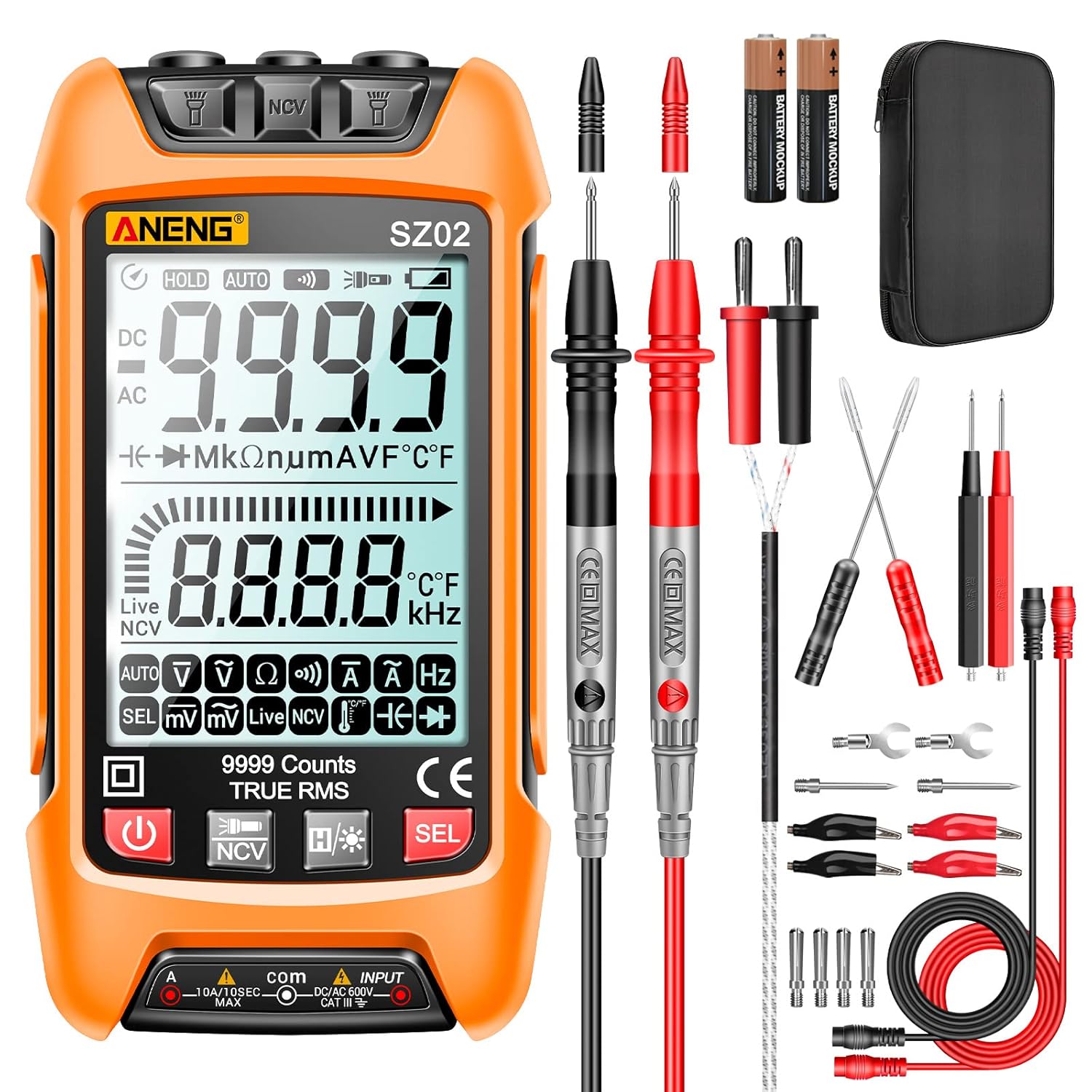
Figure 1: ANENG SZ02 Digital Multimeter and included accessories.
Safety Information
Always adhere to safety precautions when using electrical testing equipment. This device features a double ceramic fuse for anti-burn protection and a silicone cover to prevent electric shocks. Non-contact voltage testing provides an additional layer of safety with sound and light alarms.
- Ensure the device is off and disconnected from any power source before connecting or disconnecting test leads.
- Do not exceed the maximum input values for any measurement range.
- Always inspect test leads for damage before use.
- Discharge capacitors before measuring capacitance to avoid electric shock.
- Use appropriate personal protective equipment (PPE) when working with electricity.

Figure 2: Internal components showing safety features like double ceramic fuse.
Package Contents
The package includes the following items:
- 1 x ANENG SZ02 Digital Multimeter
- 2 x AAA Batteries (pre-installed)
- 1 x Combination Lead Set (4 connection sockets, 2 PVC cables, 2 copper needles, 2 U-shaped inserts, 2 meter pens, 2 alligator clips, 2 puncture needles)
- 1 x Multimeter Test Lead
- 1 x Temperature Line
- 1 x Charging Cable
- 1 x Instruction Manual
- 1 x Storage Bag
Setup
Before first use, ensure batteries are properly installed and connect the test leads.
- Battery Installation: The multimeter comes with 2 AAA batteries pre-installed. If replacement is needed, open the battery compartment on the back and insert new batteries, observing polarity.
- Connecting Test Leads: Insert the red test lead into the "INPUT" jack and the black test lead into the "COM" jack. Ensure they are securely connected. The test leads are designed to withstand high voltage and current, and come with protective covers for the tips.
Figure 3: Proper connection of test leads to the multimeter.
Operating Instructions
The ANENG SZ02 features automatic identification for most measurements, simplifying operation. Press the power button to turn on the device and activate the backlight for improved visibility.
1. AC/DC Voltage Measurement
The multimeter automatically identifies AC or DC voltage. Simply connect the test leads to the circuit or component to be measured. The display will show the voltage reading.
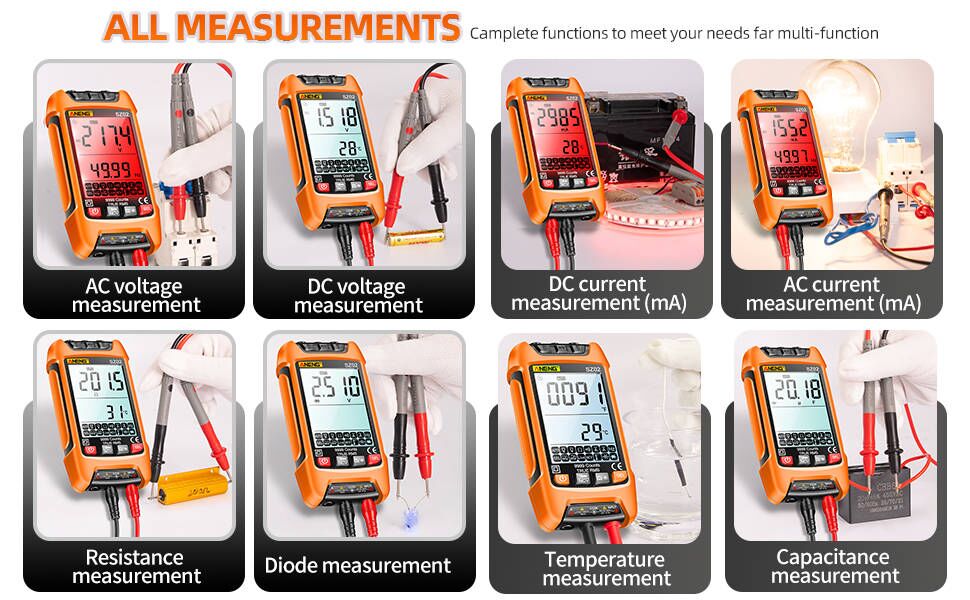
Figure 4: Examples of AC and DC voltage measurements.
2. Resistance Measurement
To measure resistance, ensure the circuit is de-energized. Touch the test leads to both ends of the resistor. The multimeter will automatically detect and display the resistance value.
3. Continuity Measurement (Buzzer)
For continuity checks, touch the test leads to the points you wish to test. If there is continuity (low resistance), the multimeter will emit a "dididi" beep sound.
4. Diode Measurement
When measuring diodes, ensure the positive and negative poles of the test leads are aligned with the diode's polarity for accurate readings.
5. Capacitance Measurement
Important: For safety, discharge the capacitor completely before attempting to measure its capacitance. Touch the test leads to both ends of the capacitor, and the multimeter will display the capacitance value.
6. Millivolt Measurement
Before measuring millivolts, the displayed value can be reset to zero by pressing the appropriate button (refer to the device's interface for the specific button, usually "REL" or "ZERO").
7. AC/DC Current Measurement
For current measurements, the test lead needs to be inserted into the 10A jack (for higher currents) or mA jack (for lower currents) as appropriate. Ensure the circuit is broken and the multimeter is connected in series with the load.

Figure 5: Measuring AC current in a circuit.
8. Non-Contact Voltage (NCV) Detection
The NCV function allows for safe detection of AC voltage without direct contact. When voltage is detected, the screen will turn red and an audible alarm will sound. This is particularly useful for identifying live wires.

Figure 6: NCV detection in action, showing the screen turning red.
9. Flashlight Function
The multimeter is equipped with dual torch lighting at the top, which can be activated to illuminate dimly lit work areas or for use at night.

Figure 7: Using the built-in flashlight for visibility.
10. Temperature Measurement
Plug the temperature wire into the designated jacks on the multimeter. Use the probe to measure the temperature of the desired object or environment.
Instructional Video
Video 1: Comprehensive demonstration of ANENG SZ02 Multimeter features and measurement functions.
Maintenance
Proper maintenance ensures the longevity and accuracy of your multimeter.
- Cleaning: Wipe the device with a dry, soft cloth. Do not use abrasive cleaners or solvents.
- Storage: Store the multimeter in its provided storage bag in a cool, dry place when not in use.
- Battery Replacement: When the low battery indicator appears on the screen, replace the 2 AAA batteries promptly to ensure accurate readings and proper operation.
- Fuse Replacement: The double ceramic fuse protects against overloading. If the fuse blows, replace it with a fuse of the same type and rating (refer to device markings for specifications).
Troubleshooting
If you encounter issues with your ANENG SZ02 Multimeter, refer to the following common troubleshooting steps:
| Problem | Possible Cause | Solution |
|---|---|---|
| No display/Device won't turn on | Dead batteries; Power button issue | Replace AAA batteries; Ensure power button is fully pressed. |
| Inaccurate readings | Low battery; Incorrect lead connection; Exceeded range; Damaged leads | Replace batteries; Check lead insertion; Select appropriate range; Inspect/replace leads. |
| No continuity beep | Open circuit; Low battery | Verify circuit continuity; Replace batteries. |
| NCV not detecting voltage | Distance too far; Low voltage source | Bring closer to the source; Confirm voltage presence with direct measurement. |
Specifications
- Brand: ANENG
- Model: SZ02
- Display: 9999 Counts, True RMS, Backlit LCD
- Power Source: 2 x AAA Batteries (included)
- Measurement Types: AC/DC Voltage, AC/DC Current, Resistance, Continuity, Capacitance, Frequency, Diode, Temperature, NCV
- Safety Rating: Double Ceramic Fuse, Anti-Burning, Silicone Cover
- Dimensions: 8.66 x 5.94 x 1.93 inches
- Weight: 15.52 ounces
- Color: Yellow
Warranty and Support
ANENG provides lifetime service and technical support for this electrical tester. For any inquiries, technical assistance, or warranty claims, please refer to the contact information provided in the original product packaging or visit the official ANENG website.
For more information, visit the ANENG Store.


