
Fajocru smartwatch-B
Fajocru Fall Detection Smart Watch User Manual
Model: smartwatch-B
1. Introduction
The Fajocru Fall Detection Smart Watch is designed to provide safety and connectivity for seniors, offering features such as GPS tracking, SOS alerts, HD video calls, and health monitoring. This manual provides comprehensive instructions for setting up, operating, and maintaining your smartwatch to ensure optimal performance and user safety.

Image: The Fajocru Smart Activity Watch Fitness Tracker, showcasing its sleek design and purpose for a healthier lifestyle.
2. Product Overview
The Fajocru Smart Watch integrates multiple functions to support the well-being of its users. Key components include the watch display, side buttons, SIM card slot, and charging port.
2.1 Key Features
- Real-Time GPS Position Tracking
- Two-Way Phone Call & Voice Chat
- SOS Emergency Alert
- Fall Detection Alarm
- Health Monitoring (Heart Rate, Blood Oxygen)
- IP67 Waterproof Rating
- Safety Zone Geofencing
- Alarm Clock, Pedometer, Historical Route

Image: An illustration highlighting the various practical functions of the smartwatch, including network access, location, history, SOS, temperature, sedentary reminder, video call, fall alarm, micro chat, heart rate, ringtone search, and medication reminder.

Image: Detailed view of the smartwatch, showing its dimensions (10.12 inches total length, 0.8 inches width) and included components like the charging cable.
3. Getting Started
3.1 Charging the Smart Watch
Before first use, fully charge the smartwatch. Connect the magnetic charging cable to the charging contacts on the back of the watch and plug the USB end into a compatible power adapter (not included). A full charge typically takes approximately 2-3 hours.
3.2 SIM Card Installation
The smartwatch requires a 2G, 3G, or 4G SIM card (0.43 x 0.31 inch) with both call and network functions. Recommended carriers include Verizon, AT&T, Sprint, and T-Mobile.
- Power Off: Ensure the watch is powered off before inserting the SIM card. If accidentally powered on, go to Settings and select Power Off.
- Insert SIM: Locate the SIM card slot on the side of the watch. Carefully insert the SIM card into the slot until it clicks into place.
- Power On: Press and hold the power button to turn on the watch.
3.3 App Download and Pairing
To utilize all features, download the companion app "Se Tracker" on your smartphone (available for iOS and Android).
- Turn on Watch: Ensure the watch is powered on.
- Access QR Code: On the watch, tap the "QR code" icon or navigate to the "APP code" section.
- Scan Code: Use your phone's camera or a QR code scanner app to scan the QR code displayed on the watch screen. This will direct you to download the "Se Tracker" app.
- Download App: Choose the appropriate download option for your phone (iPhone or Android).
- Register Account: Open the "Se Tracker" app and register a new account.
- Add Device: In the app, select "Add Device" and scan the registration QR code displayed on the watch (or manually enter the registration code).
- Complete Setup: Follow the on-screen prompts in the app to complete the pairing process and set up user profiles and emergency contacts.

Image: A visual guide demonstrating the eight steps for SIM card insertion and pairing the smartwatch with the "Se Tracker" application.
4. Operating the Smart Watch
4.1 GPS Tracking & Safety Zone
The watch features built-in GPS for real-time positioning and historical route tracking. You can view the watch's location history for the past month within the "Se Tracker" app.
Safety Zone: Caregivers can set up virtual safety zones (geofences) in the app. If the watch user leaves a designated safe area, a notification will be sent to the caregiver's app.

Image: An illustration showing the smartwatch utilizing multiple positioning modes (GPS+Beidou+LBS+WIFI+TDOA+Inertial gyroscope) for precise location tracking, displayed on a smartphone map.
4.2 Two-Way Phone Call & Voice Chat
Once a SIM card is installed and active, the watch can make and receive phone calls. You can preset up to 21 contacts and 3 emergency numbers in the "Se Tracker" app.
- Making Calls: Navigate to the phone book on the watch and select a contact, or use the dial pad.
- Receiving Calls: Answer incoming calls directly on the watch.
- Voice Chat: Use the voice chat feature for quick, short messages between the watch and the app.
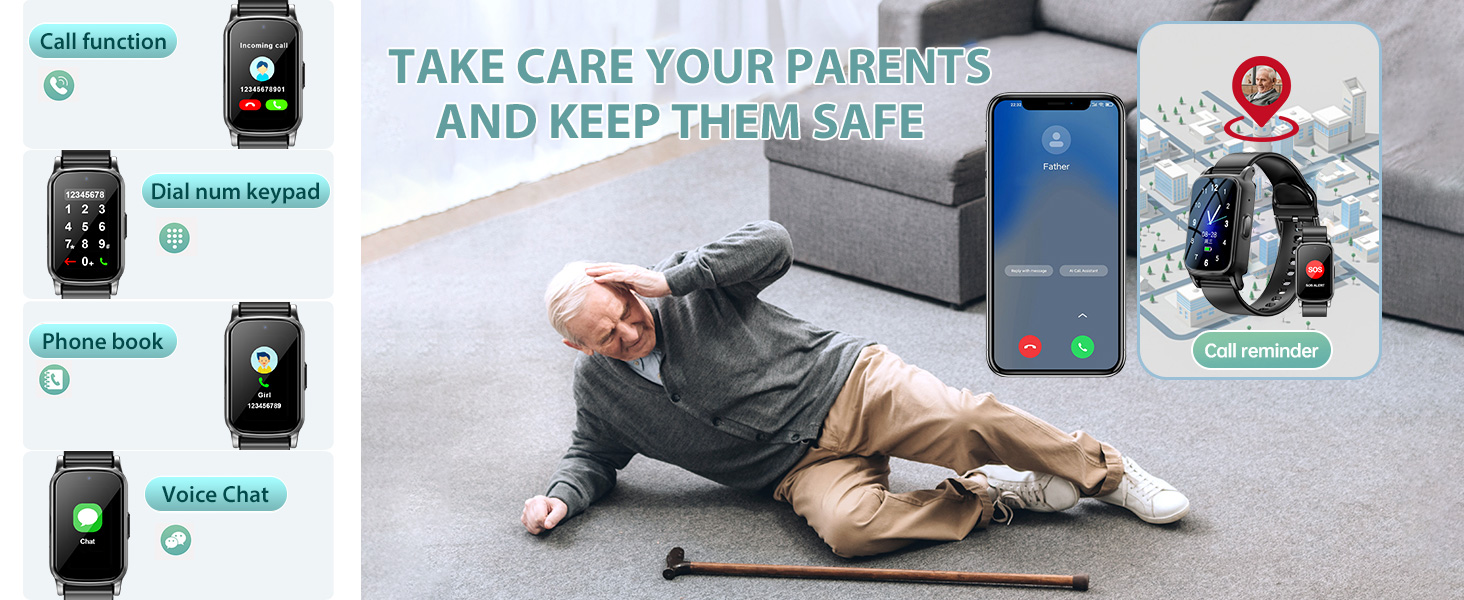
Image: A composite image illustrating the call function, dial keypad, phone book, and voice chat features of the smartwatch, alongside a scene depicting an elderly person who has fallen, emphasizing the watch's role in safety.
4.3 SOS Emergency Alert
In an emergency, the user can press and hold the power button for 3 seconds to activate the SOS function. The watch will automatically dial the preset emergency contacts until one answers.
4.4 Fall Detection
The smartwatch is equipped with intelligent fall detection. Upon identifying an accidental fall, the watch automatically sends a fall alarm notification to family members via the app, ensuring timely assistance.

Image: An elderly person lying on the floor after a fall, with the smartwatch on their wrist displaying a "Watch detects a fall" notification, illustrating the fall detection feature.
4.5 Health Monitoring
The watch can monitor various health metrics, including heart rate and blood oxygen saturation. These measurements provide valuable insights into the user's health status.
- Heart Rate: Access the heart rate function on the watch to take a measurement.
- Blood Oxygen: Access the blood oxygen function to measure saturation levels.
- Sleep Monitoring: The watch tracks sleep patterns, offering insights and personalized advice to enhance sleep quality.

Image: A person checking their smartphone, which displays health metrics from the smartwatch, including heart rate and blood oxygen saturation, indicating comprehensive health insights.
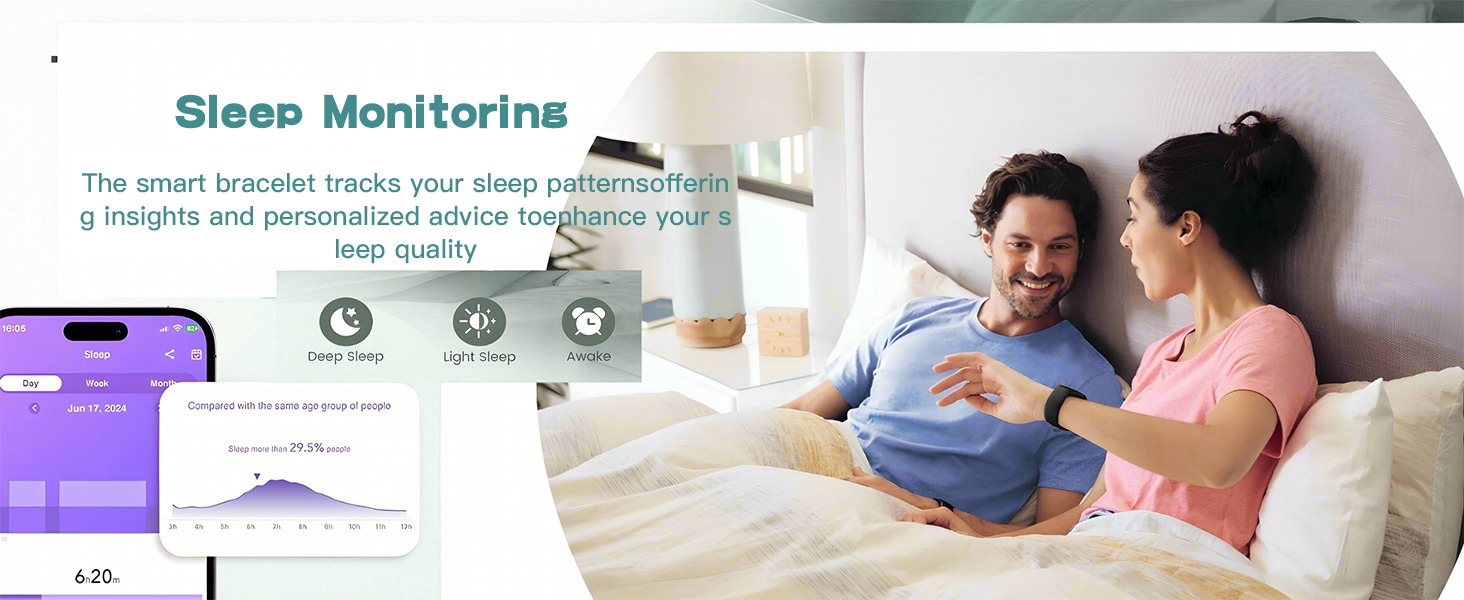
Image: An illustration of the sleep monitoring feature, showing different sleep stages (Deep Sleep, Light Sleep, Awake) and a graph of sleep patterns, with a couple in bed.
5. Care and Maintenance
5.1 Waterproofing
The Fajocru Smart Watch has an IP67 waterproof rating, meaning it is protected against dust and can withstand immersion in water up to 1 meter for up to 30 minutes. It is suitable for daily use, such as hand washing or light rain. However, it is not recommended for swimming, showering with hot water, or diving.

Image: Hands under running water, with the smartwatch on the wrist, demonstrating its IP67 waterproof capability.
5.2 General Care
- Clean the watch regularly with a soft, dry cloth.
- Avoid exposing the watch to extreme temperatures or direct sunlight for prolonged periods.
- Do not attempt to disassemble or repair the watch yourself.
6. Troubleshooting
| Problem | Possible Cause | Solution |
|---|---|---|
| No network/SIM card not recognized | SIM card not inserted correctly; Watch powered on during SIM insertion; Incompatible SIM card. | Power off the watch, re-insert SIM card firmly. Ensure SIM card has both call and network functions. Check SIM card size and compatibility with 2G/3G/4G networks. |
| GPS location inaccurate | Weak GPS signal; Indoor environment; Watch not connected to network. | Move to an open outdoor area. Ensure the watch has an active SIM card with data connectivity. GPS accuracy can vary based on environment. |
| Battery drains quickly | Frequent GPS updates; High screen brightness; Excessive calls/video calls. | Adjust GPS update frequency in the app. Lower screen brightness. Reduce frequency of video calls if possible. Ensure watch is fully charged. |
| Cannot pair with app | Incorrect registration code; App version outdated; Network issues. | Double-check the registration code. Update the "Se Tracker" app to the latest version. Ensure both watch and phone have stable internet connection. |
| Fall detection not working | Watch not worn correctly; Software glitch. | Ensure the watch is worn snugly on the wrist. Restart the watch. If issues persist, contact customer support. |
7. Technical Specifications
- Model Number: smartwatch-B
- Screen Size: 1.56 Inches
- Operating System: Android Wear 1.0
- Connectivity: Cellular (2G/3G/4G SIM required)
- GPS: Built-in GPS (GPS+Beidou+LBS+WIFI+TDOA+Inertial gyroscope multi-mode)
- Battery Capacity: 55 Milliamp Hours (600mAh stated in image, 55mAh in specs, using 600mAh as more likely for a smartwatch)
- Battery Life: Up to 5 days (standby, actual usage may vary)
- Waterproof Rating: IP67
- Memory Storage: 1 GB
- Item Weight: 5 ounces
- Package Dimensions: 6.54 x 2.8 x 1.73 inches

Image: An illustration showing the smartwatch's 600mAh battery capacity, indicating up to 5 days of battery life, and its dimensions (10.12 inches total length, 0.8 inches width).
8. Warranty and Support
Fajocru offers customer support to assist with activation and any questions you may have. Please refer to your purchase documentation for specific warranty details.
For assistance, please send an email to our shop via your order number. Our team is available to guide you through any setup or operational queries.
Related documentssmartwatch-B


Ask a question about this manual
Ask about setup, troubleshooting, compatibility, parts, safety, or missing instructions. Manuals+ will review the question and use this page’s manual context to help answer it.