
DATOUBOSS FBM-JC-6215-EU-3
DATOUBOSS 48V 6200W Hybrid Inverter + 48V 300Ah LifePO4 Battery User Manual
Model: FBM-JC-6215-EU-3 | Brand: DATOUBOSS
1. Product Overview
The DATOUBOSS integrated energy storage system is an all-in-one unit combining a powerful 48V 6200W hybrid inverter and a 48V 300Ah Lithium Iron Phosphate (LiFePO4) battery. This integrated design eliminates the need to purchase an inverter and battery separately, simplifying wiring and communication.
The unit is equipped with movable pulleys at the bottom for easy relocation after unpacking, making it an ideal choice for large portable power stations.
The integrated battery features Grade A LiFePO4 cells, offering higher energy density, stable performance, and increased power output. Its built-in 150A Battery Management System (BMS) provides comprehensive protection against overcharge, over-discharge, overcurrent, short circuit, overheating, and under-temperature conditions, ensuring extended battery life and safety.
With a battery capacity of 15.36 kWh, this mobile all-in-one power bank provides ample power for long-term energy storage. It supports RS232 and RS485 communication, making it suitable for home energy storage, off-grid solar systems, and emergency power supply.
The DATOUBOSS all-in-one machine features a user-friendly color LCD touchscreen for easy operation and monitoring of machine information. The warning mode assists in identifying and resolving issues efficiently. Detailed solutions for error codes are provided in the manual, and professional technical support is available if needed.

Figure 1.1: Front view of the DATOUBOSS all-in-one energy storage system, highlighting its compact design and integrated display.

Figure 1.2: Diagram illustrating the integrated nature of the DATOUBOSS system, combining a hybrid inverter and LiFePO4 battery into a single unit.
2. Setup and Installation
This section provides guidelines for setting up and installing your DATOUBOSS energy storage system. Due to the product's size and weight (100 kg), careful handling and consideration of its movable pulleys are essential for positioning.
2.1 Unpacking and Inspection
Upon receipt, carefully inspect the integrated battery unit. If any damage to the packaging or the product itself is found, document it with photos and videos immediately and contact customer support. The outer packaging is a wood-encrypted package with a tight seal to protect the product during transit. When unpacking, exercise caution to avoid scratches.

Figure 2.1: Detailed dimensions of the product and its outer wooden packaging, crucial for handling and placement planning.
2.2 Physical Placement
The unit is equipped with movable pulleys at the bottom, allowing for direct movement after unpacking without manual installation. Choose a suitable location that is dry, well-ventilated, and within the specified operating temperature range (-10 to 50°C).

Figure 2.2: Illustration of the product's dimensions and the integrated movable pulleys for easy positioning.
2.3 Wiring Connections
Ensure all installations follow applicable local and national electrical codes. The rear panel of the unit provides clearly labeled ports for PV input, AC input, and AC output. Refer to the diagram below for detailed wiring instructions.
- PV+ Positive terminal port
- PV- Positive terminal port
- AC IN + Utility direct charge positive terminal port
- AC IN - Direct charging positive terminal for utility power
- AC IN Utility direct charging ground wire connector
- AC OUT + Inverter output positive terminal port
- AC OUT - Inverter Output Negative Terminal Port
- AC OUT inverter output ground wire ground port
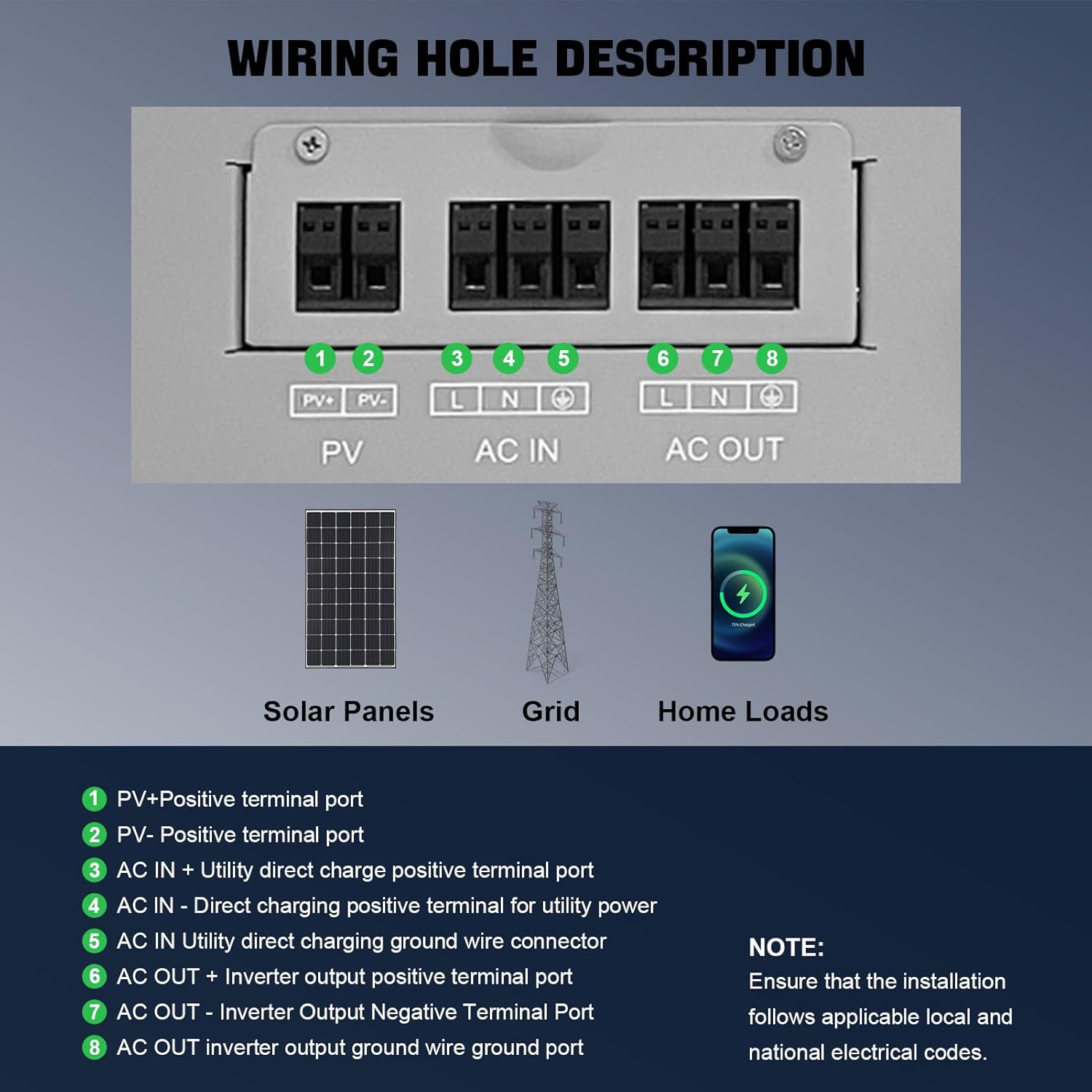
Figure 2.3: Detailed diagram of the wiring ports on the rear panel, showing connections for solar panels, grid input, and home loads.
2.4 Communication Interface
The unit includes RS232 and RS485 interfaces for communication. The RS232 interface can connect to a matching WiFi module for wireless communication and remote data monitoring. The RS485 interface enables communication with other batteries.
- RS485 Pinout:
- 1 corresponds to 485B
- 2 corresponds to 485A
Ensure to check which two pins of the battery are 485A and 485B for successful communication.
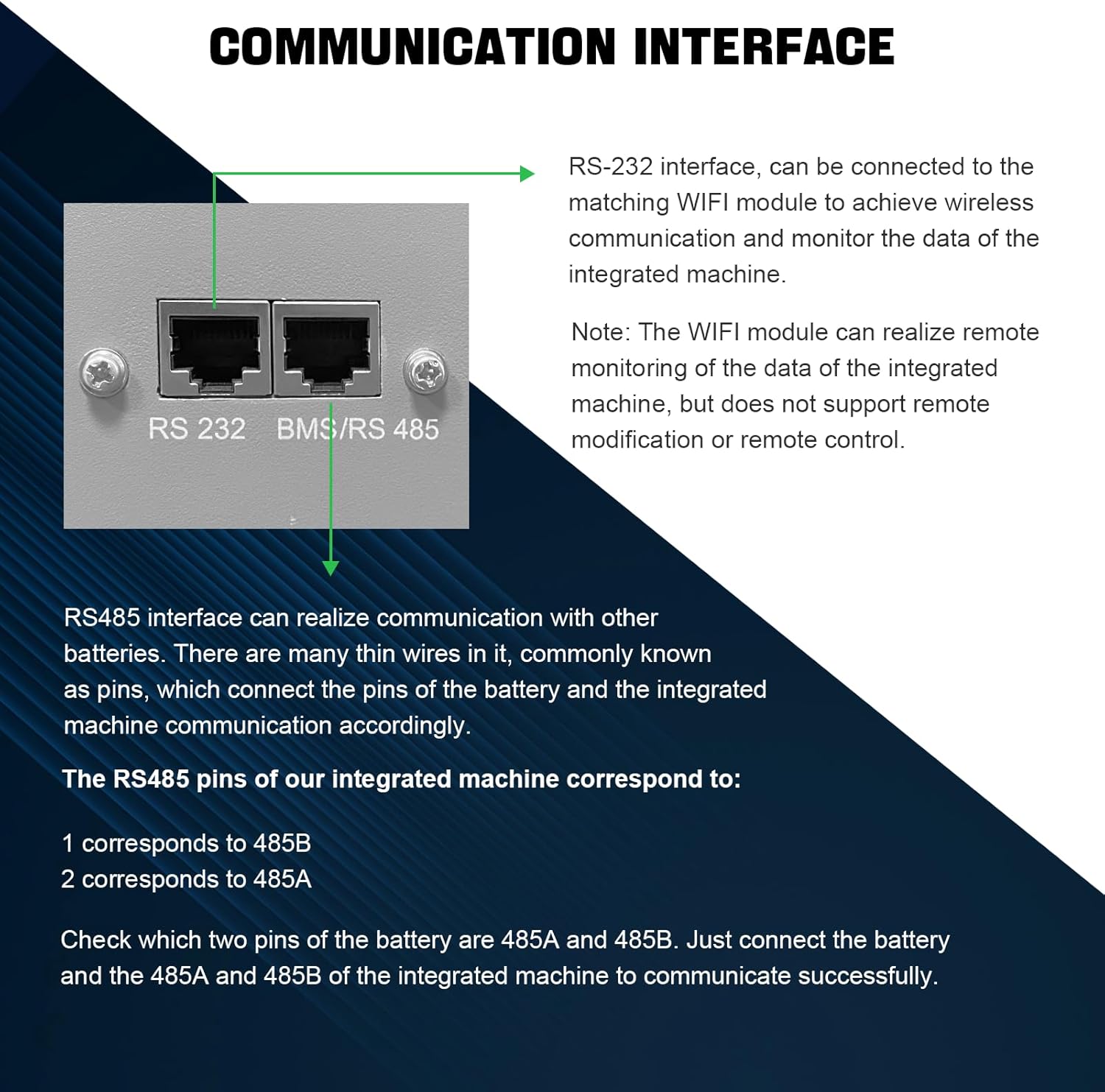
Figure 2.4: Close-up view of the RS232 and BMS/RS485 communication ports on the unit.
3. Operating Instructions
The DATOUBOSS all-in-one system is designed for user-friendly operation via its integrated color LCD touchscreen.
3.1 Touchscreen Operation
The touchscreen allows for easy navigation and monitoring of system information. You can switch between multiple pages to view real-time data such as power generation, consumption, battery status, and more. The intuitive interface simplifies control compared to traditional button-based systems.

Figure 3.1: Illustration of the interactive color touchscreen display, showing various system parameters and an intuitive user interface.
3.2 Indicator Lights and Buttons
The front panel features several indicator lights and a reset button for quick status checks and system control.
- ON/OFF Indicator Light: Shows power status.
- RUN Indicator Light: Indicates operational status.
- ALM (Alarm) Indicator Light: Illuminates when a warning or error occurs.
- RESET Button: Used to reset the system.
- Battery Indicator Light: Displays battery charge level (100%, 75%, 50%, 25%).
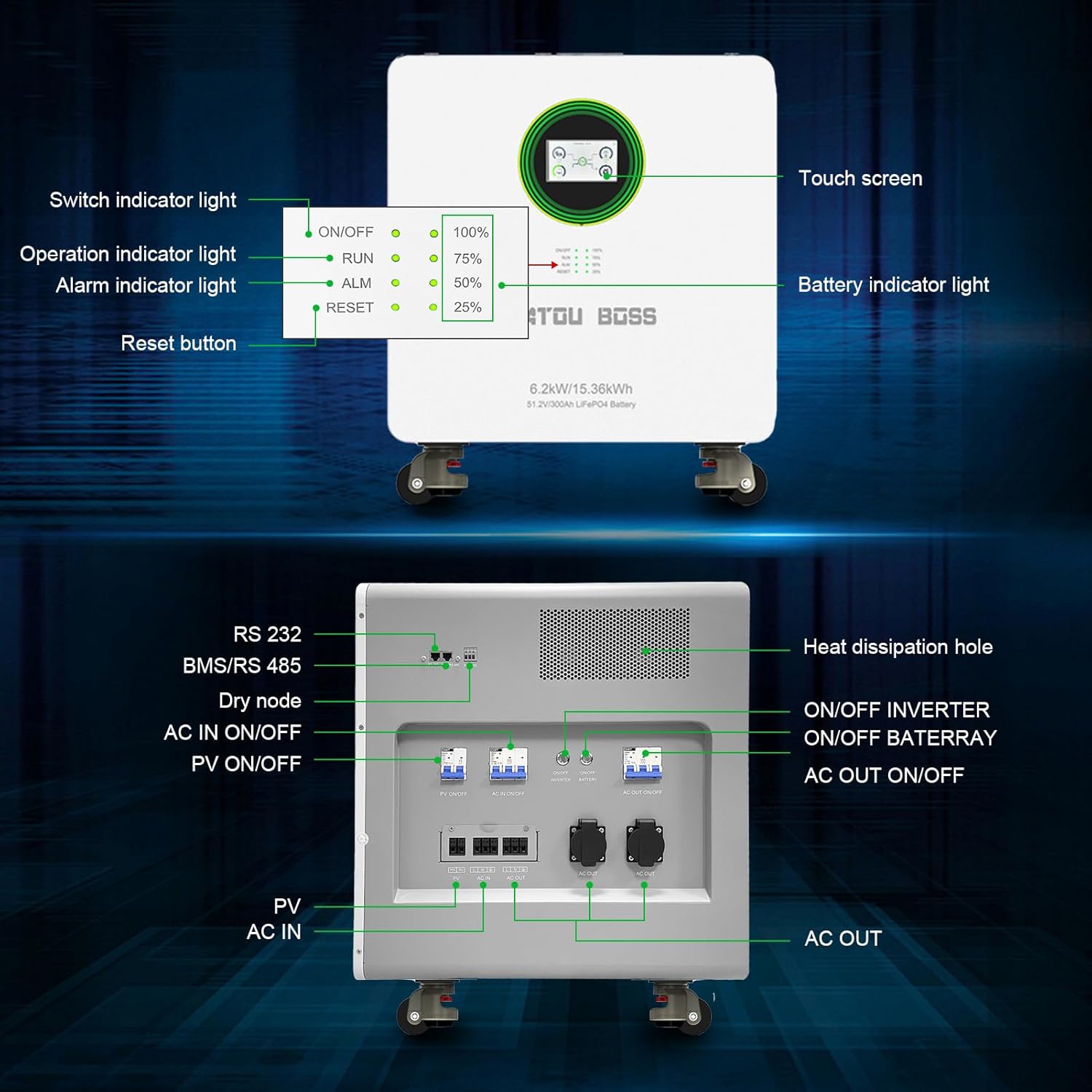
Figure 3.2: Overview of the front panel, detailing the touchscreen, indicator lights (ON/OFF, RUN, ALM, Battery), and reset button.
4. Maintenance
Regular maintenance ensures the longevity and optimal performance of your DATOUBOSS energy storage system. The integrated LiFePO4 battery is designed for high durability with 8000+ cycles at 70% SOH (State of Health) at 25°C, and 3000 cycles at 70% SOH at 45°C.
4.1 General Care
- Keep the unit clean and free from dust. Use a soft, dry cloth for cleaning.
- Ensure proper ventilation around the unit. Do not block the heat dissipation holes.
- Operate the system within the specified working temperature range of -10°C to 50°C and working environment humidity of 20%-95% (non-condensing).
- Store the unit in a temperature range of -15°C to 60°C if not in use for extended periods.
4.2 Battery Health
The built-in 150A BMS actively protects the LiFePO4 battery. While the BMS manages most aspects of battery health, avoiding extreme discharge or charge cycles when possible can further extend its lifespan. Monitor the battery indicator light and touchscreen for charge levels.
5. Troubleshooting
The DATOUBOSS system is equipped with a warning mode on its touchscreen to help identify and resolve issues. If error codes or warning codes appear, refer to this section for guidance.
5.1 Common Issues and Solutions
| Problem | Possible Cause | Solution |
|---|---|---|
| System not turning on | No power input; Main switch off; Internal fault. | Check AC input and PV input connections. Ensure the main power switch is ON. If problem persists, contact support. |
| Alarm light (ALM) illuminated | Overload; Over-temperature; Battery fault; Other system error. | Check the touchscreen for specific error codes. Reduce load if overloaded. Ensure proper ventilation. If battery fault, contact support. |
| Touchscreen unresponsive or blank | System off; Software glitch; Hardware issue. | Ensure the unit is powered on. Try pressing the RESET button. If still unresponsive, contact support. |
| No power output (AC OUT) | Output switch off; Overload protection; Inverter fault. | Check AC OUT connections. Verify output switch is ON. Reduce connected load. Consult the manual for specific inverter fault codes. |
If you encounter error codes or warnings that you cannot resolve using the provided solutions, or if the problem persists, please contact DATOUBOSS professional technicians directly for assistance.
6. Specifications
Detailed technical specifications for the DATOUBOSS 48V 6200W Hybrid Inverter + 48V 300Ah LifePO4 Battery system.
6.1 Overall Parameters
| Parameter | Value |
|---|---|
| Product Model | JC-6215 |
| Battery Type | LiFePO4 battery 300Ah |
| Battery Capacity | 15.36 kWh |
| Dimensions (L × W × H) | 550 × 541 × 638 mm |
| Weight | 100 kg |
| Nominal Voltage | 51.2V |
| 25°C Cycle Life | 8000 cycles, 70% state of health (SOH) |
| 45°C Cycle Life | 3000 cycles, 70% state of health (SOH) |
| PV Charging Mode | MPPT |
| PV Input Maximum Power | 8500W |
| MPPT Tracking Range | 60-500Vdc |
| Optimum Voltage | 300-400Vdc |
| Maximum PV Input Voltage | 500Vdc |
| Maximum PV Input Current | 27A |
| Maximum PV Charging Current | 120A |
| Maximum AC Charging Current | 100A |
| Maximum Charging Current | 120A |
| Input Form | L+N+PE |
| Rated Input Voltage | 220/230/240VAC |
| Voltage Range | 90-280VAC ±3V; UPS mode: 170-280VAC ±3V |
| Frequency Range | 50Hz/60Hz (adaptive) |
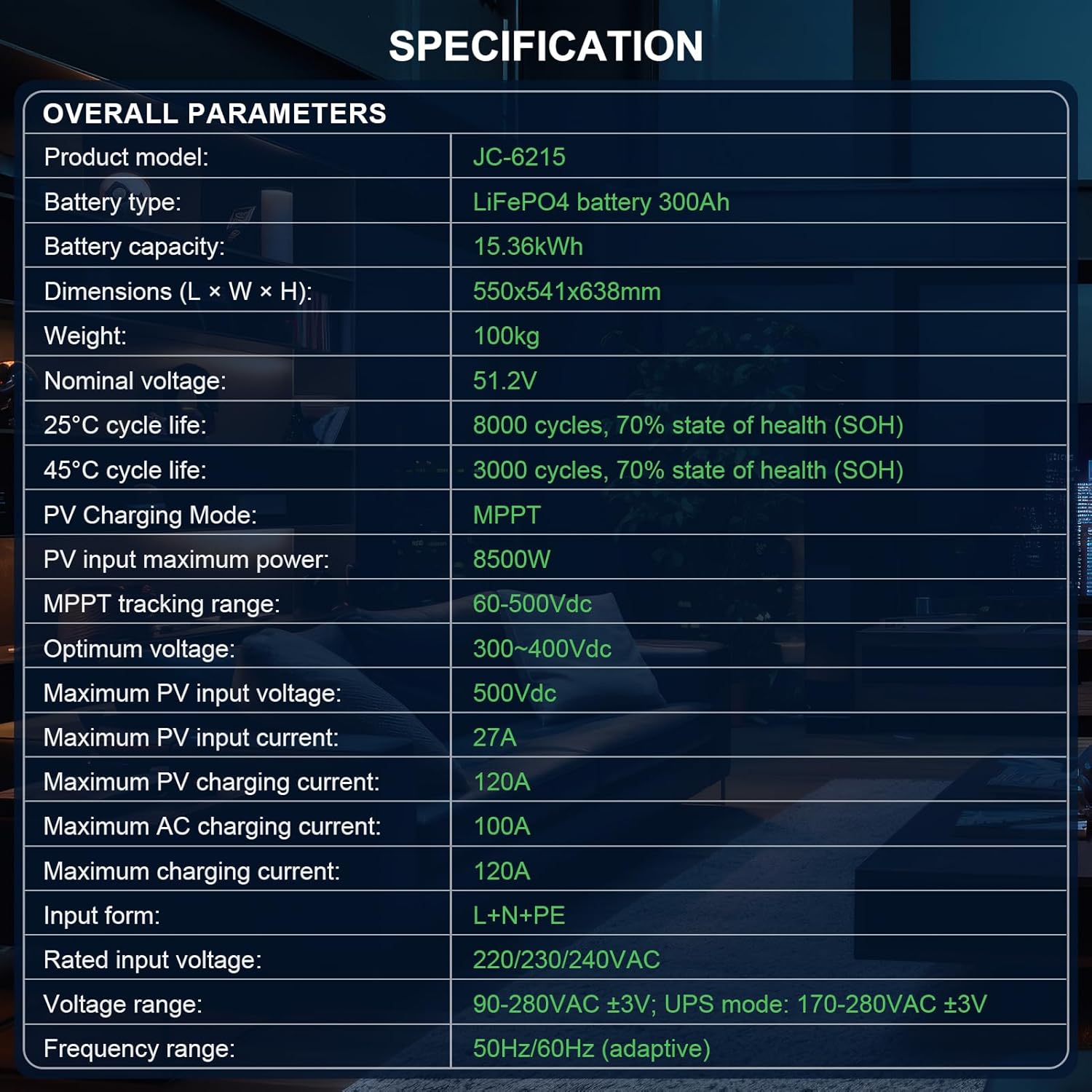
Figure 6.1: Table detailing the overall technical parameters of the DATOUBOSS energy storage system.
6.2 Output Parameters
| Parameter | Value |
|---|---|
| Battery Inverter Rated Output Power | 6200W |
| PV Inverter Rated Output Power | 6500W |
| Output Voltage | 220/230/240VAC ±5% |
| Output Frequency | 50/60Hz ±0.1% |
| Waveform | Pure Sine Wave |
| Switching Time (adjustable) | 10ms for computer equipment, 20ms for household appliances |
| Peak Power | 12400VA |
| Overload Capacity | Battery mode: 105%-150% load continuous 11s; 150%-200% load for 2 seconds; >200% load for 400ms |
| LCD Display | Displays operation mode, load, input, output and other information |
6.3 Other Parameters
| Parameter | Value |
|---|---|
| Working Temperature | -10~50°C |
| Working Environment Humidity | 20%-95% (non-condensing) |
| Storage Temperature | -15~60°C |
| Altitude | Not more than 1000 meters; above 1000 meters, derated, up to 4000 meters (reference IEC62040) |
| Noise Level | <50 dB |

Figure 6.2: Table detailing the output and other environmental parameters of the DATOUBOSS energy storage system.
7. Warranty and Support
DATOUBOSS is committed to the quality of its products and provides comprehensive customer support.
7.1 Product Warranty
This all-in-one machine comes with a 5-year warranty. This warranty covers defects in materials and workmanship under normal use.

Figure 7.1: Visual representation of DATOUBOSS's commitment to product lifespan, warranty, and customer service.
7.2 Customer Service
DATOUBOSS offers professional 24-hour customer service. If you have any questions about the product, require technical assistance, or need to report an issue, please do not hesitate to contact us. We are dedicated to providing friendly and patient customer support.
While a paper English manual is included with the product, electronic manuals in various languages are available upon request. Please contact us via the Amazon Backend if you require an electronic version in a different language.
Related documentsFBM-JC-6215-EU-3


Ask a question about this manual
Ask about setup, troubleshooting, compatibility, parts, safety, or missing instructions. Manuals+ will review the question and use this page’s manual context to help answer it.