
1. Introduction
The DATOUBOSS All-in-One Home Energy Storage System is an integrated solution combining a 48V 6.2kW hybrid inverter and a 48V 300Ah Lithium Iron Phosphate (LiFePO4) battery. This design simplifies installation by eliminating the need for complex wiring and communication between separate inverter and battery units. The system is equipped with mobile casters for convenient relocation, making it suitable for various applications including solar energy storage, RVs, and residential use.
2. Product Overview
This system features a high-density LiFePO4 battery with a 15.36 kWh capacity, managed by an integrated 150A Battery Management System (BMS) for comprehensive protection against overcharge, over-discharge, overcurrent, and short circuits. The unit includes a color touch screen for intuitive operation and monitoring, and supports RS232 and RS485 communication protocols.

Figure 2.1: Front view of the DATOUBOSS All-in-One Home Energy Storage System, showcasing its compact design and integrated display.

Figure 2.2: Overview of key specifications for the DATOUBOSS system, including battery type, capacity, nominal voltage, and inverter output power.

Figure 2.3: Diagram illustrating the integration of the hybrid inverter and LiFePO4 battery into the DATOUBOSS all-in-one unit, highlighting its simplified setup.
3. Safety Notes and Warnings
Read, understand, and follow all instructions before using or installing this product. Save all applicable instructions and documentation for future reference.
- Wear safety equipment and use insulated tools.
- Installation should be carried out by a professional.
- Use the appropriate size wiring.
- Ensure that the installation follows applicable local and national electrical codes.
- Ensure that the system is properly grounded.
- Ensure the battery is installed in a location suitable for the electronic device.
- Keep the battery within the safe temperature range for stable operation.
- Clean the battery with a suitable cleaner (e.g., sandpaper, dry cloth) and do not use any spray cleaners, liquids, aerosols, or solvents to clean the paint.
- Make sure all fasteners are properly tightened.
- Do not burn, crush, or puncture the battery.
- Do not place the battery in a hazardous/flammable environment where it could come into contact with corrosive chemicals or vapors.
- Do not store or install this product in radiators, collectors, cookers, or enclosures that may remain overheated.
- Do not immerse the product in liquid.
- Risk of fire, explosion, and burns. If electrical odor or overheating occurs, safely disconnect circuit breakers and call the fire department.
- Keep away from damaged batteries and any liquid (electrolyte) or gas (flammable) leaking from batteries. If inadvertently inhaled, evacuate the contaminated area and seek medical assistance.
- If battery leakage fluid comes into contact with eyes or skin, flush the affected area with running water for 15 minutes and seek medical attention.
- In the event of a fire, do not use water! Use only dry powder fire extinguishers. If possible, move the battery pack to a safe place before it catches fire.

Figure 3.1: Important safety guidelines and warnings for the installation and operation of the DATOUBOSS system.
4. Setup
4.1 Preparation
Ensure the equipment is powered off before beginning any installation. It is strongly recommended that installation be performed by a qualified professional electrician to ensure safety and compliance with all electrical codes.
4.2 Installation Tools
Required tools include a Phillips screwdriver, a torque wrench or pliers for secure connections, and appropriate size cables and terminals that match the battery pack's current requirements and dimensions.
4.3 Unpacking and Inspection
Before installation, carefully inspect the equipment. Ensure that the packaging is intact and that all components, including the integrated energy storage system and the user manual, are present and undamaged.
4.4 Location and Environmental Requirements
- Do not install the product in hostile environments. The ambient temperature should be maintained between 0°C and 55°C for optimal performance.
- Avoid installing near heat sources such as radiators or direct sunlight, and ensure the unit is not in an enclosed space that could lead to overheating.
- Ensure adequate ventilation around the unit.
- The unit should be installed vertically on a solid wall.
4.5 Wiring Hole Description
The rear panel of the unit features clearly labeled ports for PV input, AC input, and AC output. Refer to the diagram below for detailed port identification and ensure all connections comply with local and national electrical codes.

Figure 4.1: Detailed view of the rear panel, showing the various input and output ports for PV, AC, and communication.

Figure 4.2: Wiring diagram illustrating connections for solar panels, grid input, and home loads. Ensure proper polarity and grounding.
- PV+: Positive terminal port for photovoltaic input.
- PV-: Negative terminal port for photovoltaic input.
- AC IN +: Utility direct charge positive terminal port for AC power.
- AC IN -: Utility direct charge negative terminal port for AC power.
- AC IN Ground: Utility direct charge ground wire connector.
- AC OUT +: Inverter output positive terminal port.
- AC OUT -: Inverter output negative terminal port.
- AC OUT Ground: Inverter output ground wire ground port.
5. Operating
5.1 Touch Screen Interface
The DATOUBOSS system features a color touch screen for intuitive control and monitoring. This interface allows users to easily navigate through different pages to view system status, adjust settings, and identify any warnings or errors.
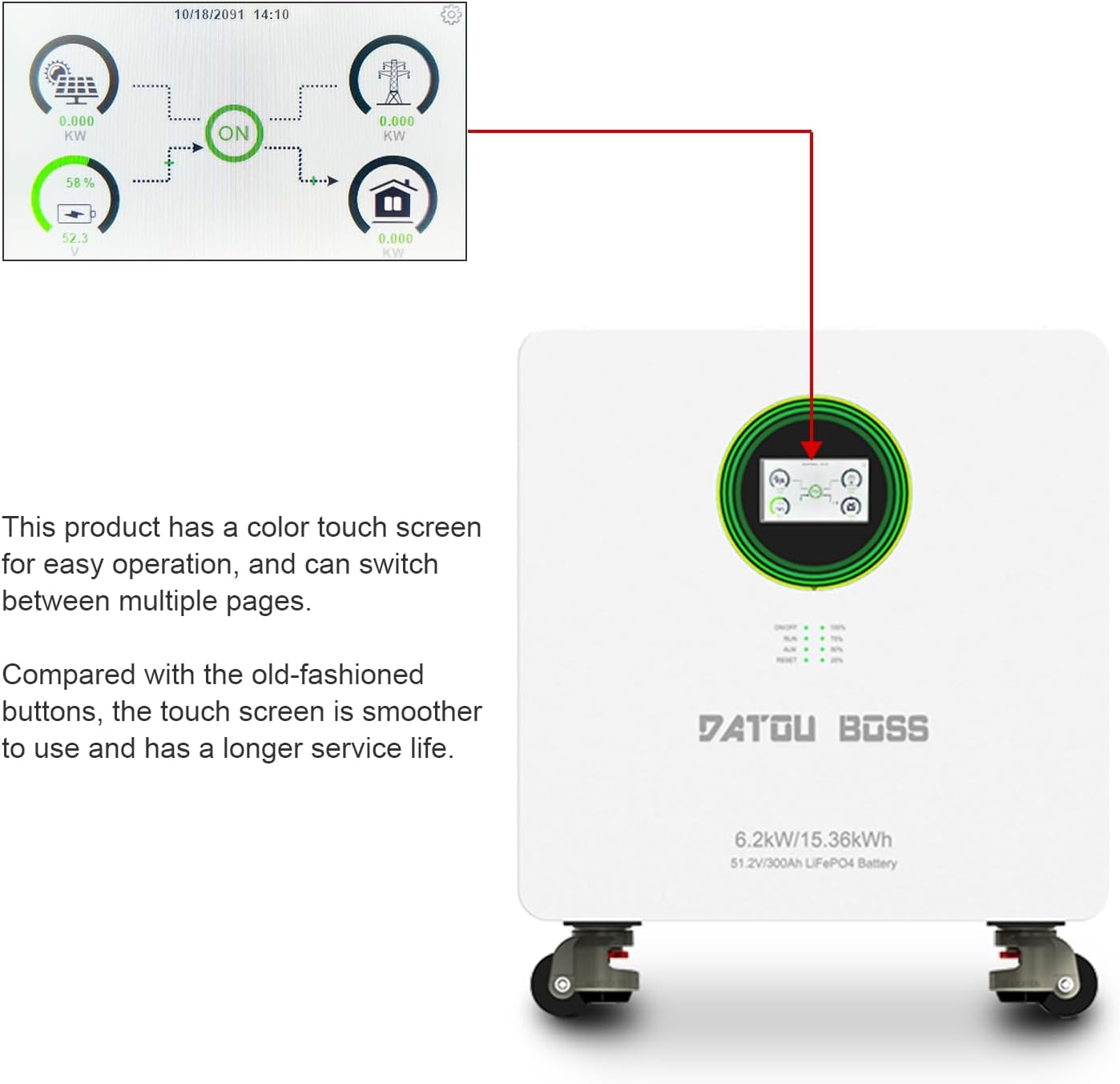
Figure 5.1: The color touch screen display, showing real-time operational data and system status.
5.2 Communication Interface
The unit is equipped with RS232 and RS485 communication ports. The RS232 interface can connect to a Wi-Fi module for wireless communication and remote monitoring of system data. The RS485 interface facilitates communication with other batteries, connecting the battery pins to the integrated machine's communication pins.

Figure 5.2: Close-up of the RS232 and BMS/RS485 communication ports on the DATOUBOSS system.
5.3 Home Screen Description
The home screen provides an overview of the system's operational data, including PV input, AC input, load consumption, and battery status. It displays the date and time, and allows access to system settings.

Figure 5.3: The main home screen display, showing real-time energy flow and system status indicators.
5.4 System Settings Menu
The system settings menu allows configuration of various parameters to optimize performance and tailor the system to specific needs. Access this menu by pressing the system configuration icon on the home screen.

Figure 5.4: The system settings menu, providing access to various configuration options.
- Battery Setting: Configure battery type, charge voltage, float voltage, cut-off voltage, and equalization parameters.
- System Work Mode: Configure ECO function, output priority (e.g., solar priority, battery priority), and output type.
- Grid Setting: Adjust input voltage range, grid connection mode, and charge start/end times.
- Charge Setting: Select charge priority (solar first, solar and AC simultaneously), maximum charge current, etc.
- Advanced Function: Configure dual output voltage thresholds, discharge time, recovery delay, etc.
- Device Info: Set system time, screen brightness, RGB light switch, and view detailed device information.
5.5 Detailed Screen Views
The system provides detailed screens for various components and parameters:

Figure 5.5: Detail screen showing machine type, inverter type, and various temperature readings.

Figure 5.6: Solar screen displaying PV input voltage, current, power, and daily/monthly/yearly energy production.
Figure 5.7: Battery screen showing battery type, BMS communication status, voltage, charge/discharge current, and bus voltage.

Figure 5.8: BMS screen providing details on BMS protocol, State of Charge (SOC), charge/discharge current, BMS temperature, and charge/discharge limits.
6. Maintenance
Regular maintenance ensures the longevity and optimal performance of your DATOUBOSS system.
6.1 General Care
- Keep the unit clean and free from dust and debris. Use a dry cloth for cleaning. Avoid using abrasive cleaners, solvents, or liquids that could damage the unit's finish or internal components.
- Ensure proper ventilation is maintained around the unit to prevent overheating. Regularly check that air vents are not obstructed.
6.2 Battery Care
The integrated LiFePO4 battery is designed for long life and features a robust Battery Management System (BMS) that protects against common issues such as overcharge, over-discharge, and extreme temperatures. No user-level battery maintenance is typically required beyond ensuring the unit operates within specified environmental conditions.
7. Troubleshooting
The DATOUBOSS system's LCD screen will display warning or error codes if an issue arises. These codes are designed to help identify problems quickly.
- Refer to the detailed solutions provided in the comprehensive user manual (available electronically upon request) for specific error code interpretations and troubleshooting steps.
- If you are unable to resolve an issue using the manual's guidance, or if you encounter persistent problems, please contact DATOUBOSS professional technical support for assistance.
8. Specifications
The following tables detail the overall, input, and output parameters of the DATOUBOSS All-in-One Home Energy Storage System.
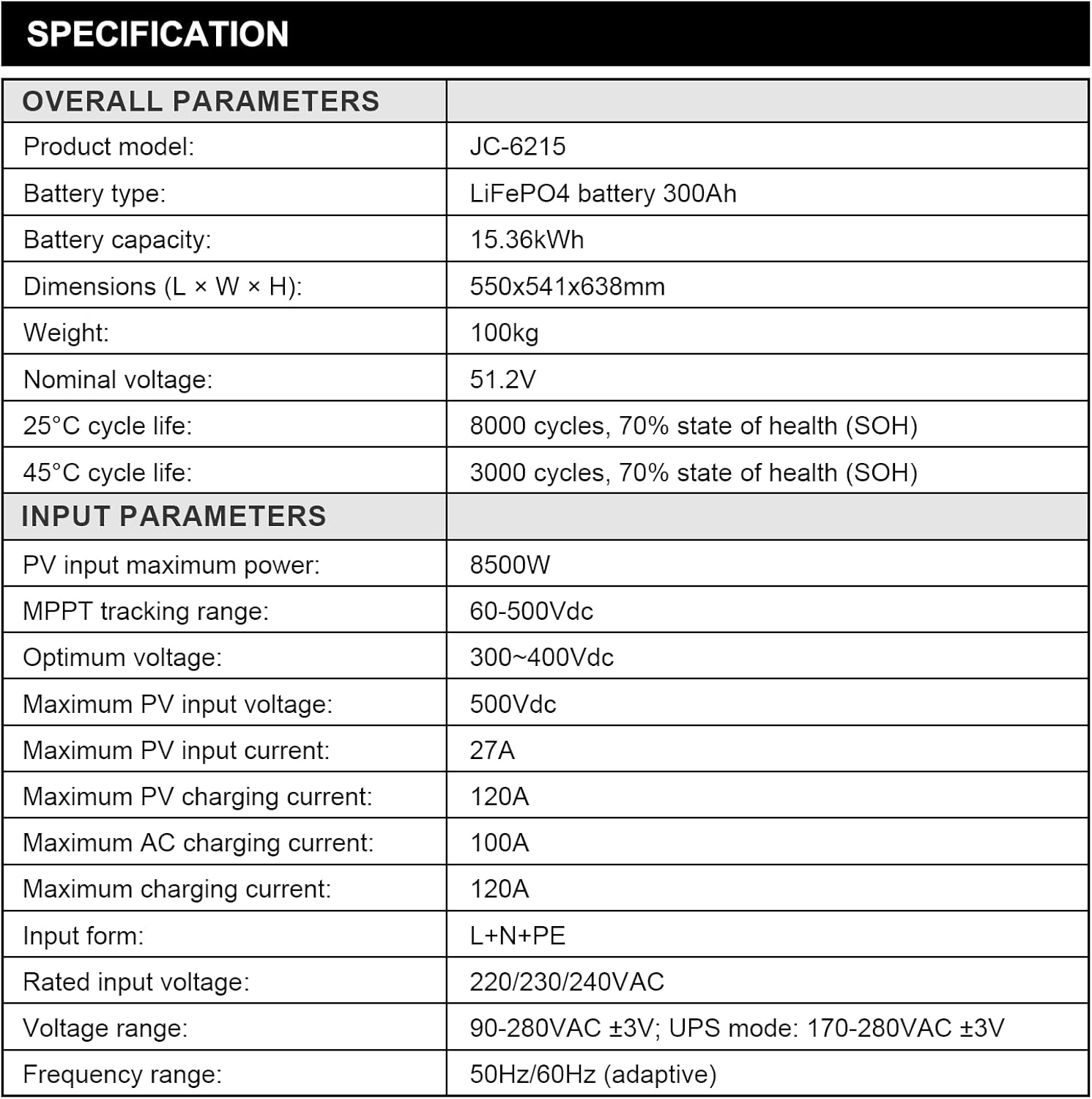
Figure 8.1: Overall and Input Parameters of the DATOUBOSS All-in-One System.

Figure 8.2: Output and Other Parameters of the DATOUBOSS All-in-One System.
9. Warranty and Support
DATOUBOSS stands behind the quality of its products.
- Warranty: This all-in-one machine comes with a 5-year warranty.
- Customer Support: Professional 24-hour customer service is available.
- Contact: For any product-related questions, technical assistance, or to request electronic manuals in various languages, please do not hesitate to contact us through Amazon. Our friendly and patient customer service team is ready to assist you.


