
1. Introduction
The Polibi Twin Murphy Cabinet Bed with Adjustable Desk is a versatile, space-saving furniture solution designed for compact living areas, guest rooms, or home offices. It seamlessly transforms from a functional desk and cabinet unit into a comfortable twin-sized bed, offering both workspace and sleeping accommodations. This manual provides essential information for the safe assembly, operation, and maintenance of your new cabinet bed.
2. Safety Information
- Read all instructions carefully before assembly and use. Failure to follow instructions may result in injury or product damage.
- Ensure all fasteners are securely tightened before use. Periodically check and re-tighten as necessary to maintain stability.
- Do not exceed the maximum weight capacity of 500 lbs (227 kg) for the bed.
- Keep children and pets away from moving parts during transformation between bed and desk configurations.
- Use the cabinet bed on a level and stable surface to prevent tipping.
- Do not stand or jump on the bed or desk.
- Always clear the desk surface before transforming the unit into a bed.
3. Package Contents & Pre-Assembly
Before beginning assembly, carefully unpack all components and verify that all parts are present and undamaged. Refer to the detailed parts list provided in the physical assembly manual included with your product. If any parts are missing or damaged, do not proceed with assembly and contact customer support.
Included Components: Cabinet Bed Frame, Adjustable Desk Section, Foldable Cushion.

The Polibi Twin Murphy Cabinet Bed in its primary desk configuration, ready for assembly or daily use.
Tools Required:
Refer to the physical assembly manual for a complete list of tools required. Typically, a screwdriver and Allen wrench (often included) are sufficient.
Assembly Recommendation:
It is recommended to have two adults for assembly to ensure safety and ease of construction.
4. Setup (Assembly Instructions)
The Polibi Twin Murphy Cabinet Bed requires assembly. Please follow the detailed step-by-step instructions and diagrams provided in the physical assembly manual included with your product. Ensure each step is completed correctly before proceeding to the next. Do not overtighten screws unless specified.
5. Operating Instructions
5.1 Transforming from Desk to Bed
- Clear the Desk: Remove all items from the desk surface to prevent damage or interference during transformation.
- Unlock Mechanism: If present, disengage any securing latches or locks that hold the bed unit in its cabinet position.
- Extend Bed: Gently pull the bed unit forward and down. Guide it smoothly until it fully extends and the support legs automatically deploy or are manually positioned.
- Verify Stability: Ensure the bed is fully extended and stable before use.

This image illustrates the process of unfolding the cabinet bed into its sleeping configuration. The desk remains accessible above the bed.
5.2 Transforming from Bed to Desk
- Remove Bedding: Take off all bedding, pillows, and personal items from the bed.
- Fold Cushion: If your cushion is foldable, ensure it is properly folded to fit back into the cabinet.
- Retract Supports: Retract any manual support legs.
- Lift Bed Unit: Gently lift the bed unit upwards and push it back into the cabinet until it locks securely in place.
- Verify Lock: Ensure the bed unit is fully secured in the cabinet position before using the desk.
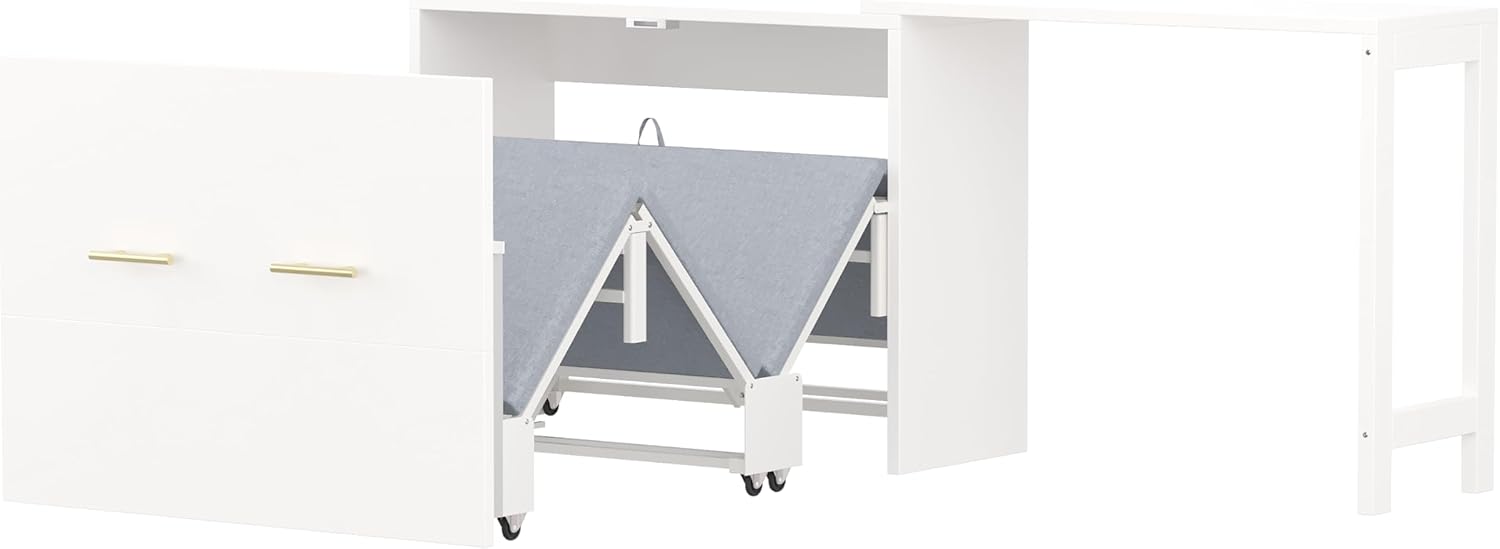
The bed unit is shown folding upwards and retracting into the cabinet, converting back to the desk configuration.
5.3 Adjusting the Desk Layout
The adjustable desk feature allows for flexible configurations to suit your space and needs.
- Straight-Line Configuration: Position the movable desk section to align directly with the cabinet, creating a long, straight workspace.
- L-Shaped Configuration: Rotate or reposition the movable desk section to form an 'L' shape with the cabinet, providing an expanded corner workspace.
To adjust, carefully reposition the movable desk section as desired. Ensure the desk is stable and all connections are secure in its chosen configuration before placing items on it.
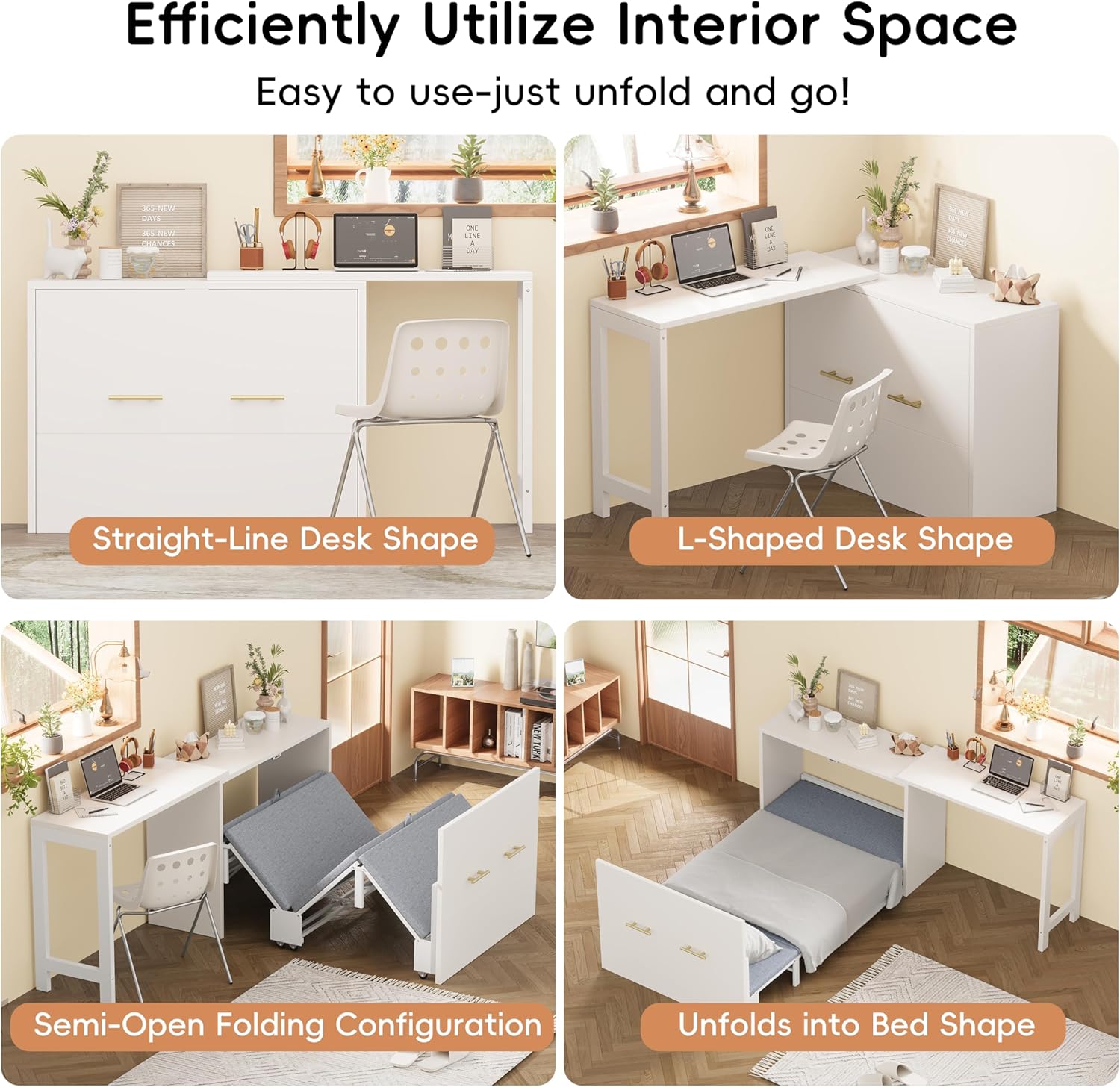
This image displays the two primary desk configurations: a straight-line setup and an L-shaped setup, demonstrating the flexibility of the adjustable desk.
6. Maintenance
- Hardware Inspection: Regularly inspect all screws, bolts, and connections for tightness. Re-tighten any loose fasteners as needed to ensure structural integrity.
- Cleaning Surfaces: Clean the cabinet and desk surfaces with a soft, damp cloth. Avoid using harsh chemicals, abrasive cleaners, or polishes that may damage the finish.
- Cushion Care: For the foldable cushion, spot clean with a mild detergent and a damp cloth. Allow it to air dry completely before folding or storing. Do not machine wash or tumble dry.
- Mechanism Care: Keep the folding mechanism free of dust, dirt, and debris to ensure smooth and effortless operation. A dry lubricant can be applied to moving parts if necessary, following the lubricant manufacturer's instructions.
7. Troubleshooting
| Problem | Possible Cause | Solution |
|---|---|---|
| Bed does not fold/unfold smoothly. | Obstruction in the mechanism; loose fasteners; mechanism needs lubrication. | Check for any items blocking the movement. Ensure all locking mechanisms are disengaged (for unfolding) or engaged (for folding). Tighten any loose fasteners. Apply a dry lubricant to moving parts if friction is evident. |
| Desk feels unstable or wobbly. | Loose assembly screws; uneven floor surface; desk sections not properly aligned. | Verify all assembly screws are tight. Ensure the unit is placed on a level surface. Check that the adjustable desk sections are properly aligned and secured in their chosen configuration. |
| Unusual noise during operation. | Friction between moving parts; loose components. | Inspect moving parts for any signs of friction or wear. Tighten any loose fasteners. A small amount of dry lubricant on pivot points may help. |
8. Specifications
| Feature | Detail |
|---|---|
| Size | Twin |
| Special Features | Foldable Cushion, Adjustable Desk |
| Color | White |
| Product Dimensions (Bed Extended) | 79.92"L x 74.8"W x 30.32"H |
| Weight Capacity | 500 lbs |
| Frame Material | MDF + Iron |
| Style | Modern |
| Manufacturer | Polibi |
| Model Number | B0FD3TBPLG |
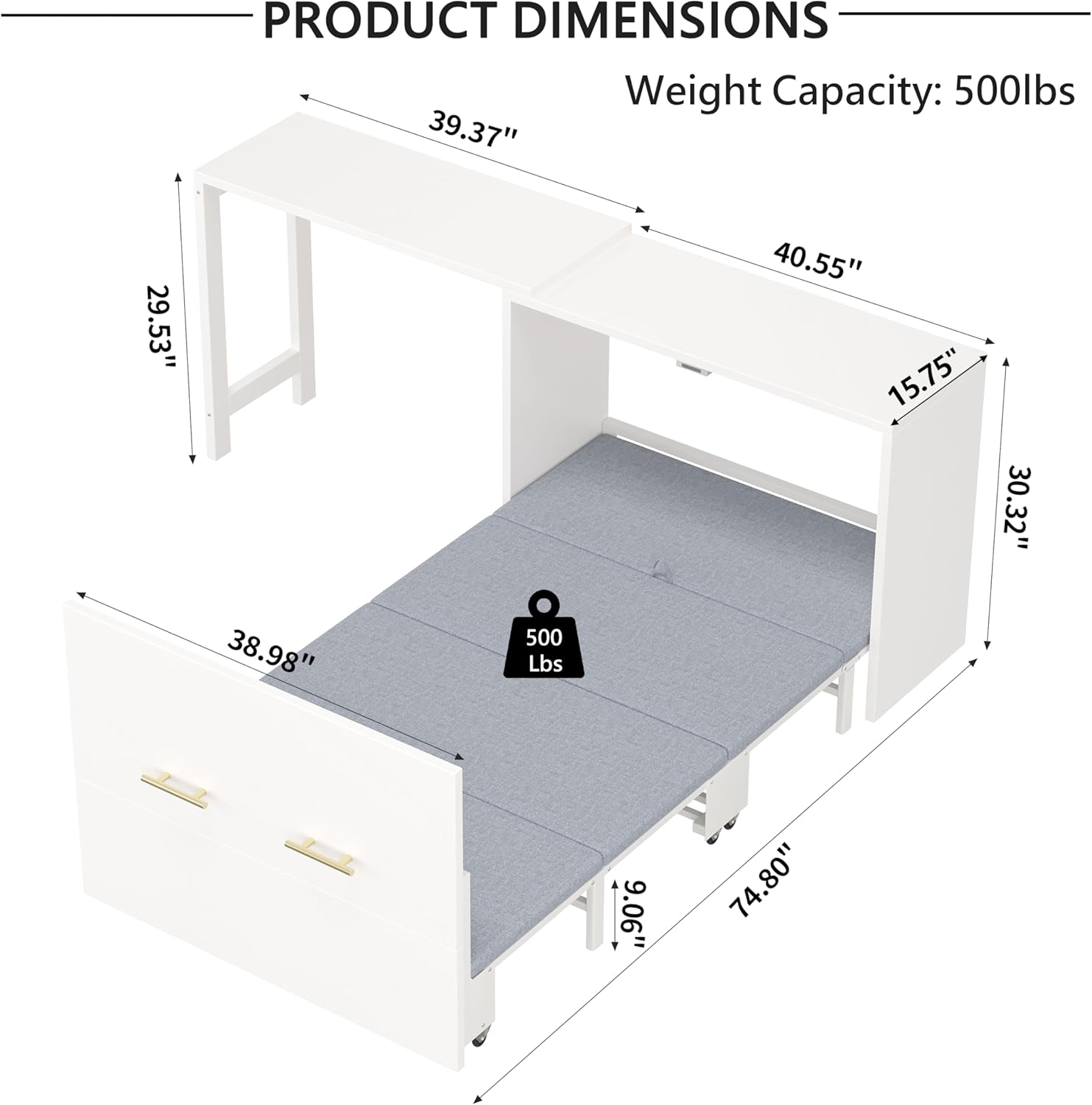
A detailed diagram illustrating the dimensions of the Polibi Twin Murphy Cabinet Bed in its extended bed configuration, including length, width, and height, along with the 500 lbs weight capacity.
9. Warranty and Support
For detailed warranty information regarding your Polibi Twin Murphy Cabinet Bed with Adjustable Desk, please refer to the specific warranty documentation included with your purchase. This documentation outlines the terms, conditions, and duration of your product's warranty.
For assistance with assembly, missing parts, operational questions, or any other support needs, please contact Polibi customer service. You can typically find contact details (phone number, email, or website) in your product packaging or by visiting the official Polibi website.
