
1. Introduction
This instruction manual provides essential information for the safe and effective use of your Kircuit 19V 65W AC/DC Adapter. This adapter is specifically designed to provide reliable power to compatible devices, such as the Wo-We WoWe P5 HU-MNPC07-P5 Ryzen 5 3500U Mini PC.
The adapter converts standard AC wall power into the DC power required by your device, enabling operation and battery charging. Please read this manual thoroughly before using the product.
2. Safety Information
- Ensure the adapter is connected to a power outlet with the correct voltage (AC 100-240V).
- Do not expose the adapter to water, moisture, or extreme temperatures.
- Avoid dropping or subjecting the adapter to strong impacts.
- Do not attempt to open or modify the adapter. This may void the warranty and pose safety risks.
- Keep the adapter away from children.
- Unplug the adapter from the power outlet when not in use for extended periods.
- This adapter features built-in over-voltage and over-heat protection for safe operation.
3. Package Contents
Verify that your package contains the following items:
- 1 x Kircuit 19V 65W AC/DC Adapter Unit
- 1 x AC Power Cord

4. Setup
Follow these steps to set up your AC/DC adapter:
- Connect the AC Power Cord: Insert the female end of the AC power cord into the input port of the Kircuit AC/DC adapter unit. Ensure it is firmly seated.
- Connect to Power Outlet: Plug the male end of the AC power cord into a standard electrical wall outlet (AC 100-240V).
- Connect to Device: Insert the barrel tip connector of the adapter's DC output cable into the power input port of your compatible device (e.g., Wo-We WoWe P5 Mini PC).
- Verify Connection: Ensure all connections are secure before powering on your device.


5. Operating Instructions
Once properly connected, the adapter will supply power to your device. If your device has a charging indicator, observe it to confirm that power is being received and the battery is charging (if applicable).
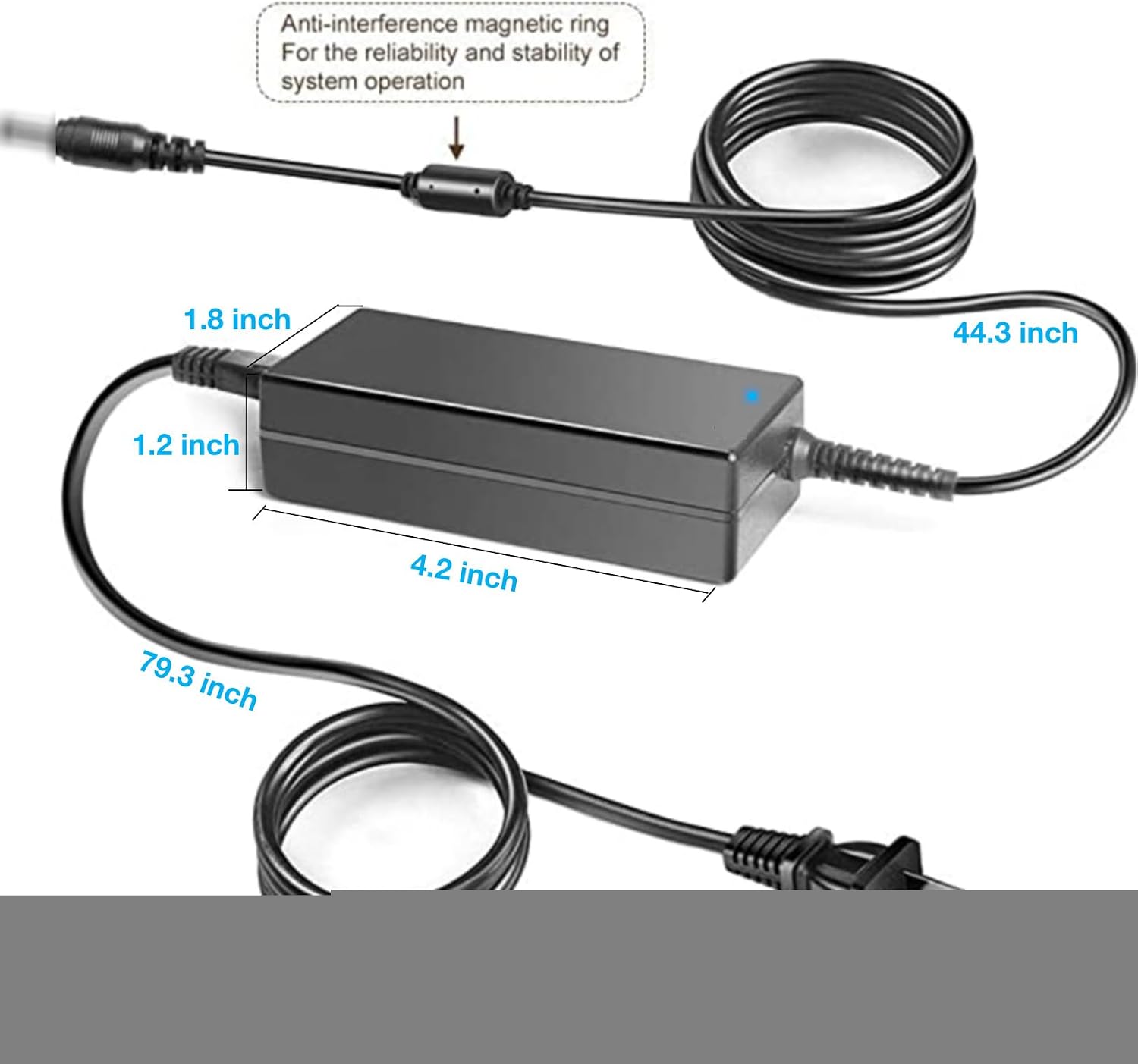
The adapter is designed for continuous operation within its specified voltage and wattage limits. An anti-interference magnetic ring is integrated into the DC cable for reliable system operation.
6. Maintenance
- Cleaning: Disconnect the adapter from all power sources and devices before cleaning. Use a soft, dry cloth to wipe the surface. Do not use liquid cleaners or abrasive materials.
- Storage: Store the adapter in a cool, dry place when not in use. Avoid wrapping the cables too tightly to prevent damage.
- Handling: Always grasp the plug when disconnecting from an outlet or device; do not pull on the cable.
7. Troubleshooting
If you encounter issues with your Kircuit AC/DC adapter, consider the following:
- No Power to Device:
- Ensure the AC power cord is securely plugged into both the adapter and the wall outlet.
- Verify that the wall outlet is functional by testing it with another device.
- Check that the barrel tip connector is fully inserted into your device's power port.
- Adapter Overheating:
- Ensure the adapter is used in a well-ventilated area and not covered.
- If overheating persists, discontinue use and contact support.
- Loose Connection: If the connection feels loose, ensure the barrel tip matches the device's port size. This adapter uses a standard barrel tip connector.
8. Specifications
| Feature | Specification |
|---|---|
| Brand | Kircuit |
| Input Voltage | AC 100-240V, 50/60Hz |
| Output Voltage | DC 19V |
| Output Current | 3.42A |
| Output Power | 65W |
| Connector Type | Barrel Tip |
| Compatible Devices | Wo-We WoWe P5 HU-MNPC07-P5 Ryzen 5 3500U Mini PC |
| Special Feature | Over Voltage Protection, Over Heat Protection |
| Color | Black |
9. Warranty and Support
This Kircuit AC/DC adapter is manufactured to high-quality standards. For warranty information or technical support, please refer to the seller's return policy or contact the manufacturer directly through their official website. Please have your product model and purchase details available when contacting support.
Manufacturer: Shenzhen Waweis Technology Co., Ltd