
Introduction
This manual provides essential information for the proper setup, operation, and maintenance of your AMOVAN Smart Ring R09. The Smart Ring R09 is designed to monitor various health metrics including body temperature, heart rate, blood oxygen, sleep patterns, and activity levels. It features a Bluetooth 5.2 dual-mode RTL8762ESF chip, VC30F-S sensor, and ST LIS2DOCTR six-degree-of-freedom motion sensor for accurate data collection and high-speed connection. Data transmission is encrypted to ensure user privacy. Please read this manual thoroughly before using your device.
Setup
1. Unboxing
Upon opening the package, ensure all components are present:
- AMOVAN Smart Ring R09
- Spare charging cable
- Charging box
- Instruction manual
2. Sizing Guide
To ensure accurate readings, selecting the correct ring size is crucial. The ring should fit snugly but comfortably on your finger. It should not be too tight to restrict circulation nor too loose to move freely. You can use a ring sizer or a paper strip to measure your finger circumference. Refer to the size chart below for guidance.

3. Charging the Ring
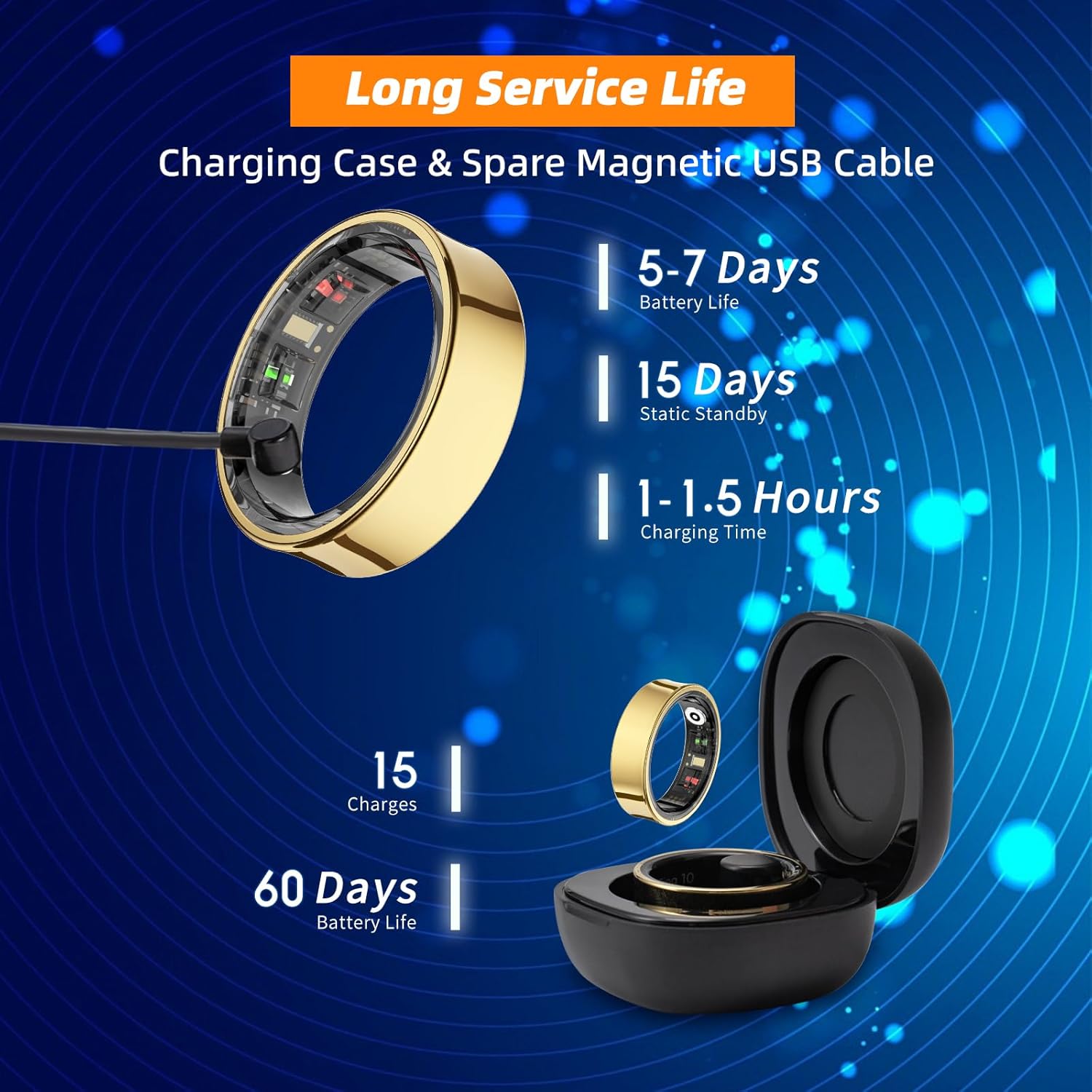
Before first use, fully charge your smart ring. Place the ring into the provided wireless charging case. Connect the charging case to a power source using the Type-C cable. A full charge typically takes 1 to 1.5 hours. The ring offers a usage time of 5-7 days and a static standby time of up to 15 days. The charging case can supply up to 15 charges for the ring, providing up to 60 days of static standby for the case itself.
4. App Installation
Download the official QRing app from your device's app store (iOS 9.0+ or Android 4.4+). You can also scan the QR code provided in the quick guide or on the product packaging.
5. Pairing the Ring
Open the QRing app and follow the on-screen instructions to bind your smart ring. Ensure Bluetooth is enabled on your smartphone. The pairing process takes approximately 0.8 seconds.
Video: Instructions for pairing the AMOVAN Smart Ring R09 with an Apple (iOS) device. This video demonstrates the steps to connect the ring to the QRing app on an iPhone.
Video: Instructions for pairing the AMOVAN Smart Ring R09 with an Android device. This video demonstrates the steps to connect the ring to the QRing app on an Android phone.
Operating Instructions
1. Wearing the Ring
Wear the smart ring on any finger where it fits comfortably and securely. For optimal data accuracy, ensure the sensors on the inner surface of the ring are in contact with your skin.
2. Health Monitoring Features
The AMOVAN Smart Ring R09 continuously monitors various health metrics. All data can be viewed and analyzed within the QRing app. No subscription is required to access these features.

- Body Temperature: The ring monitors your body temperature, providing insights into your thermal state.
- Heart Rate: Track your heart rate throughout the day and night. The app displays your heart rate trends and average BPM.
- Blood Oxygen: Monitor your blood oxygen saturation levels.
- Sleep Monitoring & AI Analysis: The ring provides accurate sleep tracking, monitoring sleep quality with detailed charts and data. It tracks sleep stages (REM, light, deep sleep) and awake time. The app analyzes daily, weekly, and monthly reports to help optimize your lifestyle and improve overall sleep.

- HRV (Heart Rate Variability): Measures the variation in time between heartbeats, an indicator of overall health and stress.
- Stress Monitoring: The ring can help monitor stress levels, providing data to help you manage daily stress.
- Menstrual Cycle Recording: The app allows for tracking and recording of menstrual cycles.
3. 100+ Sports Modes
The fitness tracker ring accurately monitors and tracks sports data, such as calorie consumption, steps, exercise distance, and time. It supports over 100 sports modes. You can view all health data on the QRing app and analyze daily, weekly, and monthly reports to optimize your lifestyle and improve your overall health.

4. Gesture Control
The smart ring supports gesture control for various functions, including remote control photography, music control, short video viewing, browsing e-books, and playing mini-games. Note that enabling gesture control will increase power consumption.

Maintenance
1. Cleaning
To maintain hygiene and sensor accuracy, regularly clean your smart ring. Use a soft, damp cloth to wipe the ring and its sensors. Avoid harsh chemicals or abrasive materials that could damage the device.
2. Water Resistance
The AMOVAN Smart Ring R09 has a 5ATM waterproof rating, meaning it can withstand static water pressure equivalent to 50 meters deep. This allows for daily activities such as hand washing, showering, and swimming in shallow water without needing to remove the ring.
3. Battery Care
To prolong battery life, avoid fully discharging the ring frequently. Charge it when the battery level is low (below 20%). Store the ring and charging case in a cool, dry place when not in use.
Troubleshooting
- Ring not pairing: Ensure Bluetooth is enabled on your phone and the ring is charged. Try restarting both the ring (by placing it in the charger) and your phone.
- Inaccurate readings: Check that the ring is worn snugly on your finger and the sensors are clean and in direct contact with your skin.
- App not syncing data: Ensure the ring is connected via Bluetooth and the app has the necessary permissions on your phone. Try refreshing the app or restarting it.
- Short battery life: Reduce the use of gesture control, as it increases power consumption. Ensure the ring is fully charged.
Specifications
| Feature | Specification |
|---|---|
| Model Number | R09 |
| Connectivity Technology | Bluetooth 5.2 |
| Chipset | RTL8762ESF |
| Sensors | VC30F-S, ST LIS2DOCTR (six-degree-of-freedom motion sensor) |
| Waterproof Rating | 5ATM |
| Battery Capacity | 30 Milliamp Hours (Ring) |
| Battery Life (Usage) | 5-7 days |
| Battery Life (Static Standby) | Up to 15 days |
| Charging Time | 1-1.5 hours |
| Charging Case Capacity | 15 charges for ring, 60 days static standby |
| Operating System Compatibility | iOS 9.0+, Android 4.4+ |
| Special Features | Gesture Control, Lightweight, Multisport Tracker, Activity Tracker, Wireless Charging, Temperature Tracker |
| Item Weight | 220 Grams (total package weight) |
Warranty and Support
Warranty Information
The AMOVAN Smart Ring R09 comes with a 12-month free replacement warranty. A full refund is available within 6 months of purchase. Please retain your proof of purchase for warranty claims.
Customer Support
For any questions, technical assistance, or warranty claims, please contact AMOVAN customer support. We aim to provide quick replies within 12 hours.
You can visit the official AMOVAN store on Amazon for more information and support: AMOVAN Store


