1. Introduction
This manual provides detailed instructions for the safe and efficient operation of your BORYLI LED 200W Beam Moving Head Light. Please read this manual thoroughly before installation and use to ensure proper function and to prevent damage.

Figure 1: BORYLI LED 200W Beam Moving Head Light, front view with colorful ring light.
2. Safety Information
- Always connect the unit to a grounded circuit.
- Ensure proper ventilation to prevent overheating.
- Do not look directly into the light source.
- Keep away from flammable materials.
- Disconnect power before cleaning or servicing.
- Minimum distance to flammable materials: 0.2m.
- Maximum ambient temperature: 45°C.
3. Product Overview
The BORYLI LED 200W Beam Moving Head Light is designed for professional stage and event lighting. It features a powerful 200W LED light source, a variety of patterns (gobos), colors, and prism effects, along with flexible control options.
3.1 Key Features
- Light Source: 200W LED (Total power: 180W)
- Voltage: AC100-240V 50/60HZ
- Patterns: 13 patterns (including 3 glass gobos) + white light
- Colors: 11 colors + white light
- Prism: 6 x 12 Prism with Rainbow effect
- Dimming: 0-100% linear dimming
- Pan Rotation: 540°
- Tilt Rotation: 200°
- Control Modes: DMX512, Self-driving (Auto), Sound-activated, Master-slave
3.2 Components
The product package includes the main light unit and essential components for operation.
- Motor bulb
- Hall element
- Lighter
- Aperture color plate
- Prism plate

Figure 2: Product dimensions (25.5cm x 18.5cm x 41cm) and weight (6KG).
4. Setup
4.1 Unpacking and Inspection
Carefully remove the light from its packaging. Inspect for any signs of damage during transit. Report any damage to your supplier immediately.
4.2 Mounting
The fixture can be mounted using its bracket. Ensure the mounting surface or truss is capable of supporting the weight of the fixture. Always use a safety cable when suspending the unit.
4.3 Connections
Connect the power cable to a suitable AC 100-240V, 50/60Hz power outlet. For DMX control, connect a DMX cable from your DMX controller to the DMX IN port on the fixture. For multiple fixtures, daisy-chain them using DMX OUT to DMX IN connections.

Figure 3: Rear panel showing DMX IN/OUT, Power IN/OUT, and ON/OFF switch.
4.4 Initial Power-On and DMX Address Setting
After connecting power, switch the unit ON. The LCD display will illuminate. Use the menu buttons to navigate to the DMX address setting. Set the desired DMX address for your fixture. Refer to the DMX channel chart in the operating section for channel assignments.

Figure 4: Front view showing the LCD display and control buttons for menu navigation.
5. Operating Instructions
5.1 Control Modes
- DMX512 Mode: Connect to a DMX controller for full control over all functions.
- Sound-activated Mode: The light reacts to sound, suitable for dynamic effects without a controller.
- Auto Operation Mode: Pre-programmed sequences run automatically.
- Master-slave Synchronization: Link multiple units for synchronized operation without a DMX controller.
5.2 LCD Display Navigation
The LCD display allows access to various settings and modes. Use the UP, DOWN, ENTER, and ESC buttons to navigate the menu and adjust parameters.
Video 1: Demonstration of LCD display navigation and various light effects including color changes, beam patterns, and movement.
5.3 Basic Functions
- Pan/Tilt: Control horizontal (540°) and vertical (200°) movement.
- Color: Select from 11 colors plus white light.
- Patterns (Gobos): Choose from 13 patterns, including 3 glass gobos.
- Prism: Activate the 6 x 12 prism for multi-beam effects.
- Dimming: Adjust light intensity from 0% to 100%.

Figure 5: Examples of various beam effects and colors achievable with the light.

Figure 6: Close-up of the gobo wheel, showing different patterns and glass gobos.
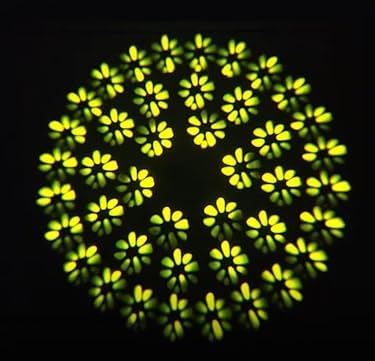
Figure 7: A single gobo pattern projected by the light, demonstrating clarity and detail.

Figure 8: Dynamic beam effects, including crossing beams and color changes, created by multiple units.
6. Maintenance
6.1 Cleaning
Regular cleaning of the lens and housing is recommended to maintain optimal light output and prevent overheating. Use a soft, lint-free cloth and a mild cleaning solution. Ensure the unit is powered off and disconnected before cleaning.
6.2 Bulb Replacement
The light source is an LED, which has a long lifespan. If replacement is necessary, contact qualified service personnel. Do not attempt to replace the LED module yourself unless you are a certified technician.
6.3 General Care
Store the fixture in a dry, dust-free environment when not in use. Avoid exposing the unit to extreme temperatures or humidity. Periodically check all cables and connections for wear or damage.
7. Troubleshooting
| Problem | Possible Cause | Solution |
|---|---|---|
| No power | Power cable disconnected, fuse blown, power switch off. | Check power cable connection, replace fuse if necessary, ensure power switch is ON. |
| No light output | Dimmer channel at 0%, light source failure. | Increase dimmer value via DMX or menu. If issue persists, contact support. |
| No DMX control | Incorrect DMX address, faulty DMX cable, DMX controller issue. | Verify DMX address, check DMX cable connections, test with another DMX controller. |
| Fixture not moving | Pan/Tilt locked, motor issue, DMX signal error. | Check for physical obstructions, verify DMX signal, perform a reset if available in menu. |
| LCD display shows "ERR" | Internal error. | Power cycle the unit. If the error persists, contact technical support. |
8. Specifications
| Feature | Detail |
|---|---|
| Rated Voltage | AC 100 - 240V, 50/60Hz |
| Total Power | 180W |
| Light Source Power | 100W (LED) |
| Patterns | 13 patterns (3 glass gobos) + white light |
| Colors | 11 colors + white light |
| Prism | 6 x 12 Prism, Rainbow effect |
| Dimming | 0-100% linear dimming |
| Channels | 16CH/20CH (dual modes) |
| Control Modes | DMX512 / Sound-activated / Auto operation / Master-slave synchronization |
| Pan Rotation | 540° |
| Tilt Rotation | 200° |
| Item Weight | 12.5 Pounds (approx. 5.67 kg) |
| Product Dimensions | 11"L x 9"W x 15"H (approx. 27.9cm x 22.9cm x 38.1cm) |
| Light Output Maximum | 13000 Lumens |
| Color Temperature | 5200 Kelvin |
| Beam Angle | 200 Degrees |
| Material | Glass (for gobos), Plastic (shade) |
| Specification Met | DMX512 |
9. Warranty and Support
For warranty information, please refer to the terms provided at the time of purchase or contact your retailer. BORYLI offers customer support for product inquiries and technical assistance.
Optional protection plans are available for extended coverage. These plans typically cover repairs or replacements beyond the standard manufacturer's warranty.
- 3-Year Protection Plan
- 4-Year Protection Plan
- Complete Protect (monthly plan covering eligible purchases)
For further assistance, please visit the official BORYLI store or contact their customer service department.


