
1. Introduction and Overview
The VENTION Powerhive Laptop Power Bank is a high-capacity, fast-charging portable power solution designed to keep your devices powered on the go. With a 20000mAh battery and up to 165W total output, it can charge laptops, smartphones, tablets, and other USB-powered devices efficiently. Its intelligent digital display provides real-time information, and integrated cables enhance convenience.

Image 1.1: VENTION Powerhive Laptop Power Bank with integrated strap.
2. Product Features
- Universal Fast Charging: Supports fast charging for a wide range of devices including MacBook, iPhone 16 Pro, iPad Pro, Galaxy S25 Ultra, Dell, and HP laptops. Features USB-C1 (up to 100W), USB-C2 (up to 65W), and USB-A (up to 60W) ports for simultaneous charging.
- High Capacity: 20000mAh battery capacity, capable of charging a MacBook Air 13 approximately 1.3 times or an iPhone 16 up to 4 times. Designed for long-term durability with over 80% battery health remaining after 1000 charging cycles.
- Powerful Output: Total maximum output of 165W, allowing two laptops to be charged simultaneously.
- Integrated Cables: Includes two built-in USB-C cables. One functions as a reinforced carrying strap, tested for durability, and the other provides 240W high-speed charging.
- Advanced Safety Protection: Monitors temperature 200 times per second and incorporates 9 layers of protection including over-discharge, overheat, overcurrent, short-circuit, overcharge, overvoltage, recovery, overpower, and flame-retardant casing.
- Smart TFT Color Display: Displays detailed information such as battery level, voltage, current, temperature, and charging cycles.
- Interactive Emoji Indicators: Features animated emojis that reflect real-time status like battery level, standby, overheating, or fast charging.

Image 2.1: Internal view illustrating the 20000mAh high-capacity battery cells.
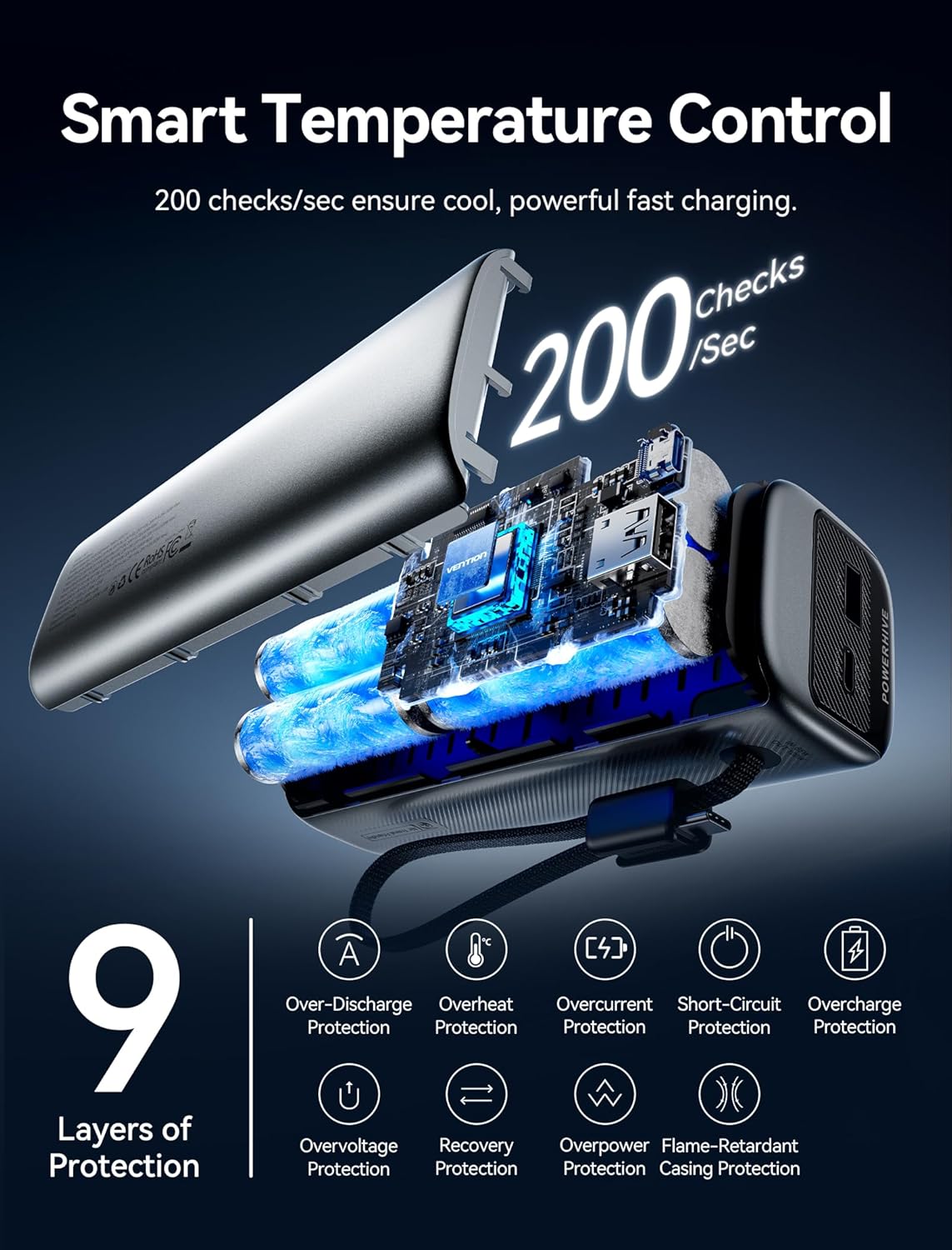
Image 2.2: Diagram showing smart temperature control and the 9 layers of protection for safe charging.
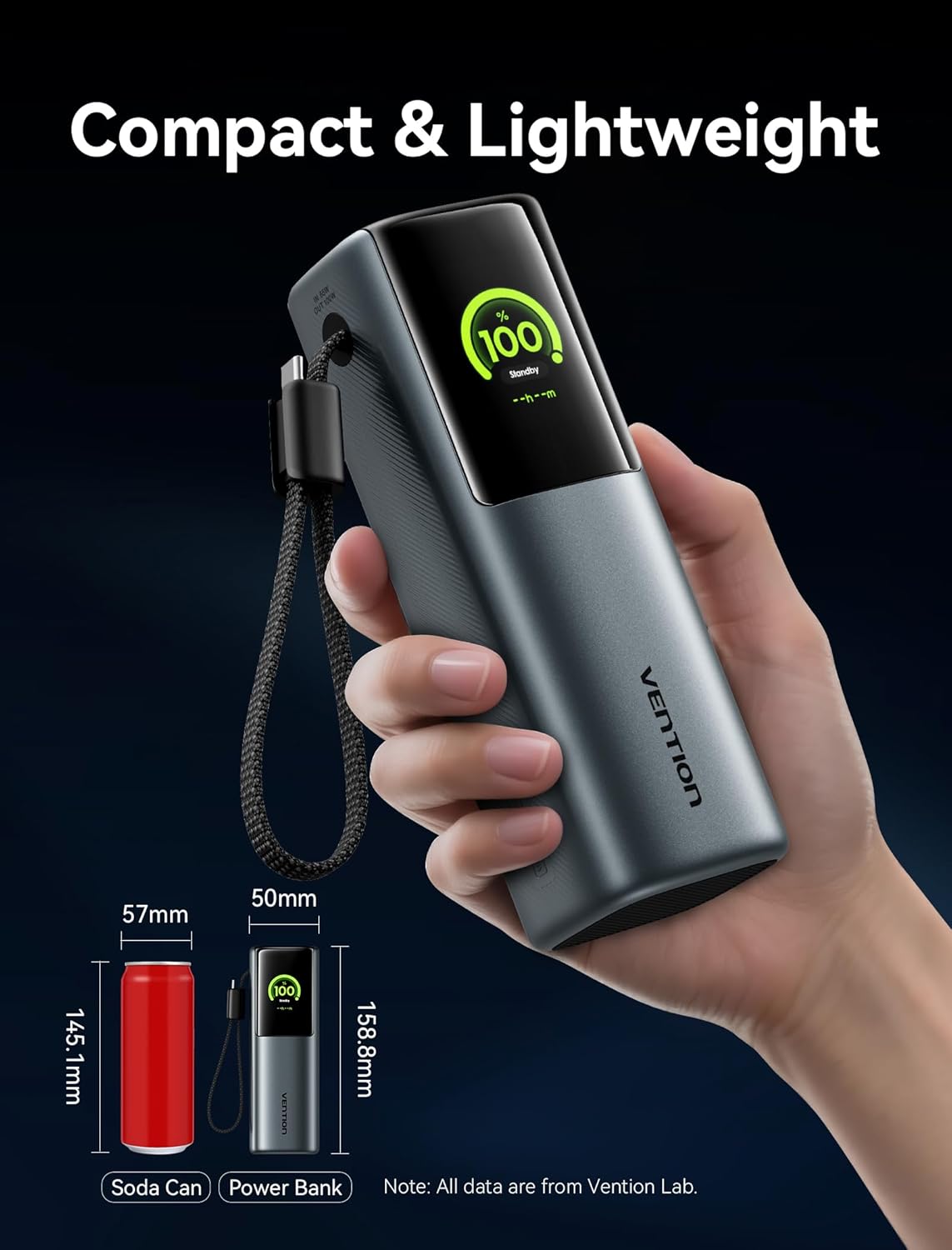
Image 2.3: The power bank's compact size, comparable to a soda can, demonstrating its portability.

Image 2.4: Overview of device compatibility, including laptops, phones, game consoles, and low-current devices.
3. Package Contents
Please check the package for the following items:
- VENTION Powerhive Laptop Power Bank (FKFH0)
- Integrated USB-C cables (2)
- Flannel storage pouch
- User Manual (this document)
4. Setup
4.1 Initial Charging of the Power Bank
Before first use, fully charge your VENTION Powerhive power bank. Connect the power bank to a suitable power adapter (not included) using one of the integrated USB-C cables or an external USB-C cable. The digital display will show the charging progress.
4.2 Connecting Devices
To charge your devices, simply connect them to the appropriate output port (USB-C1, USB-C2, or USB-A) on the power bank using their respective charging cables. The power bank will automatically detect the connected device and begin charging.
5. Operating Instructions
5.1 Charging Your Devices
The VENTION Powerhive power bank supports charging up to three devices simultaneously. For optimal fast charging, ensure your device and cable support the power bank's output capabilities.
- Single Device Charging: Connect your device to any available USB-C or USB-A port. The power bank will deliver the maximum compatible power.
- Multiple Device Charging: Connect up to three devices to the USB-C1, USB-C2, and USB-A ports. The power bank will intelligently distribute the total 165W output.

Image 5.1: Charging a MacBook Pro using the power bank's high-speed USB-C output.

Image 5.2: Illustrates the capability to charge two laptops concurrently with distributed power.
5.2 Understanding the Digital Display
The TFT color display provides comprehensive real-time information:
- Battery Level: Shows the remaining battery percentage.
- Charging Status: Indicates input/output wattage, voltage, and current.
- Temperature: Displays the internal temperature of the power bank.
- Charging Cycles: Tracks the number of charging cycles the battery has undergone.
- Estimated Time: Shows estimated time to full charge or discharge.

Image 5.3: Various display modes of the Smart TFT screen, showing battery, charging, and temperature data.

Image 5.4: Examples of interactive emoji indicators on the display, reflecting different operational states.
5.3 Safety Guidelines
The power bank is equipped with multiple safety protections. To ensure safe operation:
- Avoid extreme temperatures.
- Do not expose to water or excessive humidity.
- Do not disassemble or attempt to repair the device.
- Use only compatible charging cables and adapters.
- Keep out of reach of children.
5.4 Official Product Video
Video 5.5: An official product video from Vention Official Store showcasing the Powerhive 20000mAh 165W Power Bank's features and design.
6. Maintenance
To ensure the longevity and optimal performance of your power bank:
- Storage: Store the power bank in a cool, dry place away from direct sunlight and extreme temperatures.
- Cleaning: Use a soft, dry cloth to clean the exterior. Do not use liquid cleaners or aerosols.
- Battery Care: For best battery health, avoid completely draining the power bank frequently. Recharge it regularly, especially if it will be stored for an extended period.
- Protective Pouch: Utilize the included flannel storage pouch to protect the power bank from scratches and minor impacts during travel.
7. Troubleshooting
If you encounter issues with your VENTION Powerhive power bank, please refer to the following common solutions:
| Problem | Possible Cause | Solution |
|---|---|---|
| Power bank not charging | Charging cable or adapter faulty; power bank fully charged; connection issue. | Try a different cable and adapter. Ensure connections are secure. Check display for charge status. |
| Device not charging from power bank | Power bank battery low; device cable faulty; incompatible device; power bank in standby mode. | Recharge the power bank. Use a different device cable. Ensure device is compatible. Check power bank display for output. |
| Slow charging | Cable or adapter not supporting fast charging; multiple devices connected; device not supporting fast charging. | Use a compatible 5A/100W PD cable and adapter. Disconnect other devices. Verify device fast charging capability. |
| Display not working or showing errors | Software glitch; overheating; internal issue. | Disconnect all devices and cables, then reconnect. Allow power bank to cool down if hot. If issue persists, contact support. |
If the problem persists after attempting these solutions, please contact VENTION customer support for further assistance.
8. Specifications
| Feature | Detail |
|---|---|
| Product Dimensions | 6.5 x 2.2 x 2 inches |
| Item Weight | 1.39 pounds |
| Model Number | FKFH0 |
| Battery Type | 4 x 9V batteries (included) |
| Battery Capacity | 20000 mAh |
| Voltage | 3.7 Volts |
| Connector Type | USB Type A, USB Type C |
| Special Features | Fast Charging, Digital Display, Emoji Animation, Integrated USB-C Cables |
| Manufacturer | VENTION |
| Date First Available | June 13, 2025 |
9. Warranty and Support
For warranty information and customer support, please refer to the official VENTION website or contact their customer service directly. Keep your purchase receipt as proof of purchase for any warranty claims.
VENTION Official Store: Visit VENTION Store on Amazon


